
For anyone entering the world of software development, two names appear with relentless frequency: Git and GitHub. While they are often mentioned in the same breath and frequently confused as being the same thing, they serve distinct, albeit complementary, purposes. Understanding the nuance between them is not just a technical requirement—it is the foundational knowledge necessary for modern collaborative engineering.
Understanding Git: The Version Control System
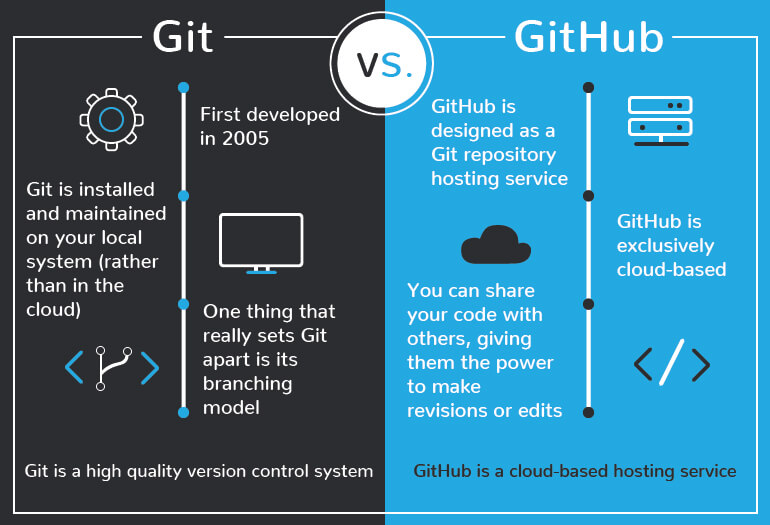
At its core, Git is a Version Control System (VCS). Created by Linus Torvalds in 2005 for the development of the Linux kernel, Git was designed to handle everything from small projects to massive enterprise-level codebases with speed and efficiency. Unlike older systems that relied on a central server, Git is a Distributed Version Control System (DVCS).
The Mechanics of Version Control
Version control is effectively a time machine for your code. It tracks every change made to a file or a set of files over time, allowing you to recall specific versions later. If a new feature breaks your application, or if a team member accidentally deletes a critical function, Git allows you to revert the project to a stable, previous state.
Every developer working on a project using Git has a full copy of the project history on their local machine. This makes Git incredibly fast, as most operations—such as committing changes, branching, or viewing history—are performed locally without requiring a network connection.
Core Git Concepts
To master Git, one must understand its fundamental operations:
- Repositories: The database or directory where your project files and the history of changes live.
- Commits: Think of a commit as a “snapshot” of your project at a specific moment. When you commit, you are saving the current state of your work.
- Branches: This is perhaps the most powerful feature of Git. A branch represents an independent line of development. You can create a branch to experiment with a new feature without affecting the main codebase. Once you are satisfied with your work, you can “merge” that branch back into the main line.
- Staging Area: Before committing, files are placed in the “staging area.” This allows you to choose exactly which changes you want to include in your next snapshot, giving you granular control over your project’s evolution.
GitHub: The Hub for Collaboration
If Git is the engine that tracks changes, GitHub is the ecosystem where that engine thrives. Launched in 2008, GitHub is a cloud-based hosting service for Git repositories. It takes the power of Git and adds a user-friendly interface, social networking features, and project management tools, making it the industry standard for collaborative software development.
Moving from Local to Remote
While Git lives on your computer, GitHub lives on the internet. GitHub provides a “remote” location where your local Git repositories can be pushed. By hosting your code on GitHub, you gain an off-site backup, and more importantly, you create a central point where multiple contributors can interact with the same codebase.
Collaboration and the Open Source Revolution
GitHub transformed how software is built by introducing the “Pull Request” (PR) workflow. When a developer makes changes in their own branch, they can submit a Pull Request to the main project. This notifies the project maintainers, who can then review the code, suggest modifications, and discuss the changes before eventually merging them into the primary branch.
This workflow is the backbone of the Open Source community. GitHub hosts millions of public repositories, allowing developers from across the globe to contribute to projects ranging from personal blogs to complex machine learning libraries. It is not just a place to store code; it is a collaborative platform that allows for global transparency and collective debugging.
Key Differences: The Local vs. The Remote
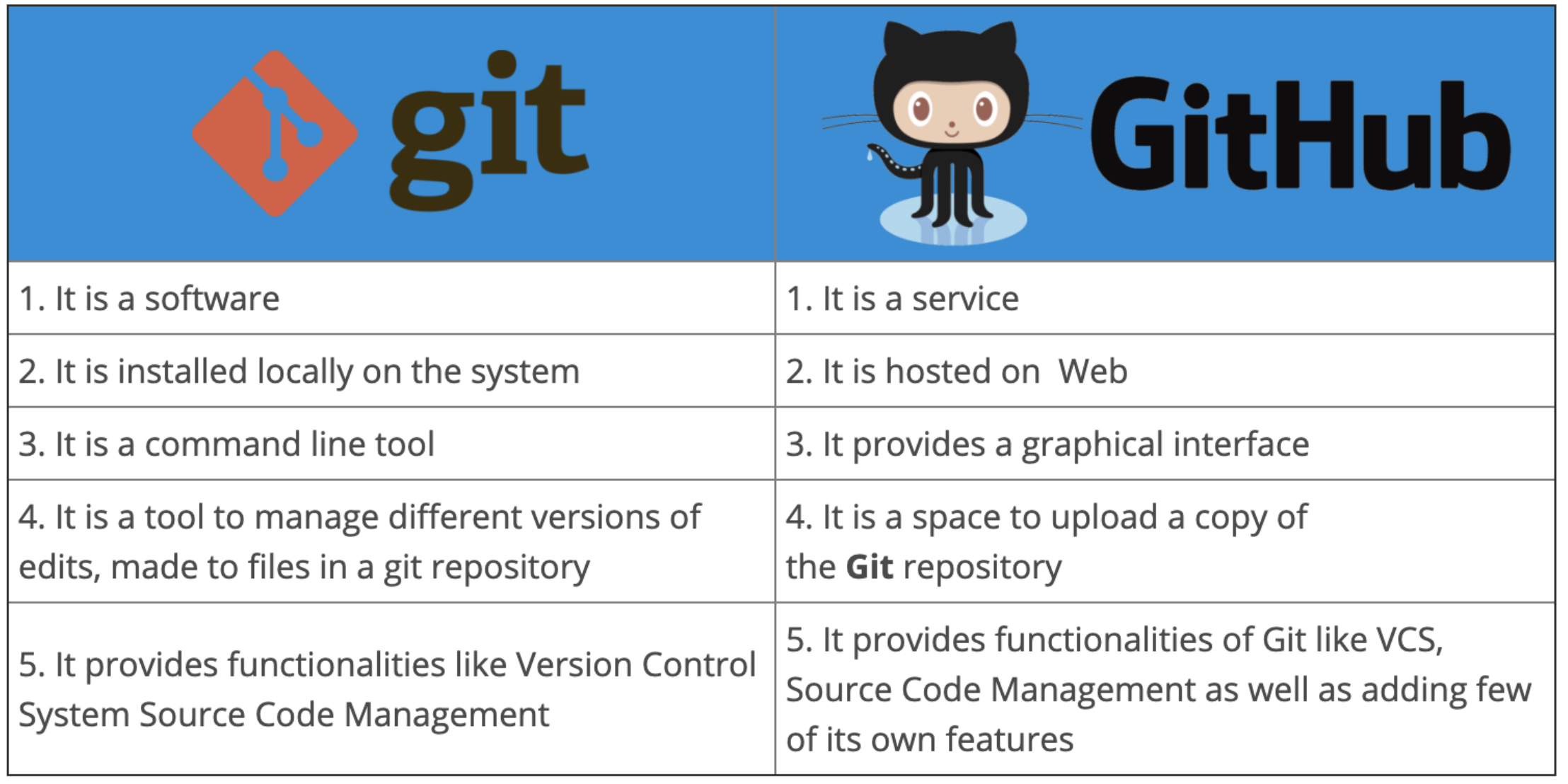
The confusion between Git and GitHub often stems from the fact that they are both integral to the same workflow. However, the distinction is binary: Git is the tool, and GitHub is the platform.
Git is the Tool
Git is software installed directly onto your operating system. It operates via the command line (Terminal or Command Prompt) or through graphical user interface (GUI) clients. It manages the logic of tracking, branching, and merging your code. Even if you never used a service like GitHub, you could still use Git to manage your personal files, versioning them locally on your hard drive.
GitHub is the Platform
GitHub is a service provider. It functions as a web-based repository hosting service. While Git tracks the code, GitHub tracks the interactions between people. It includes features like:
- Issue Tracking: A system to report bugs or request new features.
- Project Boards: Kanban-style boards for tracking progress and assigning tasks.
- Wikis: Space for documentation to explain how a project works.
- GitHub Actions: A powerful CI/CD (Continuous Integration/Continuous Deployment) tool that automates the testing and deployment of your code.
In essence, you do not need GitHub to use Git, but you almost certainly need GitHub (or a similar alternative like GitLab or Bitbucket) to work professionally with a distributed team.
Why These Tools Are Essential for Modern Tech
Whether you are a data scientist, a front-end developer, or a backend engineer, the mastery of Git and GitHub is non-negotiable. Their adoption has created a standardized language of development that allows engineers to jump from one company to another with minimal friction.
The Professional Standard
In a professional environment, “Code Review” is the primary mechanism for maintaining quality control. GitHub facilitates this by making it easy to highlight specific lines of code, leave comments, and track the history of discussions. This ensures that no code enters the production environment without having been audited by at least one other pair of eyes.
Portfolio and Reputation
For the individual developer, GitHub serves as a living resume. By making projects public, developers can showcase their coding style, their ability to document their work, and their willingness to contribute to existing codebases. Many hiring managers now look at a candidate’s GitHub profile before even conducting an interview. It provides concrete evidence of a developer’s ability to work with others, manage complexity, and engage with the broader tech community.
Continuous Integration and Workflow Automation
Modern development is no longer just about writing code; it is about automating the lifecycle of that code. GitHub’s integration with cloud platforms allows for “Continuous Integration.” Every time you push code to GitHub, automated scripts can run unit tests, check for vulnerabilities, and deploy the application to a staging server. This level of automation—driven by Git commands and managed by GitHub’s infrastructure—is what allows modern companies to push updates to their software multiple times a day without breaking the system.

Conclusion
Git and GitHub represent the architecture of modern digital creation. Git provides the structural integrity, ensuring that code is manageable, safe, and traceable. GitHub provides the social and operational layer, ensuring that work can be shared, reviewed, and deployed with unparalleled efficiency.
To learn Git is to learn the art of non-destructive experimentation. To learn GitHub is to join a global network of collaborators. Together, they have democratized software development, turning what was once a solitary, difficult pursuit into a transparent, communal, and highly structured endeavor. Whether you are building a simple website or contributing to the next great advancement in Artificial Intelligence, these tools will be the foundation upon which your work is built.
aViewFromTheCave is a participant in the Amazon Services LLC Associates Program, an affiliate advertising program designed to provide a means for sites to earn advertising fees by advertising and linking to Amazon.com. Amazon, the Amazon logo, AmazonSupply, and the AmazonSupply logo are trademarks of Amazon.com, Inc. or its affiliates. As an Amazon Associate we earn affiliate commissions from qualifying purchases.