
In the modern era of hyper-connectivity, we often take the seamless flow of information for granted. We click a link, and a webpage appears; we send a message, and it arrives instantly across the globe. However, beneath this effortless user experience lies a complex architecture of protocols and hardware working in unison. At the heart of this architecture is a critical component known as the gateway address. Often referred to as the “Default Gateway,” this numerical label serves as the essential exit point for data leaving a local network to navigate the vast expanse of the internet.
Understanding the gateway address is not merely an academic exercise for network engineers; it is a foundational piece of knowledge for anyone looking to master digital security, optimize home office performance, or troubleshoot connectivity issues in an increasingly remote-work-driven world.
The Fundamental Mechanics of a Gateway Address
To understand a gateway address, one must first understand the concept of a network. A Local Area Network (LAN), such as your home Wi-Fi or an office Ethernet system, is a self-contained environment where devices (computers, smartphones, printers) communicate directly with one another. However, these devices cannot speak directly to a server in another country without an intermediary. This is where the gateway address comes into play.
Defining the Default Gateway
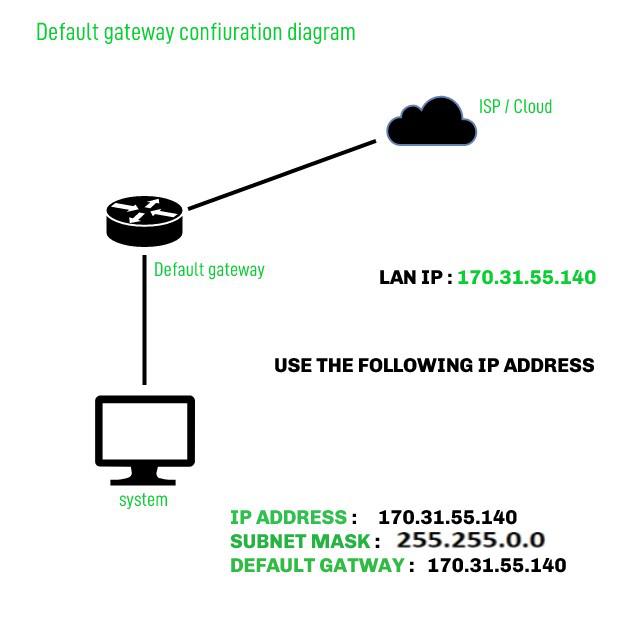
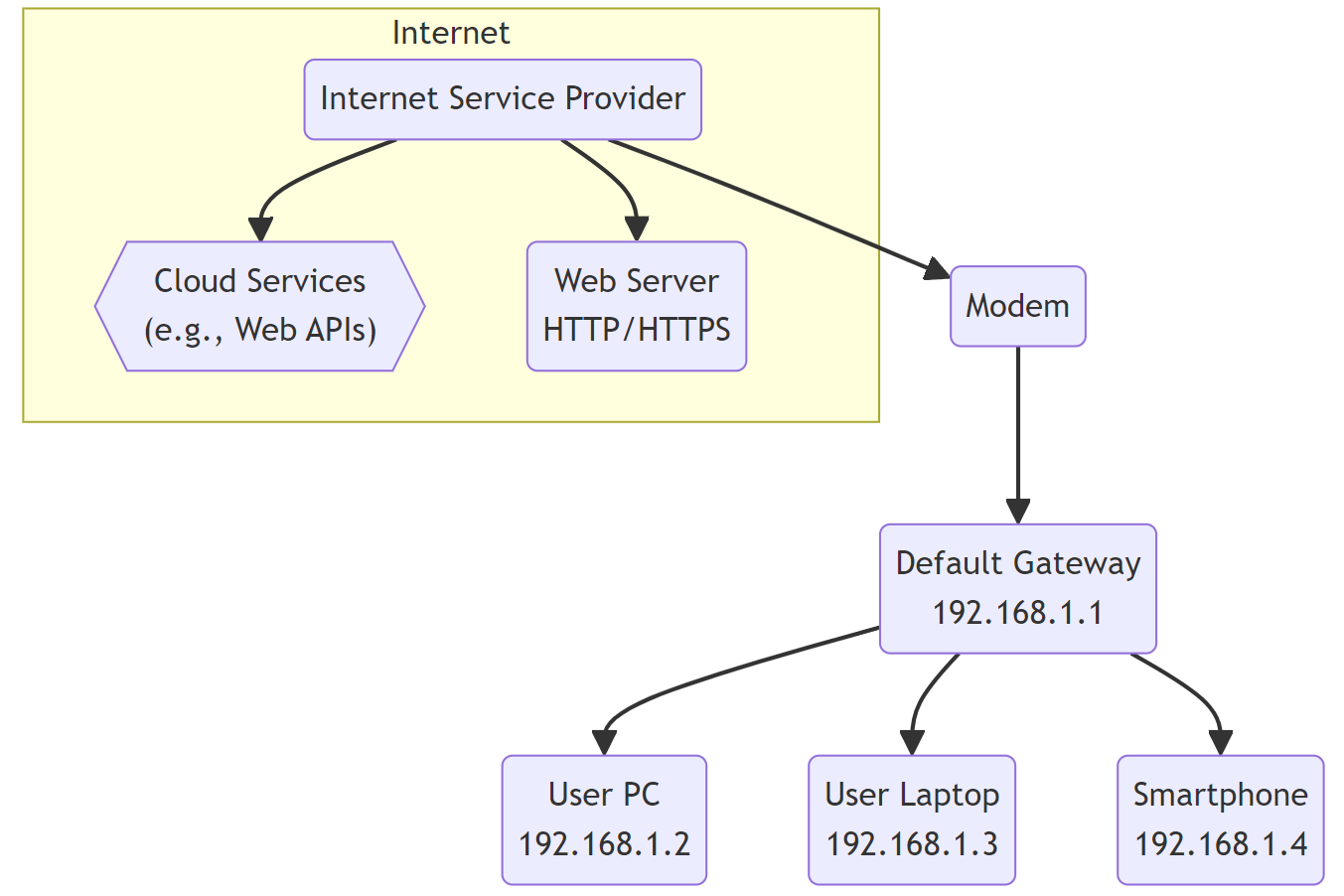
In technical terms, a gateway address is the IP address of the router or the networking device that connects a local network to other networks or the internet. When a device on your network wants to send data to an IP address that is not within its local subnet, it identifies that the destination is “outside.” It then sends those data packets to the gateway address.
Think of your local network as a high-security office building. Within the building, you can walk from desk to desk to hand over documents. But if you need to send a letter to another city, you must take it to the mailroom—the single point of exit. In this analogy, the mailroom’s location is the gateway address. Without it, your data would remain trapped within the “walls” of your local network.
How IP Addresses and Subnets Interact
Every device on a network has a unique identifier called an IP (Internet Protocol) address. These addresses are divided into two parts: the network ID and the host ID. This division is managed by a “subnet mask.”
When you initiate a request—for instance, typing a URL into your browser—your computer compares its own network ID with the network ID of the destination. If they match, the communication stays local. If they differ, the computer realizes it cannot reach the destination directly. It then references its internal configuration to find the “Default Gateway.” This address tells the computer exactly where to send the data so it can be routed toward its final destination.
How a Gateway Functions in Modern Networking
The gateway is more than just a passive signpost; it is an active participant in the lifecycle of every data packet. In most residential and small business setups, the gateway is the internal IP address of the router. In large enterprise environments, the gateway might be a dedicated high-capacity server or a sophisticated firewall appliance.
The Routing Process: From Device to Internet
The journey of a data packet through a gateway involves several sophisticated steps. Once the packet reaches the gateway, the device (usually a router) performs a task called “routing.” The router maintains a routing table—a database of paths that data can take to reach different network segments.
The gateway looks at the destination IP of the incoming packet and determines the most efficient “next hop” to get it closer to its target. This process repeats across multiple gateways across the internet—a process known as “hops”—until the data reaches its destination. When the destination server sends data back, the process happens in reverse, with the gateway receiving the external data and delivering it to the specific device on the local network that requested it.
The Role of Network Address Translation (NAT)
One of the most critical functions performed at the gateway level is Network Address Translation (NAT). Because the world has largely run out of unique IPv4 addresses, most home networks use “private” IP addresses (like 192.168.x.x) that are not reachable from the public internet.
The gateway address acts as the bridge. When your laptop sends a request to a website, the gateway replaces your laptop’s private IP address with the router’s single “public” IP address. It keeps a log of this transaction so that when the website responds, the gateway knows exactly which internal device to pass the information back to. This allows dozens of devices to share a single internet connection seamlessly.
Finding and Configuring Gateway Addresses
For the average user, the gateway address is typically assigned automatically through a protocol called DHCP (Dynamic Host Configuration Protocol). However, there are many scenarios—such as setting up a web server, configuring an IoT device, or troubleshooting a “No Internet” error—where you need to find or manually set this address.
Locating Your Gateway Address on Windows and macOS
Finding your gateway address is a straightforward process that offers a glimpse into the “under-the-hood” settings of your operating system.
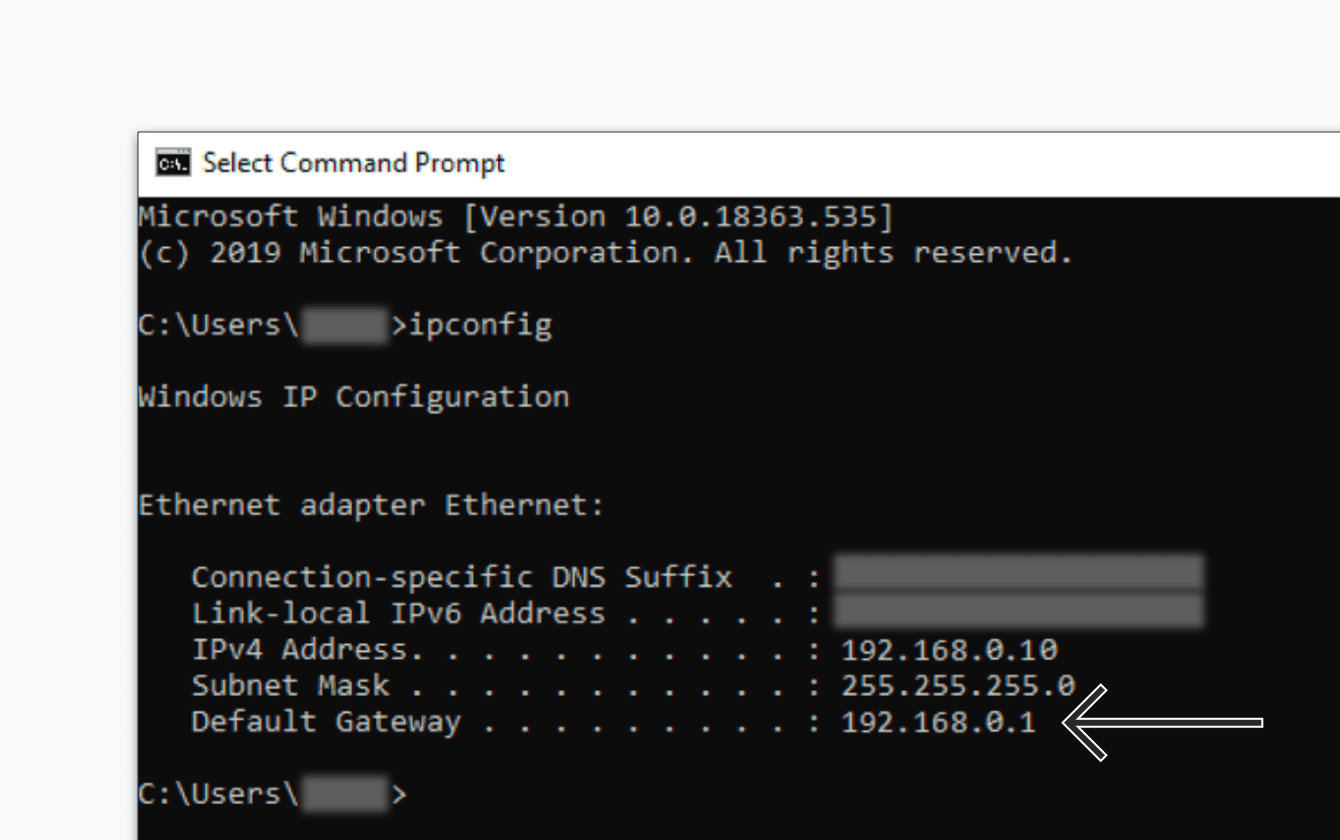
- On Windows: The most common method is using the Command Prompt. By typing
ipconfigand pressing Enter, you will see a list of network adapters. Under your active connection, look for “Default Gateway.” It is usually a series of numbers such as192.168.1.1or10.0.0.1. - On macOS: Users can go to System Settings > Network, select their active connection (Wi-Fi or Ethernet), and click “Details.” Under the TCP/IP tab, the gateway will be listed simply as “Router.”
Understanding these numbers is the first step in diagnosing why a device might be able to talk to a local printer but cannot load a webpage. If the “Default Gateway” field is blank or shows an incorrect range, the device is effectively “blind” to the outside world.
Static vs. Dynamic Gateway Assignments
While DHCP handles gateway assignments for most consumer devices, professionals often use “Static IP” configurations. In a static setup, you manually input the IP address, subnet mask, and gateway address. This is common for devices that need to remain at a fixed location on the network, such as network-attached storage (NAS) units or security cameras.
If a static gateway address is entered incorrectly—even by one digit—the device will lose all external connectivity. This highlights the precision required in network administration; the gateway address is the single thread that connects a local ecosystem to the global web.
The Critical Link to Digital Security and Performance
Beyond its role in basic connectivity, the gateway address represents a strategic “chokepoint” in a network. Because all external traffic must pass through this point, it is the primary location for implementing security measures and managing network performance.
Gateways as a Security Perimeter
In the context of digital security, the gateway is the first line of defense. Modern gateways often double as firewalls. They inspect incoming and outgoing packets for malicious signatures, unauthorized access attempts, and anomalies.
By controlling the gateway, administrators can implement “Egress Filtering.” This is a security practice where only certain types of data are allowed to leave the network. For example, if a piece of malware on a local computer tries to “phone home” to a command-and-center server, a properly configured gateway can identify this suspicious outbound traffic and block it at the source. Furthermore, many businesses use “Secure Web Gateways” (SWG) that filter web traffic to prevent employees from inadvertently visiting phishing sites or downloading infected files.
Troubleshooting Common Gateway Issues
When a network “goes down,” the gateway is often the first place tech professionals look. Common issues include:
- Gateway IP Conflicts: If two devices on a network are accidentally assigned the same IP address as the gateway, the entire network can become unstable.
- Hardware Failure: Since the gateway is typically a physical router, hardware degradation or overheating can lead to packet loss, manifesting as “lag” or intermittent disconnects.
- Incorrect Routing Tables: In complex setups, the gateway might have an outdated routing table, leading it to send data into a “black hole” where it never reaches the intended destination.
By pinging the gateway address (using the ping command), a user can determine if the problem lies within their own hardware or with their Internet Service Provider (ISP). If you can “ping” your gateway successfully but cannot reach a website, your local hardware is fine, and the issue likely resides with the ISP or the external DNS.
Conclusion
The gateway address is one of the most vital yet overlooked components of the digital age. It serves as the translator, the traffic controller, and the security guard of our digital communications. Whether it is a simple IP address in a home router or a sophisticated enterprise-grade security appliance, the gateway is the “doorway” that makes the global internet possible. By understanding how these addresses function, how to find them, and the role they play in the broader tech ecosystem, users and professionals alike can ensure more stable, secure, and efficient digital experiences. In the vast, interconnected world of technology, knowing where the exit is located is the only way to truly find your way in.
aViewFromTheCave is a participant in the Amazon Services LLC Associates Program, an affiliate advertising program designed to provide a means for sites to earn advertising fees by advertising and linking to Amazon.com. Amazon, the Amazon logo, AmazonSupply, and the AmazonSupply logo are trademarks of Amazon.com, Inc. or its affiliates. As an Amazon Associate we earn affiliate commissions from qualifying purchases.