
In the rapidly evolving landscape of social media software, the line between personal communication and professional content distribution has blurred. Meta, the parent company of Facebook, has addressed this shift by introducing “Professional Mode” for profiles. This feature represents a significant architectural pivot in how the platform handles user identity, data analytics, and content reach. Unlike the traditional Facebook Page, which functions as a separate entity for businesses, Professional Mode allows individual users to transform their personal profiles into high-powered creator hubs without losing their existing social connections.

For tech-savvy users and digital creators, understanding the mechanics of Professional Mode is essential. It is not merely a visual update but a comprehensive suite of tools designed to leverage Facebook’s sophisticated algorithms and data telemetry. By activating this mode, users gain access to enterprise-level features that were previously restricted to corporate pages, all while maintaining the streamlined user interface (UI) of a personal profile.
Understanding the Architecture of Facebook Professional Mode
At its core, Professional Mode is a software toggle that unlocks a secondary layer of functionality within the Facebook mobile app and desktop environment. It essentially upgrades the standard user database entry to include “Creator” permissions, enabling a dual-purpose profile that handles both private social networking and public content broadcasting.
From Personal Profile to Public Presence
The technical distinction between a standard profile and Professional Mode lies in the visibility settings and follower mechanics. In a standard profile, the primary connection is the “Friend” request, a reciprocal relationship that necessitates mutual approval. Professional Mode introduces a “Follower” model similar to Instagram or X (formerly Twitter).
When a user enables Professional Mode, their profile becomes “Public” by default for new content, allowing anyone on the platform to follow them and see their public updates in their Feed. However, the software maintains a distinct “Friends” list, preserving the private social graph. This hybrid architecture allows for a “one-to-many” broadcast capability while retaining the “one-to-one” private networking capabilities that define the Facebook experience.
Key Feature Sets and Technical Enhancements
Activating Professional Mode triggers the deployment of several high-level tools within the user interface. These include the Professional Dashboard, which serves as the command center for all creator activities. Technologically, this dashboard integrates real-time data from Meta’s backend, providing users with a snapshot of their digital footprint.
Furthermore, users gain access to enhanced post-scheduling tools and the ability to use “Top Fan” badges, which are algorithmic identifiers that reward highly engaged users. The underlying software also enables “Category” labels (e.g., Digital Creator, Scientist, Journalist), which help Facebook’s recommendation engine categorize the profile and suggest it to relevant audiences.
Technical Setup and Configuration
Transitioning to Professional Mode requires a specific sequence of software interactions. Because this feature is being rolled out globally, the availability depends on the user’s region and the current version of the Facebook build they are running.
Eligibility Requirements and Global Availability
Meta has designed Professional Mode to be accessible to most users, provided they adhere to the platform’s Community Standards and Partner Monetization Policies. From a technical standpoint, the profile must be in good standing—meaning no recent “shadowbans” or API-level restrictions due to policy violations.
The feature is currently available on both iOS and Android versions of the Facebook app, as well as via web browsers. It is important to note that Professional Mode is currently restricted to individual profiles; it cannot be applied to accounts that are already managed as “Business Pages” or “Community Groups,” as those entities operate on a different software framework within the Meta Business Suite.
The Activation Process: Step-by-Step Transition
To initiate the transition, a user navigates to their profile settings via the “three-dot” menu. The software then prompts a “Turn on Professional Mode” dialogue box. Upon confirmation, the Facebook UI undergoes a subtle but significant transformation:
- UI Refresh: The profile header is updated to display the chosen creator category.
- Dashboard Integration: A new button for the “Professional Dashboard” appears prominently below the profile bio.
- Privacy Migration: The system prompts the user to review their “Who can follow me” settings, ensuring the “Public” toggle is active to allow for algorithmic reach.
This process is reversible. If a user decides to return to a standard profile, the software allows them to “Turn off Professional Mode,” though they will lose access to the accumulated analytics data and professional tools.
Deep Dive into Professional Dashboards and Analytics
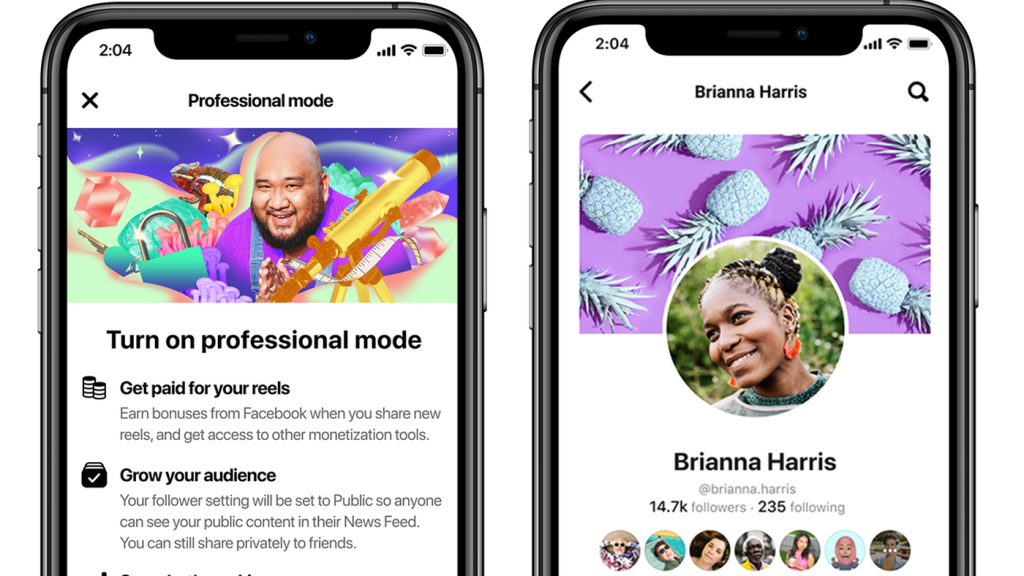
The most significant technical advantage of Professional Mode is the access to deep-level data analytics. For anyone looking to understand how their content interacts with the Facebook algorithm, these metrics are invaluable.
Audience Insights and Data Telemetry
The Professional Dashboard provides a granular look at audience demographics. This includes data on age, gender, and geographic location of followers. Unlike the basic “likes” seen on personal posts, these insights use telemetry to track how users are discovering the profile—whether through the “Suggested for You” algorithm, direct search, or shares.
This data allows creators to optimize their content strategy based on technical performance. For instance, if the analytics show a high engagement rate from a specific timezone, the creator can use the built-in scheduling tools to deploy posts when that segment of the audience is most active.
Content Performance Metrics
Each post within Professional Mode is tracked for specific performance KPIs (Key Performance Indicators). These include:
- Reach: The unique number of accounts that saw the post.
- Engagement: The total number of interactions (reactions, comments, shares, and clicks).
- Retention: For video content, the dashboard tracks how long viewers watched, providing a “retention curve” that identifies where the audience dropped off.
These metrics are presented through interactive charts and graphs, similar to those found in Google Analytics or specialized social media management software. This technical feedback loop is crucial for understanding the “virality” of content and how to better interface with Facebook’s recommendation engine.
Privacy, Security, and Access Control in Professional Mode
A common concern when moving from a private profile to a professional one is the compromise of personal security. Facebook has integrated several software-level safeguards to ensure that while the “Professional” side is public, the “Personal” side remains protected.
Managing Public vs. Private Content
Even with Professional Mode active, the software retains “Audience Selectors” for every post. When a user creates a new update, they can choose to share it with the “Public” (to grow their professional reach) or “Friends only” (to keep personal updates private). This binary permission system ensures that a creator can post photos of a professional conference to the world while sharing family photos only with their trusted inner circle.
Safety Tools and Moderation Features
Professional Mode grants access to the “Moderation Assist” tool. This is an automated software agent that allows users to set specific criteria for comment moderation. For example, a user can configure the tool to automatically hide comments that contain specific keywords, links, or from accounts with no profile picture. This reduces the manual overhead of community management and protects the user from “trolling” or automated spam bots, which are more prevalent on public-facing profiles.
Additionally, the “Support Hub” provides a direct line to technical documentation and reporting tools, ensuring that creators have the resources to handle security threats or account impersonation.
Future-Proofing Your Digital Presence through Meta’s Ecosystem
As Meta continues to unify its various platforms—Facebook, Instagram, WhatsApp, and Threads—Professional Mode acts as a bridge. It is a foundational step for users who wish to participate in the broader Meta creator ecosystem.
Interoperability with Instagram and Meta Business Suite
Professional Mode is designed to work in tandem with Instagram Professional accounts. Through the “Accounts Center” in the app settings, users can link their profiles, allowing for cross-platform posting and unified messaging. From a technical perspective, this creates a synchronized data stream, where analytics from both platforms can be viewed in a centralized location.
Furthermore, while Professional Mode is handled within the main Facebook app, it is also compatible with the Meta Business Suite. This allows for more advanced management on desktop, including the use of the “Planner” for long-term content calendars and the “Inbox” for managing communications across Facebook and Instagram in one UI.

The Long-term Roadmap for Professional Profiles
The introduction of Professional Mode signals a shift in Facebook’s software development focus. The platform is moving away from being a static social directory toward becoming a dynamic discovery engine. For the user, staying in “Personal Mode” means remaining within a closed loop of existing friends. In contrast, Professional Mode places the profile into the global stream of content, governed by AI-driven discovery.
As AI tools like Meta AI become more integrated into the platform, Professional Mode users will likely be the first to receive updates for AI-assisted content creation, automated tagging, and enhanced searchability. By adopting this mode now, users are positioning their digital identity to be fully compatible with the next generation of social media infrastructure.
aViewFromTheCave is a participant in the Amazon Services LLC Associates Program, an affiliate advertising program designed to provide a means for sites to earn advertising fees by advertising and linking to Amazon.com. Amazon, the Amazon logo, AmazonSupply, and the AmazonSupply logo are trademarks of Amazon.com, Inc. or its affiliates. As an Amazon Associate we earn affiliate commissions from qualifying purchases.