
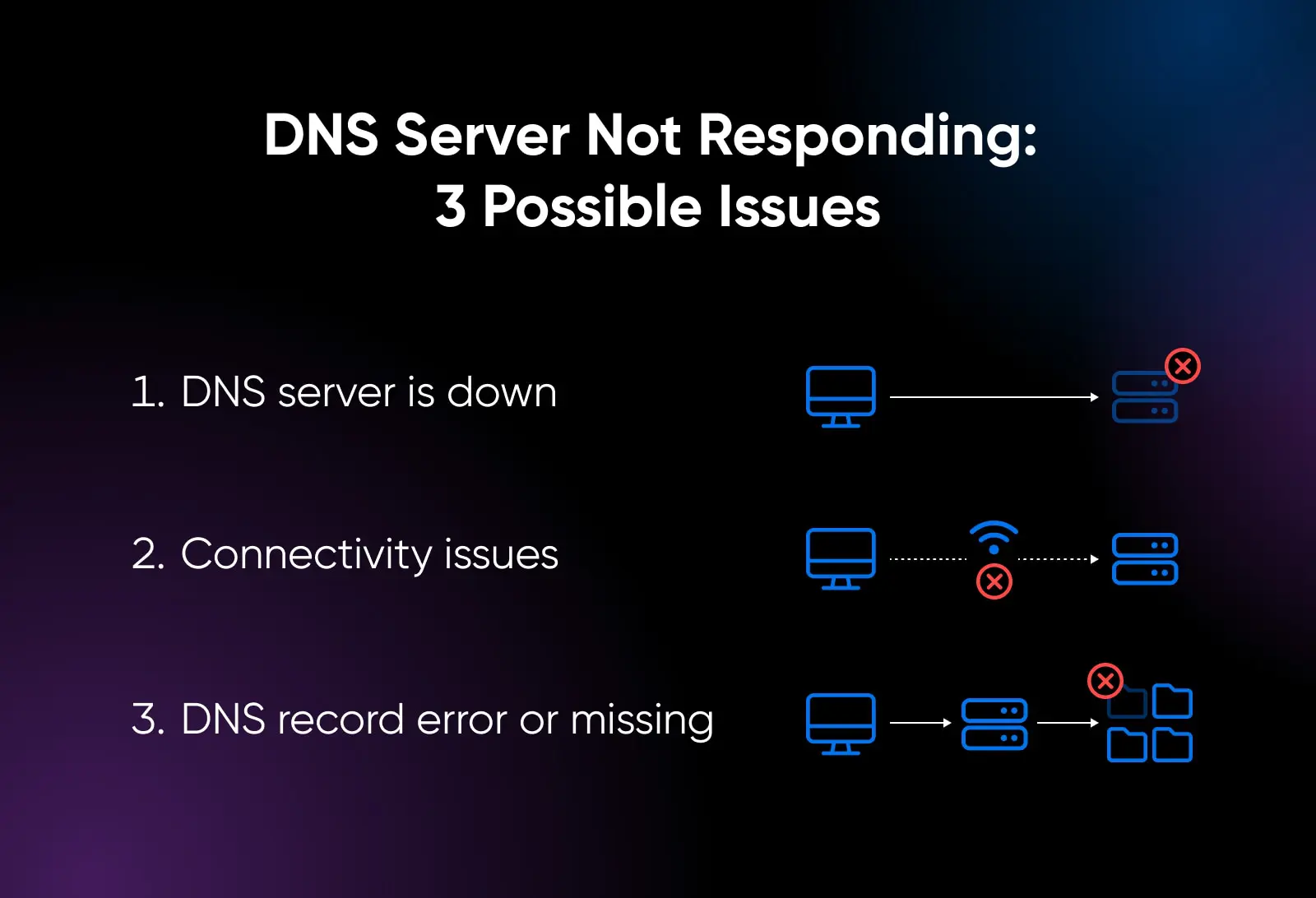
The internet, for all its complexity and the speed at which it operates, relies on a surprisingly straightforward foundation. When you type a URL into your browser, you are initiating a silent, instantaneous conversation between your device and the vast network of servers that constitute the Domain Name System (DNS). However, when that connection fails—resulting in the dreaded “DNS server not responding” error or a “DNS probe finished” notification—the digital world comes to a grinding halt. Understanding what a DNS problem is requires peering behind the curtain of the web to see how your computer translates human language into machine-readable instructions.
The Architecture of the Domain Name System
To understand why a DNS problem occurs, one must first grasp the purpose of the system itself. At its core, the internet functions using Internet Protocol (IP) addresses—strings of numbers like 192.0.2.1 that act as the physical coordinates for every server on the planet. Humans, however, are poorly equipped to remember sequences of digits for every website we visit. We prefer names like google.com or wikipedia.org.
The Digital Phonebook
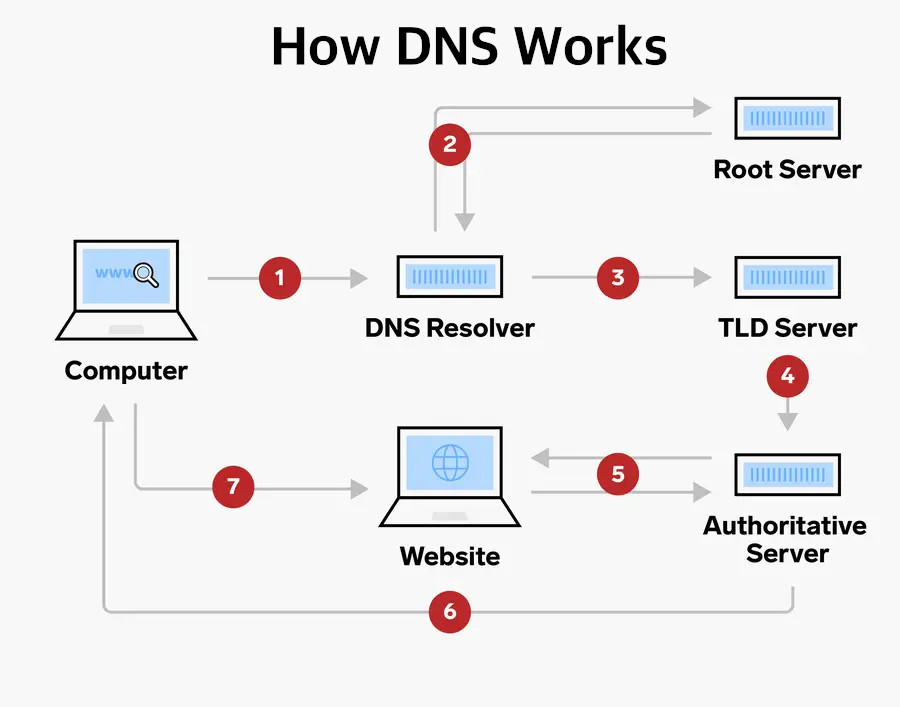
The Domain Name System acts as the internet’s phonebook. It is a hierarchical, distributed database that maps those easy-to-remember domain names to the complex numerical IP addresses that servers actually recognize. When you enter a web address, your computer performs a “DNS lookup.” It queries a series of servers—starting with your local ISP or a public resolver—to ask, “Where can I find the server for this specific domain?” Once the IP is returned, your browser can proceed to load the content. A DNS problem is essentially a failure in this lookup process. If the phonebook is missing pages, unreachable, or providing outdated information, your browser is left wandering in the digital dark.
Hierarchical Resolution
The resolution process is a multi-step relay race. It begins at the recursive resolver, moves to root name servers, then to Top-Level Domain (TLD) servers (which handle the .com, .org, or .net extensions), and finally to the authoritative name server that holds the specific record for the domain you requested. A disruption at any one of these stages constitutes a DNS problem. Whether it is a server outage, a misconfigured record, or a localized connectivity issue, the result is the same: the link between the name and the destination is severed.
Common Indicators of DNS Issues
DNS problems are rarely subtle; they usually manifest as complete connectivity blackouts, even when your internet connection itself is perfectly healthy. It is common to see that your router is connected to the internet, and other devices might be working, yet a specific machine remains unable to resolve hostnames.
Error Messages Explained
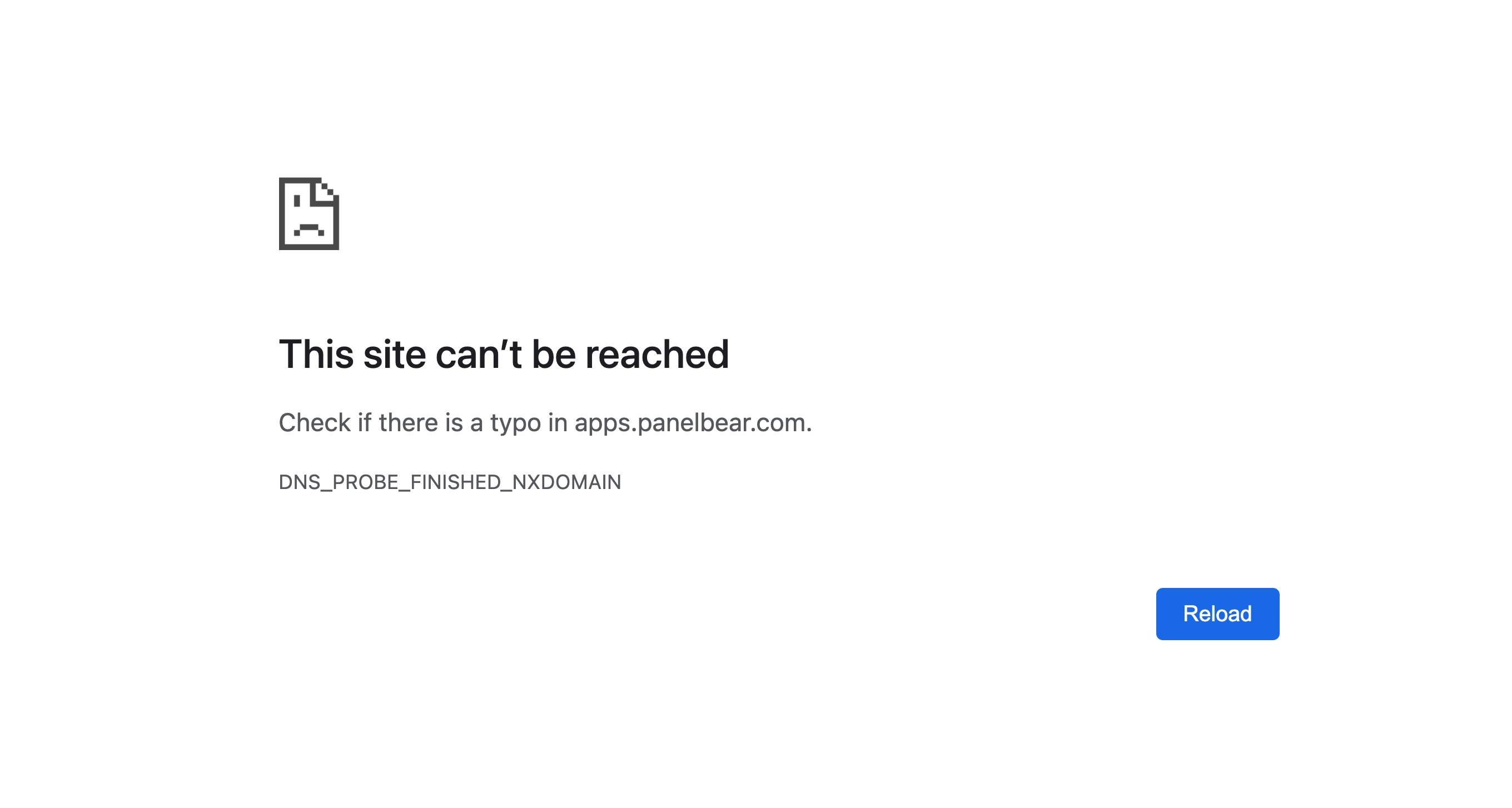
Users typically encounter these errors in their web browser. Common messages include “DNSPROBEFINISHEDNXDOMAIN,” which suggests the domain does not exist, or “DNSPROBEFINISHEDBAD_CONFIG,” which points to a localized network configuration error. Another frequent culprit is the “DNS Server Not Responding” notification. These messages serve as a diagnostic shorthand, signaling that while your computer can ping the outside world, it cannot translate the addresses needed to retrieve data.
Symptoms Beyond the Browser
DNS issues are not limited to browsers. You might find that your email client can no longer fetch messages, software applications cannot check for updates, or gaming consoles fail to connect to online services. Because almost every internet-connected application relies on the DNS to locate its backend servers, a DNS failure acts as a bottleneck for your entire digital ecosystem. When you see your system pinging successfully via command line (using an IP address) but failing when using a domain name, you are witnessing a classic DNS resolution failure.
Causes and Troubleshooting Strategies
A DNS problem can originate from your local hardware, your Internet Service Provider (ISP), or the website’s own DNS configuration. Distinguishing between these causes is the first step toward a resolution.
Local Network and Cache Issues
Often, the problem lies within your device or local network. Your computer maintains a “DNS cache”—a local memory bank of recent IP resolutions designed to speed up browsing. Over time, this cache can become corrupted or outdated. Clearing this cache—a process commonly referred to as “flushing the DNS”—is a frequent and effective fix. Similarly, the network settings on your router or your operating system’s network adapter might be misconfigured, pointing toward DNS servers that are no longer active or are under heavy load.
ISP and Third-Party Resolvers
Your Internet Service Provider assigns you default DNS servers. While these are usually reliable, they are not immune to outages, traffic congestion, or filtering policies. When an ISP’s DNS servers go down, you are effectively cut off from the web unless you have an alternative. One of the most effective ways to mitigate recurring DNS problems is to bypass the ISP’s servers entirely by using public DNS resolvers, such as those provided by Google (8.8.8.8), Cloudflare (1.1.1.1), or Quad9 (9.9.9.9). These services offer increased reliability, faster resolution speeds, and often, enhanced security features.
DNS Propagation and Misconfiguration
From the perspective of website administrators, DNS problems can be self-inflicted. When moving a domain to a new host or updating DNS records (like A records, CNAMEs, or MX records), there is a window of time known as “propagation.” During this time, the new information is distributed to servers around the world. If the TTL (Time to Live) values for your records are set too high, users may be directed to old, non-existent servers long after you have moved your content. Furthermore, syntax errors in DNS zone files can lead to complete resolution failures, effectively taking a website offline for the entire global network.
The Future of DNS Security and Reliability
As the internet grows, the DNS is being pushed to handle unprecedented levels of traffic and malicious activity. This has led to the evolution of DNS security, transforming how we understand and mitigate “problems” within the system.
DNSSEC and Encryption
The original design of the DNS did not include strong security mechanisms, making it vulnerable to “cache poisoning” or “spoofing,” where hackers redirect users to malicious, fake websites. To combat this, DNSSEC (DNS Security Extensions) was introduced to verify the integrity and authenticity of DNS data. Simultaneously, we are seeing the widespread adoption of DNS over HTTPS (DoH) and DNS over TLS (DoT). These protocols encrypt the queries your computer makes to DNS resolvers, preventing ISPs or eavesdroppers from tracking your browsing history and ensuring that the communication between you and the resolver remains tamper-proof.
The Role of Global Anycast Networks
To prevent the kind of massive DNS outages that occur when centralized servers are overwhelmed, modern infrastructure relies on Anycast. Anycast allows multiple servers across the globe to share the same IP address. When a user sends a query, the network automatically routes it to the closest available server. This architecture not only makes the DNS significantly faster but also provides a layer of redundancy; if one server node fails, the traffic is seamlessly routed to the next available location.
The DNS is the silent engine of the internet. While a DNS problem might seem like a mere technical inconvenience, it is a reminder of the delicate orchestration required to keep the modern world connected. By understanding the hierarchy of the system—from your local cache to the global Anycast networks—you are better equipped to troubleshoot, optimize, and secure your own slice of the digital landscape. Whether it is a simple flush of your local settings or a strategic switch to a more reliable public resolver, mastering the DNS is an essential skill for anyone operating in a tech-driven age.
aViewFromTheCave is a participant in the Amazon Services LLC Associates Program, an affiliate advertising program designed to provide a means for sites to earn advertising fees by advertising and linking to Amazon.com. Amazon, the Amazon logo, AmazonSupply, and the AmazonSupply logo are trademarks of Amazon.com, Inc. or its affiliates. As an Amazon Associate we earn affiliate commissions from qualifying purchases.