
In the digital age, the concept of “customization” has evolved from a niche feature to a fundamental expectation. It’s no longer just about choosing a color or a font; customization now underpins our interactions with technology, shaping our experiences, enhancing our productivity, and even influencing our digital security. At its core, customization in the tech realm is the process of tailoring a piece of software, hardware, or a digital service to meet the specific needs, preferences, or requirements of an individual user or a group. This adaptability is a powerful driver of innovation and user satisfaction, allowing technology to seamlessly integrate into our lives rather than dictating how we interact with it.

The ubiquity of customization stems from the recognition that a one-size-fits-all approach is increasingly inadequate. Our digital lives are diverse, spanning work, entertainment, communication, and learning. To optimize these experiences, users demand tools and platforms that can be molded to their unique workflows, cognitive styles, and even their physical environments. This pursuit of personalization has led to sophisticated algorithms, intuitive interfaces, and a vast array of customizable options that empower users to exert control over their digital landscape.
The Spectrum of Customization in Tech
Customization in technology isn’t a monolithic concept; it exists on a broad spectrum, from simple user interface tweaks to deeply ingrained system-level modifications. Understanding this spectrum is crucial to appreciating the breadth and depth of its impact.
User Interface (UI) and User Experience (UX) Personalization
One of the most visible forms of customization revolves around the user interface (UI) and the overall user experience (UX). This involves altering the visual and interactive elements of software and applications to align with user preferences.
Visual Adjustments and Theming
At the most basic level, users can often personalize the look and feel of their digital tools. This includes changing color schemes, adjusting font sizes, selecting wallpapers, and activating dark modes to reduce eye strain or conserve battery life. These seemingly minor adjustments can significantly improve readability and comfort, especially for users with visual impairments or those who spend extended periods in front of screens. The rise of customizable themes, particularly in operating systems and web browsers, allows for a more aesthetically pleasing and personalized digital environment. Think of the extensive theme options available for operating systems like Windows and macOS, or the ability to customize browser extensions and their appearances.
Layout and Content Arrangement
Beyond visual aesthetics, customization extends to how information is presented and organized. Users can often reorder menu items, customize toolbars, pin frequently used features, and even create personalized dashboards. This allows for more efficient workflows by bringing essential functions to the forefront and minimizing the need to navigate through complex menus. For instance, in productivity suites like Microsoft Office or Google Workspace, users can customize the ribbon interface, add shortcuts, and arrange panes to suit their specific tasks. Similarly, content aggregation platforms like news apps or social media feeds can be tailored to display topics and sources that matter most to the individual, filtering out noise and prioritizing relevant information.
Functional and Behavioral Customization
Moving beyond the visual, customization can also deeply impact the functional behavior of technology, allowing users to adapt tools to their specific tasks and workflows.
Workflow Optimization and Automation
This is where customization truly shines in enhancing productivity. Users can often configure software to automate repetitive tasks, create custom shortcuts, define macros, and set up personalized workflows. For example, in project management software, teams can define custom fields, statuses, and approval processes to match their unique operational procedures. Developers frequently leverage customization to build highly specialized development environments, scripting repetitive compilation or deployment tasks. Even everyday applications offer levels of functional customization; imagine setting up custom rules in your email client to automatically sort, label, and archive messages, or configuring a smart home system to execute complex routines based on time, location, or sensor triggers. This level of control transforms generic tools into powerful, bespoke solutions.
Feature Enablement and Disablement
Many software applications offer a vast array of features, some of which may not be relevant or even desirable for every user. Customization allows users to enable or disable specific features, thereby simplifying the interface and reducing cognitive load. This is particularly prevalent in professional software, where users might only need a subset of the available tools. For example, a graphic designer might disable advanced 3D rendering features in image editing software if their work primarily involves 2D illustration. Conversely, a scientist might enable specialized data analysis plugins for a general-purpose software suite. This selective activation streamlines the user experience and ensures that users are not overwhelmed by unnecessary complexity.
System-Level and Advanced Customization
At the most profound level, customization can involve modifying the underlying operating system or even hardware configurations to achieve a highly specialized and optimized technological experience.
Operating System and Software Configuration
Beyond application-level settings, users can often customize their operating system to a significant degree. This includes managing startup programs, configuring network settings, installing custom drivers, and even tweaking system performance parameters. For advanced users, this can involve modifying registry settings in Windows or delving into command-line configurations on Linux-based systems. The ability to fine-tune these aspects allows for a highly personalized computing environment that can be optimized for specific use cases, whether it’s gaming, high-performance computing, or running specialized scientific simulations.
Hardware Modification and Integration
While often more involved, hardware itself can also be customized. This ranges from assembling custom-built computers with specific components chosen for their performance characteristics, to adding peripherals and modules that extend the functionality of existing devices. Think of gamers building PCs tailored for specific graphics cards and processors, or audio engineers configuring modular synthesizers with unique sound-generating capabilities. The Internet of Things (IoT) further expands this, with many smart devices allowing for custom integrations and inter-device communication to create unique, automated systems. This level of hardware customization allows for unparalleled control over the physical computing experience.
The Benefits and Challenges of Customization
The pervasive nature of customization in technology is not without its advantages and disadvantages. Understanding these nuances is key to leveraging its full potential while mitigating its drawbacks.
Empowering Users and Enhancing Productivity
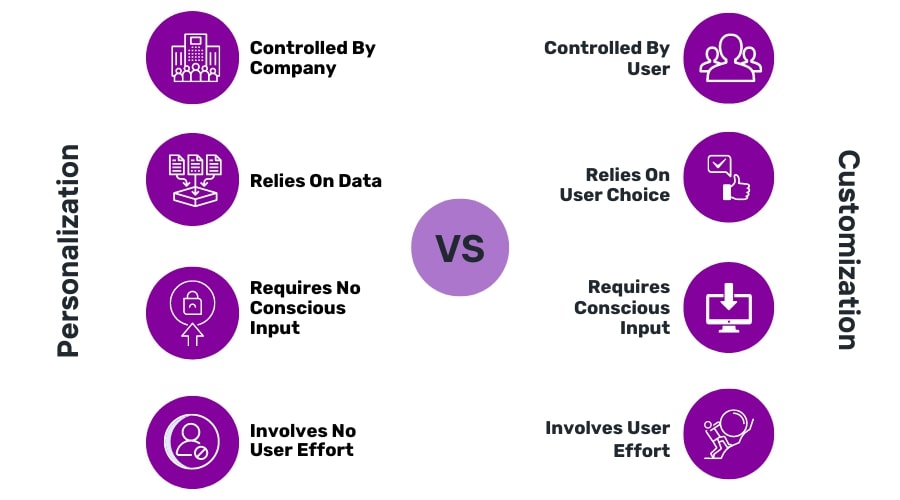
The most significant benefit of customization is user empowerment. It shifts the paradigm from passively consuming technology to actively shaping it.
Tailored Workflows and Increased Efficiency
By allowing users to configure tools to their specific needs, customization directly leads to increased efficiency. When software aligns perfectly with a user’s workflow, tasks are completed faster and with fewer errors. This is particularly critical in professional environments where time is money and precision is paramount. The ability to automate repetitive actions and streamline complex processes frees up valuable mental bandwidth for more strategic and creative endeavors.
Improved Accessibility and Inclusivity
Customization plays a vital role in making technology accessible to a wider range of users, including those with disabilities. Features like adjustable font sizes, high-contrast modes, screen reader compatibility, and customizable keyboard shortcuts can transform a frustrating digital experience into an empowering one. This inclusivity ensures that technology can be a tool for everyone, regardless of their physical or cognitive abilities.
Potential Drawbacks and Considerations
While the benefits are clear, unchecked or poorly implemented customization can introduce its own set of challenges.
Complexity and Learning Curves
The sheer number of customization options available in some software can be overwhelming. Users may spend considerable time learning how to effectively configure a tool, which can be a deterrent, especially for those who need to get started quickly. For complex systems, this learning curve can be steep, requiring dedicated training or experimentation.
Security Vulnerabilities and Maintenance Issues
Advanced customization, particularly at the system level, can inadvertently introduce security vulnerabilities if not done correctly. Modifying default security settings or installing third-party customizations without proper vetting can expose systems to malware or unauthorized access. Furthermore, heavily customized systems can become more difficult to update and maintain, as software updates may conflict with custom configurations. This can lead to compatibility issues and require ongoing troubleshooting.
Interoperability and Standardization
When individual users or organizations heavily customize their systems, it can create challenges with interoperability and standardization. Sharing data or collaborating on projects can become more difficult if different users are working with vastly different configurations of the same software. This can lead to compatibility issues when exchanging files or integrating different systems.
The Future of Customization: AI and Hyper-Personalization
The evolution of customization is intrinsically linked to advancements in artificial intelligence (AI) and the pursuit of ever-deeper personalization. As AI becomes more sophisticated, the way we interact with and customize our technology will undergo a profound transformation.
AI-Driven Adaptive Interfaces
Artificial intelligence is poised to revolutionize customization by moving beyond user-initiated changes to systems that intelligently adapt to user behavior and context in real-time. AI algorithms can analyze a user’s habits, preferences, and current tasks to dynamically adjust interfaces, suggest relevant features, and even anticipate needs before they are explicitly stated.
Predictive Personalization and Proactive Assistance
Imagine software that learns your most frequent actions and proactively presents shortcuts or relevant information. AI-powered tools can predict what you’re trying to do and offer the most efficient path forward, effectively customizing the user experience on the fly. This could manifest as intelligent suggestions in writing software, adaptive learning platforms that adjust content delivery based on student progress, or smart assistants that proactively manage your schedule based on your communication patterns.
Context-Aware Customization
The future will see technology becoming acutely aware of context. Your devices will understand whether you’re at work, at home, commuting, or in a meeting, and adjust their behavior accordingly. This context-aware customization means your laptop might automatically switch to a more focused work mode when you’re in the office, and then transition to a more relaxed entertainment mode when you’re at home. This seamless adaptation removes the burden of manual configuration and ensures technology is always working optimally for you in any given situation.
The Ethical Landscape of Hyper-Personalization
As customization reaches unprecedented levels of sophistication with AI, it brings a new set of ethical considerations that must be addressed. The power to deeply understand and tailor experiences also carries the potential for manipulation and privacy concerns.
Data Privacy and Security in a Personalized World
The effectiveness of AI-driven customization relies heavily on the collection and analysis of vast amounts of user data. Ensuring the privacy and security of this data is paramount. Users need transparency about what data is being collected, how it’s being used, and robust controls to manage their digital footprint. The risk of data breaches or misuse of personalized information for targeted advertising or even more insidious purposes necessitates strong ethical frameworks and regulatory oversight.
Algorithmic Bias and Echo Chambers
AI algorithms, while powerful, can inadvertently perpetuate or even amplify existing societal biases if the data they are trained on is biased. This can lead to discriminatory outcomes in personalized experiences, such as in job application filtering or loan application reviews. Furthermore, hyper-personalized content feeds, while convenient, can create “echo chambers” where users are primarily exposed to information that confirms their existing beliefs, limiting exposure to diverse perspectives and potentially hindering critical thinking. Addressing these biases and ensuring fairness in AI-driven customization is a significant ongoing challenge.
Customization, in its myriad forms, is no longer a luxury in the realm of technology; it’s a fundamental requirement for effective, efficient, and enjoyable digital engagement. From the simple act of changing a theme to the complex adaptive capabilities powered by AI, the ability to tailor our technological tools empowers us, enhances our productivity, and makes digital experiences more inclusive. As we move forward, navigating the ethical implications of hyper-personalization will be as crucial as harnessing its transformative potential, ensuring that customization remains a force for good, augmenting human capabilities rather than diminishing them.
aViewFromTheCave is a participant in the Amazon Services LLC Associates Program, an affiliate advertising program designed to provide a means for sites to earn advertising fees by advertising and linking to Amazon.com. Amazon, the Amazon logo, AmazonSupply, and the AmazonSupply logo are trademarks of Amazon.com, Inc. or its affiliates. As an Amazon Associate we earn affiliate commissions from qualifying purchases.