
In the contemporary landscape of higher education, the integration of technology is no longer an elective upgrade but a fundamental necessity. For the City University of New York (CUNY), the largest urban university system in the United States, this digital backbone has long been powered by Blackboard. As a robust Learning Management System (LMS), CUNY Blackboard serves as a centralized hub where technology, pedagogy, and administrative efficiency converge. Understanding what CUNY Blackboard is requires an exploration of its technical architecture, its role in facilitating asynchronous communication, and its position within the broader evolution of educational technology (EdTech).
Core Architecture and Features of the Blackboard LMS
At its essence, Blackboard is a sophisticated Software as a Service (SaaS) platform designed to manage the complexities of modern academic environments. Within the CUNY ecosystem, it acts as a virtual classroom that transcends the physical boundaries of the university’s 25 campuses across New York City’s five boroughs. The platform is engineered to handle massive data loads, supporting hundreds of thousands of concurrent users, from students and faculty to administrators.
Course Management and Content Delivery
The primary function of Blackboard is course management. For instructors, the platform provides a structured environment to upload syllabi, lecture notes, multimedia content, and external links. This digital repository ensures that students have 24/7 access to learning materials, fostering a self-paced learning environment that is essential for the diverse CUNY student body.
From a technical perspective, the content delivery system utilizes a hierarchical folder structure that allows for the organization of modules by week or topic. This systematic arrangement is crucial for maintaining cognitive load balance, ensuring that students are not overwhelmed by the volume of information. Furthermore, the platform supports various file formats, including SCORM packages, which allow for interactive and trackable learning objects to be integrated directly into the course workflow.
Communication and Collaboration Tools
Blackboard is not merely a storage unit for documents; it is an interactive communication engine. The platform integrates several tools designed to mimic and enhance the collaborative nature of a physical classroom. The “Discussion Board” is perhaps the most critical of these, providing a space for asynchronous dialogue where students can engage in critical analysis and peer-to-peer learning.
Beyond discussion boards, the platform includes real-time collaboration tools such as Blackboard Collaborate—a high-definition web conferencing solution. This tool features whiteboarding, application sharing, and breakout rooms, leveraging WebRTC technology to provide seamless video and audio communication without the need for external plugins. By integrating these collaborative features, CUNY Blackboard facilitates a community of inquiry, even in fully remote settings.
Navigating the CUNY Blackboard Interface: A User’s Tutorial
For the end-user, the effectiveness of an LMS is measured by its usability and accessibility. CUNY has customized the Blackboard interface to align with its institutional identity while maintaining the core functionality of the software. Navigating this interface requires an understanding of how the platform interacts with other CUNY-wide systems.
Accessing the Portal via CUNYfirst
A unique aspect of CUNY Blackboard is its integration with CUNYfirst (Fully Integrated Resources and Services Tool). CUNYfirst is the university’s enterprise resource planning (ERP) system, powered by Oracle’s PeopleSoft. To access Blackboard, users must authenticate through the CUNY Login page, which utilizes Single Sign-On (SSO) technology.
This technical integration ensures that once a student registers for a course in CUNYfirst, they are automatically enrolled in the corresponding Blackboard shell. This automated provisioning reduces administrative overhead and ensures that users have immediate access to their digital classrooms. For the user, this means that their CUNY credentials serve as a universal key to all digital resources, streamlining the user experience and reducing the “password fatigue” often associated with managing multiple academic accounts.
Dashboard Customization and Notification Management
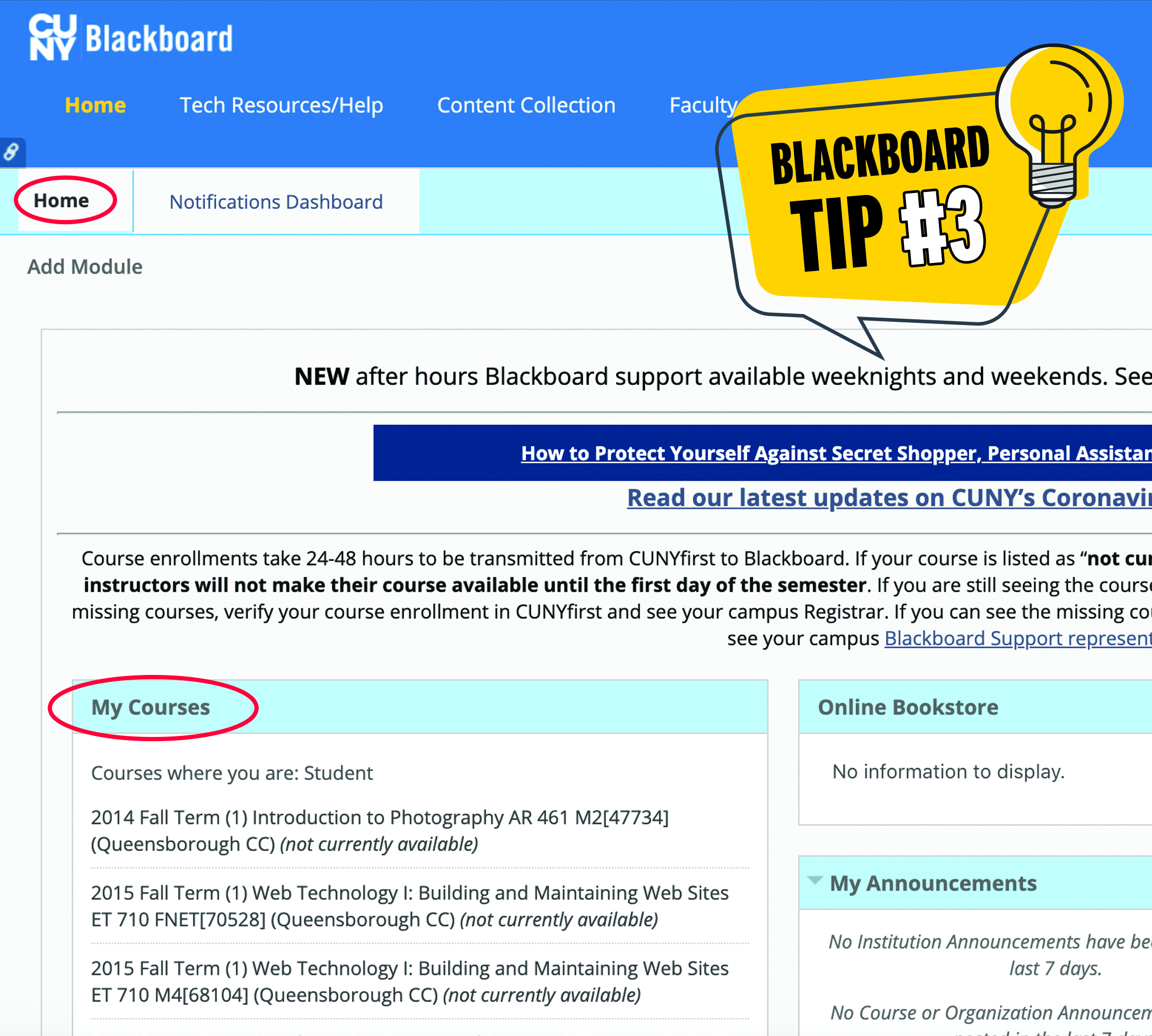
Upon logging in, users are greeted by the Blackboard Institution Page and the Activity Stream. The Activity Stream is a sophisticated notification engine that uses algorithmic sorting to highlight upcoming deadlines, newly posted content, and recent grades. This feature is a significant technological leap from older versions of the software, as it mimics the “feed” logic found in social media platforms, making it more intuitive for the modern user.
Users can further customize their experience by adjusting notification settings. Through the global navigation menu, students can opt to receive SMS alerts or emails for specific events, such as when a faculty member posts an announcement. This granular control over the information flow is a hallmark of user-centered design, allowing students to tailor the platform to their specific organizational needs.
The Role of AI and Integration in Modern Education
As EdTech continues to evolve, Blackboard has integrated advanced technologies to enhance the learning experience. This includes the implementation of Artificial Intelligence (AI) and the seamless integration of third-party software tools that expand the platform’s native capabilities.
Blackboard Ultra: The Next Generation Interface
CUNY has been transitioning many of its courses to the “Blackboard Ultra” experience. Ultra represents a total overhaul of the platform’s UX/UI design, shifting toward a more responsive, mobile-first architecture. Unlike the “Original” view, which relied heavily on nested menus, Ultra utilizes a streamlined, flat design that reduces the number of clicks required to reach content.
Technically, Ultra is built using modern web standards like HTML5 and CSS3, ensuring that the platform is fully responsive across devices—from desktops to smartphones. This is particularly vital for CUNY students, many of whom rely on mobile devices as their primary means of accessing coursework. Furthermore, Ultra introduces AI-driven features such as “nudge” notifications, which use data analytics to identify students who may be falling behind and automatically suggest resources or reminders to keep them on track.
Third-Party Integrations: Turnitin, Zoom, and Panopto
Blackboard’s strength lies in its ability to act as a “motherboard” for other specialized software. Through Learning Tools Interoperability (LTI) standards, CUNY Blackboard integrates seamlessly with external applications. One of the most prominent integrations is Turnitin, an AI-powered plagiarism detection and grading tool. When a student submits an assignment through Blackboard, it is automatically routed through Turnitin’s vast database to ensure academic integrity.
Additionally, the integration of Panopto provides a robust video management system. Faculty can record lectures, edit them, and embed them directly into their Blackboard courses. These videos are then indexed using AI, allowing students to search for specific keywords within a lecture and jump directly to that timestamp. By centralizing these diverse tools within the Blackboard interface, CUNY provides a unified digital ecosystem that minimizes technical friction for both students and instructors.
Digital Security and Privacy within the CUNY Network
In an era of increasing cyber threats, the security of a platform that houses the personal and academic data of thousands is paramount. CUNY Blackboard employs rigorous security protocols to protect user data and ensure compliance with federal regulations.
Data Protection and FERPA Compliance
Blackboard is designed to be fully compliant with the Family Educational Rights and Privacy Act (FERPA). This means that all student data—including grades, attendance records, and personal identifiers—is encrypted both at rest and in transit. The platform uses Advanced Encryption Standard (AES) 256-bit encryption, the same level used by financial institutions and government agencies.
From a technical management perspective, CUNY employs role-based access control (RBAC). This ensures that only authorized individuals have access to specific data. For instance, a professor can view the grades for their own class but cannot access the records of students in another department. This “principle of least privilege” is a cornerstone of digital security, preventing unauthorized data exposure and ensuring that the digital classroom remains a safe space for all participants.
Cybersecurity Best Practices for Students
While the platform itself is secure, the “human element” remains a potential vulnerability. CUNY encourages students to adopt cybersecurity best practices, such as using Multi-Factor Authentication (MFA). By requiring a second form of verification—usually a code sent to a mobile device—MFA significantly reduces the risk of account takeovers via phishing or credential stuffing attacks.
The platform also includes “SafeAssign,” a tool that not only checks for plagiarism but also protects the intellectual property of students. When a paper is submitted, it is added to a global reference database (if opted-in), which helps prevent others from using that work without credit. This focus on security extends beyond just data protection; it encompasses the preservation of academic honesty and the integrity of the degree-granting process.
The Future of EdTech: The Migration Toward Brightspace
While Blackboard has been the stalwart of CUNY’s digital infrastructure for years, the university is currently in the midst of a significant technological shift. CUNY has announced a multi-year migration from Blackboard to D2L Brightspace. This transition represents the next phase in CUNY’s tech strategy.
Why the Shift? Comparing LMS Capabilities
The move to Brightspace is driven by a desire for a more modern, flexible, and intuitive user experience. While Blackboard has made strides with its Ultra update, Brightspace is often cited for its superior mobile application and more advanced data analytics capabilities. Brightspace offers a “Pulse” app that provides a highly streamlined mobile experience, which is a critical factor for CUNY’s tech-savvy student population.
Furthermore, Brightspace’s adaptive learning paths allow instructors to create customized journeys for students based on their performance. For example, if a student fails a practice quiz, the LMS can automatically unlock a remedial video or reading module before allowing the student to proceed. This level of automation and personalization represents the future of AI in education, moving from a “one-size-fits-all” model to a truly individualized learning experience.

Preparing for the Digital Transition
As CUNY phases out Blackboard, the technical challenge lies in data migration. Moving years of course content, student records, and media files from one LMS to another is a massive undertaking involving complex API integrations and data mapping. CUNY’s IT departments are working to ensure that the transition is as seamless as possible, providing faculty with tools to “export” their Blackboard content and “import” it into the new Brightspace environment.
This migration highlights a key trend in the Tech niche: the constant evolution of software. No platform is permanent. The transition from Blackboard to Brightspace is a testament to CUNY’s commitment to staying at the forefront of educational technology, ensuring that its students have access to the most advanced tools available to facilitate their academic and professional success. For now, Blackboard remains a vital component of the CUNY experience, serving as the bridge between traditional pedagogy and the digital future.
aViewFromTheCave is a participant in the Amazon Services LLC Associates Program, an affiliate advertising program designed to provide a means for sites to earn advertising fees by advertising and linking to Amazon.com. Amazon, the Amazon logo, AmazonSupply, and the AmazonSupply logo are trademarks of Amazon.com, Inc. or its affiliates. As an Amazon Associate we earn affiliate commissions from qualifying purchases.