
In the modern smart home ecosystem, the proliferation of devices—smart TVs, Blu-ray players, soundbars, and gaming consoles—has historically led to a frustrating phenomenon: “remote control clutter.” Navigating through multiple plastic controllers, each dedicated to a single device, can turn a simple movie night into a logistical challenge. Anynet+ is Samsung’s proprietary solution to this problem, leveraging the industry-standard HDMI-CEC (Consumer Electronics Control) protocol to provide a seamless, integrated control experience. By unifying your home theater setup, Anynet+ simplifies device interaction, allowing users to control multiple compatible devices with just one remote.
Understanding the Technology Behind Anynet+
At its core, Anynet+ is not a completely unique technology, but rather Samsung’s implementation of HDMI-CEC. When high-definition multimedia interface (HDMI) cables were first introduced, they were designed primarily to carry high-quality audio and video signals. However, developers recognized early on that the physical connection could also act as a data bridge, allowing devices to communicate with each other.
The Role of HDMI-CEC
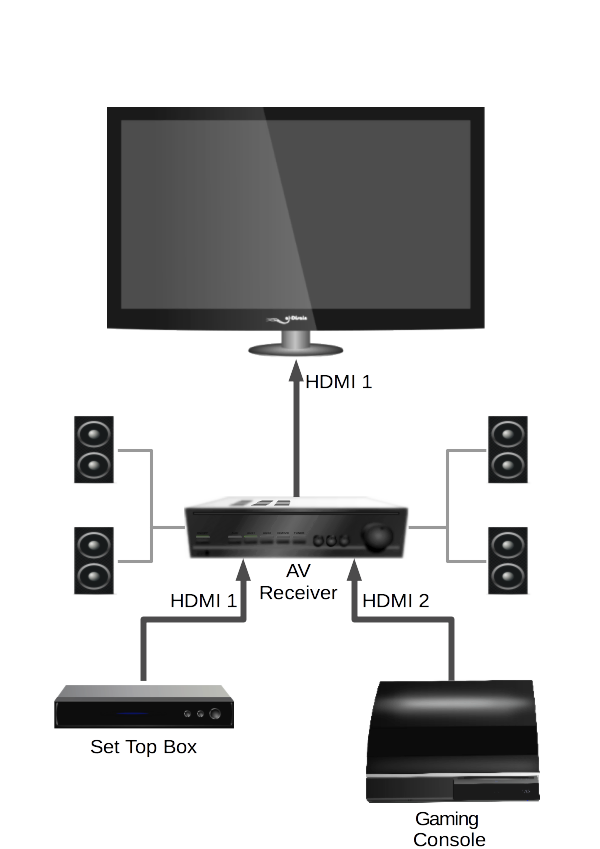
HDMI-CEC is the underlying framework that allows HDMI-connected devices to exchange commands. Through this protocol, a TV can “tell” a soundbar to wake up, or a Blu-ray player can “instruct” the TV to switch to the correct input port as soon as the disc starts spinning. Anynet+ acts as the software layer that sits atop this protocol on Samsung devices, offering a user-friendly interface to manage these interactions. It turns a collection of disparate gadgets into a cohesive system that behaves as a single unit.
Communication Flow
The beauty of Anynet+ lies in its bi-directional communication. When you press the “Power” button on your Samsung remote, the signal is received by the TV, which then sends a command through the HDMI cable to all connected Anynet+ devices. Similarly, if you turn on a console connected to the system, the device sends a “handshake” signal to the TV, prompting it to turn on and automatically switch to the appropriate HDMI source. This removes the need for input switching menus, as the system intelligently detects which device is active.
Setting Up and Configuring Anynet+
For those looking to declutter their living room, setting up Anynet+ is a relatively straightforward process. However, because it relies on the physical handshake between hardware components, there are specific requirements and configurations that must be met to ensure the system operates reliably.
Essential Hardware Requirements
To leverage Anynet+, you must ensure that all hardware involved is compatible. This means:
- HDMI Connectivity: You must use high-quality HDMI cables. While most standard cables support CEC, older or damaged cables can occasionally cause handshake failures.
- CEC Support: Every device in your chain must support HDMI-CEC. While Samsung calls it Anynet+, other manufacturers use their own branding (e.g., Sony’s BRAVIA Sync, LG’s SimpLink, Panasonic’s VIERA Link). Fortunately, these standards are generally cross-compatible, meaning a Samsung TV can often control a non-Samsung soundbar, provided both have CEC enabled.
- Direct Connections: For the most stable results, it is best to connect devices directly to the TV’s HDMI ports rather than through an external splitter or a non-CEC-compliant switch, which may block the signal.
Configuring the Settings
Once your devices are physically connected, you must activate the feature in the menu settings. On most Samsung smart TVs, this is found under:
- Settings
- General (or External Device Manager)
- Anynet+ (HDMI-CEC)
- On
Once enabled, you should perform an “Auto Search” for devices. The TV will poll the HDMI ports, identify compatible peripherals, and register them. After registration, your single Samsung remote should gain basic control functionality over volume, power, and playback for those registered units.
The Practical Advantages of an Integrated Home Theater
The transition to an integrated system through Anynet+ offers more than just convenience; it fundamentally changes the user experience in a home media environment. By reducing technical friction, users spend less time managing settings and more time enjoying content.
Streamlined User Experience
The most immediate benefit is the reduction in remote control inventory. In a typical setup, users often have one remote for the TV, one for the cable box, and one for the sound system. Anynet+ allows the TV remote to send essential commands like “Volume Up,” “Mute,” “Play,” “Pause,” and “Power” through the HDMI cable to the external device. This means the soundbar volume is adjusted directly by the TV remote without ever needing to touch the soundbar’s native controller.
Intelligent Input Switching
One of the most persistent frustrations in home entertainment is the “input dance”—navigating through a TV menu to find the correct HDMI source after turning on a gaming console or a streaming box. Anynet+ eliminates this through “One-Touch Play.” When you power on a device connected via HDMI, it sends a message to the TV to switch to the port where the device is plugged in. This seamless switching makes the home theater system feel intelligent and responsive, effectively lowering the barrier to entry for family members who might be intimidated by complex technical setups.
Troubleshooting Common Anynet+ Issues
While Anynet+ is designed for “plug-and-play” simplicity, technical issues can occasionally occur. Because the system relies on a delicate “handshake” between devices, any interruption in that digital communication can cause the feature to malfunction.
Identifying Handshake Failures
If you notice that your devices are not turning on or off in unison, or if volume control has stopped working, the HDMI-CEC handshake has likely failed. This is often the result of an update to one of the devices, a momentary power flicker, or a loose cable.
Resolving Connectivity Problems
To restore full functionality, follow these diagnostic steps:
- Power Cycle: Turn off all connected devices and unplug them from the wall power for at least 60 seconds. This forces the devices to reset their HDMI controllers.
- Check Cable Integrity: Ensure that all HDMI cables are seated firmly in the ports. If the problem persists, try swapping the HDMI cable to rule out a faulty wire.
- Firmware Updates: Ensure your TV and any connected devices (such as a Blu-ray player or soundbar) are running the latest firmware. Manufacturers frequently push updates to improve CEC compatibility and resolve communication bugs.
- Re-register Devices: Go back into the Anynet+ menu on your Samsung TV and perform a fresh “Device Scan” to re-identify all connected components.
Limitations of CEC
It is important to manage expectations regarding what Anynet+ can achieve. While it is excellent for power, volume, and playback control, it is not a universal remote replacement. It will not, for example, allow you to navigate deep within the settings menu of a third-party gaming console or a complex media streamer. For highly specific device operations, you will still need the native remote or a dedicated universal remote control system.

The Future of Connected Home Integration
Anynet+ represents a significant step toward the goal of “invisible technology”—where the systems that power our home entertainment run in the background without requiring constant manual intervention. As the industry moves toward more sophisticated smart home protocols, the integration provided by HDMI-CEC and features like Anynet+ continues to evolve.
Looking ahead, we can expect even tighter integration as TVs become the central hub for the smart home. As HDMI standards update (such as the widespread adoption of eARC, or Enhanced Audio Return Channel), the bandwidth for command signals increases, allowing for more complex interactions between TVs, sound systems, and even smart home automation platforms. Anynet+ is the foundation upon which this seamless, clutter-free future is built, ensuring that the technology stays hidden while the entertainment remains front and center.
aViewFromTheCave is a participant in the Amazon Services LLC Associates Program, an affiliate advertising program designed to provide a means for sites to earn advertising fees by advertising and linking to Amazon.com. Amazon, the Amazon logo, AmazonSupply, and the AmazonSupply logo are trademarks of Amazon.com, Inc. or its affiliates. As an Amazon Associate we earn affiliate commissions from qualifying purchases.