
In the modern digital landscape, the volume of data generated, shared, and stored is growing at an exponential rate. Whether you are a software developer distributing a complex application, a creative professional sending high-resolution assets, or an everyday user trying to declutter your hard drive, data management is a critical skill. At the heart of this discipline lies the “RAR” file.
Short for Roshal Archive, RAR is a proprietary archive file format that supports data compression, error recovery, and file spanning. While most users are familiar with the ubiquitous ZIP format, RAR represents a more sophisticated alternative often favored by power users and IT professionals for its superior efficiency. This article provides a deep dive into the technology behind RAR files, comparing them to other formats, and offering a comprehensive guide on how to utilize them effectively.
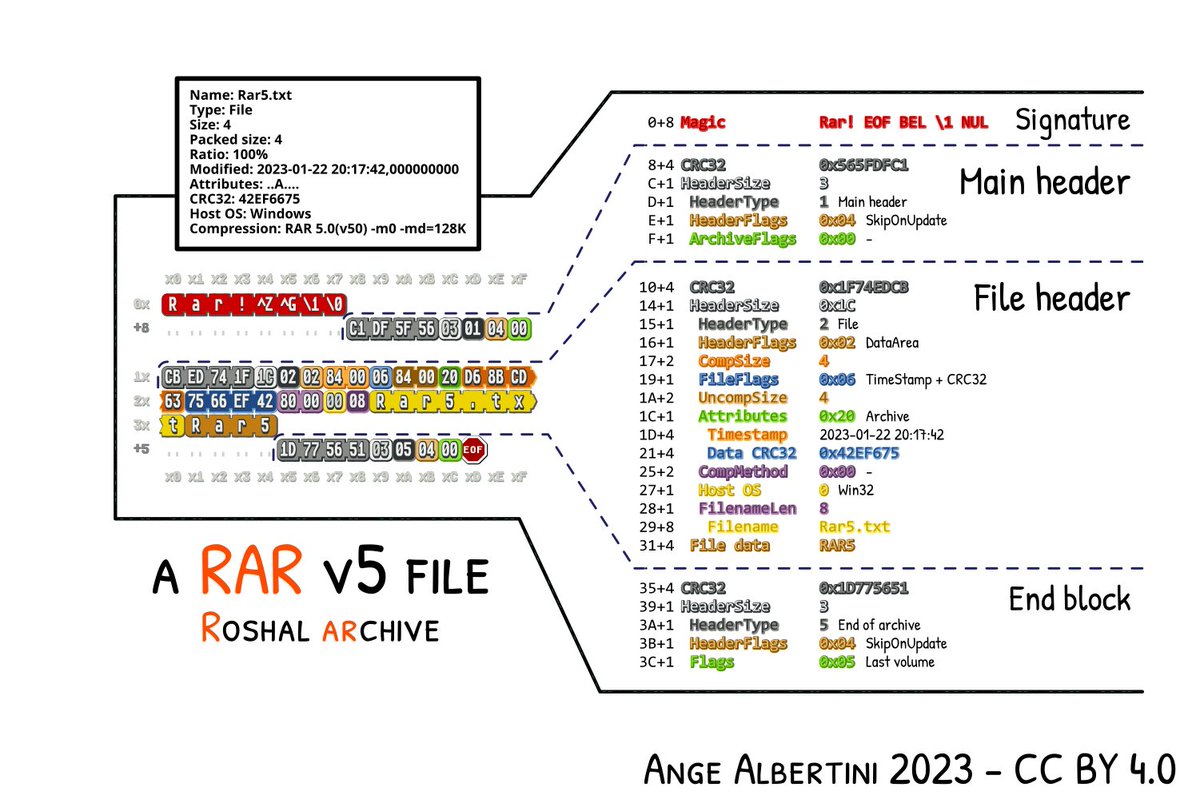
The Technical Architecture of the Roshal Archive
To understand what a RAR file is, one must first understand the concept of lossless data compression. Unlike “lossy” compression (used in JPEGs or MP3s), where some data is discarded to save space, lossless compression ensures that the original data can be reconstructed bit-for-bit.
The Origins of the Roshal Archive
The RAR format was developed by Russian software engineer Eugene Roshal in 1993. It was initially released alongside WinRAR, the graphical interface for managing these archives. Over the decades, the format has evolved through several versions, most notably moving from RAR4 to the current RAR5 standard. The transition to RAR5 introduced a larger compression dictionary (up to 1 GB), which significantly improves the compression ratio for large files, though it sacrifices some backward compatibility with older software.
How Lossless Compression Works in RAR
RAR files utilize a sophisticated compression algorithm based on the Lempel-Ziv-Storer-Szymanski (LZSS) and Huffman coding methods. The algorithm identifies repeating patterns within the data and replaces them with shorter references. What sets RAR apart from many other formats is its “Solid Archiving” capability. In a standard archive, each file is compressed individually. In a “Solid” RAR archive, multiple files are treated as a single continuous data stream. This allows the algorithm to find patterns across different files, resulting in much higher compression ratios, especially when archiving many similar files (such as a folder full of text documents or source code).
RAR vs. ZIP: A Technical Comparison
When choosing a compression format, the debate often settles between RAR and ZIP. While ZIP is the industry standard due to its native support in Windows and macOS, RAR offers several technical advantages that make it the superior choice for specific tech-heavy use cases.
Compression Ratios and Efficiency
In almost every benchmark, RAR outperforms ZIP in terms of file size reduction. Because RAR uses a more complex algorithm and larger dictionary sizes, it can shrink files further than the standard DEFLATE algorithm used by ZIP. For IT professionals managing server backups or developers distributing large software packages, the difference between a 10% and 15% reduction in file size can equate to gigabytes of saved bandwidth and storage costs.
Proprietary vs. Open Source Standards
One of the primary distinctions is the licensing model. ZIP is an open standard, which is why it is integrated into virtually every operating system without the need for third-party software. RAR, conversely, is a proprietary format. While the source code for “unRAR” (the extraction part) is available for developers to include in their software, the code for creating RAR files remains a closely guarded secret of RARLAB. This is why many free tools can open RAR files, but only specific licensed software can create them.
Multi-Volume Archives and File Spanning
A standout feature of the RAR format is its ability to split a single large archive into several smaller volumes (e.g., .part1.rar, .part2.rar). This is known as “spanning.” In the early days of computing, this was used to fit large programs onto multiple floppy disks. Today, it is used to bypass file size limits on email attachments, cloud storage providers, or FAT32-formatted external drives. If one part of the multi-volume archive is missing, the entire set cannot be extracted, ensuring data integrity across the transfer.
Essential Features for Power Users
Beyond simple compression, the RAR format includes a suite of advanced features designed for data integrity and security. These tools make it a preferred format for long-term archiving and secure data transmission.
Data Redundancy and Recovery Records
One of the most innovative features of RAR is the “Recovery Record.” Digital files are susceptible to “bit rot” or corruption during transit. RAR allows users to add a percentage of redundant data to the archive. If the file becomes slightly corrupted (due to a bad sector on a hard drive or a dropped packet during a download), the software can use the Recovery Record to mathematically reconstruct the damaged parts. This makes RAR one of the most resilient file formats for long-term data storage.
Advanced Encryption Standards (AES-256)
Security is a paramount concern in the digital age. RAR files support 256-bit AES (Advanced Encryption Standard) encryption. When a RAR archive is password-protected, the software encrypts not only the content of the files but also the metadata, such as file names and sizes. This “encrypt file names” feature prevents unauthorized users from even seeing what is inside the archive without the correct key, providing an extra layer of privacy that basic ZIP files often lack.
Solid Archiving and Memory Management
While solid archiving significantly increases the compression ratio, it does come with a trade-off: to extract a single file from the middle of a solid archive, the software must process all the data preceding it. For tech users, this means choosing between “Solid” for maximum space saving or “Non-solid” for faster access to individual files within the archive. Modern versions of WinRAR allow users to configure these parameters based on their specific hardware capabilities and needs.
How to Open and Manage RAR Files
Because RAR is not natively supported by all operating systems, users need third-party utilities to interact with these files. Fortunately, the ecosystem for RAR management is robust and spans all major platforms.
Leading Software Solutions: WinRAR and Beyond
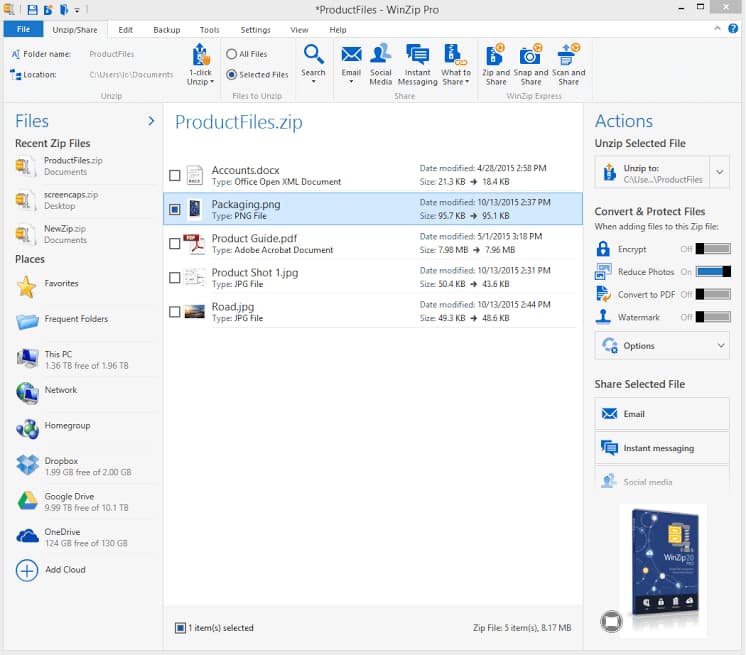
WinRAR is the definitive tool for managing RAR files on Windows. Known for its iconic “books” icon and its famously generous trial period, it remains the most feature-complete option. For users who prefer open-source or free alternatives, 7-Zip is a powerful contender. While 7-Zip uses its own .7z format, it is fully capable of extracting RAR files. Another excellent option is PeaZip, which offers a modern interface and support for over 200 archive formats.
Cross-Platform Compatibility (macOS and Linux)
On macOS, the operating system’s built-in “Archive Utility” cannot handle RAR files. Mac users typically turn to The Unarchiver, a free, lightweight app that handles almost any archive format with a single click. For Linux users, the unrar package can be installed via the command line (sudo apt-get install unrar), allowing for powerful terminal-based extraction and management, which is essential for server administrators.
Mobile Access: Handling RARs on Android and iOS
As mobile devices become primary computing tools, the need to open RAR files on the go has grown. On Android, the official “RAR” app by RARLAB provides the same engine found in the desktop version. On iOS, apps like “iZip” or “Documents by Readdle” allow users to preview and extract compressed files directly from their iPhones or iPads, integrating seamlessly with cloud services like iCloud and Google Drive.
Best Practices for Digital Security and File Integrity
While RAR files are incredibly useful, they are also a common vector for distributing malware. Because archives can “hide” the true nature of the files within them, users must exercise caution.
Identifying Malicious Archives
A common tactic used by cybercriminals is to double-extend a file within a RAR archive (e.g., document.pdf.exe). If a user has “hide file extensions” enabled in their OS, they might only see document.pdf and double-click it, inadvertently executing malicious code. Always use an archive manager to “Preview” or “View” the contents of a RAR file before extracting it. Furthermore, if a RAR file from an unknown source is password-protected, it is often a red flag; passwords are sometimes used to prevent antivirus software from scanning the contents of the archive.
The Role of Checksums and Hash Verification
To ensure that a RAR file has not been tampered with or corrupted, many developers provide a “checksum” (such as MD5 or SHA-256) alongside the download link. After downloading a RAR file, you can use a hashing tool to generate a string of characters from your local file. If your string matches the one provided by the source, the file is identical to the original. WinRAR also includes a built-in “Test” function that checks the internal CRC (Cyclic Redundancy Check) of each file in the archive to ensure integrity.
Conclusion
The RAR format remains a cornerstone of digital file management. By offering a sophisticated balance of high-ratio compression, robust security through AES-256 encryption, and unique data recovery features, it provides a level of utility that basic formats cannot match. Whether you are a system administrator looking to optimize storage or a tech enthusiast sharing large datasets, understanding the nuances of the RAR format is an essential component of modern digital literacy. By using the right tools and following security best practices, you can harness the full power of the Roshal Archive to streamline your digital workflow.
aViewFromTheCave is a participant in the Amazon Services LLC Associates Program, an affiliate advertising program designed to provide a means for sites to earn advertising fees by advertising and linking to Amazon.com. Amazon, the Amazon logo, AmazonSupply, and the AmazonSupply logo are trademarks of Amazon.com, Inc. or its affiliates. As an Amazon Associate we earn affiliate commissions from qualifying purchases.