
The Amazon Firestick, officially known as the Amazon Fire TV Stick, is a popular series of media streaming devices developed by Amazon. In essence, it transforms any television with an HDMI port into a smart TV, offering access to a vast array of digital content, applications, and services. This compact gadget plugs directly into a TV’s HDMI input, connects to the internet via Wi-Fi, and is controlled by a dedicated remote or a smartphone app, providing a seamless gateway to online entertainment and smart home integration.
Demystifying the Amazon Firestick: A Gateway to Digital Entertainment
At its core, the Firestick is a micro-computer designed specifically for media consumption. It brings the rich world of online streaming directly to your largest screen, bypassing the need for a smart TV’s often-limited operating system or cumbersome navigation. Its rise to prominence is largely due to its affordability, ease of use, and extensive content library, positioning it as a cornerstone in many modern home entertainment setups.

Core Functionality and Design
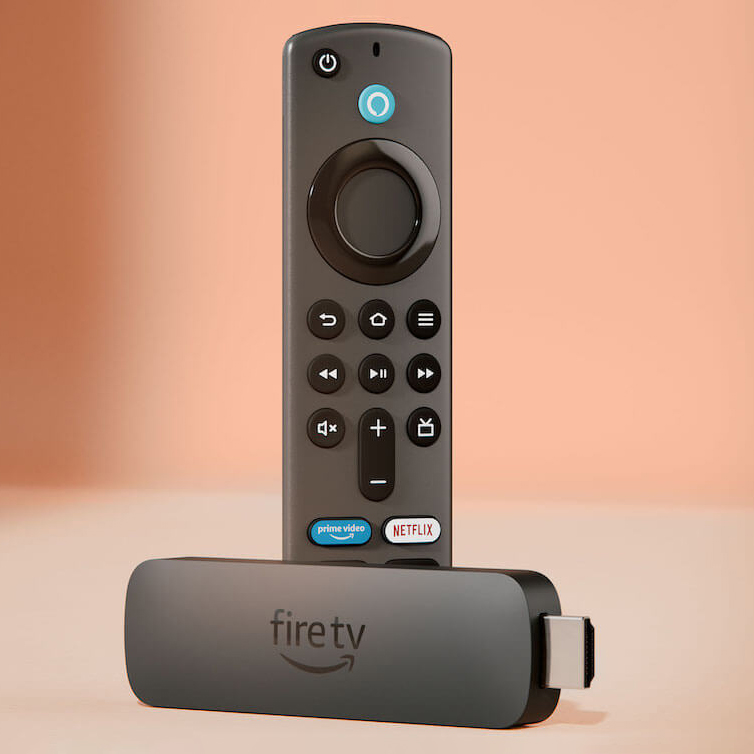
The physical design of a Firestick is remarkably understated. It typically resembles a USB flash drive, though slightly larger, and connects directly to an available HDMI port on a television or AV receiver. Power is supplied via a micro-USB or USB-C port, usually connected to a wall adapter or, if available and sufficient, a USB port on the TV itself. Once plugged in and powered, the device projects a user-friendly interface onto the screen, primarily centered around Amazon’s Fire OS, a customized version of Android.
This interface provides intuitive navigation through various apps, content categories, and settings. Users can browse content from numerous streaming providers, launch games, or access utilities directly from the home screen. A key component of the Firestick experience is its remote control. Modern iterations feature voice control capabilities powered by Amazon’s Alexa, allowing users to search for content, control playback, launch apps, and even manage smart home devices with spoken commands. This hands-free interaction significantly enhances convenience and accessibility, streamlining the user experience.
Evolution and Device Generations
Since its initial launch in 2014, the Amazon Fire TV Stick has undergone several iterations, each bringing advancements in processing power, graphical capabilities, connectivity, and feature sets. Early models primarily supported HD (1080p) resolution, but subsequent generations have embraced 4K Ultra HD, HDR (High Dynamic Range) for improved color and contrast, and even advanced audio formats like Dolby Vision and Dolby Atmos.
Key evolutionary milestones include:
- Enhanced Performance: Each new generation typically features faster processors and more RAM, leading to smoother navigation, quicker app loading times, and better overall responsiveness.
- Improved Connectivity: Upgrades to Wi-Fi standards (e.g., Wi-Fi 5, Wi-Fi 6) ensure more stable and faster internet connections, crucial for high-resolution streaming. Bluetooth connectivity has also been enhanced for pairing remotes, game controllers, and audio devices.
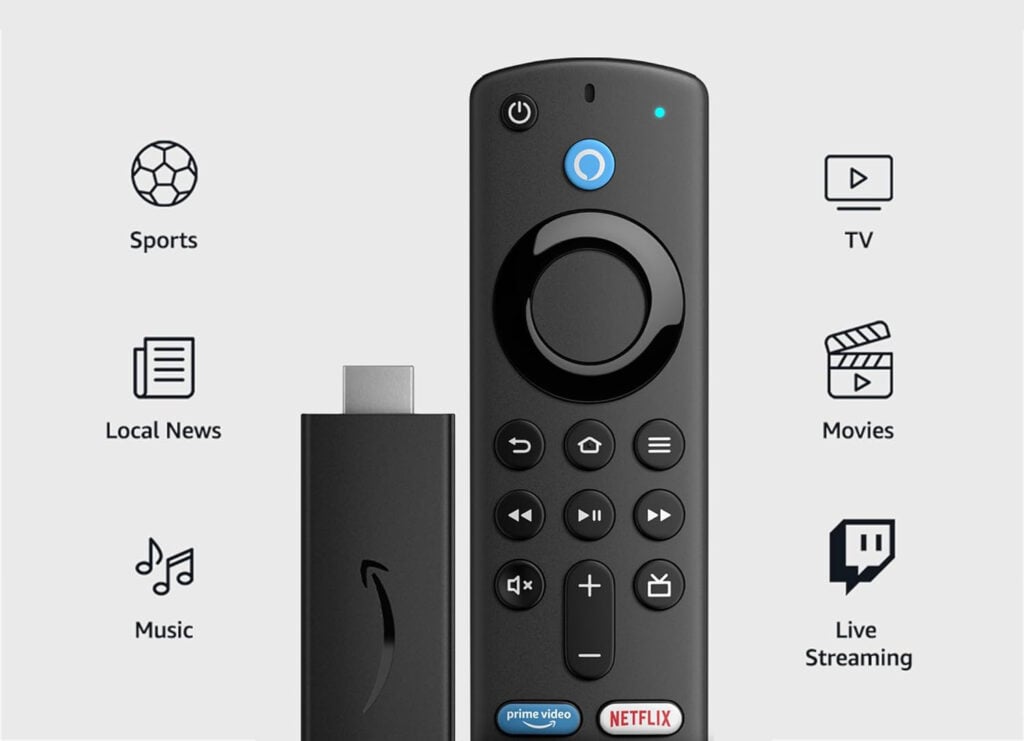
- Advanced Remote Controls: The introduction of Alexa voice control was a significant leap, followed by programmable buttons for TV power and volume, reducing the need for multiple remotes. The latest remotes often feature dedicated buttons for popular streaming services.
- New Form Factors: While the stick form factor remains dominant, Amazon also offers Fire TV Cube, which integrates a full-fledged Echo speaker with a Fire TV device, and even Fire TV Omni Series smart televisions, demonstrating the brand’s commitment to embedding its streaming platform directly into home entertainment hardware.
These continuous improvements ensure the Firestick remains competitive and capable of handling the latest streaming technologies and user demands, adapting to an ever-evolving digital landscape.
Unlocking Content: Streaming Services and App Ecosystem
The primary appeal of the Amazon Firestick lies in its ability to centralize access to an extensive content library. It acts as a universal hub, aggregating applications from nearly every major streaming provider, alongside a wealth of niche content and utilities. This broad compatibility eliminates the need for users to switch between different input sources or smart TV platforms to access their preferred shows and movies.
Accessing Popular Streaming Platforms
Out of the box, the Firestick supports a comprehensive range of popular streaming applications. This includes, but is not limited to:
- Video-on-Demand (VoD) Services: Amazon Prime Video (naturally), Netflix, Disney+, Hulu, HBO Max, Apple TV+, Paramount+, Peacock, and numerous others. Users simply download the desired app from the Amazon Appstore, log in with their existing subscriptions, and begin streaming.
- Live TV Streaming: Services like Sling TV, YouTube TV, Hulu + Live TV, and fuboTV provide access to live broadcast television channels without a traditional cable subscription, all accessible through the Firestick.
- Music Streaming: Apps such as Amazon Music, Spotify, Apple Music, and Pandora allow users to stream their favorite audio content directly through their TV’s sound system or connected speakers.
- Free Content Platforms: Ad-supported free streaming services like Pluto TV, Tubi, Freevee (formerly IMDb TV), and The Roku Channel are also readily available, offering a wealth of movies and TV shows at no additional cost.
The Fire OS interface is designed to make discovering this content easy, often featuring a unified search function that scans across multiple installed apps, presenting results regardless of their origin.
The Amazon Appstore and Beyond
The Amazon Appstore serves as the primary gateway for downloading applications onto the Firestick. It offers thousands of apps specifically optimized for the TV interface, ranging from entertainment and news to productivity and utilities. While the Appstore is robust, the Firestick’s Android-based foundation also allows for “sideloading” of applications from outside the official store. This process, while requiring a bit more technical know-how and carrying potential security risks if sources are untrusted, enables users to install apps not officially available on the Amazon Appstore, expanding the device’s functionality even further. This flexibility appeals to users seeking to customize their streaming experience beyond the standard offerings.
Voice Control with Alexa Integration
One of the most powerful features of modern Firestick devices is the deep integration of Amazon’s intelligent voice assistant, Alexa. The remote controls for most Firestick models include a dedicated microphone button. Pressing and holding this button allows users to issue voice commands such as:
- “Alexa, play The Lord of the Rings.”
- “Alexa, open Netflix.”
- “Alexa, show me action movies.”
- “Alexa, fast forward five minutes.”
- “Alexa, turn off the living room lights.” (if connected to smart home devices)
- “Alexa, what’s the weather like?”
This voice control capability significantly enhances the user experience by reducing the need for manual text input, which can be cumbersome on a TV interface, and by providing quick access to information and device control. For those with a broader Amazon smart home ecosystem, the Firestick acts as another touchpoint for controlling lights, thermostats, security cameras, and other compatible devices, solidifying its role as a central component in a connected home.
Beyond Basic Streaming: Advanced Features and Capabilities
While primarily known for streaming, the Amazon Firestick boasts a range of advanced functionalities that extend its utility beyond simply playing movies and TV shows. These features leverage its processing power and connectivity to offer a more integrated and versatile entertainment and smart home experience.
Screen Mirroring and Casting
Many Firestick models support screen mirroring and casting capabilities, allowing users to display content from their smartphones, tablets, or even computers directly onto their television.
- Screen Mirroring: This feature replicates the entire display of a compatible mobile device onto the TV. It’s particularly useful for sharing photos, videos, presentations, or even browsing the web on a larger screen. The Firestick uses Miracast technology for this, requiring the source device to also support Miracast.
- Casting: Some apps, particularly those like YouTube or certain photo gallery applications, support direct casting. This allows users to “send” content from their phone to the Firestick, with the Firestick then taking over the streaming, freeing up the mobile device for other tasks. While not as universally implemented as Google’s Chromecast protocol, it provides a convenient way to share media.
These features transform the TV from a passive consumption device into an active display for personal content and collaborative viewing.
Gaming on Your Firestick
While not a dedicated gaming console, the Firestick is capable of playing a variety of casual and some more graphically intensive games. The Amazon Appstore includes a dedicated games section with titles ranging from simple puzzle games to more complex adventure games. For a better gaming experience, users can pair Bluetooth game controllers directly with the Firestick, providing more precise control than the standard remote. While it won’t replace a PlayStation or Xbox, it offers a fun and accessible platform for light gaming, often leveraging touch-friendly mobile titles adapted for the big screen. The growing library of games includes popular franchises and indie titles, making it an unexpected perk for casual gamers.
Enhancing Your Smart Home
The Firestick’s integration with Alexa extends its utility far beyond entertainment into the realm of smart home management. As mentioned, users can control compatible smart devices (lights, thermostats, door locks, security cameras) directly through voice commands via the Firestick remote.
- Live Camera Feeds: For users with Amazon Ring cameras or other compatible smart security cameras, the Firestick can display live video feeds directly on the TV screen. A simple voice command like “Alexa, show me the front door camera” instantly brings up the feed, providing an excellent security monitoring tool.
- Routines and Automation: The Firestick can participate in Alexa Routines, allowing users to automate multiple actions with a single command or schedule. For example, a “Good Night” routine could dim the lights, lock the doors, and turn off the TV through the Firestick.
This deep integration positions the Firestick not just as a streaming device, but as a central hub for managing and interacting with a broader smart home ecosystem, enhancing convenience and control over the living environment.
Choosing the Right Firestick for Your Needs
With multiple models available, selecting the ideal Amazon Firestick involves considering several factors tailored to individual requirements, budget, and existing technology. Each iteration brings specific enhancements, catering to different user profiles, from casual viewers to avid cinephiles and smart home enthusiasts.
Comparing Different Models: Lite, HD, 4K, Max
Amazon typically offers a tiered lineup of Firestick devices, each with distinct capabilities:
- Fire TV Stick Lite: This entry-level model is the most affordable and generally supports up to 1080p (Full HD) streaming. It comes with an Alexa Voice Remote Lite, which includes voice control but typically lacks TV power and volume buttons, requiring users to manage TV controls separately. It’s ideal for older TVs, secondary rooms, or users primarily interested in basic HD streaming.
- Fire TV Stick (Standard HD): This model also supports 1080p streaming but includes the full Alexa Voice Remote with TV controls, offering a more integrated user experience. It often features slightly faster performance than the Lite version.
- Fire TV Stick 4K: A significant upgrade, this model supports 4K Ultra HD resolution, HDR10, HDR10+, and HLG for enhanced picture quality, and often Dolby Vision and Dolby Atmos for superior audio. It requires a 4K-compatible TV and fast internet to fully utilize its capabilities. This is a popular choice for users with 4K televisions looking for a premium viewing experience.
- Fire TV Stick 4K Max: This is typically the most advanced stick model, building upon the 4K version with a more powerful processor for snappier navigation, faster app loading, and potentially better gaming performance. It often supports Wi-Fi 6 for improved wireless connectivity and may include additional features like Live View Picture-in-Picture for smart cameras. It’s designed for power users, those with Wi-Fi 6 routers, or anyone seeking the absolute best performance in a stick form factor.
- Fire TV Cube: While not a “stick,” the Cube is Amazon’s highest-end Fire TV device, combining a Fire TV 4K Max with a full-fledged Echo smart speaker. It offers hands-free Alexa voice control (without needing the remote), an Ethernet port, and even more powerful processing, serving as a central smart home hub in addition to a premium streaming device.
Factors to Consider: Resolution, Speed, Storage
When making a selection, consider the following:
- TV Resolution: If you have a 4K TV, opting for a Fire TV Stick 4K or 4K Max is essential to fully appreciate the higher resolution and HDR content. For 1080p TVs, an HD or Lite model will suffice and save money.
- Performance and Speed: Faster processors and more RAM (found in 4K Max or Cube) translate to a smoother user interface, quicker app launches, and less buffering, especially when dealing with complex apps or multiple tasks.
- Connectivity: While all models use Wi-Fi, the 4K Max’s Wi-Fi 6 support offers benefits for those with compatible routers, leading to potentially faster and more reliable streaming, especially in congested network environments.
- Storage: Firesticks typically come with 8GB of internal storage, which is generally sufficient for core streaming apps. If you plan to download many games or a large number of utility apps, this might become a consideration, though it’s rarely a major limiting factor for standard use.
- Remote Features: The presence of TV control buttons (power, volume) on the remote can significantly streamline daily use by reducing the need for multiple remotes.
Setup and Installation: A Simple Process
Setting up an Amazon Firestick is designed to be straightforward:
- Plug it in: Insert the Firestick into an available HDMI port on your TV.
- Power it up: Connect the included power adapter to the Firestick and then to a wall outlet.
- Select Input: Switch your TV’s input source to the HDMI port where the Firestick is connected.
- Pair Remote: Follow on-screen instructions to pair the remote control.
- Connect to Wi-Fi: Select your home Wi-Fi network and enter the password.
- Login to Amazon: Sign in with your Amazon account (or create one).
- Download Apps: The device will guide you through downloading popular streaming apps.
This user-friendly setup ensures that even technologically less-savvy individuals can get their Firestick up and running quickly, granting immediate access to a world of digital entertainment.
Optimizing Your Firestick Experience
Maximizing the utility and performance of your Amazon Firestick goes beyond the initial setup. Regular maintenance, understanding security protocols, and staying informed about new features can significantly enhance your streaming and smart home integration.
Performance Tips and Troubleshooting
To ensure a consistently smooth Firestick experience, consider these optimization and troubleshooting tips:
- Clear Cache and Data: Over time, apps accumulate cache data which can slow down performance. Regularly clear the cache for frequently used apps via
Settings > Applications > Manage Installed Applications. - Force Stop Unused Apps: If an app is acting buggy or consuming resources in the background, force-stopping it can resolve issues.
- Restart the Device: A simple restart can often fix minor glitches and improve responsiveness. This can be done via
Settings > My Fire TV > Restartor by simply unplugging it for 30 seconds. - Check Your Wi-Fi Connection: Ensure your Firestick is connected to a strong Wi-Fi signal. If streaming 4K content, a robust and fast connection is critical. Consider moving your router closer, using a Wi-Fi extender, or upgrading to a Firestick model with Wi-Fi 6 if you have a compatible router.
- Free Up Storage: While 8GB is usually enough, if you download many games or apps, storage can become an issue. Uninstall unused apps to free up space.
- Update Software: Always ensure your Firestick’s operating system is up-to-date. Amazon regularly releases updates that include performance improvements, bug fixes, and new features. Check for updates via
Settings > My Fire TV > About > Check for Updates. - Use the Official Power Adapter: While tempting to use a TV’s USB port for power, it often doesn’t provide sufficient wattage, leading to instability or performance issues. Always use the included power adapter.
Digital Security and Privacy Considerations
As an internet-connected device, the Firestick is subject to general digital security and privacy concerns.
- Strong Passwords: Use a strong, unique password for your Amazon account.
- App Permissions: Be mindful of the permissions requested by apps you install, especially when sideloading. Stick to trusted sources.
- VPN Usage: For enhanced privacy and to bypass geo-restrictions, many users opt to install a Virtual Private Network (VPN) client directly on their Firestick. This encrypts your internet traffic and masks your IP address, adding a layer of security and allowing access to content not available in your region.
- Amazon Privacy Settings: Review Amazon’s privacy settings for your account and Fire TV device. You can often limit data collection related to advertising and app usage within the Fire OS settings.
Future Trends in Streaming Devices
The landscape of streaming devices is continuously evolving. Future iterations of the Firestick and similar gadgets are likely to focus on:
- Even Faster Processors: To handle increasingly complex applications, higher resolution content, and more sophisticated gaming.
- Advanced AI Integration: Deeper integration with AI assistants for more natural language processing, personalized content recommendations, and seamless smart home control.
- Improved Connectivity: Further advancements in Wi-Fi standards (e.g., Wi-Fi 7) and potentially broader integration with other wireless protocols for smart home devices.
- Cloud Gaming: As cloud gaming platforms mature, streaming devices could become more capable endpoints for playing high-end games directly from the cloud without the need for powerful local hardware.
- Enhanced Interoperability: Greater collaboration and standardization between different smart home ecosystems to provide a truly unified control experience.
The Amazon Firestick has cemented its position as a vital piece of technology in the modern home, offering an accessible, powerful, and ever-evolving platform for digital entertainment and smart home management. Its future development will undoubtedly continue to shape how we interact with media and our connected living spaces.
aViewFromTheCave is a participant in the Amazon Services LLC Associates Program, an affiliate advertising program designed to provide a means for sites to earn advertising fees by advertising and linking to Amazon.com. Amazon, the Amazon logo, AmazonSupply, and the AmazonSupply logo are trademarks of Amazon.com, Inc. or its affiliates. As an Amazon Associate we earn affiliate commissions from qualifying purchases.