
In the modern digital landscape, the quality of our communication is often dictated by the environments we inhabit. Whether it is the rhythmic clicking of a mechanical keyboard during an intense gaming session, the hum of an air conditioner in a home office, or the distant barking of a dog during a high-stakes corporate presentation, background noise has long been the enemy of professional audio. Recognizing this challenge, AMD introduced AMD Noise Suppression—an AI-powered solution designed to provide crystal-clear audio for gamers, creators, and professionals alike.
AMD Noise Suppression is not merely a simple volume gate; it represents a significant leap in how hardware-level artificial intelligence can be leveraged to improve the user experience. By utilizing deep learning algorithms, this technology identifies and isolates human speech while neutralizing unwanted environmental sounds. As we delve into the technical nuances, hardware requirements, and practical applications of this tool, it becomes clear that AMD is positioning itself at the forefront of AI-driven software utility.
Understanding AMD Noise Suppression: The Technology Behind the Silence
At its core, AMD Noise Suppression is an intelligent audio processing tool integrated directly into the AMD Software: Adrenalin Edition. Unlike traditional noise-canceling methods that rely on simple frequency filtering or hardware-based shielding, AMD’s approach utilizes a sophisticated neural network.
How AI and Deep Learning Filter Audio
The “magic” of AMD Noise Suppression lies in its training. The software is built upon a deep learning model that has been exposed to tens of thousands of hours of audio data, encompassing both clean human speech and a vast array of background noises. This extensive training allows the AI to distinguish the unique spectral signature of a human voice from the erratic patterns of a vacuum cleaner or the sharp transients of a fan.
When the feature is enabled, the audio signal—whether incoming from your microphone or outgoing through your speakers—is processed in real-time. The AI analyzes the waveform, identifies the noise components, and subtracts them from the signal before the audio reaches its destination. This results in a “clean” output that sounds as though it were recorded in a controlled studio environment.
Real-Time Processing and Low Latency
One of the primary concerns with AI-driven audio processing is latency. In competitive gaming or live broadcasting, even a few milliseconds of delay can desync audio from video or hinder communication. AMD has optimized Noise Suppression to run efficiently on the GPU’s specialized hardware. By offloading the computational heavy lifting to the graphics architecture, the software achieves near-instantaneous processing. This ensures that the noise-free audio remains perfectly synchronized with the user’s actions and visuals.
Hardware and Software Requirements: Is Your System Compatible?
While AMD Noise Suppression is a powerful tool, it is designed to take advantage of specific architectural advancements found in modern AMD hardware. To ensure peak performance without compromising system stability, there are certain prerequisites for users looking to adopt this technology.
Supported AMD Radeon and Ryzen Components
AMD Noise Suppression is primarily built for the RDNA 2 architecture and newer. This means that users with Radeon RX 6000 series and Radeon RX 7000 series graphics cards can fully utilize the feature. Furthermore, the technology is supported on Ryzen 6000 and 7000 series processors that feature integrated Radeon graphics.
The reason for these specific requirements lies in the AI acceleration capabilities of these architectures. RDNA 2 and RDNA 3 contain dedicated hardware instructions that are significantly more efficient at handling the matrix multiplications required for neural network processing. While older cards might technically be able to run similar algorithms via software, the performance hit would be too great for a seamless user experience.
The Role of AMD Software: Adrenalin Edition
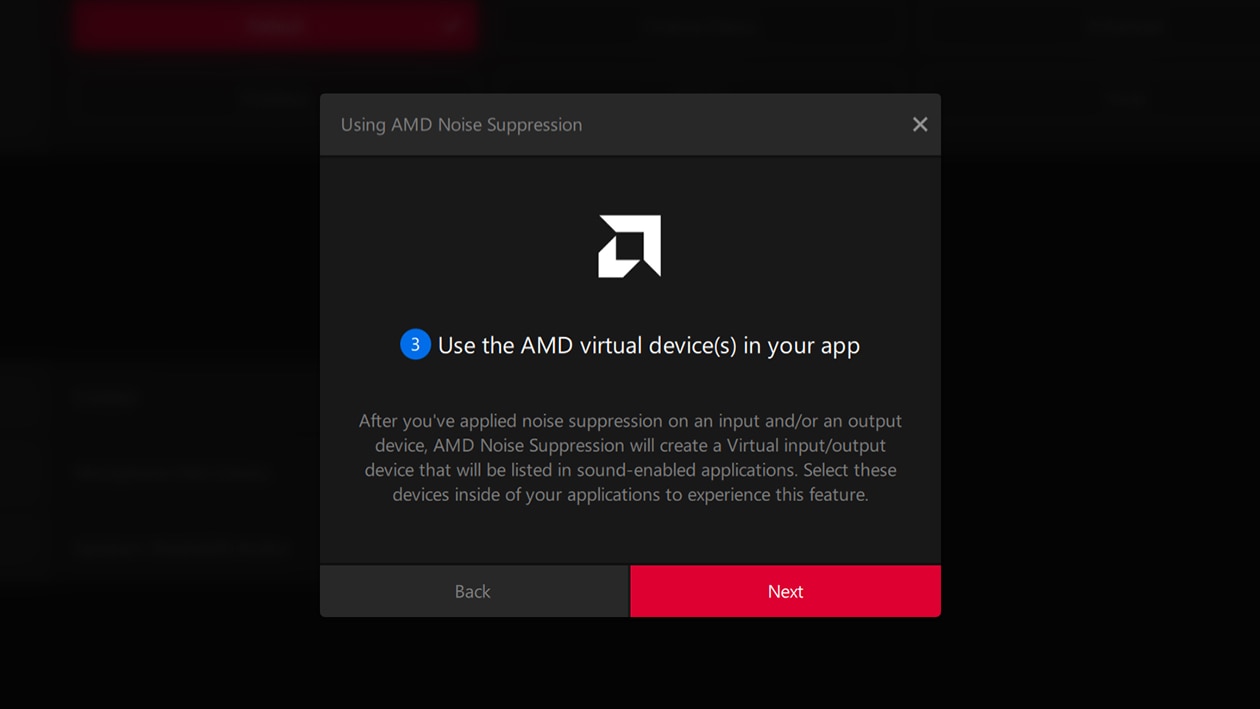
To access this feature, users must have a compatible version of the AMD Software: Adrenalin Edition installed (typically version 22.7.1 or later). This software suite acts as the command center for the Radeon ecosystem. AMD’s decision to integrate noise suppression directly into the driver software—rather than releasing it as a standalone application—offers a streamlined experience. It allows the noise suppression to function as a “virtual device,” making it universally compatible with almost any application that uses an audio input or output.
Practical Applications: From Gaming Marathons to Professional Meetings
The versatility of AMD Noise Suppression makes it a valuable asset across various disciplines. By providing two-way noise cancellation (input and output), it addresses the noise challenges of both the speaker and the listener.
Competitive Gaming and Streamer Optimization
For gamers, communication is often the difference between victory and defeat. In the heat of a match, the loud clicks of high-performance mechanical switches or the roar of cooling fans can drown out vital voice commands. AMD Noise Suppression filters these out, ensuring that teammates hear only the intended instructions.
For streamers and content creators, this tool is transformative. It reduces the need for expensive acoustic room treatment or high-end XLR microphones with physical noise gates. By cleaning up the audio at the source, creators can produce professional-quality content even in less-than-ideal environments, such as a bedroom or a shared living space.
Enhancing Remote Work and Collaboration
In the era of hybrid work, video conferencing has become the standard for professional interaction. AMD Noise Suppression works seamlessly with platforms like Microsoft Teams, Zoom, and Slack. A unique advantage here is the “Output” suppression feature. If a colleague on the other end of a call is in a noisy environment, you can enable noise suppression on your output device to filter their background noise. This creates a much more focused and less fatiguing meeting experience for the user, regardless of the other participants’ audio setups.
Setting Up and Optimizing AMD Noise Suppression
Implementing AMD Noise Suppression is a straightforward process, but understanding how to configure it correctly is essential for maximizing its effectiveness without taxing your system.
Step-by-Step Installation Guide
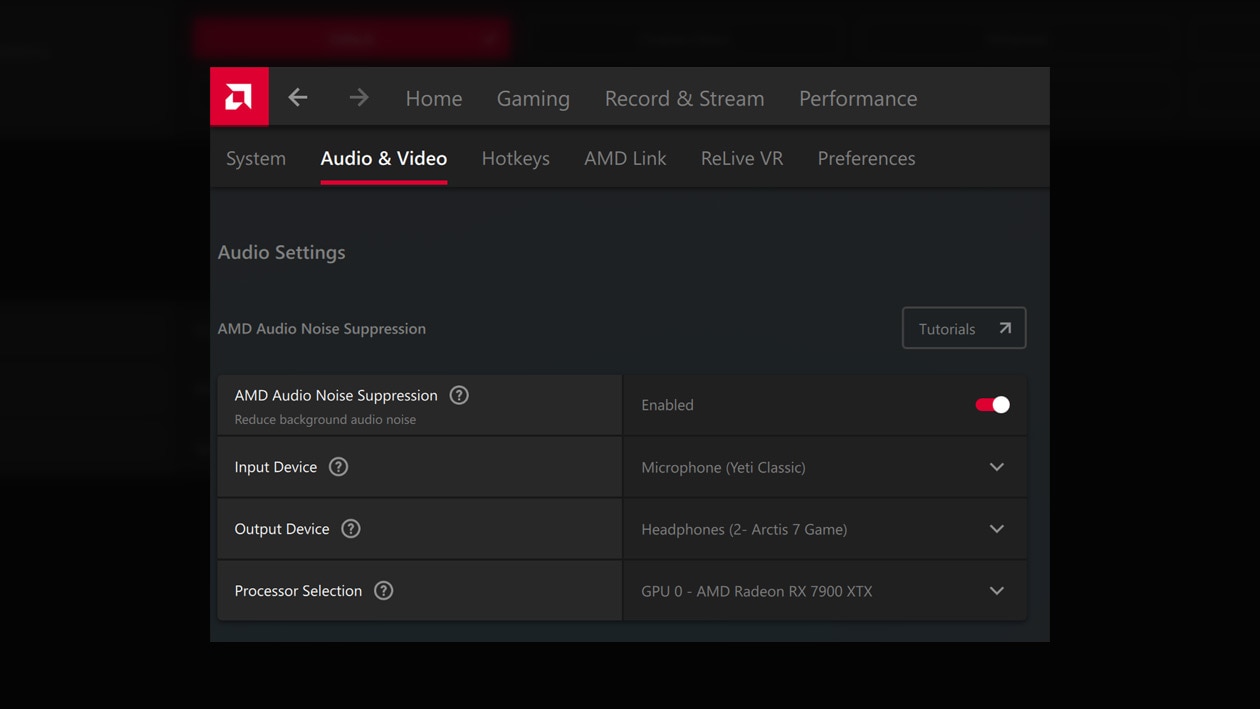
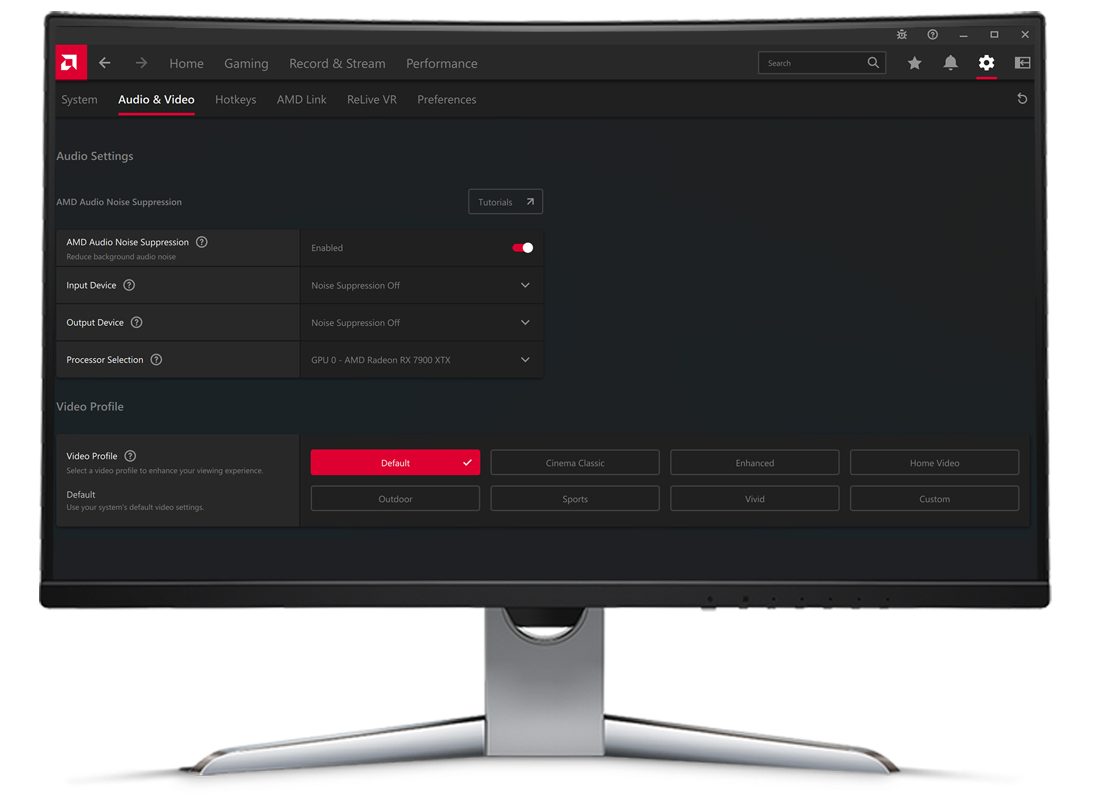
Once the AMD Adrenalin software is updated, navigating to the “Audio & Video” tab reveals the Noise Suppression toggle. Upon enabling the feature, the software creates a new virtual audio device in your Windows settings named “AMD Streaming Audio Device.”
To use it, you must go into your specific application (like Discord or OBS) and change the input device from your physical microphone to the “AMD Streaming Audio Device.” This redirects your mic’s signal through the AMD AI engine before it reaches the app. The same process applies to the output device if you wish to clean up incoming audio from others.
Fine-Tuning Your Audio Environment
While the AI is highly capable, users should still practice basic audio hygiene. For instance, setting your physical microphone’s gain to an appropriate level ensures the AI has a “strong” signal to work with. If the gain is too low, the AI might struggle to distinguish quiet speech from background noise, leading to “clipping” or a robotic-sounding voice. AMD provides a simple interface within the Adrenalin software to monitor whether the suppression is active and functioning correctly.
Comparing AMD Noise Suppression with Industry Rivals
AMD is not the only player in the AI audio space. The most notable competitor is NVIDIA Broadcast. Comparing these two reveals how the tech industry is converging on AI as the primary solution for audio fidelity.
AMD vs. NVIDIA Broadcast
NVIDIA Broadcast was the first to market with its RTX Voice and subsequent Broadcast app. While NVIDIA has a head start and offers additional features like virtual backgrounds and auto-frame for cameras, AMD’s implementation has several distinct advantages for Radeon users.
Firstly, AMD’s solution is lighter on system resources. Because it is baked into the driver, there is less software overhead than running a separate, standalone application. Secondly, AMD’s “two-way” suppression is highly intuitive, allowing users to toggle input and output suppression from a single, unified menu. While both technologies produce excellent results, AMD’s integration makes it a more seamless experience for those already within the Ryzen and Radeon ecosystem.
Performance Impact and Resource Efficiency
A common concern with any background process is the impact on frames per second (FPS) in games. In technical benchmarks, AMD Noise Suppression shows a negligible impact on performance, usually well within the margin of error (1-2%). This efficiency is a testament to the optimization of the RDNA architecture. By using specific hardware pathways designed for AI, the GPU can process audio frames in parallel with graphics rendering without causing “stutter” or significant drops in clock speed.
The Future of AI in PC Hardware
AMD Noise Suppression is a prime example of how “Tech” is moving toward a future where hardware is defined by its software capabilities. We are moving away from an era where a GPU only renders pixels; we are entering an era where the GPU acts as an intelligent co-processor for all aspects of the digital experience.
As AI models become more sophisticated, we can expect AMD to refine these algorithms further. Future iterations may include “voice profiling,” where the AI specifically learns the user’s unique vocal timbre to provide even more precise isolation. For now, AMD Noise Suppression stands as a robust, essential tool for anyone looking to reclaim their audio environment from the chaos of background noise. It is a sophisticated blend of deep learning and hardware engineering that proves, in the world of modern technology, silence truly is golden.
aViewFromTheCave is a participant in the Amazon Services LLC Associates Program, an affiliate advertising program designed to provide a means for sites to earn advertising fees by advertising and linking to Amazon.com. Amazon, the Amazon logo, AmazonSupply, and the AmazonSupply logo are trademarks of Amazon.com, Inc. or its affiliates. As an Amazon Associate we earn affiliate commissions from qualifying purchases.