
In the landscape of creative software, few applications hold as much weight in the professional sphere as Adobe InDesign. Since its launch in 1999 as the successor to PageMaker, InDesign has evolved from a simple desktop publishing (DTP) tool into a sophisticated powerhouse that defines how we consume written and visual information. For developers, designers, and tech enthusiasts, understanding InDesign is not just about knowing a “drawing program”—it is about understanding the technical bridge between raw content and polished, functional media.
At its core, Adobe InDesign is a specialized layout and page design software. While Photoshop handles pixels and Illustrator handles vectors, InDesign is the “master assembler.” It is where the assets created in other programs come together to form a cohesive, multi-page narrative. Whether it is a 500-page technical manual, an interactive digital magazine, or a high-end print advertisement, InDesign provides the technical framework to ensure precision, scalability, and professional-grade output.
The Core Mechanics: Understanding InDesign’s Role in the Software Ecosystem
To understand what InDesign is used for, one must first understand its unique position within the Adobe Creative Cloud ecosystem. Unlike “all-in-one” tools that attempt to handle every aspect of design, InDesign is built with a specific technical philosophy: the management of complex layouts and typographic systems.
Vector vs. Raster: Why InDesign is the “Master Assembler”
In the tech world, software is often categorized by how it processes data. Photoshop is a raster-based tool, manipulating grids of pixels. Illustrator is vector-based, utilizing mathematical paths. InDesign, however, is a layout engine. It does not “create” images in the traditional sense; rather, it “links” to them.
This technical distinction is crucial. When a user places a high-resolution 1GB image into InDesign, the software does not embed the full data of that image into the working file. Instead, it creates a low-resolution proxy and a technical link to the source file. This allows the software to remain performant and responsive even when managing documents with thousands of images and hundreds of pages. It is this architecture that makes it the industry standard for large-scale technical documentation and publishing.
Integration with Adobe Creative Cloud
InDesign serves as the central hub for the Creative Cloud. Through “Link” management, any change made to a source file in Photoshop or Illustrator is automatically updated within the InDesign layout. This non-destructive workflow is a cornerstone of modern digital production. Furthermore, the integration with Adobe Fonts and Creative Cloud Libraries allows for a synchronized technical environment where assets are accessible across different machines and team members, ensuring version control and technical consistency.
Primary Use Cases: From Print Media to Digital Interactivity
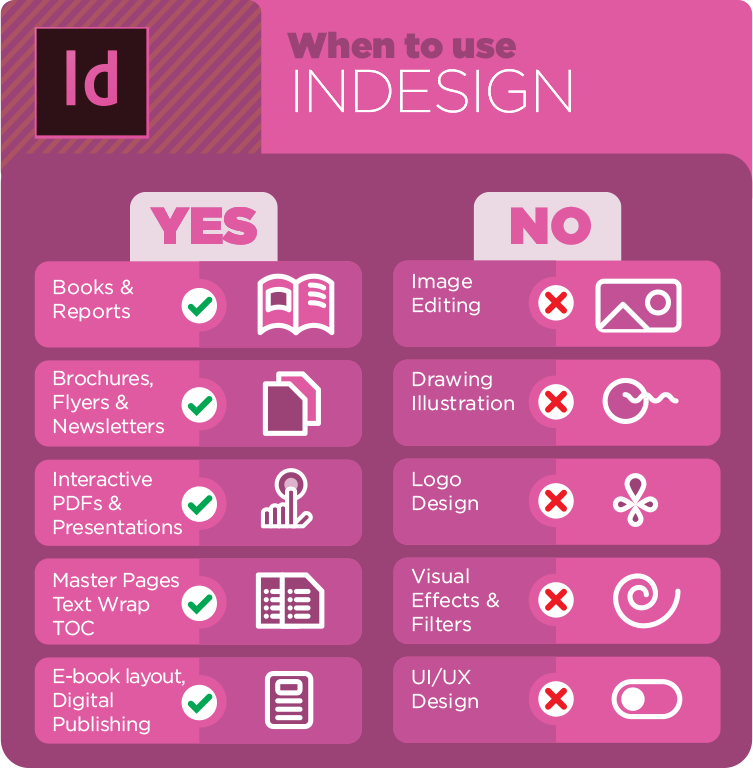
The utility of InDesign spans across multiple industries, but its applications generally fall into three technical categories: traditional print publishing, digital interactivity, and corporate collateral.
Professional Publishing and Editorial Design
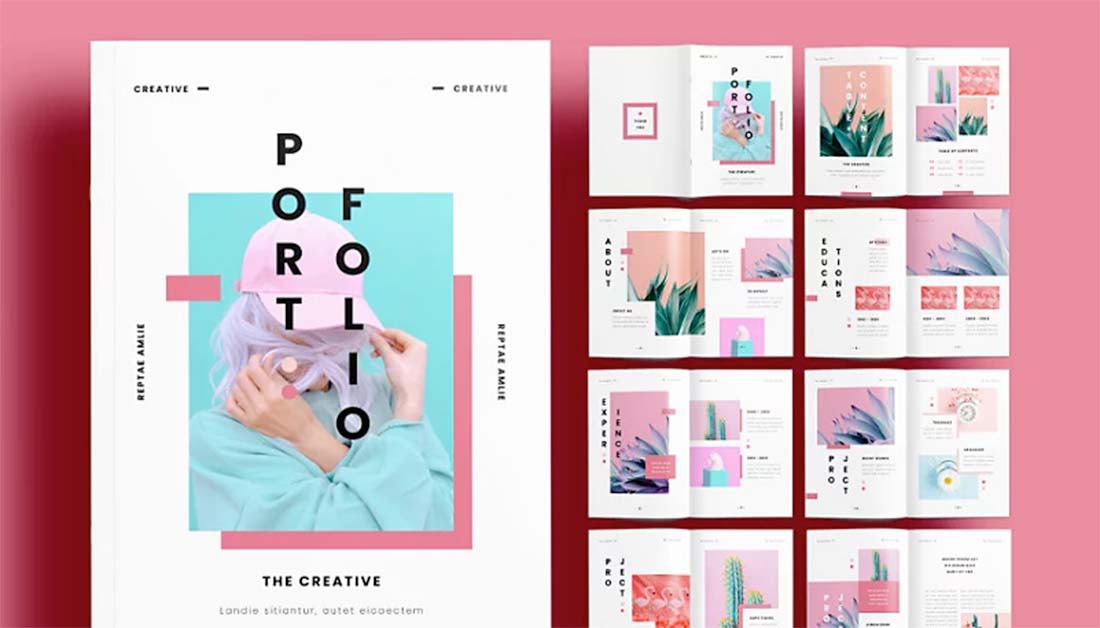
This is the traditional heart of InDesign. It is used to create magazines, newspapers, and books. The software provides technical tools that are absent in word processors like Microsoft Word. For example, InDesign offers “Baseline Grids,” which ensure that lines of text across different columns and pages align perfectly. It also handles “Bleed” and “Slug” areas—technical margins required by commercial printing presses to ensure that ink reaches the very edge of the paper after it is trimmed.
For book publishers, InDesign’s “Book” feature allows multiple separate files (chapters) to be synchronized for page numbering, table of contents generation, and indexing. This modular approach is essential for managing massive data sets without crashing the system.
Digital Publishing and Interactive PDFs
As technology shifted from paper to screens, InDesign evolved. Today, it is used extensively for creating interactive digital media. This includes:
- Interactive PDFs: Adding buttons, hyperlinks, and form fields for business use.
- EPUBs: Designing reflowable or fixed-layout ebooks for devices like the Kindle or iPad.
- Publish Online: A proprietary Adobe technology that allows designers to host an interactive version of their document on Adobe’s servers, complete with animations, video embeds, and slide-in menus.
The technical complexity here involves “Liquid Content” rules, which allow a single layout to adapt to different screen aspect ratios, much like responsive web design.
Marketing Collateral and Large-Scale Layouts
Beyond books, InDesign is the go-to tool for high-stakes marketing materials. Brochures, annual reports, and posters require a level of “Pre-flight” checking that only InDesign provides. The “Pre-flight” panel acts as a technical debugger, scanning the document for broken image links, overset text (text that doesn’t fit in its frame), and incorrect color profiles (e.g., ensuring an image is in CMYK for print rather than RGB for web).
Essential Features that Define Modern Layout Design
The reason InDesign remains the dominant force in the market is its suite of high-level technical features that automate the more tedious aspects of design.
Parent Pages and Systematic Consistency
In software development, we often talk about “templates” or “classes.” In InDesign, this concept is manifested through “Parent Pages” (formerly Master Pages). A Parent Page allows a designer to set a universal layout—including headers, footers, and page numbers—that is automatically applied to all associated pages. If a change is made to the Parent Page, it propagates throughout the entire document. This technical hierarchy is what allows for the rapid production of 1,000-page catalogs without manual errors.
Typography Management and Style Sheets
InDesign’s handling of typography is perhaps its most technically advanced feature. It uses the “Adobe Paragraph Composer,” an algorithm that looks at an entire paragraph to determine the best places to break lines, minimizing “hyphenation and justification” (H&J) errors.
Furthermore, “Paragraph Styles” and “Character Styles” work similarly to CSS (Cascading Style Sheets) in web development. By defining a “Header 1” style, a designer can change the font, color, and spacing of every header in a document by simply modifying the style definition. For power users, InDesign even supports GREP (Global Regular Expression Print), allowing users to use code-like strings to find and format specific patterns of text automatically.
Liquid Layout and Responsive Design Tools
Modern InDesign workflows often require a “multi-channel” approach. The “Liquid Layout” panel allows designers to define how elements on a page should behave when the page size changes. Elements can be pinned to edges, centered, or set to scale proportionally. This reflects the tech industry’s move toward responsive design, ensuring that a layout designed for an A4 print sheet can be converted into a tablet-friendly digital format with minimal manual restructuring.
The Evolution of InDesign: AI Integration and the Future of DTP
As with all Adobe products, InDesign has been heavily influenced by the rise of Artificial Intelligence and cloud computing. The software is no longer a static desktop application; it is a dynamic, AI-enhanced environment.
Adobe Sensei and Automated Workflows
Adobe Sensei, the company’s AI engine, has been integrated into InDesign to handle labor-intensive tasks. One notable feature is “Content-Aware Fit.” When an image is placed into a frame, Sensei identifies the most important part of the image (the “subject”) and automatically scales and crops the image to highlight that subject.
Another AI-driven advancement is the “Auto-Style” feature. For users dealing with raw unformatted text, InDesign can now analyze the structure of the copy and automatically apply relevant Paragraph Styles based on the perceived hierarchy of the content. This significantly reduces the time spent on the “setup” phase of a project.
The Shift Toward Cloud Collaboration
The tech stack for design has shifted toward collaboration. InDesign now features “Share for Review,” a web-based commenting system. Much like Google Docs or Figma, stakeholders can view a layout in their browser and leave comments that sync directly back to the designer’s InDesign workspace. This eliminates the need for endless PDF versions and fragmented email threads, streamlining the technical pipeline from concept to final export.
Conclusion: Why InDesign Remains Irreplaceable in the Tech Stack
What Adobe InDesign is used for can be summarized in one word: Control. While newer, web-based tools like Canva offer ease of use for social media graphics, they lack the technical depth required for professional publishing. InDesign provides the granularity needed to control every point of a typeface, every millimeter of a printing margin, and every byte of an exported file.
For the modern professional, InDesign is more than just a layout tool; it is a sophisticated engine for information architecture. It bridges the gap between the chaotic world of raw creative assets and the structured world of finished media. As AI continues to automate the “creative” side of design, the “technical” side—the ability to manage complex systems and ensure output precision—becomes even more valuable. Adobe InDesign remains the undisputed king of this niche, serving as the essential infrastructure for the world’s most important visual communications.
aViewFromTheCave is a participant in the Amazon Services LLC Associates Program, an affiliate advertising program designed to provide a means for sites to earn advertising fees by advertising and linking to Amazon.com. Amazon, the Amazon logo, AmazonSupply, and the AmazonSupply logo are trademarks of Amazon.com, Inc. or its affiliates. As an Amazon Associate we earn affiliate commissions from qualifying purchases.