
In an era dominated by sleek digital displays and high-definition interfaces like HDMI, DisplayPort, and USB-C, it might seem anachronistic to discuss a technology born in the late 1980s. Yet, the Video Graphics Array, or VGA, connector remains a familiar sight in various corners of the technological landscape, a testament to its foundational role in the evolution of personal computing. While no longer the primary display interface for new devices, understanding “what is a VGA connector used for” provides invaluable insight into the history of digital visual communication, the principles of analog signal transmission, and the remarkable journey of tech innovation. From dusty classroom projectors to critical industrial control systems, VGA continues to serve its purpose, offering a reliable, albeit limited, means of visual output. This article will delve into the origins, functionality, primary applications, and eventual — but not complete — supersession of the VGA connector, exploring its enduring legacy and the lessons it offers about the relentless pace of technological progress within the broader context of technology trends, practical applications, and even economic considerations that shape our digital world.
The Anatomy and Core Functionality of a VGA Connector
To truly grasp the utility of a VGA connector, one must first understand its physical characteristics and the underlying principles of its operation. Unlike its digital successors, VGA transmits information in an analog format, a method that defined video output for decades. This foundational understanding is crucial for anyone engaging with older hardware, troubleshooting display issues, or simply appreciating the journey of display technology.
A Deep Dive into the DB-15 Connector
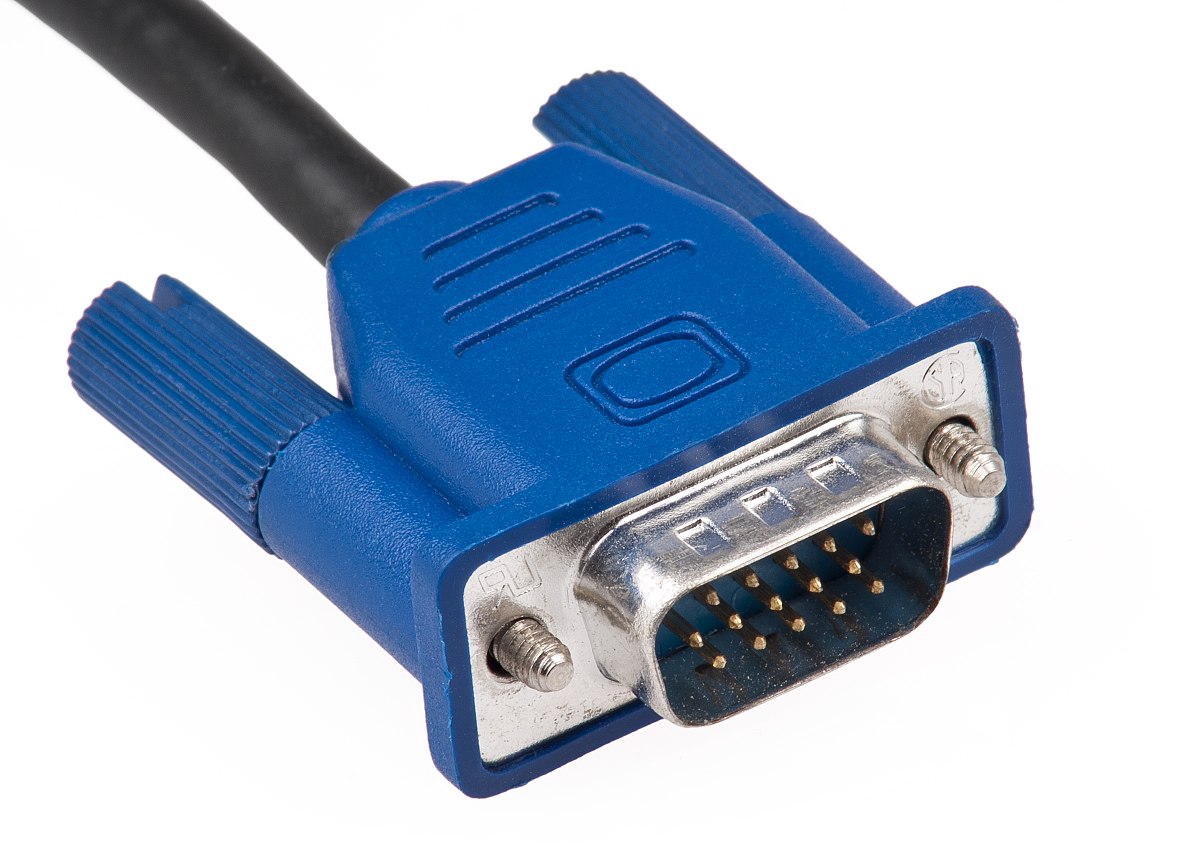
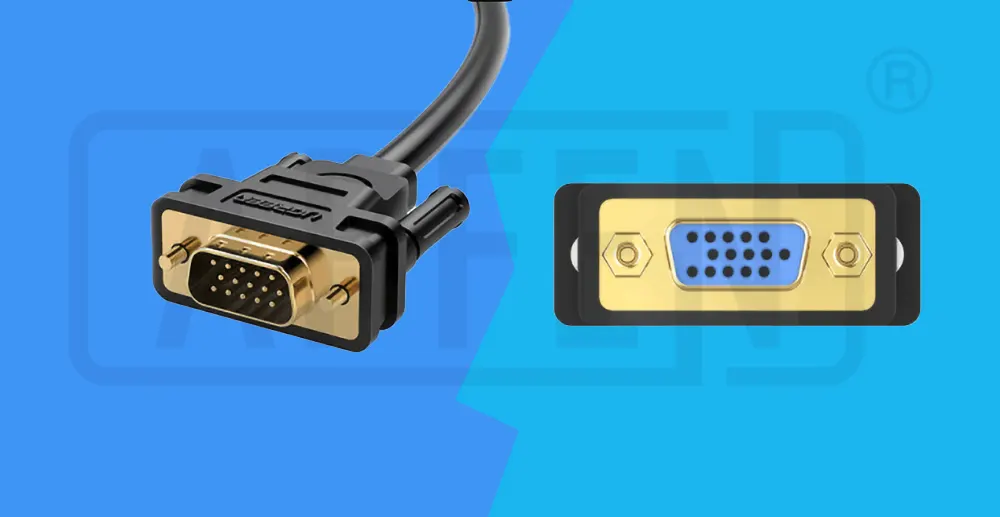
The most recognizable feature of a VGA connector is its distinctive physical form: a 15-pin D-subminiature connector, often referred to as a “DB-15” or “DE-15.” These connectors typically have three rows of five pins each. The male connector features exposed pins, designed to mate with the corresponding holes in a female port found on monitors, projectors, or graphics cards. For ease of identification and to prevent incorrect connections, VGA ports and cables are almost universally colored blue. This color coding is a practical example of design aiding user experience, a small but significant aspect of hardware “branding” and usability. The connector also includes two thumbscrews on either side, which allow users to secure the cable firmly to the port, preventing accidental disconnections – a simple yet effective design choice that highlights the practical engineering considerations of its time. While modern connectors often rely on friction fit or locking tabs, the robust screw-in design of VGA speaks to its era of utilitarian reliability.
How Analog Video Transmission Works
At its heart, VGA operates on analog principles. This means that the electrical signals transmitted through the cable directly correspond to the intensity of light for each color component and the timing information required to paint an image on the screen. The 15 pins are allocated specific roles:
- Red, Green, Blue (RGB) Signals: Three dedicated pins carry the individual analog voltage levels for each primary color. The intensity of the voltage determines the brightness of that color component for a specific pixel.
- Horizontal Sync (HSync): This signal tells the display when to end one scan line and begin the next.
- Vertical Sync (VSync): This signal indicates when a complete frame has been drawn and it’s time to move to the next frame, starting from the top of the screen.
- Ground Pins: Several pins are designated as ground, providing a return path for the electrical signals and ensuring signal integrity.
- Other Pins: A few remaining pins are reserved for DDC (Display Data Channel) which allows the graphics card to communicate with the monitor to detect its capabilities (resolutions, refresh rates), a rudimentary form of “smart” communication for displays that predates modern plug-and-play standards.
This method of transmission works perfectly with older Cathode Ray Tube (CRT) monitors, which are inherently analog devices that “draw” images line by line. For modern digital displays like LCDs, LEDs, and plasmas, an analog-to-digital converter within the monitor is necessary to interpret the VGA signal. This conversion introduces a potential for minor signal degradation or latency, one of the key reasons for the eventual shift to fully digital interfaces.
Resolution and Refresh Rate Limitations
While VGA was revolutionary in its time, its analog nature inherently limits its ability to handle extremely high resolutions and refresh rates without signal degradation. Common resolutions supported by VGA include:
- 640×480 (VGA standard)
- 800×600 (SVGA)
- 1024×768 (XGA)
- 1280×1024 (SXGA)
- 1600×1200 (UXGA)
As resolutions climb, especially above 1280×1024, the analog signal becomes more susceptible to noise, ghosting, and blurring, particularly with longer or lower-quality cables. The signal degradation is a physical limitation; electromagnetic interference can subtly alter the voltage levels, resulting in less precise color reproduction and image clarity. Similarly, while VGA can theoretically support high refresh rates, maintaining signal integrity becomes challenging. This limitation played a significant role in motivating the industry’s search for digital solutions that could offer pristine image quality irrespective of cable length or resolution, addressing a critical “Tech” challenge of maintaining visual fidelity in an increasingly high-definition world.
Historical Significance and Primary Applications
The VGA connector wasn’t just another port; it was the ubiquitous interface that powered the graphical revolution of personal computing for over a decade. Its primary uses defined how people interacted with computers for an entire generation, cementing its place in the annals of technology history.
A Legacy of PC Dominance
VGA was introduced by IBM in 1987 as part of its PS/2 line of personal computers, replacing earlier, less capable graphics standards. It quickly became the dominant display interface for PCs, largely due to its superior color depth (256 colors from a palette of 262,144, far exceeding previous standards) and higher resolution capabilities for its time (640×480 pixels). This marked a significant leap in visual fidelity, paving the way for more graphically rich operating systems and applications. For PC manufacturers, adopting VGA became a standard, creating a universal compatibility that was crucial for the burgeoning personal computer market. This standardization not only streamlined manufacturing but also made computers more accessible to the average consumer, fostering brand loyalty and driving the growth of the tech industry. It was a true enabler of the graphical user interface (GUI) era, allowing software developers to design more intuitive and visually engaging applications.
Connecting to Monitors and Projectors
The most common and enduring applications for VGA involved connecting computers to display devices:
- CRT Monitors: For many years, CRT (Cathode Ray Tube) monitors were the standard, and VGA was their perfect match. Since CRTs rendered images using analog electron beams, the analog signal from a VGA connection translated directly into the display’s operation, offering crisp, artifact-free images within the technology’s inherent limitations.
- Early LCD Monitors: As Liquid Crystal Display (LCD) technology emerged, it still needed to be compatible with the prevailing VGA standard. Early LCD monitors therefore included VGA inputs, often alongside DVI. These monitors would convert the analog VGA signal into a digital format internally for display, sometimes leading to a softer image compared to a direct digital connection, but maintaining backward compatibility was critical for market adoption and sales.
- Projectors: Perhaps the most enduring stronghold for VGA is in projectors, particularly in educational institutions, conference rooms, and business settings. For many years, VGA was the only widely available interface for projectors. Its robustness, relative simplicity, and ability to transmit a video signal over relatively long distances (albeit with potential degradation) made it ideal for these environments. Even today, many older projectors, and even some budget new ones, still feature VGA inputs, making it a reliable choice for presentations where legacy equipment might be in use. The “Tech” aspect here relates to presentation tools, infrastructure, and the long upgrade cycles common in public and educational sectors.
Industrial and Specialized Uses
Beyond standard consumer applications, VGA continues to thrive in various industrial and specialized environments where reliability, cost-effectiveness, and compatibility with legacy systems are paramount.
- Legacy Control Systems: Many industrial control systems, manufacturing equipment, and specialized machinery developed decades ago rely on embedded computers with VGA outputs. Upgrading these systems can be prohibitively expensive or complex, so maintaining VGA compatibility ensures the continued operation of critical infrastructure.
- KVM Switches: Keyboard, Video, Mouse (KVM) switches are devices that allow a user to control multiple computers from a single set of peripherals. Many KVM switches, especially those designed for server rooms or industrial applications, still utilize VGA for video input/output due to its cost-effectiveness and widespread compatibility with the diverse range of systems they manage.
- Medical Equipment: Similar to industrial systems, certain types of medical diagnostic equipment or patient monitoring systems might incorporate VGA for their display output due to the longevity requirements and stringent certification processes that discourage rapid technological shifts.
- Arcade Cabinets and Vintage Gaming: For enthusiasts of retro gaming, VGA is often the preferred or necessary connection for emulators or original hardware, ensuring an authentic display experience true to the era.
In these contexts, the “Tech” aspects lean towards specialized hardware, system longevity, and the practical challenges of digital security and infrastructure management where proven, stable technology often takes precedence over the latest innovations. The cost of replacing functional, albeit older, equipment often makes maintaining VGA connectivity a sound “Money” decision.
The Decline and The Rise of Digital Alternatives
While VGA played a pivotal role in the personal computer revolution, its analog nature eventually became its primary limitation as display technology and user expectations evolved. The digital revolution demanded a new approach to video transmission, leading to the development of superior interfaces.
The Inevitable Shift to Digital
The reasons for VGA’s eventual decline are rooted in the inherent disadvantages of analog signal transmission:
- Signal Degradation: As discussed, analog signals are susceptible to noise, interference, and loss of quality over longer cable runs or with higher resolutions. This meant a less crisp and sometimes artifact-ridden image, especially noticeable on high-resolution flat-panel displays.
- No Audio Transmission: VGA is a video-only interface. This required separate audio cables (e.g., 3.5mm jack), adding to cable clutter and complicating setup. Modern users expected a single cable solution for both audio and video.
- Lack of Digital Rights Management (DRM): Analog signals are easily copied. With the rise of digital content and high-definition media, content providers and hardware manufacturers sought secure digital interfaces that could support HDCP (High-bandwidth Digital Content Protection) to prevent unauthorized copying. VGA offered no such protection.
- Native Digital Displays: The widespread adoption of LCD, LED, and Plasma displays, which are inherently digital devices, made the analog-to-digital conversion within the monitor an unnecessary extra step. A direct digital signal offered superior clarity and fidelity.
These limitations, coupled with the rapid advancements in digital display technology and the increasing demand for higher resolutions and integrated multimedia experiences, sealed VGA’s fate as the primary display standard. It was a classic example of “Technology Trends” moving beyond the capabilities of an established solution.
Introducing DVI, HDMI, and DisplayPort
The vacuum left by VGA’s obsolescence as a primary standard was quickly filled by a new generation of digital interfaces:
- DVI (Digital Visual Interface): Introduced in 1999, DVI was the first major step towards digital video. It offered superior image quality compared to VGA, supporting resolutions up to 2560×1600. Crucially, DVI could carry both digital and, in some variants (DVI-I), analog signals, providing a crucial bridge during the transition period. This allowed monitor manufacturers to include both DVI and VGA ports, easing the transition for consumers.
- HDMI (High-Definition Multimedia Interface): Launched in 2002, HDMI quickly became the standard for consumer electronics. It not only supported high-definition video (up to 4K and beyond) but also integrated multi-channel digital audio into a single, compact cable. Its widespread adoption in TVs, Blu-ray players, game consoles, and later PCs made it the dominant interface for multimedia content. HDMI’s ability to support HDCP was a key factor in its success with copyrighted content.
- DisplayPort: Introduced in 2006, DisplayPort emerged as a royalty-free digital display interface, primarily targeting the PC and professional market. It offered even higher bandwidth than HDMI, supporting higher resolutions, refresh rates, and features like multi-stream transport (MST) for daisy-chaining multiple monitors from a single port. DisplayPort has become a favorite in the gaming and professional graphics communities due to its robust capabilities.
These successors represented significant “Technology Trends,” each pushing the boundaries of what was possible in display connectivity, focusing on higher fidelity, simpler connections, and enhanced multimedia capabilities.
Adapters and Bridging the Gap
Despite the ascendancy of digital interfaces, the sheer volume of legacy VGA-enabled equipment meant that a complete, overnight transition was impossible. This created a market for adapters and converters, serving as a critical bridge between old and new technologies.
- HDMI to VGA / DisplayPort to VGA Adapters: These adapters allow newer devices with digital outputs (like modern laptops or graphics cards) to connect to older displays or projectors that only have VGA inputs. Most of these adapters are “active” converters, meaning they contain electronics to convert the digital signal into an analog VGA signal. This conversion often comes with a slight cost in image quality and can introduce compatibility quirks, but it’s a practical solution for specific scenarios.
- VGA to HDMI / VGA to DisplayPort Adapters: Less common, these adapters allow older devices with VGA outputs to connect to modern displays with only digital inputs. These are also active converters and are often used to extend the life of legacy equipment.
- USB-C to VGA Adapters: With the rise of USB-C as a versatile port capable of carrying video signals (via DisplayPort Alt Mode), USB-C to VGA adapters have become common for ultra-thin laptops that might lack dedicated video outputs, further extending the reach of VGA into contemporary “Gadgets.”
While these adapters offer crucial compatibility, they underscore the limitations of VGA. The need for active conversion highlights the fundamental differences between analog and digital signals and often serves as a temporary workaround rather than a long-term solution, offering a practical “Tutorial” for users facing compatibility challenges.
Modern Relevance and Practical Considerations
While VGA has largely stepped down from its throne as the primary display interface, it hasn’t disappeared entirely. Its continued presence in specific niches highlights its enduring value and offers practical lessons for users and IT professionals alike.
Why VGA Persists in Niche Markets
VGA’s survival can be attributed to several factors that make it a practical choice in specific, often overlooked, scenarios:
- Cost-Effectiveness: For basic display functionality where high resolutions or digital audio are not required, VGA hardware (cables, ports, basic graphics cards) can be significantly cheaper to manufacture and implement. This makes it attractive for budget-conscious systems, older hardware, or simple monitoring applications.
- Robustness and Simplicity: The analog nature of VGA, while its downfall for high fidelity, also contributes to its robustness for simple data transmission. There are fewer complex protocols to negotiate compared to digital interfaces, making it less prone to certain types of digital handshaking issues. In industrial environments where reliability is paramount and conditions can be harsh, the proven stability of VGA can be an advantage.
- Backward Compatibility: As previously mentioned, the sheer volume of existing VGA-enabled projectors, monitors, and legacy computer systems dictates its continued use. Educational institutions, small businesses, and government offices often have long hardware refresh cycles. Replacing every VGA-compatible projector or monitor simultaneously would be an enormous logistical and financial undertaking. Therefore, maintaining VGA compatibility in new equipment, or using adapters, becomes a necessity.
- Low Security Risk for Display: In some highly sensitive or secure environments, an analog-only display connection might be preferred specifically because it doesn’t carry sophisticated digital data streams or support complex protocols that could potentially be exploited. This touches upon digital security concerns, where simpler, older tech can sometimes present a smaller attack surface.
These factors demonstrate that technology evolution isn’t always about outright replacement but often about finding specialized niches where older solutions still deliver adequate “Tech” value and make “Money” sense.
Troubleshooting Common VGA Issues
Despite its simplicity, users may encounter common issues with VGA connections. Familiarity with these can save time and frustration, offering a practical “Tutorial” for maintaining legacy systems:
- “No Signal” or Black Screen:
- Check connections: Ensure the VGA cable is securely fastened at both the computer/source and the display, and the thumbscrews are tightened.
- Correct input: Verify the monitor or projector is set to the correct input source (e.g., “VGA,” “PC,” or “Input 1”).
- Graphics Driver: Ensure the computer’s graphics drivers are up to date.
- Resolution: Sometimes the output resolution might be incompatible with the display. Try booting in safe mode or at a lower resolution.
- Fuzzy, Blurry, or Ghosted Image:
- Cable Quality: Poor quality or excessively long VGA cables are notorious for causing image degradation. Try a shorter, higher-quality, shielded cable.
- Resolution/Refresh Rate: Ensure the resolution and refresh rate are within the display’s capabilities and are not pushed too high for the analog connection.
- Signal Interference: Keep VGA cables away from power cables or other sources of electromagnetic interference.
- Incorrect Colors:
- Bent Pins: Carefully inspect the pins on the connector for any bends or damage. A single bent pin can lead to missing colors.
- Cable Fault: A faulty cable can also lead to color issues.
- Monitor Settings: Check the display’s color settings.
These troubleshooting steps are fundamental for anyone managing older IT infrastructure, reinforcing the practical side of “Tech” maintenance.
The Environmental and Economic Perspective
The persistence of VGA also raises important “Money” and environmental considerations. In an era where technological obsolescence is often planned, the ability to continue using perfectly functional equipment, even if it’s older, has significant benefits:
- Reduced E-waste: By prolonging the life of VGA-compatible monitors, projectors, and computers, organizations and individuals contribute to reducing electronic waste. Discarding functional equipment solely because of an outdated port accelerates environmental impact.
- Cost Savings: For budgets constrained entities like schools or non-profits, retaining VGA equipment through the use of adapters or simply continuing to use machines that support it represents considerable cost savings compared to a full system overhaul. This aligns with financial planning and asset management, which are core “Money” topics.
- Investment in Longevity: The existence of adapters allows for a more phased approach to technological upgrades, where investment in new “Gadgets” can be prioritized for critical performance areas while existing infrastructure continues to serve its purpose for non-critical tasks. This reflects a more sustainable approach to technological investment and “Brand” reputation related to resourcefulness and practical longevity.
In conclusion, the VGA connector, while a product of a bygone era, continues to be a relevant part of our technological tapestry. Its story is one of innovation, standardization, eventual supersession by superior digital alternatives, and persistent niche utility. Understanding “what is a VGA connector used for” is not merely an exercise in historical tech knowledge, but a practical lesson in the enduring power of foundational technologies, the constant evolution of display standards, and the wise management of technological assets in a world striving for both progress and sustainability.
aViewFromTheCave is a participant in the Amazon Services LLC Associates Program, an affiliate advertising program designed to provide a means for sites to earn advertising fees by advertising and linking to Amazon.com. Amazon, the Amazon logo, AmazonSupply, and the AmazonSupply logo are trademarks of Amazon.com, Inc. or its affiliates. As an Amazon Associate we earn affiliate commissions from qualifying purchases.