
In the vast and ever-evolving landscape of digital design and technology, understanding the fundamental building blocks of visual communication is paramount. Among these, the vector graphic file stands out as a cornerstone, underpinning much of the crisp, scalable imagery we interact with daily – from the logos on our favorite apps to the intricate illustrations in digital publications. But what exactly is a vector graphic file, and what principles define its unique place in the digital ecosystem?
At its core, a vector graphic file is a type of image file that uses mathematical equations rather than individual pixels to define its visual content. Unlike raster graphics (like JPEGs or PNGs) which are composed of a fixed grid of colored pixels, vector graphics are built from points, lines, curves, and shapes, all defined by mathematical algorithms. This fundamental difference is not just a technicality; it’s the key to understanding why vector graphics are indispensable for a wide range of applications, offering unparalleled flexibility, scalability, and quality.

The Foundational Principles of Vector Graphics
To truly grasp the power of vector graphics, one must delve into the underlying principles that govern their creation and manipulation. It’s a world where geometry meets computational precision, resulting in images that defy the limitations of pixelation.
Paths, Points, and Mathematical Precision
Imagine drawing a line. In the digital realm of vector graphics, this line isn’t a series of tiny squares; it’s a mathematical instruction. A vector graphic is composed of individual objects, each defined by a series of points (called “nodes” or “anchor points”) connected by paths. These paths can be straight lines or curves (often Bezier curves), and their appearance is determined by mathematical attributes such as stroke color, fill color, thickness, and various effects.
Each point has a specific X and Y coordinate, and the curves between them are calculated using mathematical formulas. When you create a circle in a vector program, you’re not painting pixels; you’re instructing the software to draw a shape defined by a center point and a radius, along with specific fill and stroke properties. This mathematical definition means that the graphic is not tied to a specific resolution. The computer simply recalculates the mathematics to render the image at any size or resolution requested, always ensuring smooth, crisp edges.
Resolution Independence: The Holy Grail of Visuals
Perhaps the most significant advantage stemming from the mathematical nature of vector graphics is their inherent resolution independence. This means that a vector image can be scaled up or down to any size – from a tiny icon on a smartphone screen to a giant billboard – without losing quality, becoming pixelated, or appearing blurry.
Think of a raster image (like a photograph). When you zoom in too far or try to enlarge it significantly, the individual pixels become visible, resulting in a “pixelated” or “blocky” appearance. This is because a raster image has a fixed number of pixels. Vector graphics, however, redraw themselves based on their mathematical instructions every time they are scaled. The software simply recalculates the path equations for the new dimensions, rendering perfect curves and sharp lines, no matter how large or small. This makes vector graphics incredibly versatile and future-proof, ensuring consistent visual fidelity across all media and display technologies.
Why Vectors Reign Supreme: Key Advantages and Benefits
The unique properties of vector graphics translate into a host of practical advantages that make them the preferred choice for specific design tasks, particularly in professional environments.
Unrivaled Scalability and Adaptability
As discussed, scalability is the hallmark of vector graphics. This translates into immense adaptability. A company logo, for example, needs to appear perfectly sharp on a business card, a website, a mobile app, and a giant exhibition banner. If created as a vector, the same file can be used for all these applications without any quality degradation or the need to create multiple versions for different resolutions. This saves time, reduces file management complexity, and ensures brand consistency across all touchpoints. This adaptability is critical in today’s multi-device, multi-platform digital world.
Compact File Sizes (for the Right Content)
For certain types of content, vector graphic files are remarkably compact. Since they store mathematical equations rather than pixel data, the file size can be significantly smaller than a comparable raster image, especially for simple designs with solid colors, text, and geometric shapes. A complex photograph, if stored as a vector, would be massive and impractical, but a simple logo or icon can be stored efficiently. Smaller file sizes contribute to faster loading times for web pages and applications, reduced storage requirements, and quicker transmission over networks – all crucial factors in modern digital infrastructure.
Effortless Editability and Flexibility
Vector graphics offer a high degree of editability and flexibility. Each object within a vector file remains discrete and can be manipulated independently. You can easily change the color of a specific shape, alter the thickness of a line, move individual points to reshape a path, or adjust text without affecting other elements. This non-destructive editing capability means designers can iterate quickly, make revisions efficiently, and reuse elements in new compositions without starting from scratch. It’s a level of control and precision that raster images simply cannot match, where edits often involve painting over pixels and can be destructive to the original image data.
Print-Ready Quality
The precision and resolution independence of vector graphics make them ideal for professional printing. Printers, especially large-format commercial printers, require artwork that can be rendered at very high resolutions without any loss of detail. Vector files provide this perfectly, ensuring crisp lines, sharp text, and vibrant colors in everything from brochures and posters to vehicle wraps and apparel. This quality is paramount for maintaining a professional image and ensuring that printed materials accurately reflect the digital design.
Vector vs. Raster: Understanding the Core Difference
To fully appreciate vector graphics, it’s essential to understand their distinction from their digital counterpart: raster graphics. Most everyday images you encounter are raster, making the contrast between the two even more significant.
Pixel-Based vs. Path-Based
The fundamental difference lies in their underlying structure:
-
Raster Graphics: These images are composed of a grid of tiny individual squares, called pixels. Each pixel is assigned a specific color. When you view a raster image, you’re looking at a mosaic of these colored squares. Common raster formats include JPEG, PNG, GIF, and BMP. Photographs taken with digital cameras or scanned images are always raster.
-
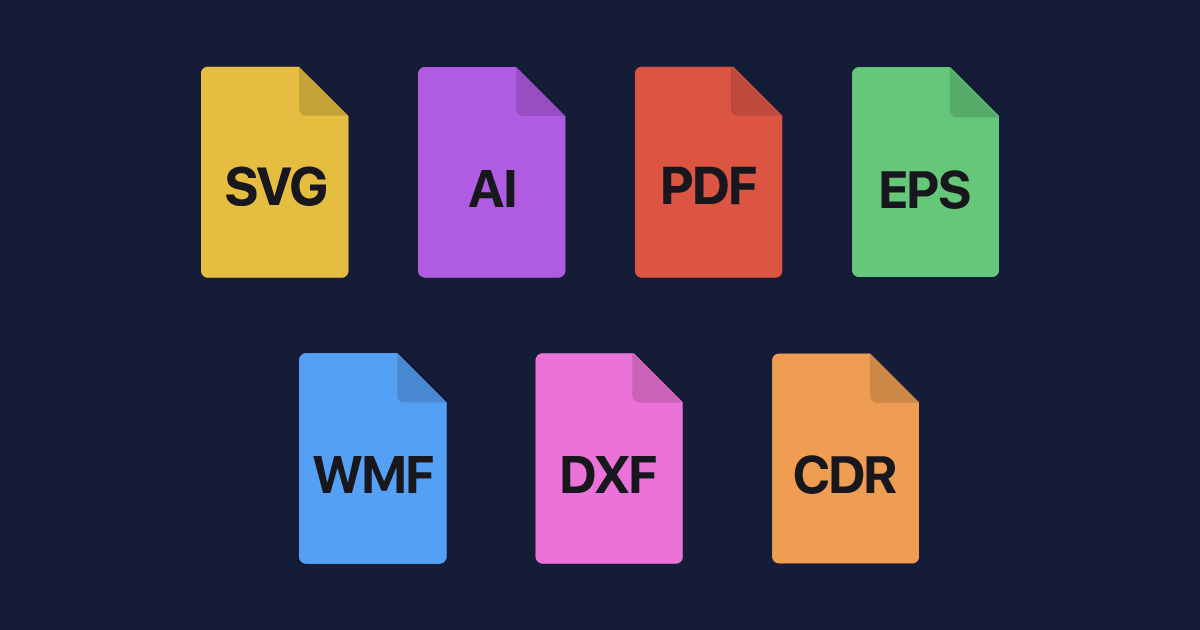
Vector Graphics: As established, these images are composed of mathematical paths, curves, and points. There are no pixels involved in their definition. Common vector formats include AI, EPS, SVG, and often PDF.
When to Choose Which
The choice between vector and raster largely depends on the content and its intended use:
-
Choose Raster when: You need to represent complex images with continuous tones and subtle color variations, such as photographs, detailed paintings, or scanned documents. Raster graphics excel at capturing realism and intricate visual details that are difficult or impossible to define mathematically.
-
Choose Vector when: You need clean, scalable artwork that must maintain crispness at any size. This includes logos, icons, illustrations, typography, technical drawings, and graphics for web interfaces. Vector is ideal for designs that rely on sharp lines, solid colors, and geometric precision.
The Blurry Line: Converting Between Formats
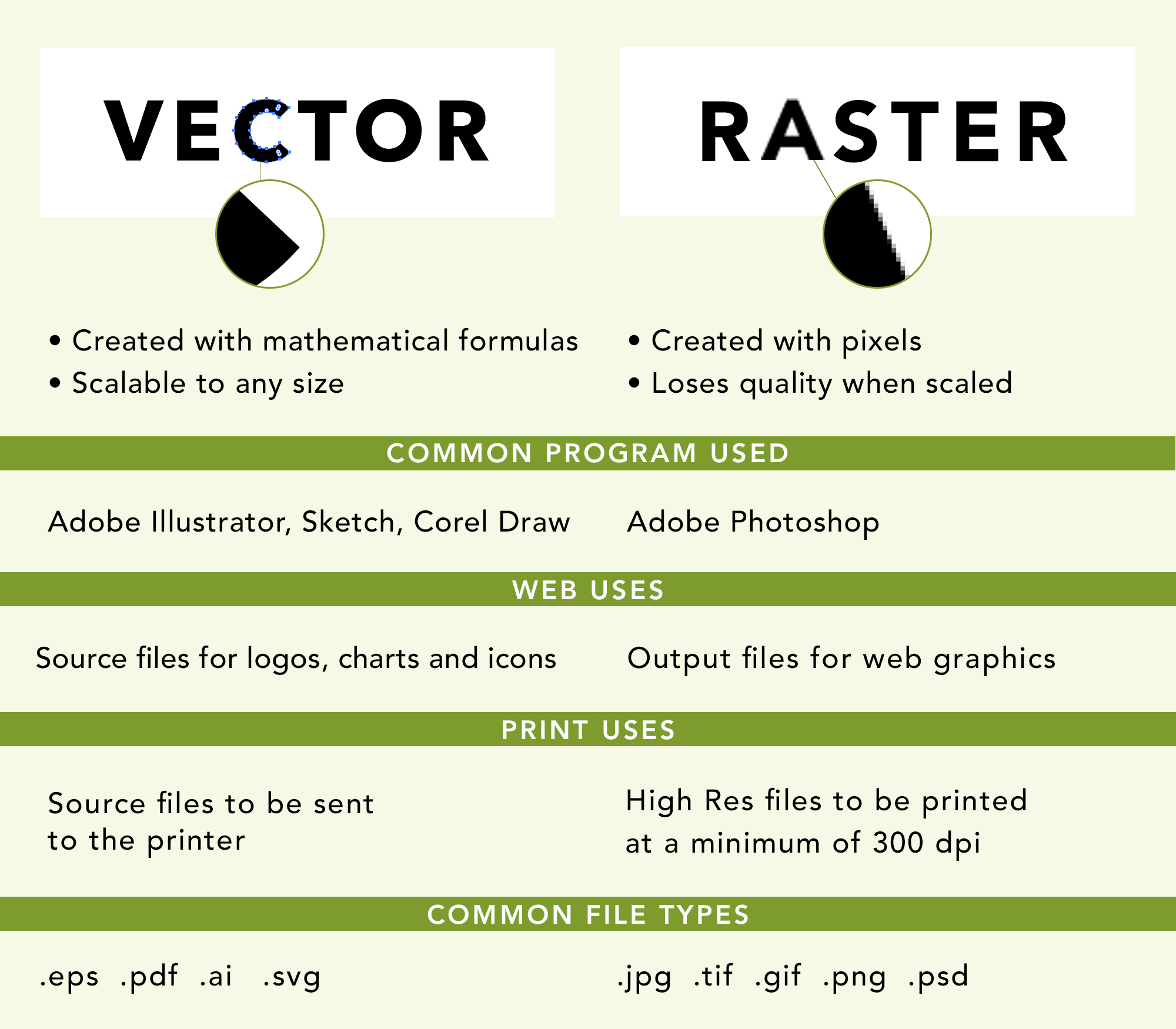
It is possible to convert a vector image to a raster image (rasterization). When you export a vector file to a JPEG or PNG, the software “flattens” the mathematical paths into a fixed grid of pixels at a specific resolution. However, this is a one-way street in terms of inherent quality; you cannot convert a raster image to a vector image and automatically gain all the benefits of vector (like infinite scalability) without significant manual effort (tracing) or specialized software that attempts to interpret pixel data into paths, often with imperfect results. Once rasterized, the resolution independence is lost.
Common Vector File Formats and Their Applications
The digital world utilizes several distinct vector file formats, each with its strengths, common uses, and specific software associations. Understanding these formats is crucial for designers, developers, and anyone working with digital assets.
Adobe Illustrator (AI)
The AI format is Adobe Illustrator’s native file format and is considered the industry standard for professional vector graphic design. AI files are highly versatile, supporting multiple artboards, layers, and advanced effects. They are primarily used for creating logos, illustrations, icons, infographics, and print layouts. Due to their comprehensive capabilities, AI files are often the working files that designers save their projects in before exporting to other formats for specific uses.
Encapsulated PostScript (EPS)
EPS is an older, more universal vector format that was once a standard for sharing vector graphics between different design programs and for professional printing. While AI files have largely superseded EPS in many workflows, EPS files are still compatible with a wide range of graphic software and are sometimes used when older systems or specific print vendors require it. EPS files can contain both vector and raster data, making them somewhat flexible but also potentially larger.
Scalable Vector Graphics (SVG)
SVG is an XML-based vector image format for two-dimensional graphics with support for interactivity and animation. Crucially, SVG is an open standard and is fully supported by all modern web browsers. This makes SVG the go-to format for web graphics like logos, icons, charts, and interactive elements, as they scale perfectly on any screen size and device, contributing to responsive web design and faster page loads. Their XML structure also means they can be styled with CSS and manipulated with JavaScript, offering developers immense control.
Portable Document Format (PDF)
While often associated with documents, PDF files can robustly contain vector graphics data, alongside text and raster images. This makes PDF an excellent format for exchanging print-ready artwork, preserving layouts, and ensuring consistent viewing across different platforms and devices. Many professional printers prefer PDFs because they can encapsulate all necessary fonts and image data, maintaining the integrity of the design.
Other Formats: CDR, DXF
-
CorelDRAW (CDR): This is the native file format for CorelDRAW, another popular vector graphics editor. CDR files are used similarly to AI files within the CorelDRAW ecosystem.
-
Drawing Exchange Format (DXF): Developed by Autodesk, DXF is a vector file format primarily used for CAD (Computer-Aided Design) programs. It’s used for exchanging 2D and 3D design data between different CAD applications, essential for architecture, engineering, and manufacturing.
When and Where to Use Vector Graphics
Given their unique advantages, vector graphics are indispensable across a multitude of applications in technology, design, and digital media.
Logos and Branding Assets
Vector graphics are the undisputed champions for creating logos and brand identities. A logo created as a vector can be used consistently across all platforms: from tiny app icons and website favicons to large-scale signage, vehicle wraps, and print advertisements, always retaining its pristine clarity. This consistency is fundamental to building a strong brand presence and is only achievable with vector fidelity.
Illustrations and Icons
From complex digital illustrations to simple web icons, vector graphics provide the precision and flexibility needed. Infographics, user interface icons, and digital art styles that favor clean lines and flat colors are perfectly suited for vector creation. They ensure that these visual elements are sharp and adaptable, whether displayed on a Retina screen or printed in a magazine.
Typography and Text
While often overlooked, fonts themselves are essentially vector graphics. Each character in a typeface is defined by mathematical paths, allowing text to be rendered smoothly and crisply at any size without jagged edges. When you use text in a vector design program, it remains editable and scalable, a crucial feature for graphic designers.
Technical Drawings and CAD
For industries requiring extreme precision, such as architecture, engineering, and product design, vector graphics are the foundation of Computer-Aided Design (CAD) software. Blueprints, schematics, and mechanical parts are all designed using vector principles, ensuring accuracy and the ability to scale designs without error for manufacturing or construction.
Web Graphics (UI/UX)
The rise of responsive web design has significantly elevated the importance of SVGs. Web interfaces leverage vector icons and graphics to ensure that user interface elements scale perfectly across devices with varying screen sizes and resolutions. This leads to sharper visuals, improved user experience, and often faster load times compared to raster alternatives for similar content.
Conclusion
A vector graphic file is far more than just another image format; it’s a testament to the power of mathematical precision in visual communication. By building images from paths, points, and mathematical equations rather than fixed pixels, vector graphics offer unparalleled scalability, flexibility, and quality. They are the backbone of modern graphic design, branding, web development, and technical illustration, enabling crisp visuals that adapt effortlessly to any size or medium.
Understanding what a vector graphic file is – and, crucially, when and why to use it – is an essential piece of knowledge for anyone navigating the digital landscape. It empowers designers to create future-proof assets, developers to build responsive web experiences, and businesses to maintain a consistent and professional visual identity, solidifying vector graphics’ indispensable role in our technologically driven world.
aViewFromTheCave is a participant in the Amazon Services LLC Associates Program, an affiliate advertising program designed to provide a means for sites to earn advertising fees by advertising and linking to Amazon.com. Amazon, the Amazon logo, AmazonSupply, and the AmazonSupply logo are trademarks of Amazon.com, Inc. or its affiliates. As an Amazon Associate we earn affiliate commissions from qualifying purchases.