
In the ever-evolving landscape of personal organization and productivity, the term “smart list” has emerged as a powerful concept, particularly within digital reminder and task management applications. Far from being a mere static collection of items, a smart list represents an intelligent, dynamic approach to organizing your to-dos. It leverages the power of technology to automate and streamline how you track and manage your tasks, ensuring that the right information surfaces at the right time. This article will delve into the core functionalities and benefits of smart lists within the context of reminder applications, exploring how they enhance efficiency, reduce mental clutter, and ultimately empower users to achieve their goals more effectively.
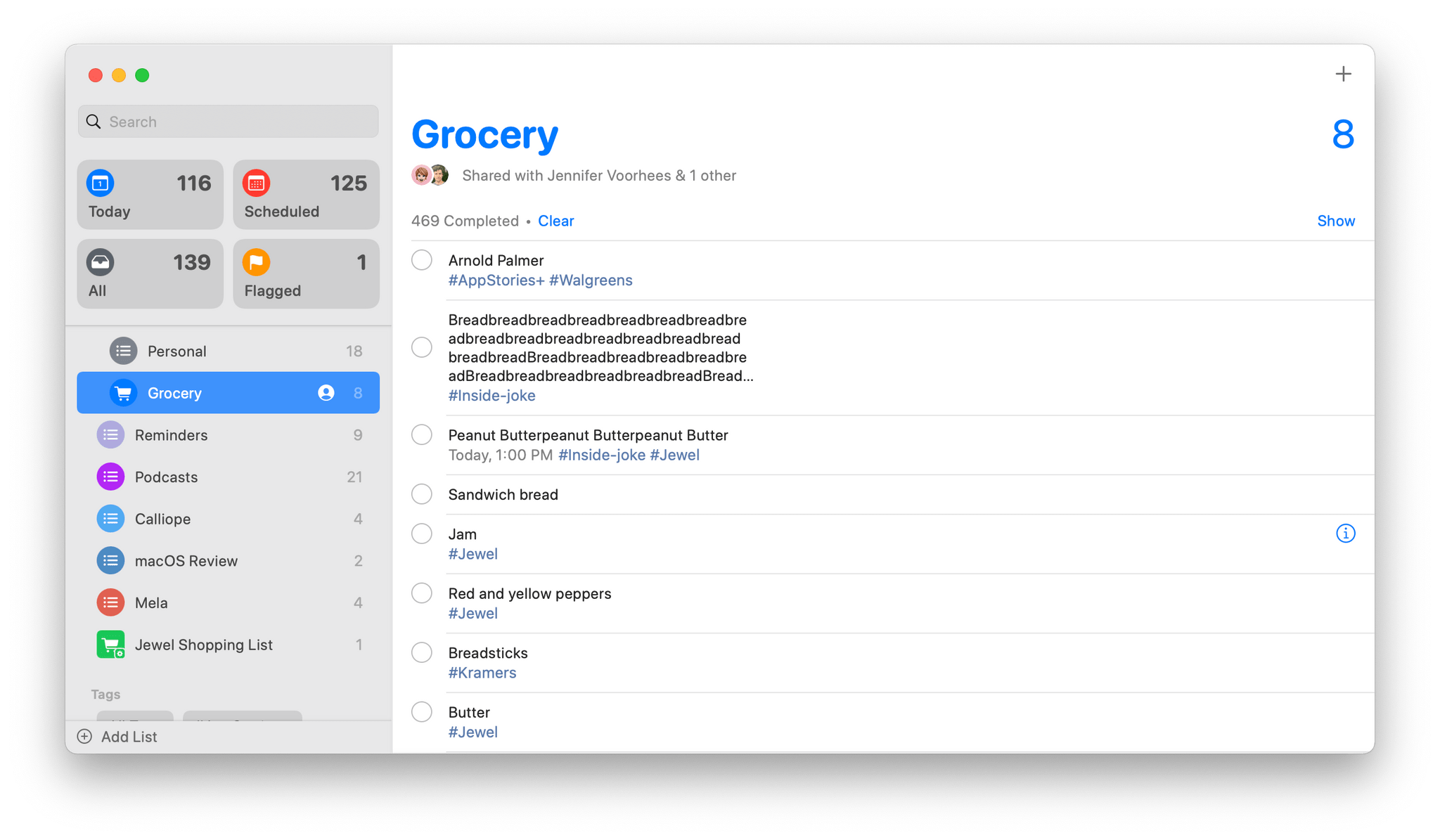
The fundamental idea behind a smart list is its ability to automatically populate and update based on predefined criteria or rules. Instead of manually adding every task to every relevant list, you set up conditions, and the application does the heavy lifting. This intelligent automation is the cornerstone of what makes smart lists so transformative for individuals and teams alike, offering a more sophisticated and less labor-intensive way to manage the constant influx of responsibilities.
The Anatomy of a Smart List: How They Work
At its heart, a smart list is a set of rules or filters that an application applies to a larger pool of tasks. Think of it as a personalized, ever-updating dashboard for a specific aspect of your life or work. The core components that define a smart list are its conditions and its dynamic nature.
Defining the Conditions: The Power of Filters
The intelligence of a smart list lies in the criteria you establish for inclusion. These conditions act as filters, sifting through your entire task database to pull out only those items that meet your specifications. Common conditions include:
- Due Date: This is perhaps the most fundamental condition. You can create smart lists for tasks due “Today,” “Tomorrow,” “This Week,” or within a custom date range. This is incredibly useful for prioritizing and focusing on immediate responsibilities. For example, a “Due Today” smart list will automatically display all tasks that are scheduled to be completed within the current day, eliminating the need to manually scan through your entire task list.
- Priority Level: Many reminder applications allow you to assign priority levels to tasks (e.g., High, Medium, Low). A smart list can be configured to show only high-priority items, ensuring that critical tasks are always visible and addressed promptly. This is invaluable for preventing important but perhaps less urgent tasks from falling through the cracks.
- Tags or Labels: Tags are a versatile way to categorize tasks beyond simple due dates. You can use tags for projects (e.g., “#WorkProjectX,” “#HomeRenovation”), contexts (e.g., “@Errands,” “@Computer”), or people (e.g., “@John,” “@ClientY”). A smart list can be set up to display all tasks associated with a particular tag or a combination of tags. For instance, a smart list for “#WorkProjectX” would gather all tasks related to that specific project, regardless of their due dates.
- Location: Some advanced reminder apps integrate with location services. You can create smart lists that trigger when you arrive at or leave a specific location. For example, a smart list for “@Grocery Store” might appear when you are physically near a supermarket, reminding you of items you need to buy. This “geo-fencing” capability leverages context to deliver relevant reminders exactly when you need them.
- Completion Status: While less common for active “to-do” smart lists, you can also create smart lists that display completed tasks. This can be useful for tracking progress on a project or for reviewing your accomplishments over a specific period.
- Custom Keywords or Phrases: Some platforms allow for more granular filtering using keywords or phrases within task titles or notes. This offers a high degree of customization, enabling you to create very specific lists based on unique identifiers.
The beauty of these conditions is their combinational power. You’re not limited to a single filter. You can create complex smart lists by combining multiple conditions. For instance, you might create a smart list for “Urgent Work Tasks Due This Week” by filtering for tasks tagged as “#WorkProjectX” with a “High” priority and a due date within the next seven days. This level of specificity ensures that your reminder application becomes a highly tailored productivity tool.
The Dynamic Nature: Always Up-to-Date
The second crucial aspect of smart lists is their dynamic nature. Unlike static lists where you manually add or remove items, smart lists automatically update in real-time as your task database changes.
- Automatic Addition: When you create a new task and it meets the criteria of a smart list, it is automatically added to that list. For example, if you add a new task with the tag “#Errands” and set its due date to “Today,” it will instantly appear in your “Errands Due Today” smart list without any further action from you.
- Automatic Removal: Conversely, when a task no longer meets the conditions of a smart list, it is automatically removed. If a task’s due date passes and you haven’t marked it as complete, it might move from a “Due Today” smart list to an “Overdue” smart list. If you mark a task as complete, it will disappear from all active smart lists. Similarly, if you change a tag or a priority level so that a task no longer matches the smart list’s criteria, it will be removed.
This continuous, automatic synchronization means that your smart lists are always an accurate reflection of your current priorities and commitments. This eliminates the tedious and error-prone process of manually managing multiple lists, reducing the chances of overlooking important tasks and freeing up valuable mental bandwidth. The system works for you, constantly organizing and presenting the information you need, precisely when you need it.
Benefits of Using Smart Lists
The intelligent automation and dynamic nature of smart lists offer a compelling array of benefits that can significantly enhance your productivity and reduce organizational friction. By leveraging these features, you can transform your reminder application from a simple to-do catcher into a powerful personal management system.
Enhanced Focus and Prioritization
One of the most significant advantages of smart lists is their ability to bring clarity to your workload. By segmenting your tasks based on relevant criteria, you can easily focus on what needs your immediate attention.
- Reducing Overwhelm: A long, unorganized list of tasks can be daunting. Smart lists break down this overwhelming volume into manageable, context-specific subsets. For instance, instead of facing a single list with 50 items, you might have a “Today” list with 5, a “Work Projects” list with 10, and an “Errands” list with 3. This visual segmentation makes it easier to tackle your responsibilities systematically.
- Highlighting Urgency and Importance: Smart lists specifically designed for due dates and priority levels ensure that the most critical tasks are always front and center. A “High Priority – Due Today” smart list, for example, guarantees that you won’t miss anything that demands immediate action. This proactive approach to task management is crucial for meeting deadlines and achieving strategic objectives.
- Contextual Awareness: Smart lists that utilize tags or location-based triggers provide context-sensitive reminders. This means you’re not just reminded of a task; you’re reminded of it when and where it’s most relevant. For example, receiving a reminder to “Pick up dry cleaning” as you pass by the cleaner is far more effective than a generic reminder that appears hours earlier or later. This contextual relevance reduces the cognitive load associated with remembering when and where to perform certain actions.
Improved Efficiency and Time Management
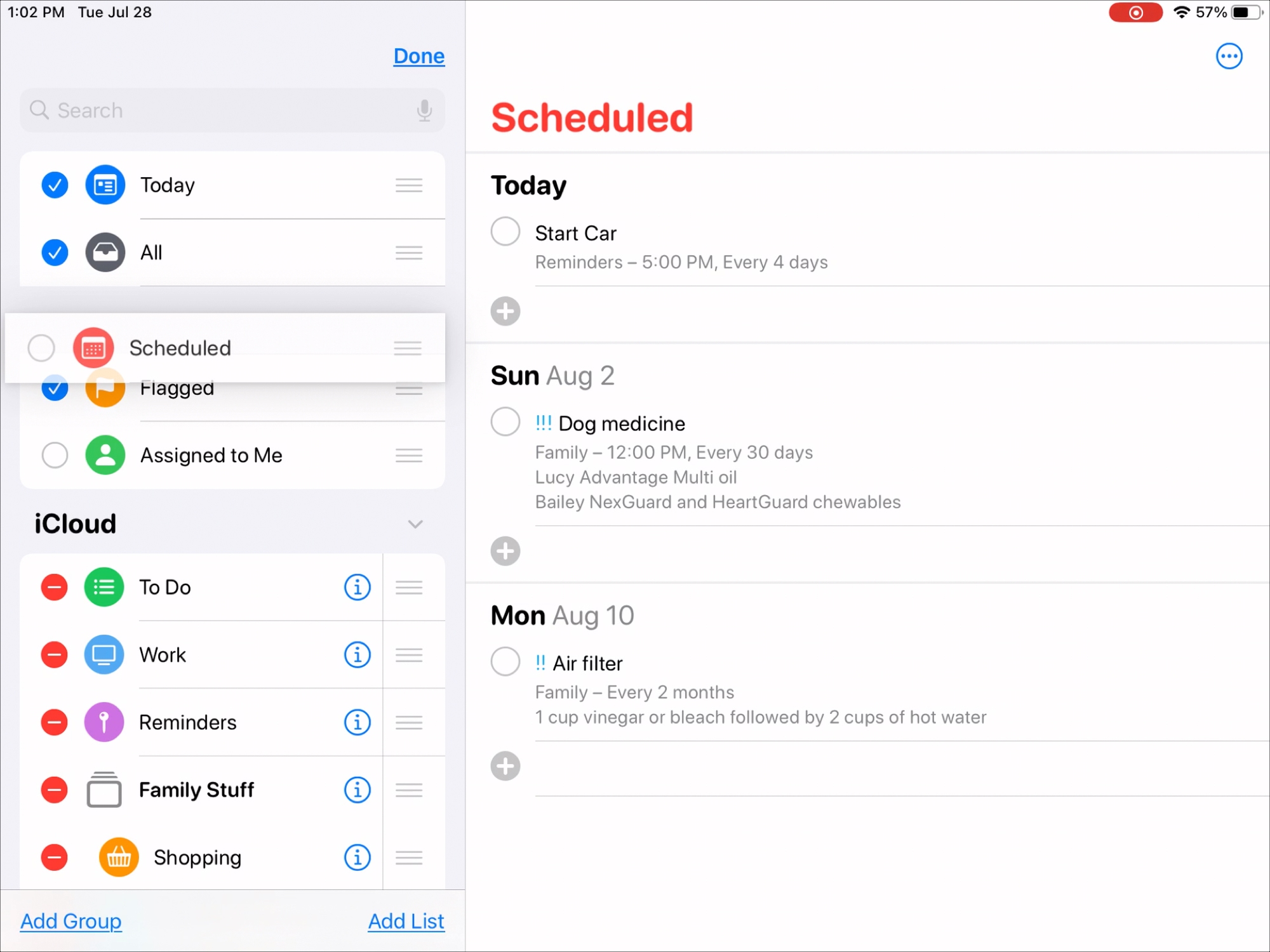
The automation inherent in smart lists directly translates into tangible gains in efficiency. By minimizing manual effort and ensuring timely reminders, you can optimize your time and streamline your workflow.
- Eliminating Redundant Tasks: You no longer need to copy tasks from a master list into multiple project-specific lists or manually update them as deadlines approach. The smart list does this for you. This saves a considerable amount of time and reduces the potential for human error, such as forgetting to move a task or duplicating an entry.
- Minimizing Procrastination: By presenting you with focused, actionable lists, smart lists can help combat procrastination. When you see a clear, concise list of what needs to be done now, it’s often easier to get started. The psychological barrier of facing a massive, unorganized task list is lowered, making it more likely that you will engage with your tasks.
- Streamlining Workflow: For recurring tasks or project phases, smart lists can create a predictable and efficient workflow. Imagine a smart list that automatically gathers all tasks for “Weekly Report Generation” or “Monthly Financial Review.” As you complete tasks within these recurring processes, the smart list updates, showing you what remains and prompting the next steps. This automation creates a consistent rhythm for your work.
Reduced Mental Clutter and Stress
One of the most profound benefits of using smart lists is the liberation of your mental energy. By offloading the constant task of remembering and organizing to your reminder application, you can reduce mental clutter and the associated stress.
- “Getting it Out of Your Head”: The act of capturing tasks is just the first step. The real value comes from having them reliably organized and presented. Smart lists ensure that once a task is captured, it will surface when and how you need it, freeing your mind from the burden of trying to remember everything. This “externalization” of your to-do list is a powerful stress reducer.
- Increased Peace of Mind: Knowing that your reminder system is intelligently managing your tasks provides a sense of control and peace of mind. You can trust that important items will be brought to your attention at the appropriate time, allowing you to relax and focus on the task at hand without the nagging worry of forgetting something crucial.
- Better Work-Life Balance: By efficiently managing both professional and personal tasks, smart lists can contribute to a better work-life balance. You can create separate smart lists for work-related items and personal errands, ensuring that neither domain encroaches unfairly on the other. This clear separation and efficient management can lead to a more fulfilling and less stressful life.
Advanced Smart List Strategies and Best Practices
While the basic functionality of smart lists is straightforward, adopting advanced strategies and adhering to best practices can unlock their full potential and further elevate your organizational prowess. This involves thoughtful planning, consistent application, and a willingness to iterate as your needs evolve.
Strategic Tagging and Labeling
The effectiveness of many smart lists hinges on how you use tags and labels. Treating them as more than just arbitrary keywords is crucial for building robust and intelligent organizational systems.
- Develop a Consistent Tagging Convention: Establish a clear and consistent system for your tags. Decide on a naming convention (e.g., lowercase, hyphenated, camel case) and stick to it. For example, always use “#ProjectX” and not “#projectx” or “#Project-X.” This consistency is paramount for the filters to work reliably.
- Utilize Hierarchical or Nested Tags (if supported): Some reminder applications allow for nested tags, creating a hierarchy. For instance, you could have a main tag like “Work” and then nested tags under it like “Work/Marketing” or “Work/Development.” This allows for more granular filtering and a more structured organization of your tasks.
- Use Tags for Context and Action: Think beyond simple project names. Use tags to indicate the context or type of action required. Examples include:
@waiting: For tasks where you are waiting for a response from someone else.@email: For tasks that can be handled via email.@phone: For tasks that require a phone call.@read: For articles or documents to be read later.@ideas: For brainstorming or undeveloped thoughts.
- Regularly Review and Refine Your Tags: As your projects and responsibilities change, so too should your tagging system. Periodically review your tags to ensure they are still relevant and efficient. Remove outdated tags and add new ones as needed to reflect your current workflow.
Leveraging Due Dates and Time-Based Smart Lists
Due dates are a primary driver for many smart lists, and mastering their use can significantly improve your time management.
- Create “Actionable Today” Lists: A smart list showing only tasks due today is fundamental. However, consider creating variations like “Needs Attention Today” which might include tasks due today and overdue tasks, ensuring nothing slips through the cracks.
- Implement “Next Actions” Lists: Beyond just due dates, think about the next physical action required. A smart list filtered by a tag like “@nextaction” can present you with a clear set of tasks you can start working on immediately, regardless of their formal due date.
- Utilize Recurring Tasks Effectively: For tasks that repeat regularly (e.g., daily, weekly, monthly), leverage the recurring task feature in your reminder app. Smart lists can then be configured to pull in upcoming instances of these recurring tasks, ensuring they are consistently addressed. For example, a smart list for “Weekly Review” will automatically populate with the next upcoming weekly review task.
Combining Multiple Criteria for Powerful Automation
The real power of smart lists emerges when you combine multiple filtering conditions to create highly specific and automated lists.
- Project-Specific Overviews: Combine a project tag with a due date filter. For example, a smart list for “Project Alpha – This Week” would show all tasks tagged “#ProjectAlpha” that are due within the next seven days.
- Contextual Action Lists: Combine a context tag with a priority level. A smart list for “@Computer – High Priority” would display all high-priority tasks that can be done on your computer.
- “Waiting For” Lists: Combine a “@waiting” tag with a filter for tasks that are not yet marked as complete. This provides a clear overview of who or what you are waiting for, allowing you to follow up effectively.
- Customizable Dashboards: Think of your smart lists as personalized dashboards. Create a few key smart lists that give you a high-level overview of your most important areas of focus at any given time. This might include a “Today’s Top 3,” a “Work Focus” list, and a “Personal Errands” list.

Regular Review and Iteration
Your needs and workflows are not static, and neither should be your smart list setup.
- Weekly Review of Smart Lists: Dedicate time each week to review your smart lists. Are they still serving your needs? Are there tasks that are consistently appearing on a list and not being addressed? This review can reveal inefficiencies or areas where your criteria need adjustment.
- Adapt to New Projects and Responsibilities: As you take on new projects or your responsibilities shift, update your smart list configurations accordingly. This might involve creating new tags, adjusting due date ranges, or refining priority filters.
- Experiment with Different Configurations: Don’t be afraid to experiment. Try setting up a smart list with a different combination of filters to see if it improves your workflow. What works for one person might not work for another, so personalization is key.
By embracing these advanced strategies and best practices, you can transform your reminder application into an exceptionally powerful and intelligent tool. Smart lists are not just about keeping track of what you need to do; they are about optimizing how and when you do it, leading to greater efficiency, reduced stress, and ultimately, a more accomplished and organized life.
aViewFromTheCave is a participant in the Amazon Services LLC Associates Program, an affiliate advertising program designed to provide a means for sites to earn advertising fees by advertising and linking to Amazon.com. Amazon, the Amazon logo, AmazonSupply, and the AmazonSupply logo are trademarks of Amazon.com, Inc. or its affiliates. As an Amazon Associate we earn affiliate commissions from qualifying purchases.