
In the ever-evolving landscape of digital communication, understanding the fundamental components of various platforms is crucial for seamless interaction. Among these platforms, Skype has long held a prominent position, facilitating video calls, instant messaging, and voice calls across the globe. Central to navigating and utilizing Skype effectively is the concept of a “Skype name,” a unique identifier that sets users apart. This article delves into the intricacies of what a Skype name is, its evolution, its significance in the context of digital identity, and how it functions within the broader technological ecosystem.
The Genesis and Evolution of the Skype Name
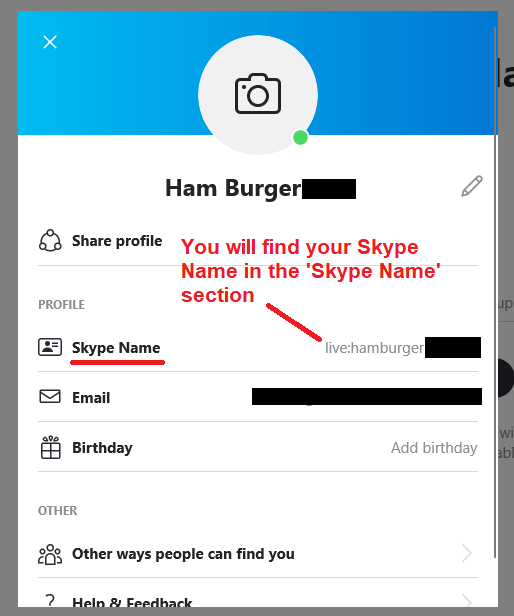
The Skype name, often referred to as a username or account name, was initially the primary credential for logging into and being recognized on the Skype platform. Introduced at a time when unique online identities were still solidifying, the Skype name served as a digital passport, allowing users to connect with friends, family, and colleagues without the need for phone numbers.
Early Days: A Unique Identifier for Connection
When Skype first emerged, the process of creating an account was straightforward. Users were prompted to choose a unique Skype name, which would then be their public identifier on the platform. This name could be anything from a personal nickname to a more formal representation of their identity. Unlike email addresses, which often contained real names or were tied to specific providers, Skype names offered a degree of separation and anonymity, allowing users to curate their online persona.
The selection of a Skype name was a critical step, as it determined how others would find and add you to their contact lists. A memorable and easily searchable Skype name was often preferred to facilitate connections. The platform’s early growth was fueled by its user-friendly interface and the ability to connect with people globally, and the Skype name was a cornerstone of this accessibility.
The Shift Towards Microsoft Accounts
As Microsoft acquired Skype in 2011, the platform began a gradual integration with the broader Microsoft ecosystem. This integration eventually led to a significant shift in how users accessed and managed their Skype accounts. The reliance on standalone Skype names began to diminish as Microsoft transitioned towards a unified login system.
This transition meant that users were increasingly encouraged or required to link their Skype accounts to their Microsoft accounts. A Microsoft account, often an Outlook.com or Hotmail.com email address, became the primary credential for logging into Skype. While this offered benefits like centralized account management and enhanced security, it also meant that the traditional, standalone Skype name started to play a less prominent role for many users.
The Modern Skype Experience: Account Aliases and Identifiers
Today, the concept of a “Skype name” can be a little nuanced, especially for users who transitioned their accounts or created new ones after the Microsoft integration. For older accounts that were created before the widespread adoption of Microsoft account logins, the original Skype name may still function as the primary login identifier. These are often referred to as “Skype IDs” or “legacy Skype accounts.”
However, for newer accounts or those that have been fully integrated with a Microsoft account, the login is typically handled by the Microsoft account’s email address. In this scenario, the concept of a distinct “Skype name” is more akin to an alias or a profile identifier within the Skype application. While you might not log in with it directly, it still serves as your unique identifier on the platform, visible to your contacts and used for searching and adding individuals.
This evolution highlights a broader trend in the digital world: the consolidation of online identities and the move towards unified account management systems. While the term “Skype name” might evoke the original, standalone username, its modern interpretation often encompasses a unique identifier within a larger digital identity framework.
The Significance of a Skype Name in Digital Identity
In the digital realm, an online identity is composed of various elements that define who you are and how you are perceived by others. The Skype name, in its various forms, has always played a crucial role in shaping a user’s digital presence on the platform.
Establishing a Unique Presence
At its core, a Skype name provides a user with a unique identity within the Skype network. This uniqueness is essential for preventing confusion and ensuring that communication is directed to the intended recipient. Without distinct identifiers, it would be impossible to distinguish between individuals with similar names or to manage a contact list effectively.
The choice of a Skype name, especially in the early days, was an exercise in self-branding. Users could opt for a professional name for business contacts, a casual nickname for friends, or something more creative to express their personality. This ability to curate a digital persona was a significant aspect of the early internet experience.
Facilitating Discoverability and Connection
The primary function of a Skype name is to facilitate discovery and connection. When you want to add a new contact, you typically search for them using their Skype name (or their Microsoft account email, depending on their setup). A well-chosen, memorable Skype name makes it easier for others to find you. Conversely, if you are trying to connect with someone, you need to know their Skype name.
This discoverability is paramount for building and maintaining social and professional networks. Whether it’s keeping in touch with distant relatives, collaborating with colleagues on projects, or simply expanding your social circle, the Skype name acts as the key to unlocking those connections.
The Role in Privacy and Security
While not its primary function, the Skype name also has implications for privacy and security. In the early days, using a Skype name that was different from your real name or email address offered a degree of anonymity. This was particularly valuable for individuals who were concerned about sharing personal information online.
However, as Skype became more integrated with Microsoft accounts, the direct link to personal information became stronger. For users who log in with their Microsoft account, their associated email address is often visible or discoverable on their profile, which can impact privacy. It’s important for users to be aware of their privacy settings and how their Skype profile information, including their name and associated details, is presented to others.
The evolution of the Skype name from a simple username to a more integrated part of a broader digital identity underscores the changing landscape of online interactions. It highlights the ongoing need for users to manage their digital personas carefully and to understand the implications of their chosen identifiers in terms of connection, privacy, and overall online presence.
How a Skype Name Functions in Communication and Beyond
Beyond its role as a login credential and identifier, a Skype name is intrinsically linked to the core functionalities of the platform, impacting how users communicate and interact with each other. Understanding these functions is key to maximizing the benefits of using Skype.
The Foundation of Contact Management
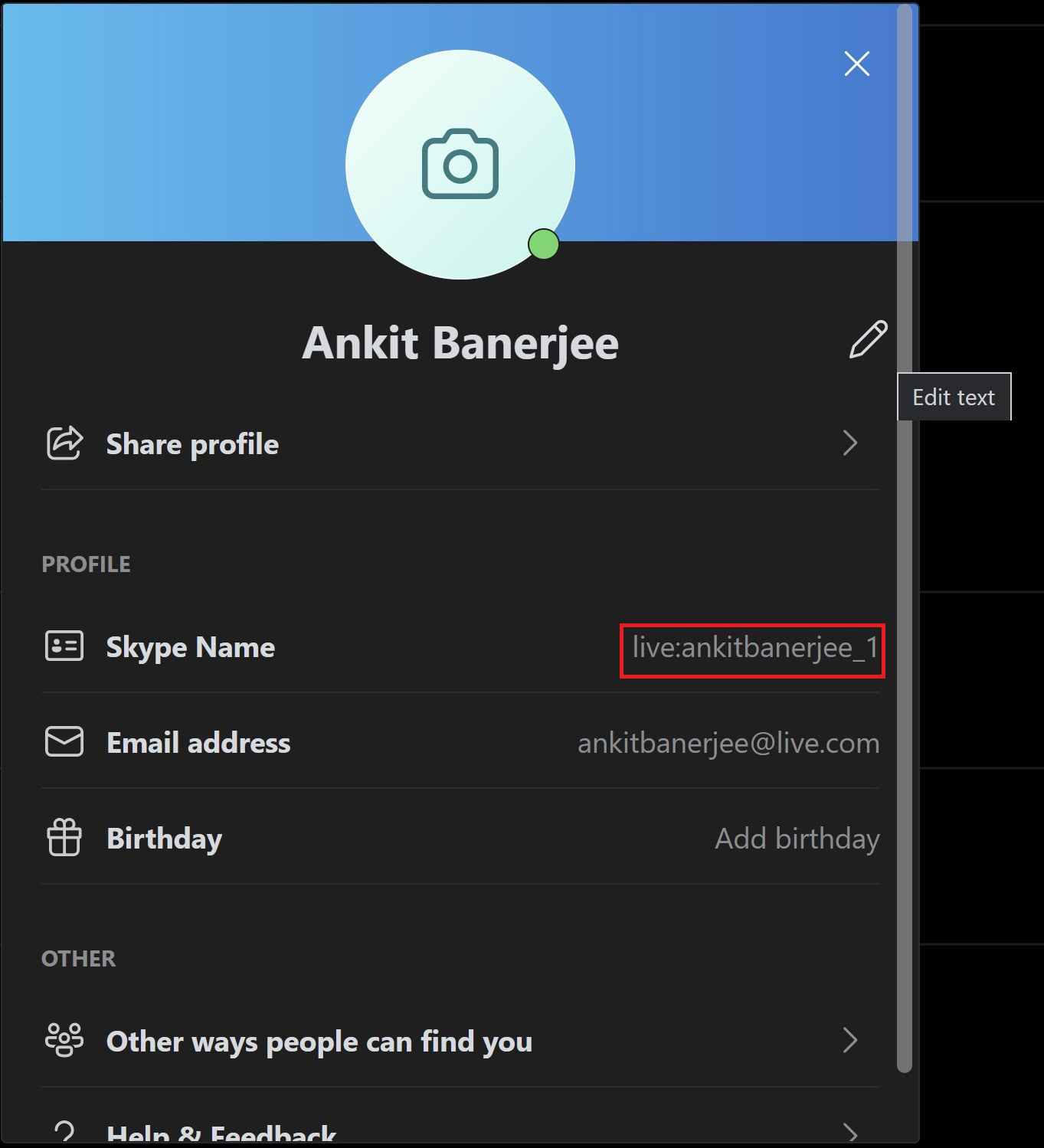
The Skype name is the bedrock upon which your contact list is built. When you add someone to your Skype contacts, you are essentially associating their unique Skype identifier with your account. This allows for a streamlined way to initiate calls, send messages, and see their online status.
Imagine a scenario without unique identifiers. If two people named “John Smith” were on Skype, how would you know which one to call? The Skype name eliminates this ambiguity. It provides a definitive way to address and interact with specific individuals within the vast Skype network. This is particularly important in professional settings where precision and avoiding miscommunication are paramount.
Enabling Search and Discovery
The search functionality within Skype relies heavily on users’ Skype names. When you’re looking for someone you know or want to connect with a new acquaintance, you typically use the search bar. Typing in their Skype name will bring up their profile if they exist on the platform.
This search capability is not limited to finding individuals. It also extends to finding public Skype groups or channels, which can be identified by their own unique names or descriptions. This makes Skype a versatile tool for both one-on-one communication and group interactions, all facilitated by recognizable identifiers.
Personalization and Profile Integration
While the core function of a Skype name is identification, it also plays a role in personalizing your profile. Your chosen Skype name, along with your display name, profile picture, and status message, contributes to your overall presence on the platform.
For users with legacy Skype accounts, their Skype name is often prominently displayed. Even for those using Microsoft accounts, their Skype profile is linked to their Microsoft identity, and their chosen Skype name or display name becomes their public face on the platform. This allows users to present themselves in a way that aligns with their intended audience, whether it’s for personal or professional purposes.
Integration with Other Microsoft Services
The integration of Skype with Microsoft services means that the Skype name, or rather the underlying Microsoft account, often serves as a gateway to a wider range of functionalities. For instance, your Microsoft account, which is linked to your Skype, is also used for OneDrive, Outlook, Office 365, and other Microsoft applications.
This unified approach means that your digital identity is becoming increasingly interconnected. While a specific “Skype name” might be less distinct for some, the overall Microsoft account associated with it carries the weight of your digital presence across multiple platforms. This streamlines user experience and enhances security by providing a single point of authentication for various services.
In essence, the Skype name, whether as a legacy ID or as part of a broader Microsoft identity, remains a fundamental element of how we navigate and utilize the Skype platform. It’s the key to connecting, communicating, and building a presence in the digital world of real-time interaction.
Frequently Asked Questions About Skype Names
As the nature of online identities evolves, users often have questions about how Skype names work, particularly in light of platform updates and integrations. Addressing these common queries can help clarify the current functionality and usage of Skype names.
Can I Change My Skype Name?
For legacy Skype accounts created before the Microsoft account integration, changing the original Skype name is generally not possible. This is because the Skype name was designed to be a permanent, unique identifier. If you wish to have a different username, you would typically need to create a new Skype account.
For accounts that have been linked to a Microsoft account, the primary login credential is the Microsoft account’s email address. While you cannot change the original Skype name associated with a legacy account, you can change your display name on Skype. The display name is what appears to your contacts and can be updated at any time through your Skype profile settings. This allows you to present a different name without altering your core account identifier.
How Do I Find Someone’s Skype Name?
To find someone’s Skype name, you can:
- Ask them directly: The most straightforward method is to ask the person for their Skype name or the email address associated with their Microsoft account if they use that for Skype.
- Check their contact information: If you have their contact details elsewhere (e.g., on a business card, website, or social media profile), they might have listed their Skype name.
- Search within Skype: If you know their full name or part of it, you can use the search bar within Skype. However, this will only work if they have a public profile that is discoverable. You might find multiple individuals with similar names, so cross-referencing with other information (like their location or profile picture) is helpful.
- If you have them in your phone contacts: If you’ve allowed Skype to sync with your phone’s contacts and they have a Skype account linked to the same phone number, Skype may automatically suggest them as a contact.
It’s important to note that privacy settings can affect discoverability. If a user has set their profile to be private, they may not appear in search results.
What is the Difference Between a Skype Name and a Display Name?
The Skype name (or Skype ID for legacy accounts) is the unique, permanent identifier of your Skype account. It’s what you might have used to log in in the past and is crucial for the account’s existence. It’s generally not changeable.
The display name, on the other hand, is the name that appears to your contacts and others on Skype. It’s what people see next to your profile picture in chat windows and contact lists. You can change your display name as often as you like to reflect your current mood, purpose, or identity. For users logged in with Microsoft accounts, their Microsoft account display name might also be used as their Skype display name.
Can I Use My Email Address as My Skype Name?
Historically, the direct answer was no; a Skype name was a separate username. However, with the advent of Microsoft account integration, yes, you can often use the email address associated with your Microsoft account to log into Skype. This email address then functions as your primary identifier for accessing Skype and its services. While it’s your login credential, it might also be visible to your contacts as part of your profile depending on your privacy settings.
What Happens to My Old Skype Name if I Link to a Microsoft Account?
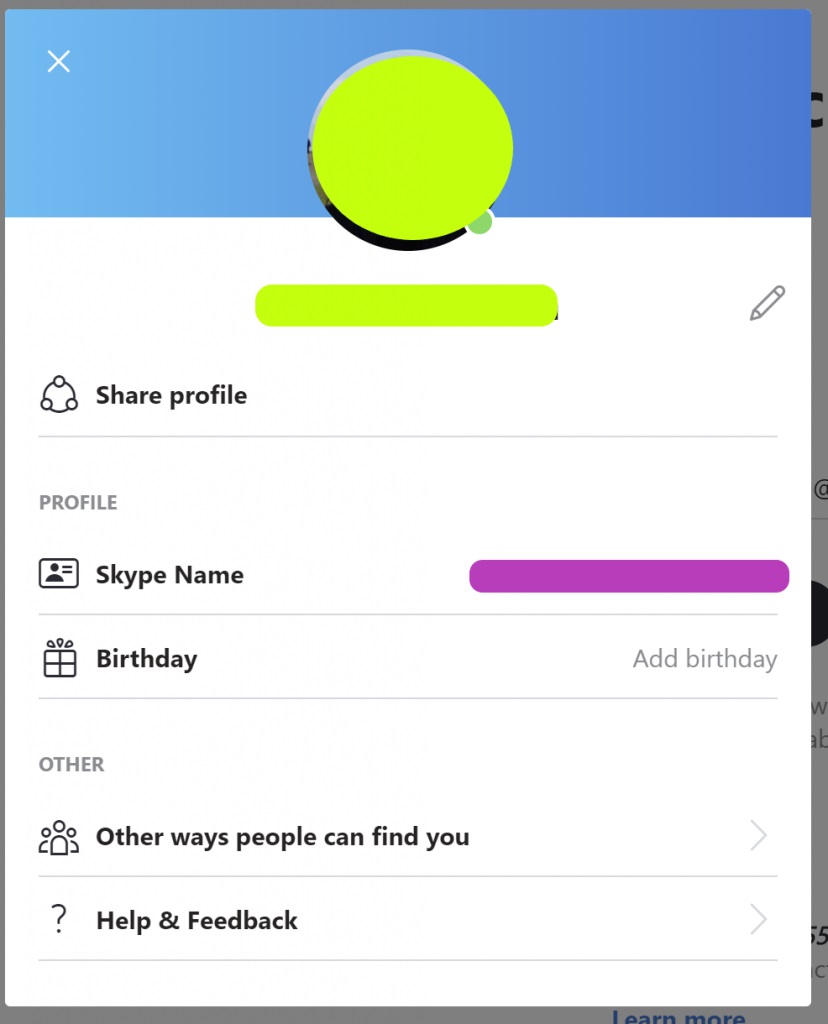
When you link a legacy Skype account to a Microsoft account, your original Skype name remains associated with that account. You will then typically use your Microsoft account’s email address and password to log in. Your original Skype name might still be visible on your profile or used in certain backend functionalities, but the primary login method shifts to the Microsoft account. This process is designed to consolidate your digital identity and streamline your experience across Microsoft services.
Understanding these aspects of Skype names empowers users to manage their digital presence effectively, ensure smooth communication, and maintain control over their online interactions.
aViewFromTheCave is a participant in the Amazon Services LLC Associates Program, an affiliate advertising program designed to provide a means for sites to earn advertising fees by advertising and linking to Amazon.com. Amazon, the Amazon logo, AmazonSupply, and the AmazonSupply logo are trademarks of Amazon.com, Inc. or its affiliates. As an Amazon Associate we earn affiliate commissions from qualifying purchases.