
In the vast ecosystem of digital technology, where every device from a smartphone to a supercomputer seeks to connect and communicate, there exists a fundamental component that makes this interconnectedness possible: the network card. Often overlooked but indispensable, this piece of hardware is the unsung hero enabling our daily digital interactions, from browsing the web to streaming high-definition content and engaging in real-time online collaboration. Understanding its function is key to grasping the foundational architecture of modern computing and connectivity.
The Fundamental Role of a Network Interface Card (NIC)
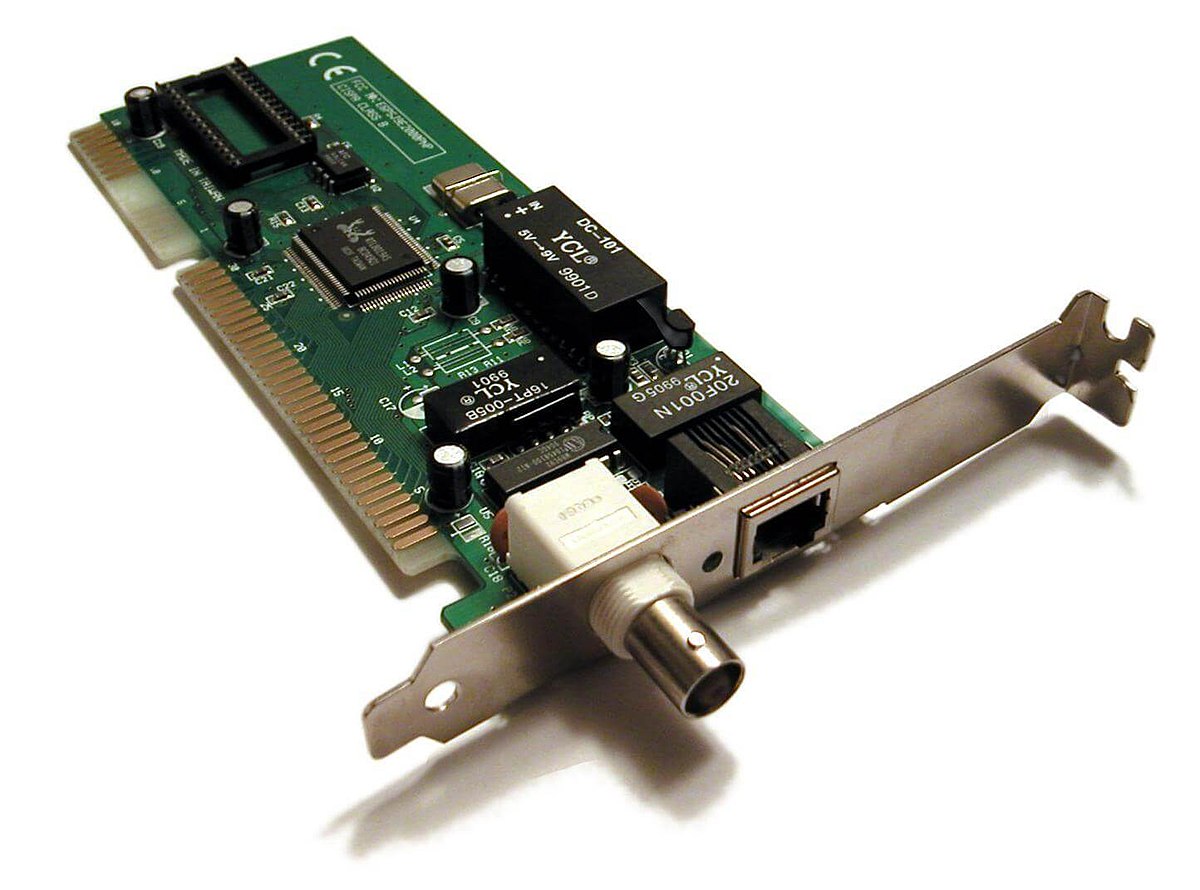
At its core, a network card, also known as a Network Interface Card (NIC), is a circuit board or chip that allows a computer or other network-enabled device to connect to a network. Without it, your device would be an isolated entity, unable to send or receive data from other devices, local networks (LANs), or the global internet. It acts as a translator, converting the digital data signals from your computer into a format that can be transmitted over a network medium, and vice-versa.
Bridging Your Device to the Digital World
Imagine your computer as a speaker and the internet as a vast concert hall. Without a microphone and an amplifier, your voice (data) cannot reach the audience. The network card serves precisely this role. It provides the physical and logical interface between your computer’s internal data bus and the network cable (Ethernet) or wireless signal (Wi-Fi). It’s the gatekeeper and the interpreter, managing the flow of information in and out of your device. This critical bridge ensures that every packet of data, be it an email, a webpage request, or a video stream, finds its way efficiently and accurately across digital pathways.
Essential for Connectivity
Whether you are connecting to a home router, an office server, or a public Wi-Fi hotspot, a network card is the prerequisite. It doesn’t just establish a connection; it manages the entire communication process. This includes handling data transfer speeds, ensuring data integrity, and recognizing unique network addresses. From the simplest tasks like checking email to complex operations like managing cloud-based services, the network card is constantly at work, often imperceptibly, ensuring seamless data exchange across diverse network topologies. Its ubiquity in modern devices, from embedded systems to high-end servers, underscores its absolute necessity in a connected world.
Anatomy and Types of Network Cards
While the basic function remains consistent, network cards come in various forms, dictated by the type of connection they facilitate and the device they inhabit. Understanding these variations provides insight into their versatility and evolution within the tech landscape.
Key Components
Regardless of type, a network card typically includes several key components:
- Controller Chip: The “brain” of the NIC, responsible for processing network data, managing the flow of information, and implementing network protocols.
- Transceiver: A port or antenna that physically connects to the network medium (e.g., RJ45 jack for Ethernet, antenna for Wi-Fi).
- Buffer Memory: Small amounts of RAM to temporarily store data packets before they are sent or after they are received, preventing bottlenecks.
- Bus Interface: Connects the NIC to the computer’s motherboard, typically via PCIe (Peripheral Component Interconnect Express) slots for internal cards.
- MAC Address: A unique, burned-in hardware address (Media Access Control address) that identifies the NIC on a network. This address is globally unique and essential for directed communication.
Internal vs. External NICs
Historically, NICs were primarily expansion cards inserted into a computer’s motherboard. While dedicated internal cards still exist, particularly for high-performance or specialized applications, many modern devices feature integrated NICs directly soldered onto the motherboard. This saves space, reduces manufacturing costs, and streamlines device design. External NICs, on the other hand, connect via USB or Thunderbolt ports, offering flexibility, portability, and an easy upgrade path for devices lacking internal slots or requiring additional network capabilities.
Wired (Ethernet) NICs
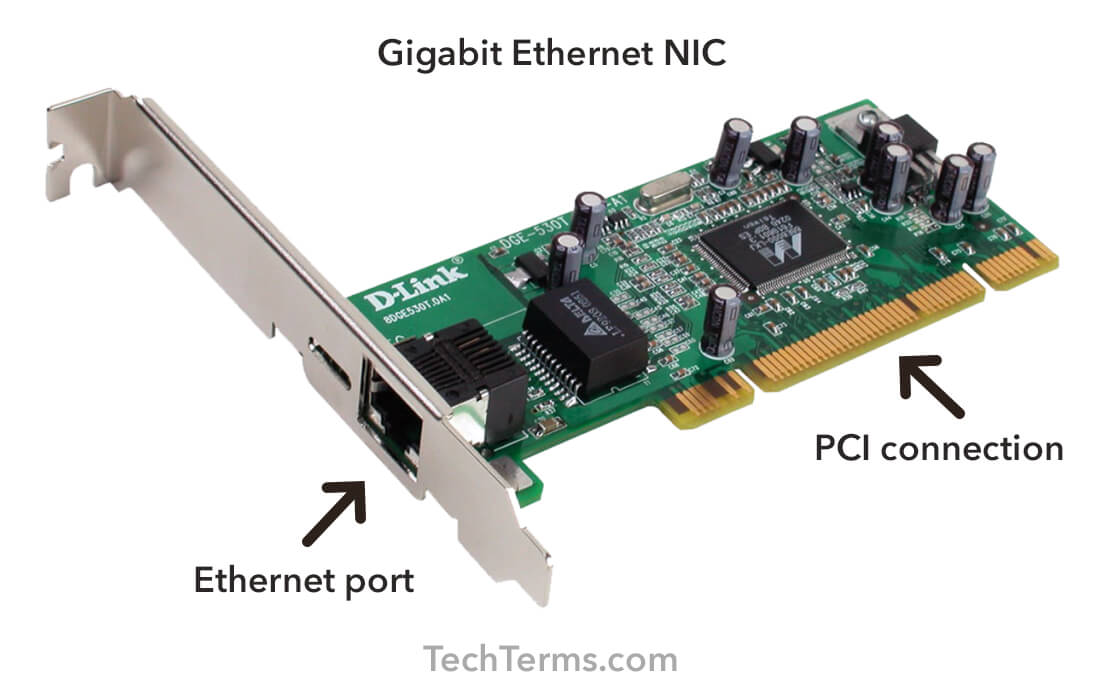
The most traditional form, wired NICs, connect to a network using physical cables, typically Ethernet (RJ45). These cards offer robust, high-speed, and secure connections, less susceptible to interference than wireless alternatives. They are commonly found in desktop computers, servers, and networking equipment like routers and switches. Ethernet standards have evolved significantly, from 10 Mbps (Megabits per second) in early days to modern Gigabit Ethernet (1 Gbps) and even 10 Gigabit Ethernet (10 Gbps) or higher for demanding environments.
Wireless (Wi-Fi) NICs
With the proliferation of mobile devices and the desire for untethered connectivity, wireless NICs have become ubiquitous. These cards incorporate radio transceivers and antennas to communicate with wireless access points (like a home router) using Wi-Fi (IEEE 802.11) standards. They offer immense convenience and flexibility, allowing devices to connect to networks without physical cables. Wi-Fi standards have also seen rapid development, from early 802.11b/g to modern 802.11ac (Wi-Fi 5) and 802.11ax (Wi-Fi 6/6E), delivering significantly higher speeds, improved efficiency, and enhanced security features.
Other Specialized NICs
Beyond standard Ethernet and Wi-Fi, specialized network cards cater to niche requirements:
- Fiber Optic NICs: Used in enterprise environments for extremely high-speed, long-distance data transmission, offering superior bandwidth and immunity to electromagnetic interference.
- USB Wi-Fi Adapters: Small, portable external wireless NICs ideal for laptops or desktops without built-in Wi-Fi or for upgrading to a newer Wi-Fi standard.
- Thunderbolt Ethernet Adapters: Offer high-speed wired connectivity for devices like ultra-thin laptops that lack an integrated Ethernet port, leveraging the high bandwidth of Thunderbolt.
- Powerline Adapters: While not strictly NICs themselves, they facilitate network connectivity over existing electrical wiring, often used in conjunction with a device’s integrated NIC.
How a Network Card Facilitates Communication
The magic of a network card lies in its sophisticated process of preparing and handling data for network transmission and reception. This involves several intricate steps and relies on adherence to established networking protocols.
Data Packetization and Transmission
When your computer wants to send data—for instance, requesting a webpage—the network card takes the raw digital information from the computer’s operating system and applications. It then divides this data into smaller, manageable units called packets. Each packet is meticulously formatted, typically adding headers and trailers that contain vital information such as the source and destination MAC addresses, IP addresses, error-checking codes, and sequence numbers. This packetization allows for efficient transmission and reassembly at the destination. For wired connections, these packets are converted into electrical signals and sent over the Ethernet cable. For wireless connections, they are modulated into radio waves and broadcast through the antenna.
MAC Addresses: The Unique Identifier
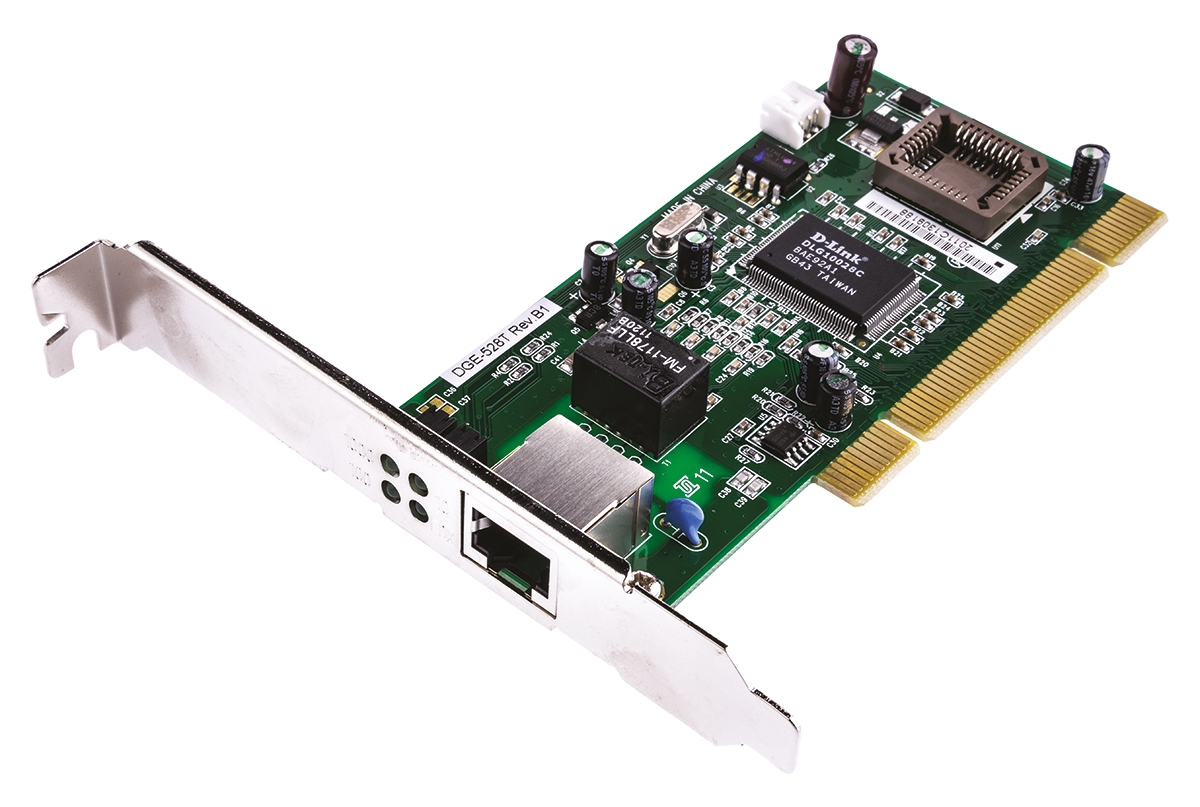
Central to the network card’s operation is the MAC (Media Access Control) address. Every single network card ever manufactured is assigned a globally unique 48-bit hexadecimal address. This address is “burned in” at the factory and serves as the device’s unique physical identity on a local network segment. When data packets travel across a local network, they are addressed not only by IP addresses (which are logical and can change) but also by MAC addresses, ensuring that a packet reaches its intended recipient on that specific network segment. The network card uses this MAC address to filter incoming traffic, accepting only those packets explicitly addressed to it, thus preventing unnecessary processing by other devices.
Protocols and Drivers
Network cards operate in accordance with a stack of networking protocols, most notably the IEEE 802.x standards for wired and wireless LANs, which define how data is framed, transmitted, and received at the physical and data link layers. The NIC’s controller chip performs many of these protocol functions in hardware, offloading work from the CPU.
Equally important are device drivers. These are software programs that act as intermediaries between the operating system and the network card’s hardware. The driver translates commands from the OS into instructions the NIC can understand and vice versa. It manages the NIC’s buffer memory, initiates data transfers, and handles interrupt requests. Keeping drivers updated is crucial for optimal performance, security, and compatibility with new operating systems and network standards.
Speed and Bandwidth Considerations
The “speed” of a network card refers to its maximum theoretical data transfer rate, typically measured in megabits per second (Mbps) or gigabits per second (Gbps). This capability directly impacts how quickly data can be sent and received. A higher speed NIC enables faster downloads, smoother streaming, and quicker data synchronization. The actual achievable speed can be influenced by many factors, including the network infrastructure (router, cables, internet service provider), network congestion, and the capabilities of the connected devices. A modern Gigabit Ethernet NIC, for example, can theoretically transfer data at 1000 Mbps, while advanced Wi-Fi 6 cards can exceed several Gbps under ideal conditions.
Evolution and Modern Implementations
The journey of the network card mirrors the broader evolution of computing and connectivity, transforming from a specialized add-on to an integrated, high-performance component.
From Dial-Up Modems to Gigabit Ethernet
Early internet connectivity relied on modems, which converted digital signals into analog tones for transmission over telephone lines – a slow and cumbersome process. As local area networking gained prominence, dedicated Ethernet cards emerged, initially offering speeds of just a few megabits per second. The relentless demand for faster data transfer spurred continuous innovation. Fast Ethernet (100 Mbps) became standard, paving the way for Gigabit Ethernet (1 Gbps), which is now commonplace in homes and businesses. Today, 10 Gigabit Ethernet (10 GbE) and even higher speeds are increasingly deployed in data centers and high-performance networks, illustrating a staggering increase in bandwidth capabilities over a relatively short period.
Integrated NICs in Modern Devices
The trend in personal computing has shifted towards thinner, lighter, and more power-efficient devices. This has led to the widespread adoption of integrated NICs, where the network controller functionality is built directly into the motherboard’s chipset or system-on-a-chip (SoC). Laptops, tablets, smartphones, smart TVs, and even many IoT devices now come with integrated wireless and sometimes wired network capabilities as a standard feature. This integration reduces complexity, saves physical space, and often results in lower power consumption, making seamless connectivity a default expectation rather than an optional add-on.
The Rise of Wi-Fi Standards (802.11ax/Wi-Fi 6, Wi-Fi 7)
Wireless networking has arguably seen the most dynamic evolution. Each new Wi-Fi standard (e.g., 802.11n, 802.11ac, 802.11ax, 802.11be) has brought significant advancements in speed, range, capacity, and efficiency. Wi-Fi 6 (802.11ax), for instance, introduced technologies like OFDMA (Orthogonal Frequency-Division Multiple Access) and MU-MIMO (Multi-User, Multiple-Input, Multiple-Output) to improve performance in congested environments with multiple connected devices. This is crucial for smart homes, dense office spaces, and public Wi-Fi hotspots. The upcoming Wi-Fi 7 (802.11be) promises even greater speeds and lower latency, pushing wireless capabilities closer to traditional wired connections, supporting bandwidth-intensive applications like virtual reality, 8K streaming, and cloud gaming.
Impact on Gaming, Streaming, and Business
The capabilities of network cards directly influence user experiences across various domains. For online gaming, a high-speed, low-latency NIC is critical for competitive play, minimizing lag and ensuring responsive interactions. In media consumption, a robust NIC enables smooth 4K/8K video streaming and quick downloads, delivering high-quality entertainment without buffering. For businesses, advanced network cards are essential for efficient data transfer within internal networks, connecting to cloud services, facilitating video conferencing, and supporting complex enterprise applications. The constant advancement in NIC technology underpins the ever-increasing demands placed on network infrastructure by modern digital lifestyles and operations.
Troubleshooting and Maintenance
While often operating silently in the background, network cards, like any hardware component, can occasionally encounter issues. Understanding basic troubleshooting and maintenance can help resolve common problems and optimize performance.
Common Issues and Diagnostics
Network connectivity problems can manifest in various ways: “No internet access,” slow speeds, dropped connections, or inability to detect a network.
- Physical Connections: The simplest first step is to check all physical connections. For wired NICs, ensure the Ethernet cable is securely plugged into both the device and the router/switch, and that the link lights on the NIC and port are active. For wireless, ensure Wi-Fi is enabled on the device and that you are within range of the access point.
- Driver Issues: Outdated, corrupted, or incompatible drivers are a frequent cause of NIC problems. Checking the Device Manager (Windows) or System Information (macOS/Linux) for driver status and errors is a good diagnostic step.
- Network Settings: Incorrect IP address configurations, DNS settings, or firewall rules can block connectivity. Resetting network settings or flushing DNS caches can often resolve these.
- Hardware Failure: While less common, a NIC can fail. If all software and configuration checks yield no results, replacing an external NIC or using a USB adapter to bypass an integrated one can determine if the hardware is faulty.
Driver Updates and Software Management
Regularly updating your network card drivers is a critical maintenance practice. Manufacturers frequently release new drivers that include bug fixes, performance enhancements, and compatibility improvements for new operating systems or network standards. You can typically find updated drivers on the device manufacturer’s website (e.g., Dell, HP, Lenovo for integrated NICs) or the NIC chipset manufacturer’s website (e.g., Intel, Realtek, Broadcom). Using the built-in update features of your operating system can also help, but direct downloads from the manufacturer often provide the most current versions.
Physical Connections and Best Practices
For wired connections, use high-quality Ethernet cables (e.g., Cat5e, Cat6, or Cat6a for Gigabit or faster speeds) and avoid running them near power lines or sources of electromagnetic interference. Ensure cables are not kinked or damaged. For wireless connections, optimize your Wi-Fi environment by placing your router in a central location, away from obstructions and interfering electronics. Consider dual-band routers and devices to leverage both 2.4 GHz and 5 GHz frequencies for better performance. Periodically restarting your router and modem can also resolve temporary network glitches. Implementing strong Wi-Fi security protocols (WPA3 is current standard) is essential to protect your network and devices from unauthorized access.
The network card, in its many forms, is undeniably a cornerstone of modern digital life. Its seamless operation allows us to interact with the global digital landscape, and understanding its function, evolution, and maintenance empowers users to harness the full potential of their connected devices.
aViewFromTheCave is a participant in the Amazon Services LLC Associates Program, an affiliate advertising program designed to provide a means for sites to earn advertising fees by advertising and linking to Amazon.com. Amazon, the Amazon logo, AmazonSupply, and the AmazonSupply logo are trademarks of Amazon.com, Inc. or its affiliates. As an Amazon Associate we earn affiliate commissions from qualifying purchases.