
In the dynamic world of technology, where visual experiences and user interactions define success, understanding fundamental concepts is paramount. Among these, the “motion path” stands out as a critical element that breathes life into static objects, guides user attention, and orchestrates seamless digital narratives. Far from being a mere technical term, a motion path is the silent choreographer behind captivating animations, intuitive user interfaces, immersive games, and precise robotic movements. It defines the precise trajectory an object follows through space and time, transforming a simple transition into an engaging journey.
At its core, a motion path is a predefined route or curve that determines how an object moves from one point to another within a digital environment. It dictates not just the start and end positions, but also the intermediate points, the curvature of the movement, and often, the timing and easing that dictate the object’s speed and acceleration along that path. Whether you’re witnessing a logo gracefully unfold, a menu item smoothly slide into view, a character navigating a virtual landscape, or an industrial robot arm executing a delicate maneuver, you are observing the meticulous execution of a motion path. Mastering this concept is essential for anyone aiming to create compelling, professional, and impactful digital experiences in an increasingly visual and interactive technological landscape.
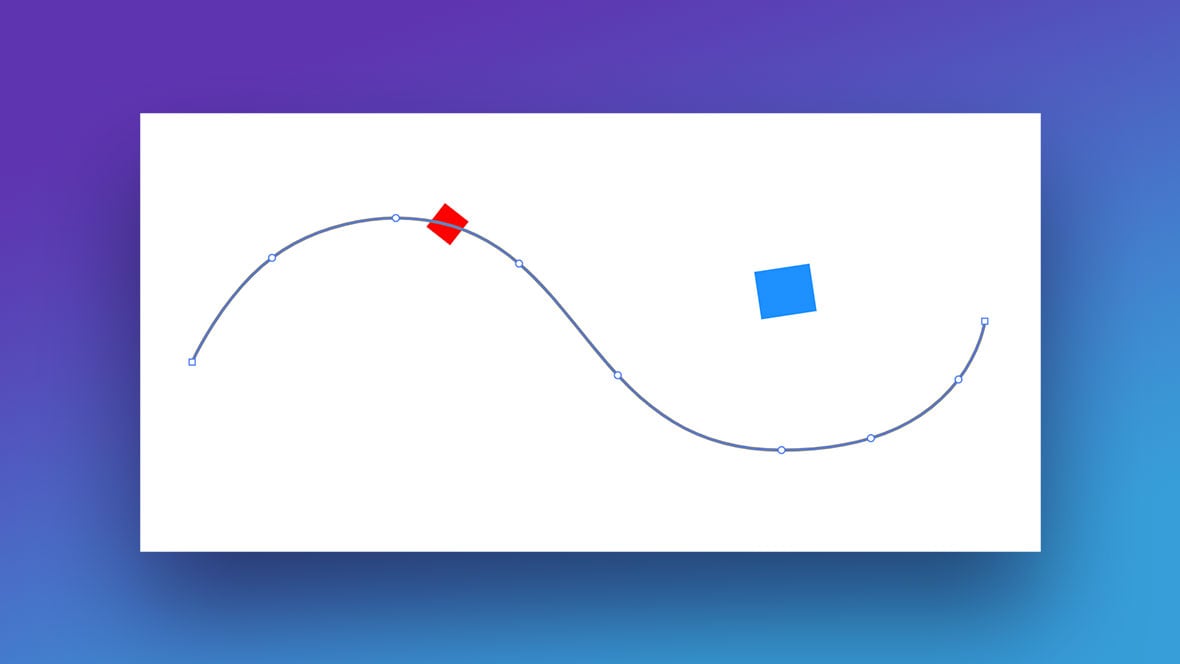
The Fundamental Concept of a Motion Path
A motion path is more than just a line; it’s a blueprint for movement, a spatial and temporal roadmap that imbues digital objects with intentionality and dynamism. Understanding its core components and underlying principles is the first step toward leveraging its power in various technological applications.
Defining the Digital Trajectory
In essence, a motion path describes the exact course an object will follow through a given space over a specified period. Imagine drawing a line on a canvas, and then instructing a digital object to trace that line. This “line” is the motion path. It can be as simple as a straight line, directing an object from left to right, or as complex as a convoluted Bezier curve, guiding an object through intricate loops, bounces, or undulations. The digital environment, whether it’s a 2D canvas in an animation program or a 3D world in a game engine, provides the spatial context for these paths. The object’s position at any given moment along this path is precisely calculated, ensuring smooth and predictable movement. This foundational concept allows creators to dictate every aspect of an object’s travel, transforming static elements into active participants in a digital scene.
Key Components of a Path
A motion path is constructed from several critical components that collectively define its behavior:
-
Start and End Points: These are the initial and final positions of the object’s journey. Every path must have a beginning and an end.
-
Control Points (or Anchor Points): For curved paths, control points (often associated with Bezier curves or splines) dictate the curvature and shape of the path between anchor points. Manipulating these points allows designers to create arcs, S-curves, and other organic movements rather than just straight lines.
-
Segments: The sections of the path between two anchor points are known as segments. These can be straight or curved, depending on the presence and influence of control points.
-
Timing: While the path defines where an object goes, timing dictates when and how fast it gets there. This involves setting durations for the movement, synchronizing it with other events, and defining its overall pace.
-
Easing: Easing refers to the acceleration and deceleration of an object along its path. Instead of a constant speed (linear motion), easing allows for more natural-looking movements, such as “ease-in” (starting slow and speeding up), “ease-out” (starting fast and slowing down), or “ease-in-out” (starting slow, speeding up, and then slowing down). This subtle yet powerful component adds a layer of realism and fluidity to the motion.
Beyond Simple Linear Movement
The true power of motion paths lies in their ability to facilitate movement that extends far beyond simple linear transitions. While a straight path is useful, most compelling digital experiences leverage complex paths that mimic real-world physics or create stylized effects. This includes:
-
Arcs and Curves: Objects don’t always move in straight lines; an arc can simulate a throwing motion, a swing, or a natural trajectory.
-
Bounces and Oscillations: Paths can be designed to include subtle or pronounced bounces, simulating impacts or rhythmic oscillations, adding character to UI elements or animated figures.
-
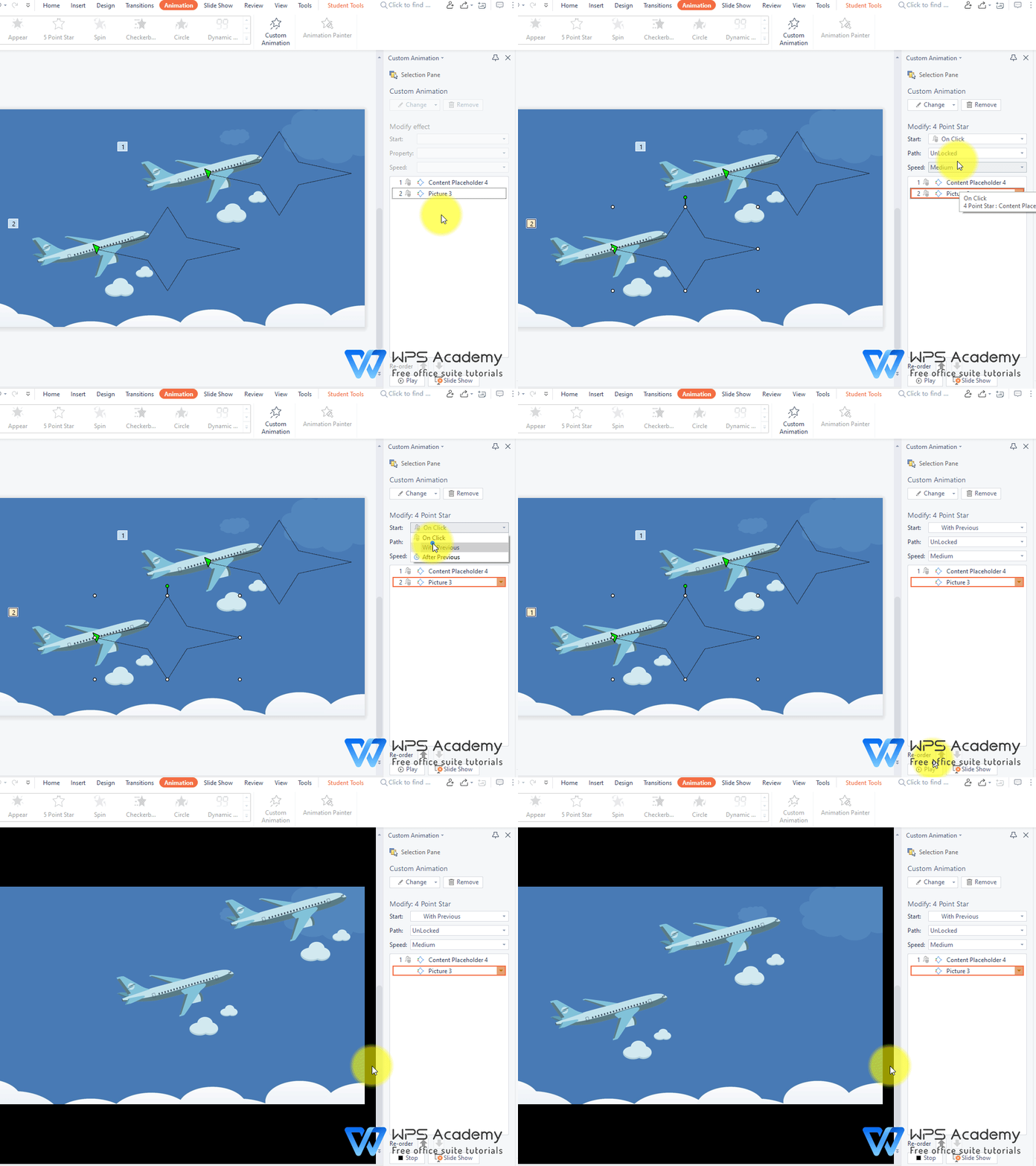
Custom Shapes: Complex, non-standard shapes can serve as motion paths, allowing objects to trace intricate patterns, circle other elements, or follow arbitrary, artistic trajectories. This flexibility is crucial for high-fidelity animations and interactive experiences where every detail contributes to the overall effect.
Applications Across Technology Domains
The utility of motion paths transcends specific software or platforms, acting as a foundational tool across a multitude of technological disciplines. Its pervasive influence highlights its importance in crafting compelling digital interactions.
Animation and Video Production
In the realm of animation and video, motion paths are the lifeblood of movement. They are used to choreograph every aspect of a scene, from the subtle shift of an expressive eyebrow to the epic flight of a mythical creature. Animators leverage motion paths to:
-
Character Movement: Define how characters walk, run, jump, or gesture across the screen, ensuring fluid and consistent actions.
-
Object Animation: Bring inanimate objects to life, such as a title sequence element flying into frame, a product rotating to show its features, or particles scattering dynamically.
-
Camera Paths: Guide the virtual camera through a 3D scene, creating cinematic pans, zooms, and dolly shots that direct viewer attention and enhance storytelling.
Leading animation software like Adobe After Effects, Blender, Autodesk Maya, and Cinema 4D provide robust tools for drawing, editing, and applying motion paths, often with sophisticated controls for timing, easing, and spatial interpolation, allowing animators to craft movements with incredible precision and artistic flair.
UI/UX Design and Web Development
Motion paths play an increasingly vital role in crafting intuitive and engaging user interfaces and web experiences. In UI/UX, movement isn’t just aesthetic; it’s functional, guiding users and providing critical feedback.
-
Microinteractions: Motion paths define the subtle animations that occur when a user clicks a button, hovers over an icon, or expands a menu. A button might subtly “bounce” or an icon might “grow” along a path to acknowledge an interaction.
-
Navigation and Transitions: Smoothly transition between different states or views within an application or website. For instance, a side panel might slide in from the left along a linear path, or a modal window might expand from the center using a more complex, easing-enhanced path.
-
Guiding User Attention: Deliberate motion paths can direct a user’s eye towards important information, calls to action, or newly revealed content, improving usability and reducing cognitive load. Web development frameworks and libraries like CSS animations, GreenSock Animation Platform (GSAP), and Framer Motion offer powerful tools for implementing sophisticated motion paths directly within web browsers, making dynamic and responsive interfaces a standard expectation.
Game Development
For game developers, motion paths are indispensable for creating immersive worlds and engaging gameplay mechanics. They dictate the movement of nearly everything within a virtual environment.
-
Non-Player Character (NPC) Routes: Program complex patrol routes for enemies, friendly NPCs, or ambient creatures, making game worlds feel alive and challenging.
-
Projectile Trajectories: Define the flight paths of bullets, arrows, magical spells, or thrown objects, incorporating physics-based curves and environmental interactions.
-
Camera Movement: Control in-game camera movements during cutscenes, follow-camera systems for players, or dynamic viewpoints during action sequences.
-
Object Animations: Animate platforms, doors, environmental hazards, or collectible items along predefined paths, creating dynamic obstacles and interactive elements.
Game engines like Unity and Unreal Engine offer integrated tools for creating spline-based paths, allowing developers to visually design complex movements for game objects, often with features for looping, reversing, and triggering events along these paths.
Robotics and Industrial Automation
Beyond the digital screen, motion paths are critical in the physical world of robotics and industrial automation. Precision and repeatability are paramount in these applications.
-
Robot Arm Movements: Program the exact trajectory for robotic arms to pick and place objects, perform assembly tasks, or weld components, ensuring accuracy and efficiency.
-
Automated Guided Vehicles (AGVs): Define the routes for autonomous vehicles in warehouses or factories, optimizing logistics and material handling.
-
Drone Flight Paths: Plan precise flight paths for drones used in surveying, delivery, or inspection, navigating complex 3D spaces with high accuracy.
Engineers use sophisticated path planning algorithms and specialized software to generate and optimize motion paths for robots, considering factors like obstacle avoidance, energy consumption, and load distribution. The reliability of these paths directly impacts the safety and effectiveness of automated systems.
Creating and Controlling Motion Paths
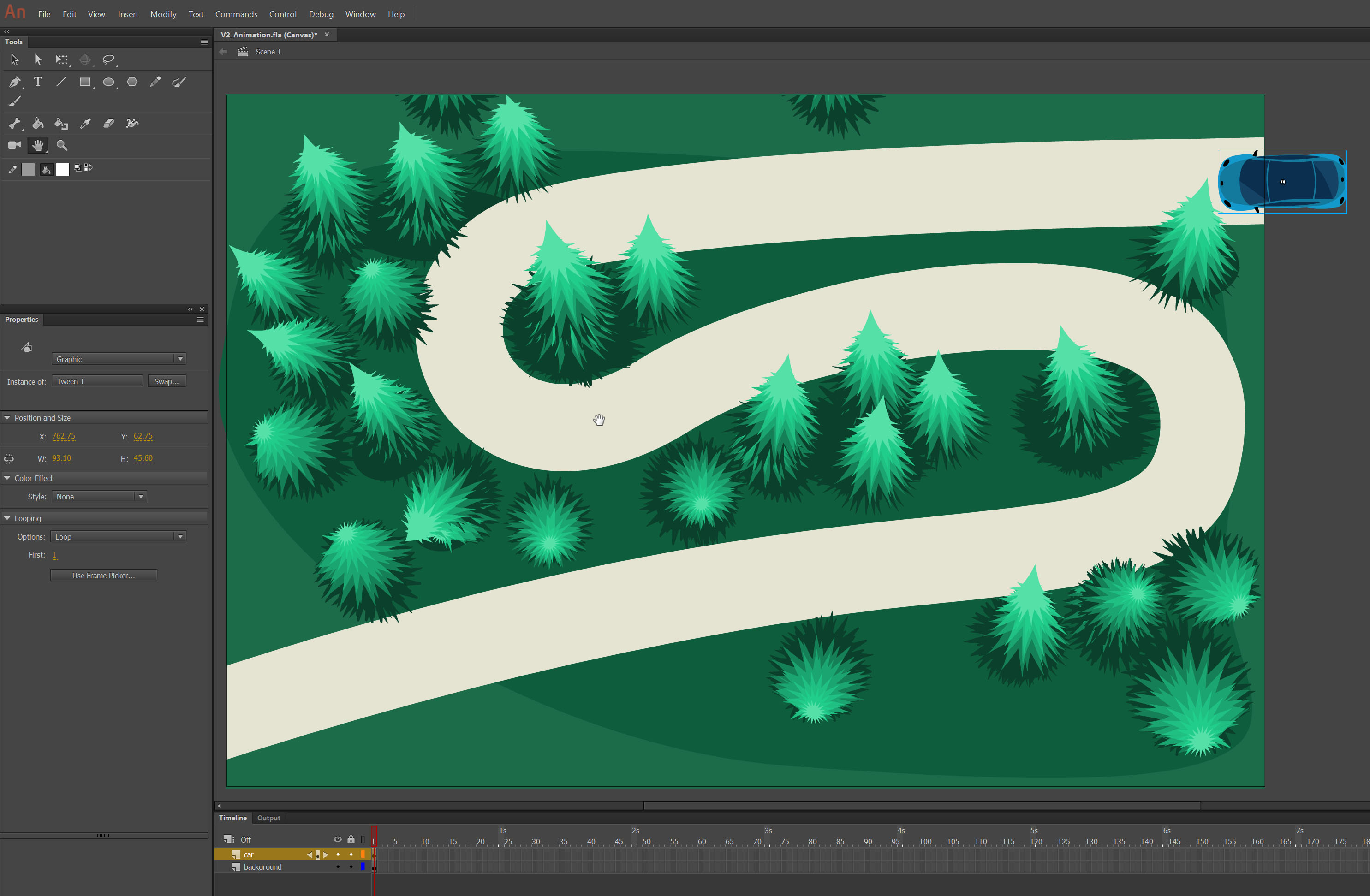
The creation and manipulation of motion paths are facilitated by a wide array of software tools and techniques, each offering different levels of control and complexity to suit various technological applications.
Software Tools and Interfaces
The chosen tool largely dictates the method of creating motion paths.
-
Vector Graphics Software (e.g., Adobe Illustrator, Inkscape): While not animation tools themselves, these programs are excellent for drawing precise vector shapes and curves (like Bezier paths) which can then be imported into animation or development environments to serve as motion paths.
-
Animation Software (e.g., Adobe After Effects, Blender, Maya): These dedicated tools provide intuitive visual interfaces for drawing paths directly on a canvas. Users can click to place anchor points and drag control handles to sculpt curves. They often include features for previewing motion along these paths in real-time.
-
Game Engines (e.g., Unity, Unreal Engine): Game engines offer built-in spline tools, allowing developers to visually create paths within the 3D environment. These paths can then be assigned to game objects or cameras, with options for interpolation and triggering events.
-
Web Development (CSS, JavaScript Libraries): For web-based animations, motion paths are typically defined programmatically. CSS
offset-path(formerlymotion-path) allows elements to follow SVG paths. JavaScript libraries like GSAP provide powerful APIs to define custom paths using coordinates or SVG path data, offering granular control over timing and easing.
Keyframing and Interpolation
At the heart of motion path animation lies keyframing. Keyframes are specific points in time where you define an object’s properties (position, rotation, scale, etc.).
-
Setting Keyframes: To create a motion path, you set a keyframe at the object’s starting position and another at its ending position (or multiple keyframes for complex paths).
-
Automatic Interpolation: The software then automatically calculates (interpolates) all the intermediate positions between these keyframes. This process, often called tweening, fills in the gaps, creating the illusion of continuous movement.
-
Spatial Interpolation: For motion paths specifically, the interpolation is spatial, meaning the software calculates the object’s position along the defined path at each frame. The type of interpolation (linear, Bezier, spline) determines the smoothness and curvature of the movement between keyframes.
Easing and Timing
While keyframes define the path and duration, easing and timing are crucial for making movements feel natural and impactful.
-
Timing: This refers to the duration of the animation and the rhythm of the movements. A longer duration results in slower movement, while a shorter duration creates faster, snappier animation. Precise timing is essential for synchronizing animations with audio, other visual elements, or user interactions.
-
Easing Curves: Instead of moving at a constant speed (linear easing), easing curves manipulate the acceleration and deceleration of an object along its path.
-
Ease-in: Starts slow and speeds up, mimicking real-world objects gaining momentum.
-
Ease-out: Starts fast and slows down, simulating an object coming to a rest naturally.
-
Ease-in-out: Combines both, starting slow, speeding up in the middle, and slowing down at the end, often perceived as very smooth and organic.
-
Most animation tools and libraries provide a range of predefined easing functions (e.g., cubic-bezier, elastic, bounce) that can be applied to motion paths, allowing creators to fine-tune the emotional and physical quality of the movement.
Advanced Techniques
As projects grow in complexity, advanced techniques for managing motion paths become invaluable.
-
Parenting to Paths: Instead of animating an object directly along a path, you can “parent” the object to a null object or a control layer that is animated along the path. This allows for easier manipulation of the object’s own properties (like rotation or scale) independently of its path movement.
-
Expressions and Scripting: For dynamic or procedurally generated paths, animators and developers use expressions (e.g., in After Effects) or scripting (e.g., JavaScript, Python in Blender/Maya) to control path parameters based on other variables or data. This enables reactive animations and complex system behaviors.
-
Inverse Kinematics (IK): In character animation, IK systems often utilize internal motion paths for joints. Instead of animating each joint individually, animators can move an end effector (like a hand), and the IK system automatically calculates the required rotations for intermediate joints to follow a natural-looking path. This significantly speeds up the animation process for complex rigged characters.
Best Practices for Effective Motion Path Design
While the technical aspects of creating motion paths are essential, understanding the principles of effective design ensures that these movements enhance, rather than detract from, the overall user experience and project goals.
Purposeful Movement
Every animation, every motion path, should serve a clear purpose. Movement for the sake of movement can be distracting and detrimental. Effective motion paths:
-
Inform: Provide visual cues about changes in state, hierarchy, or relationships between elements.
-
Guide: Direct the user’s eye to important information or next steps in a workflow.
-
Delight: Add personality, charm, and a sense of polish to an interface or narrative without being intrusive.
-
Provide Feedback: Acknowledge user input and confirm actions, making the system feel responsive and alive.
Before animating, ask: “What does this movement communicate? Is it necessary? Does it improve the experience?” If the answer isn’t clear, the motion path might need rethinking or removal.
Naturalism and Realism (or Intentional Stylization)
While digital environments defy physics, highly effective motion paths often either mimic real-world physics or make a deliberate, stylized choice to break them.
-
Adhering to Physics: Incorporating concepts like acceleration, deceleration, gravity, and momentum (through appropriate easing curves) makes animations feel more believable and satisfying. Objects don’t typically start and stop abruptly in the real world; they ease in and out.
-
Intentional Stylization: Conversely, sometimes the goal is to create highly stylized, abstract, or fantastical movements. In such cases, breaking from realistic physics (e.g., instantaneous teleportation, impossible bounces) can be a creative choice. The key is that this deviation should be intentional and serve an artistic or functional purpose, rather than being an accidental byproduct of poor animation. Consistency in stylization is also crucial for maintaining a cohesive aesthetic.
User Experience First
In UI/UX design particularly, motion paths must prioritize the user’s experience above all else. Poorly designed motion can lead to frustration, confusion, or even physical discomfort.
-
Avoiding Excessive or Distracting Motion: Too much animation, or animations that are too fast or too slow, can overwhelm users, make interfaces feel sluggish, or even trigger motion sickness in sensitive individuals. Subtlety is often key.
-
Ensuring Accessibility: Consider users with cognitive or vestibular disorders. Provide options to reduce motion or turn off animations if necessary. Motion paths should enhance clarity, not hinder it.
-
Performance Optimization: Complex motion paths, especially in web or mobile applications, must be optimized for performance. Janky or stuttering animations undermine credibility and user satisfaction. Use efficient methods for animation (e.g., CSS transforms instead of
left/topfor web), and prioritize smooth frame rates.
Iteration and Feedback
Motion path design is rarely perfect on the first attempt. It’s an iterative process that benefits greatly from testing and feedback.
-
Prototype and Test: Create prototypes of animations and test them with real users or stakeholders. Observe how they react, whether the movement is clear, and if it achieves its intended purpose.
-
Gather Feedback: Solicit constructive criticism on the timing, easing, clarity, and overall impact of the motion paths.
-
Refine and Optimize: Based on feedback, refine the paths, adjust timing, experiment with different easing functions, and optimize for performance. This continuous cycle of creation, testing, and refinement leads to polished and highly effective motion design.
In conclusion, motion paths are a foundational concept in numerous technological fields, acting as the invisible framework that brings movement, clarity, and engagement to digital experiences. From captivating animations and intuitive user interfaces to immersive game worlds and precise robotic operations, the ability to define, create, and control the trajectory of objects is a powerful skill. By understanding its fundamental components, exploring its diverse applications, mastering the tools for its creation, and adhering to best practices, technologists can unlock the full potential of motion paths to craft dynamic, purposeful, and truly impactful interactions in an ever-evolving digital landscape. As technology advances, with greater emphasis on realism, interactivity, and intelligent automation, the significance of expertly designed motion paths will only continue to grow, solidifying their status as a core competency for innovators across the tech spectrum.
aViewFromTheCave is a participant in the Amazon Services LLC Associates Program, an affiliate advertising program designed to provide a means for sites to earn advertising fees by advertising and linking to Amazon.com. Amazon, the Amazon logo, AmazonSupply, and the AmazonSupply logo are trademarks of Amazon.com, Inc. or its affiliates. As an Amazon Associate we earn affiliate commissions from qualifying purchases.