
In the intricate world of display technology, where every millisecond can impact user experience, understanding key specifications is paramount. Among these, monitor response time stands out as a crucial metric, particularly for those engaged in fast-paced activities like competitive gaming, but its implications extend to all aspects of digital interaction. At its core, response time measures how quickly a pixel on your screen can change from one color to another. This seemingly simple transition plays a profound role in the perceived smoothness and clarity of motion on your display.
Understanding the Fundamentals of Display Performance
To truly grasp the significance of response time, one must first understand the fundamental mechanics of how a monitor renders images. Unlike static images, video and interactive content rely on a rapid succession of frames, each composed of millions of individual pixels. For these frames to transition seamlessly, the pixels must respond with exceptional speed.

Pixels and Their Transitions
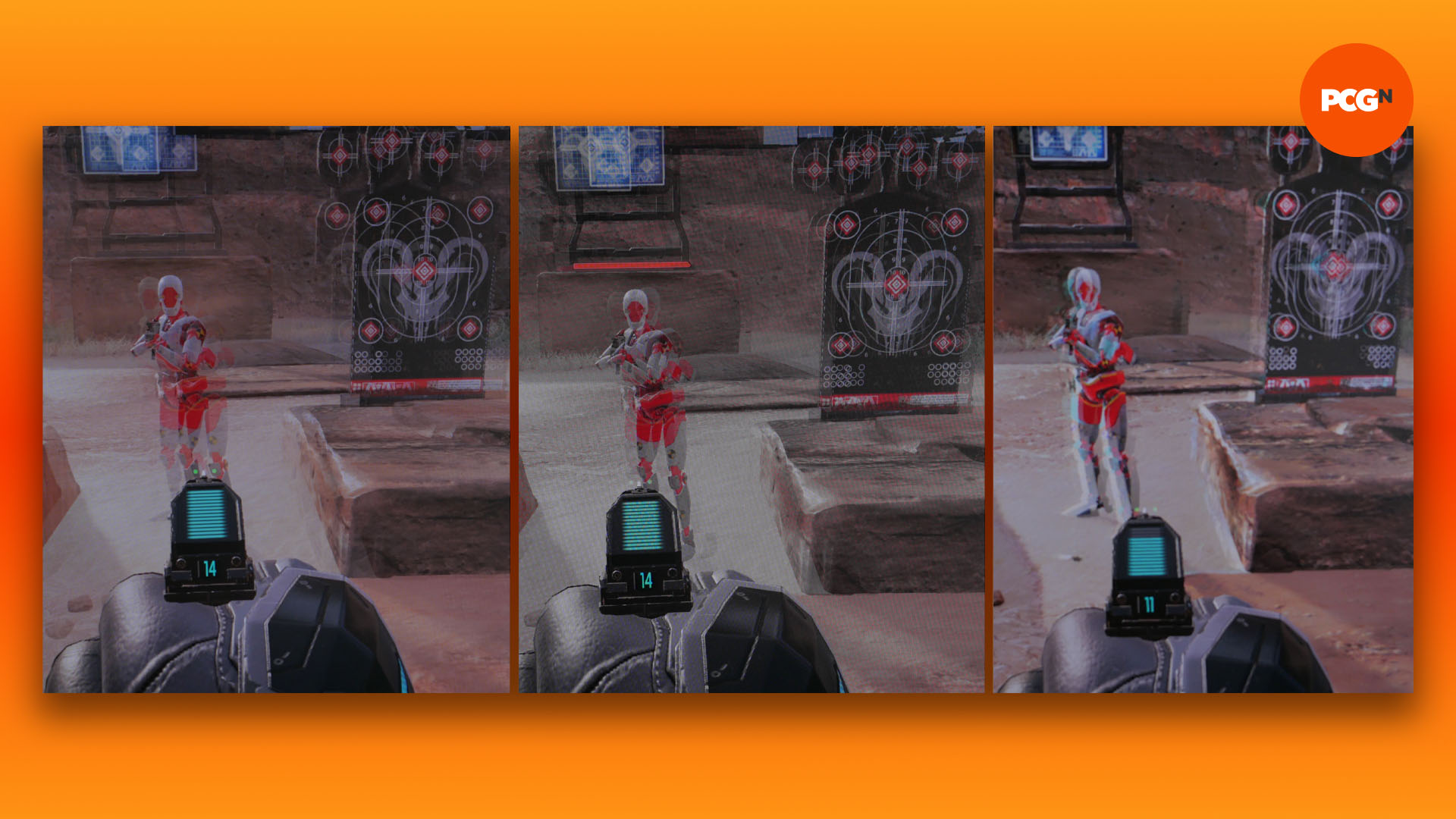
A pixel, the smallest controllable element of a picture, has the ability to display various colors by adjusting the intensity of its red, green, and blue sub-pixels. When an image changes, each pixel must shift from its current color state to a new one. Response time quantifies the duration it takes for a single pixel to complete this color change. A slower response time means a pixel lingers on its old color for a longer period before fully transitioning to the new one. This lag manifests as visual artifacts, most commonly known as “ghosting” or “motion blur,” where a trailing image appears behind moving objects on the screen. Imagine a car driving across the screen: with poor response time, you might see a faint, blurry “ghost” of the car’s previous positions trailing behind it.
Measuring Response Time: Grey-to-Grey (GtG) vs. Black-to-White (BtW)
Historically, response time was often measured as Black-to-White (BtW), which tracked the time it took for a pixel to go from pure black to pure white and back again. While straightforward, this measurement didn’t accurately reflect real-world usage, as pixels rarely transition between absolute black and white.
Today, the industry standard is Grey-to-Grey (GtG), which measures the time taken for a pixel to transition between two different shades of grey. This metric is far more representative of typical pixel changes in everyday content, where the majority of transitions occur between varying mid-tones. Most modern gaming monitors boast GtG response times of 1ms or 5ms, which are exceptionally fast. However, it’s crucial to remember that GtG measurements can vary slightly depending on the specific shades of grey chosen by manufacturers for testing, leading to some inconsistencies between brands. While GtG is the prevalent metric, some manufacturers might also report MPRT (Moving Picture Response Time), which is a different concept often linked to backlight strobing rather than pixel transition speed itself.
The Impact of Response Time on User Experience
The practical implications of response time are diverse, affecting everything from immersive gaming to professional content creation. Its influence on the perceived fluidity of motion is undeniable, making it a critical consideration for specific user profiles.
Gaming: The Criticality of Low Latency
For competitive gamers, especially in genres like first-person shooters (FPS) or real-time strategy (RTS), a low response time is almost non-negotiable. In these fast-paced environments, every millisecond counts. Ghosting and motion blur, direct consequences of slow response times, can obscure crucial details, making it harder to track enemies, dodge projectiles, or react promptly to on-screen events. A monitor with a high response time can introduce a perceptible delay between what’s happening in the game engine and what the player sees, potentially leading to a competitive disadvantage. Gamers often prioritize 1ms GtG displays to ensure the sharpest possible image during rapid camera movements and quick character actions, maximizing their reaction capabilities and visual clarity.
Everyday Use and Professional Applications
While less critical than in gaming, response time still plays a role in general computing. For everyday tasks like browsing, word processing, or watching videos, a slightly higher response time (e.g., 8ms or 12ms) is generally imperceptible and won’t significantly detract from the experience. Casual users might not even notice the difference between a 1ms and 5ms monitor.
However, for professionals involved in content creation, particularly video editing or animation, a low response time, combined with good color accuracy, can contribute to a more precise workflow. When scrubbing through video timelines or animating fast-moving objects, minimal motion blur ensures that each frame is rendered clearly, allowing for more accurate adjustments and fewer visual distortions during playback. Architects and designers working with complex 3D models might also appreciate the clarity of movement when rotating or manipulating objects.
Distinguishing Response Time from Input Lag and Refresh Rate
It’s vital not to confuse response time with other display metrics like input lag or refresh rate, although they are all interconnected aspects of overall display performance.
- Refresh Rate (Hz): This measures how many times per second the display updates its image. A 144Hz monitor refreshes 144 times per second, meaning it can display up to 144 individual frames per second (fps) if the graphics card can provide them. Higher refresh rates lead to smoother overall motion and a more fluid experience. While a high refresh rate provides more frames, a slow response time can still blur those individual frames together.
- Input Lag: This refers to the delay between an action performed on an input device (like a mouse click or keyboard press) and the corresponding visual output appearing on the screen. Input lag is influenced by the entire display pipeline, including the monitor’s internal processing, the GPU, and even the game engine. A monitor can have an excellent response time but still suffer from high input lag due to slow internal processing. Gamers, especially, seek monitors with low input lag in addition to low response time and high refresh rate.
In essence, a high refresh rate delivers more frames, a low response time ensures those frames are rendered clearly without blur, and low input lag guarantees that your actions are reflected on-screen with minimal delay. All three contribute to a superior visual and interactive experience.
Ideal Response Times for Different Users
The “best” response time isn’t a universal figure; it depends heavily on individual needs, budget, and primary use cases.
Competitive Gamers: The Need for Speed
For professional and highly competitive gamers, a 1ms GtG response time is the gold standard. Paired with a high refresh rate (144Hz, 240Hz, or even 360Hz), this combination minimizes motion blur and ensures the sharpest image clarity during rapid movements, which is crucial for quick target acquisition and precise aiming. Monitors achieving this level of performance often utilize TN (Twisted Nematic) panels, though advancements in IPS (In-Plane Switching) technology have also brought impressive 1ms GtG IPS displays to the market, offering a balance of speed and color accuracy.
Casual Gamers and Multimedia Enthusiasts
Casual gamers who enjoy a wide variety of titles without the pressure of competitive esports, along with multimedia enthusiasts who consume a lot of video content, will find 3ms to 5ms GtG response times more than adequate. These monitors typically offer a good balance between speed, color reproduction, and viewing angles, often featuring IPS or VA (Vertical Alignment) panels. The slight increase in response time compared to 1ms is generally imperceptible during single-player adventures, RPGs, or watching movies, where the benefits of richer colors and wider viewing angles might be more appreciated.
Office Work and Content Creation
For general office work, web browsing, coding, or even non-professional photo editing, response time is arguably the least critical specification. Monitors with 8ms to 12ms GtG response times are perfectly fine for these tasks. Users primarily focused on productivity or static image work should prioritize other features such as ergonomic adjustability, screen size, resolution (e.g., 4K), and especially color accuracy and panel type (IPS is often preferred for color-critical work). The minor ghosting that might occur with these response times is rarely noticeable in text-based applications or static design interfaces.
Technologies that Optimize Response Time
Monitor manufacturers employ various technologies and panel types to achieve lower response times and improve overall motion clarity.
Overdrive Technology
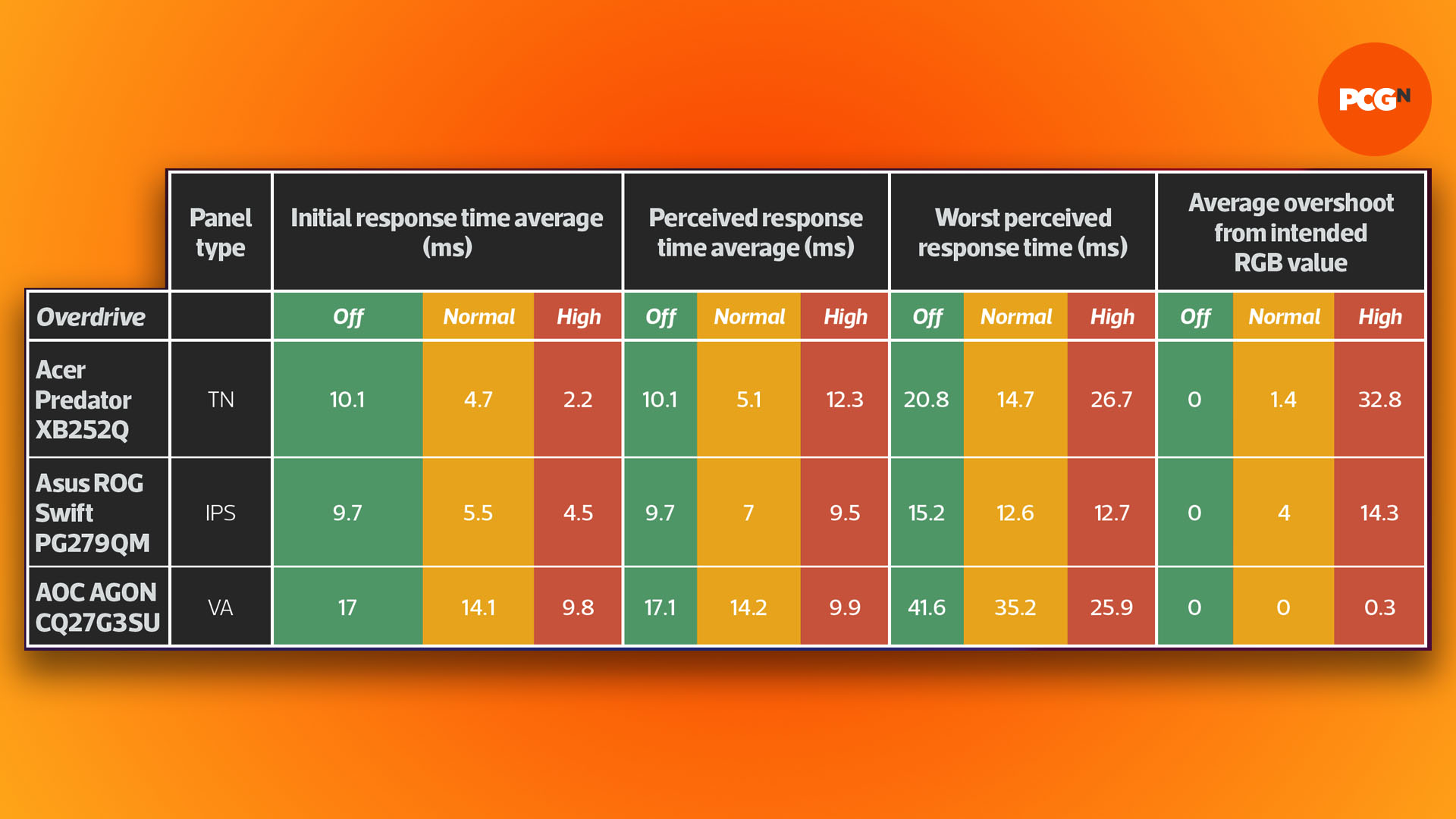
Many modern LCD monitors incorporate “overdrive” technology to reduce pixel response times. This works by temporarily applying a higher voltage to the liquid crystals in the pixels than what is strictly necessary, forcing them to change states more quickly. Once the transition begins, the voltage is reduced to prevent overshooting the target color. While effective at speeding up pixel transitions, aggressive overdrive settings can sometimes lead to “inverse ghosting” or “coronas,” where a faint, bright halo appears around moving objects. This artifact occurs when the pixels overshoot their target color and then have to correct themselves. Most monitors provide adjustable overdrive settings, allowing users to find a balance between speed and artifact suppression.
Panel Types and Their Inherent Characteristics (TN, IPS, VA)
The inherent characteristics of the liquid crystal display (LCD) panel itself play a significant role in response time:
- TN (Twisted Nematic) Panels: Traditionally, TN panels offered the fastest response times (often 1ms GtG), making them a favorite among competitive gamers. Their pixel structure allows for very quick transitions. However, their primary drawback is limited viewing angles and generally poorer color reproduction compared to other panel types.
- IPS (In-Plane Switching) Panels: IPS panels are renowned for their superior color accuracy and wide viewing angles, making them popular among graphic designers, photographers, and general users. Historically, IPS panels had slower response times than TN, but recent technological advancements have led to “fast IPS” panels that can achieve 1ms GtG response times, offering a compelling blend of speed and visual fidelity.
- VA (Vertical Alignment) Panels: VA panels strike a middle ground, offering better contrast ratios and deeper blacks than IPS and TN, along with decent color reproduction. Their response times typically fall between TN and IPS, often around 3ms to 5ms GtG, though some faster VA panels exist. They are a good choice for immersive gaming and movie watching due to their strong contrast, but can sometimes exhibit more noticeable ghosting, particularly in darker scenes, compared to TN or fast IPS panels.
Adaptive Sync (FreeSync/G-Sync) – Complementary Technologies
While not directly a response time technology, adaptive sync technologies like AMD FreeSync and NVIDIA G-Sync are crucial for enhancing the perceived smoothness of motion and reducing visual artifacts. These technologies synchronize the monitor’s refresh rate with the graphics card’s frame rate, eliminating screen tearing and stuttering. When combined with a fast response time and high refresh rate, adaptive sync provides an incredibly fluid and tear-free gaming experience, allowing the monitor to display frames as soon as they are rendered by the GPU, without waiting for the next fixed refresh cycle.
Making an Informed Decision
Choosing a monitor is a balance of various specifications, and response time is just one piece of the puzzle. Understanding its role and how it interacts with other features will empower you to make an informed decision tailored to your specific needs.
Prioritizing Your Needs
Before purchasing a monitor, clearly define your primary use case. Are you a competitive gamer who demands every millisecond of advantage? Do you primarily work with spreadsheets and documents? Or are you a creative professional who prioritizes color accuracy above all else? Your answer will dictate the ideal balance of specifications, including response time.
Reading Reviews and Benchmarks
Manufacturer specifications, particularly for response time, should always be taken with a grain of salt. Independent reviews and benchmarks often provide a more objective assessment of real-world performance. Reviewers use specialized equipment to measure actual response times and analyze potential issues like inverse ghosting, offering valuable insights that complement official figures. Look for detailed breakdowns of overdrive settings and how they impact motion clarity.
The Balance Between Response Time, Refresh Rate, and Resolution
The ultimate monitor experience often comes from a harmonious blend of specifications. A blazing-fast 1ms response time is best paired with a high refresh rate (e.g., 144Hz+) to fully realize its potential for smooth motion. Similarly, while a 4K resolution offers incredible detail, ensure your graphics card can drive games at a high enough frame rate to leverage both the resolution and a fast response time. For most users, finding a monitor that offers a good balance across these key metrics will provide the most satisfying and immersive experience, free from frustrating visual artifacts and input delays.
aViewFromTheCave is a participant in the Amazon Services LLC Associates Program, an affiliate advertising program designed to provide a means for sites to earn advertising fees by advertising and linking to Amazon.com. Amazon, the Amazon logo, AmazonSupply, and the AmazonSupply logo are trademarks of Amazon.com, Inc. or its affiliates. As an Amazon Associate we earn affiliate commissions from qualifying purchases.