
In the rapidly evolving landscape of technology, we often marvel at the speed of processors, the clarity of displays, and the sleekness of modern software. However, hidden beneath the chassis of every smartphone, laptop, and server lies a critical component that makes all these innovations possible: the main board. Often referred to as the motherboard, system board, or logic board, the main board is the fundamental platform that allows every other piece of hardware to communicate and function as a unified system.
Without a main board, a computer would simply be a collection of disconnected parts. It serves as the central nervous system of the device, providing the electrical connections and logical pathways through which data flows. To truly understand the state of modern tech, one must understand the anatomy, evolution, and strategic importance of the main board.
The Core Concept: Defining the Main Board
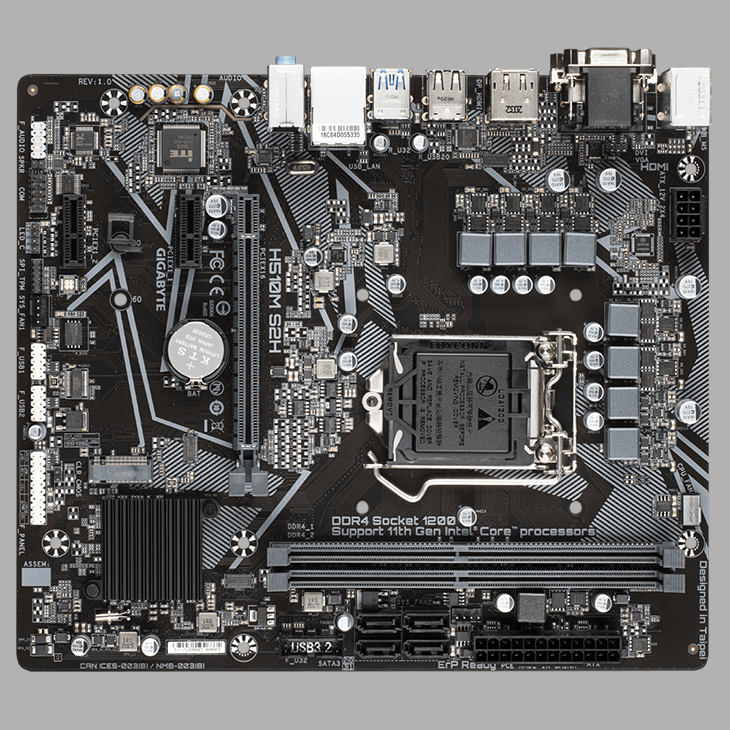
At its simplest level, a main board is a large Printed Circuit Board (PCB) that houses the most essential components of a computing device. It acts as a hub, providing the physical structure and the electrical circuitry required to link the Central Processing Unit (CPU), memory (RAM), storage, and peripheral devices.
Anatomy of the Motherboard
A main board is a complex tapestry of engineering. It is typically composed of layers of fiberglass and copper traces. These copper traces are essentially the “wires” printed onto the board, facilitating the high-speed transfer of electrons between components. Modern high-end main boards can have upwards of ten layers of circuitry to prevent signal interference and manage the massive power requirements of modern processors.
Beyond the traces, the board is populated with capacitors, resistors, and transistors. These smaller components manage voltage regulation, ensuring that sensitive parts like the CPU receive a steady, clean flow of power. A failure in even a single capacitor on the main board can lead to system instability or a complete hardware “brick.”
The Role of the Chipset
One of the most vital parts of any main board is the chipset. Think of the CPU as the brain and the chipset as the brain’s communications director. The chipset is an integrated circuit that manages the data flow between the processor, memory, and peripherals.
In the past, chipsets were divided into two parts: the Northbridge (handling high-speed communication with RAM and graphics) and the Southbridge (handling slower connections like USB and SATA). In modern tech, most of these functions have been consolidated directly into the CPU or a single Platform Controller Hub (PCH), allowing for lower latency and more efficient power consumption.
Key Components and Their Functions
To understand what a main board is, one must look at the specific sockets and slots that define its capabilities. The configuration of these components dictates what kind of computer the device will become—whether it’s a high-performance gaming rig or an energy-efficient office workstation.
The CPU Socket: The Brain’s Connection
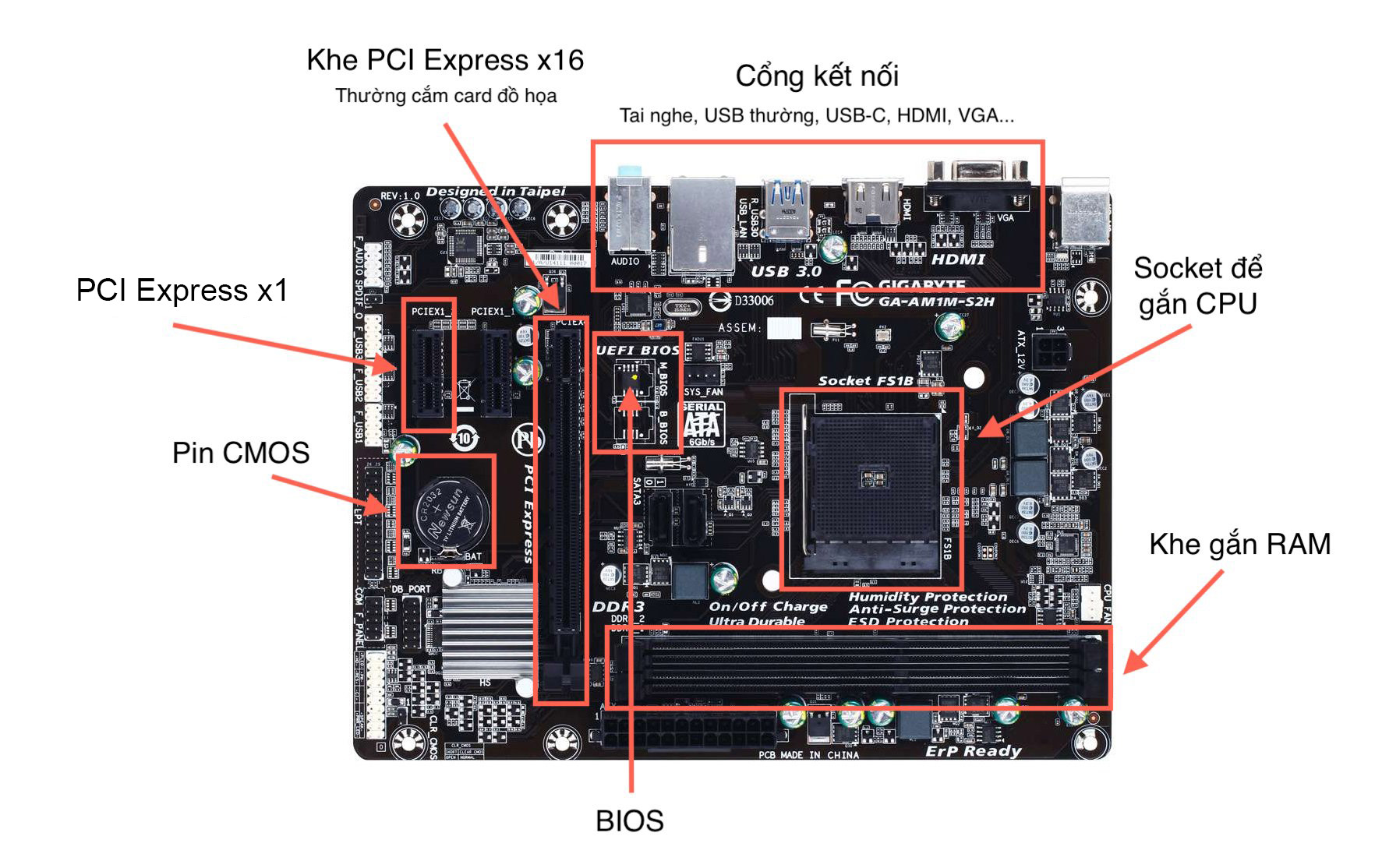
The CPU socket is the most prominent feature on any desktop main board. It is the physical interface where the processor is installed. Sockets are highly specific; an Intel processor will not fit into an AMD socket, and even within the same brand, different generations often require different socket types (such as LGA 1700 or AM5).
The socket contains hundreds or thousands of tiny pins (or contact points) that must align perfectly with the processor. This interface is responsible for the massive throughput of data required for modern computing tasks, from AI processing to high-definition video rendering.
RAM Slots and Memory Architecture
Adjacent to the CPU socket are the DIMM (Dual In-line Memory Module) slots. These slots house the system’s RAM. The main board determines the type of memory supported (e.g., DDR4 vs. DDR5) and the maximum capacity.
High-performance main boards often utilize “Dual-Channel” or “Quad-Channel” architectures. This allows the system to double or quadruple the communication bandwidth between the memory and the CPU, significantly boosting performance in data-heavy applications. The proximity of these slots to the CPU is intentional, as it reduces the physical distance data must travel, minimizing “latency.”
Expansion Slots: PCIe and Beyond
Expansion slots, most commonly Peripheral Component Interconnect Express (PCIe), allow users to add specialized hardware to the main board. This is where graphics cards (GPUs), high-speed networking cards, and sound cards are installed.
Modern main boards have transitioned to PCIe 5.0, which offers incredible bandwidth for the latest NVMe SSDs and high-end GPUs. The number of PCIe lanes a main board supports is a crucial factor for tech enthusiasts and professionals, as it determines how many high-speed devices can be used simultaneously without bottlenecking the system.
Form Factors and Standards

Main boards are not one-size-fits-all. They come in various standardized sizes, known as form factors, which determine the size of the computer case needed and the number of features the board can host.
ATX, Micro-ATX, and Mini-ITX
The most common standard for desktop computers is ATX (Advanced Technology eXtended). These boards provide the most space for expansion slots and cooling components. For those looking for a more compact footprint, Micro-ATX offers a middle ground, while Mini-ITX is the go-to for small-form-factor builds.
Despite their small size, modern Mini-ITX boards are engineering marvels, often packing almost as much power as their larger counterparts by utilizing high-density layouts and advanced cooling solutions. Choosing the right form factor is a critical first step in hardware design, balancing the need for power with the constraints of physical space.
Industrial and Specialized Form Factors
Beyond the consumer market, main boards take on many different shapes. In the world of laptops, “main boards” (often called logic boards) are custom-shaped to fit the specific curves of the device’s chassis. In the realm of AI and data centers, server-grade main boards may be massive, featuring dual CPU sockets and dozens of RAM slots to handle the enormous workloads of cloud computing and machine learning.
The Evolution of Main Board Technology
The main board has evolved from a simple “bus” for connecting parts to a highly intelligent component that actively manages system health and performance.
From Integrated Graphics to AI Processing
In the early days of computing, most features—like sound and networking—required separate expansion cards. Today, these are almost entirely integrated into the main board. High-end boards now feature premium audio codecs, 10-Gigabit Ethernet, and even dedicated hardware for managing AI-driven overclocking.
We are also seeing the integration of “NPU” (Neural Processing Unit) support within the main board’s ecosystem. As software moves toward AI-integrated workflows, the main board’s ability to efficiently distribute power and data to these specialized AI cores becomes paramount.
Connectivity: USB-C, Thunderbolt, and Wi-Fi 7
The back panel of a main board (the I/O shield) is the gateway to the outside world. The evolution of connectivity has seen the transition from bulky serial ports to high-speed USB-C and Thunderbolt 4 ports. These ports allow for data transfer speeds of up to 40Gbps and can even deliver enough power to charge a laptop or run an external monitor.
Wireless connectivity has also become a standard feature. Many modern main boards come equipped with integrated Wi-Fi 7 and Bluetooth 5.4, ensuring that the device remains connected at the highest possible speeds without the need for additional adapters.
Choosing the Right Main Board for Your Needs
Selecting a main board is one of the most consequential decisions in a tech project. It dictates the upgrade path of the machine for years to come.
Gaming vs. Productivity vs. Servers
For gamers, the focus is often on robust power delivery (VRMs) to support overclocking and multiple M.2 slots for fast game storage. For productivity professionals—such as video editors or 3D artists—the priority shifts to memory capacity and the number of high-speed Thunderbolt ports for external storage arrays.
In contrast, server main boards prioritize stability and redundancy. They often include features like ECC (Error Correction Code) memory support and remote management tools (IPMI) that allow technicians to troubleshoot the board even when it is powered off.
Future-Proofing and Compatibility
One of the biggest challenges in the tech world is “socket longevity.” When a new CPU generation is released, it often requires a new main board. Savvy tech users look for platforms that offer a degree of future-proofing—meaning the socket will be supported for multiple years.
Furthermore, the quality of the BIOS (Basic Input/Output System) or UEFI (Unified Extensible Firmware Interface) is a key differentiator. A well-maintained main board from a reputable manufacturer will receive firmware updates for years, adding support for new hardware, fixing security vulnerabilities, and improving overall system stability.
Conclusion
The main board is far more than just a piece of plastic and metal; it is the foundational architecture of the digital age. It is the silent facilitator of every click, every calculation, and every connection we make. Whether you are building a custom PC, upgrading an office fleet, or simply curious about the device in your pocket, understanding the main board provides a window into how modern technology truly functions. As we move into an era defined by AI and even faster data processing, the main board will continue to adapt, serving as the essential stage upon which the future of tech is built.
aViewFromTheCave is a participant in the Amazon Services LLC Associates Program, an affiliate advertising program designed to provide a means for sites to earn advertising fees by advertising and linking to Amazon.com. Amazon, the Amazon logo, AmazonSupply, and the AmazonSupply logo are trademarks of Amazon.com, Inc. or its affiliates. As an Amazon Associate we earn affiliate commissions from qualifying purchases.