
In the landscape of document architecture, precision is the cornerstone of professional communication. While most users are accustomed to the ubiquitous “Letter” size (8.5 x 11 inches) found in standard home printers, the “Legal” paper size remains a critical standard in specific technological and professional sectors. Understanding what legal paper size is—and more importantly, how it integrates with modern software, hardware, and document management systems—is essential for anyone navigating the complexities of digital and physical record-keeping.
Legal paper size is defined by its dimensions of 8.5 inches by 14 inches (216 mm x 356 mm). While it shares the same width as the standard Letter size, its extra three inches of length present unique technical challenges and requirements for printers, scanners, and word-processing software. This guide explores the technical nuances of the legal format, from its hardware compatibility to its digital optimization in an increasingly paperless world.
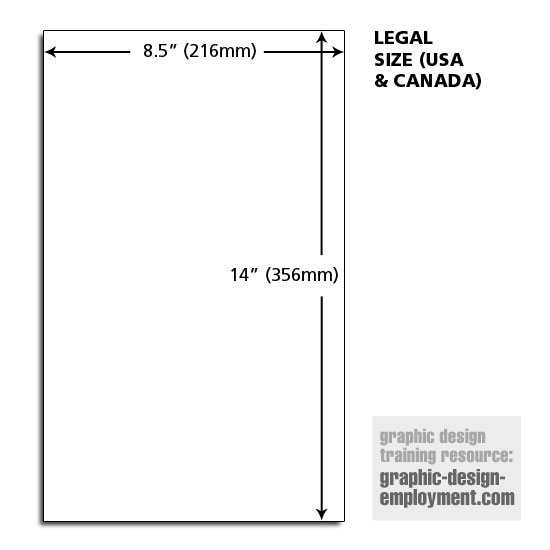
1. Understanding the Physical and Digital Blueprint of Legal Paper Size
The legal paper size is a standard within the North American “loose-leaf” system, primarily used in the United States and Canada. Unlike the international ISO 216 standards (such as A4), which rely on a consistent aspect ratio of 1:√2, the North American formats are based on traditional imperial measurements.
The Dimensional Reality: 8.5 x 14 Inches
The most defining characteristic of legal paper is its elongated aspect ratio. At 8.5 x 14 inches, it offers a total surface area of 119 square inches, compared to the 93.5 square inches of a standard Letter sheet. Technically, this represents a nearly 27% increase in vertical real estate. In the era of typewriters, this extra length was designed to accommodate long-form contracts and accounting ledgers without requiring frequent page breaks. In the digital age, this translates to more lines of code, more rows in a spreadsheet, or more clauses in a digital PDF before a “soft” page break is triggered by the software.
Historical Context vs. Modern Technological Integration
Historically, the legal size was favored by lawyers (hence the name) to allow for extensive “marginalia”—notes written in the margins—and to ensure that signatures and notary stamps resided on the same page as the core text. Today, this format is handled via specific page-description languages like PostScript or PCL (Printer Command Language). When a computer sends a “Legal” document to a printer, the software must communicate precise coordinates to the hardware to ensure the print head or laser assembly accounts for the additional three inches of travel.
2. Configuring Software Environments for Legal-Sized Workflows
In a digital-first environment, the “size” of a paper is often a metadata setting rather than a physical constraint. However, failing to configure these settings correctly results in “scaling errors” or “clipping,” where the bottom three inches of a document are lost during the rendering process.
Adjusting Page Setup in Modern Word Processors
In applications like Microsoft Word, Google Docs, or Apple Pages, the default setting is almost always “Letter.” To switch to Legal, the software must recalculate the “Canvas” size. This is not merely a visual change; it alters the pagination logic of the entire document.
- Microsoft Word: Users must navigate to the Layout tab, select Size, and choose Legal. Technically, this changes the
Section.PageSetupproperty in the document’s XML schema. - Google Docs: This is managed via File > Page Setup. Because Google Docs is browser-based, the “Legal” setting triggers a different CSS print media query to ensure the browser’s print engine recognizes the 14-inch length.
PDF Optimization and Aspect Ratio Challenges
The PDF (Portable Document Format) is the industry standard for legal documents because it “locks” the dimensions. When creating a legal-sized PDF, the software embeds the MediaBox and CropBox dimensions (612 x 1008 points) into the file header. A common technical hurdle arises when users attempt to view legal-sized PDFs on standard 16:9 widescreen monitors. Because the legal format is significantly taller than it is wide, it often requires high-resolution “portrait” monitors or significant zooming, which can lead to pixelation if the text is not properly vectorized.
3. Hardware Compatibility and Printer Optimization
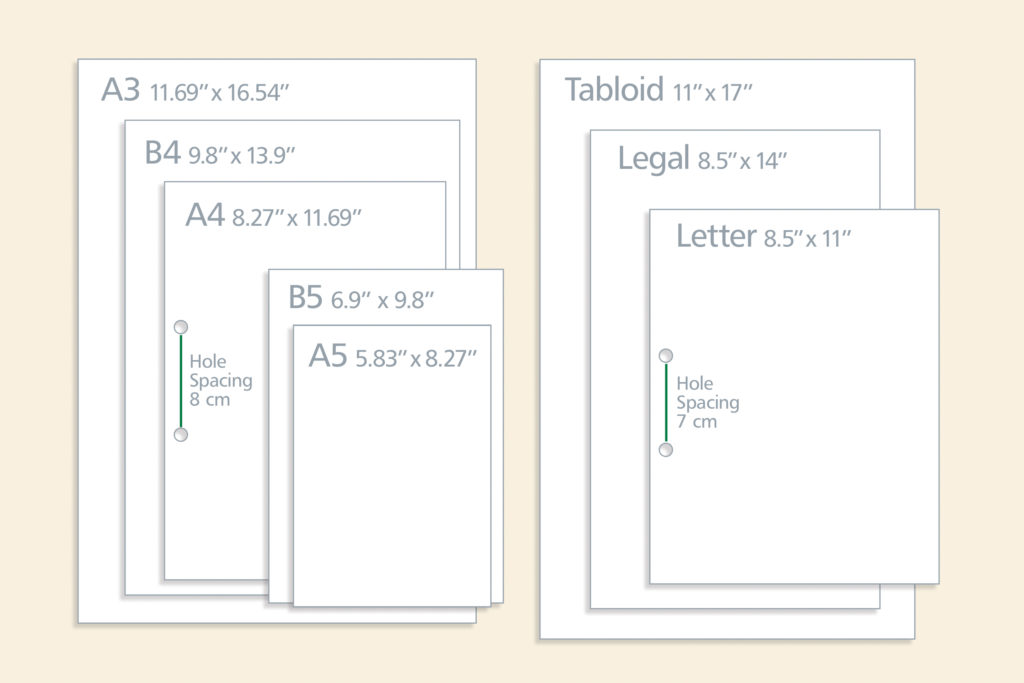
One of the most significant technical barriers to using legal paper is hardware support. Not all consumer-grade printers are equipped to handle 14-inch media, necessitating a closer look at tray mechanics and sensor arrays.
Tray Configurations and Multi-Purpose Feeders
Most office-grade laser printers feature adjustable paper trays. To accommodate legal paper, the user must physically extend the tray, often by engaging a mechanical latch that allows the back of the tray to slide outward. Technologically, the printer uses optical sensors or physical micro-switches to detect the tray’s extension. If the software sends a “Legal” job but the sensor detects a “Letter” tray, the printer will trigger a “Paper Mismatch” error. High-capacity office machines often have a dedicated “Legal” drawer to bypass the need for manual adjustments.
Resolution and Scaling: Avoiding the “Letter-to-Legal” Distortion
A frequent technical error occurs when a document designed for Letter size is “forced” onto Legal paper. Modern printer drivers offer two options: “Fit to Page” or “Actual Size.”
- Fit to Page: The driver scales the content, which can distort font sizes and line weights. In a legal context, this could invalidate a document if the font size falls below a legally required minimum (e.g., 10-point type).
- Actual Size: The content remains at 100% scale, but since the paper is three inches longer, a large white margin appears at the bottom.
For technical precision, documents should always be authored in the 8.5 x 14 format from the start to ensure the DPI (dots per inch) remains consistent across the entire length of the page.
4. The Role of Legal Paper in Modern Document Management Systems (DMS)
As businesses move toward digital transformation, the legal paper size presents specific challenges for scanning and archival technology. Document Management Systems (DMS) must be calibrated to handle “oversized” formats without losing data integrity.
OCR (Optical Character Recognition) and Oversized Formats
When a legal-sized document is fed into an ADF (Automatic Document Feeder), the scanner’s CIS (Contact Image Sensor) must remain active for a longer duration than for a standard sheet. In legacy hardware, this sometimes led to “buffer overflow” errors if the scanner’s internal memory wasn’t sufficient to hold the larger image file. Modern OCR software, such as Adobe Acrobat DC or ABBYY FineReader, uses sophisticated algorithms to recognize the 8.5 x 14 boundary. It then maps the text to a coordinate system that accounts for the extra vertical space, ensuring that signatures at the very bottom of the 14-inch page are indexed and searchable.
Cloud Storage and Aspect Ratio Considerations
In the cloud, “size” is measured in kilobytes, not inches. However, the aspect ratio of a legal document affects how it is previewed in web interfaces like Dropbox, SharePoint, or Google Drive. These platforms use “thumbnails” generated by server-side rendering engines. Because legal documents are exceptionally tall, their thumbnails often appear thin and illegible compared to Letter or A4 documents. Technicians managing these systems often have to adjust “Preview” settings to ensure that the bottom of legal documents isn’t cut off in the UI (User Interface) gallery view.
5. Future-Proofing Documentation: From Physical Legal Size to Digital Compliance
While the legal paper size is a staple of North American tech and law, the global trend is leaning toward standardization and virtualization. Understanding where this format sits in the future of technology is vital for long-term data strategy.
The Shift Toward A4 and Global Standards
Most of the world utilizes the ISO 216 standard (A4), which is 8.27 x 11.69 inches. In international tech collaborations, the 14-inch legal size is often seen as an outlier. Modern ERP (Enterprise Resource Planning) systems and automated document generation tools (like DocuSign) are increasingly designed to be “size-agnostic.” They prioritize “responsive” document design that flows text based on the viewer’s screen size rather than a fixed physical paper size. However, for legacy systems and “Hard-Copy” compliance, the 8.5 x 14 parameters must still be maintained in the codebase.

Virtualization and the Obsolescence of Specific Paper Dimensions
As we move toward a “paperless” society, the concept of “paper size” is becoming a virtual construct. Digital Signature Platforms (DSPs) now allow users to sign documents on mobile devices where the “14-inch” length is irrelevant to the user experience but critical for the generated PDF’s metadata. The future of the legal paper size lies in its role as a “formatting container.” Technology professionals must ensure that even as the physical paper disappears, the software logic remains robust enough to handle the specific layout requirements that the 8.5 x 14-inch standard was created to address.
In conclusion, the legal paper size is more than just a longer sheet of paper; it is a specific set of technical parameters that influences hardware design, software logic, and digital archiving. By mastering the settings, tray configurations, and rendering nuances of the 8.5 x 14-inch format, organizations can ensure that their most important documents are captured, stored, and printed with absolute technical fidelity.
aViewFromTheCave is a participant in the Amazon Services LLC Associates Program, an affiliate advertising program designed to provide a means for sites to earn advertising fees by advertising and linking to Amazon.com. Amazon, the Amazon logo, AmazonSupply, and the AmazonSupply logo are trademarks of Amazon.com, Inc. or its affiliates. As an Amazon Associate we earn affiliate commissions from qualifying purchases.