
In the vast and intricate world of C programming, a single character like ‘a’ can hold a multitude of meanings, or perhaps, no inherent meaning at all without context. For beginners, encountering a seemingly innocuous character like ‘a’ in a snippet of C code can be perplexing. Is it a special keyword? A magic symbol? A reserved operator? The answer, in most common scenarios, is far simpler yet profoundly important: ‘a’ is typically an identifier.
An identifier is a name given to an entity in a C program, such as a variable, function, array, struct, union, or macro. It’s how we refer to and manipulate pieces of data or blocks of code. While ‘a’ itself has no intrinsic function in C, its power lies in what it represents – a placeholder that the programmer assigns meaning to. Understanding what ‘a’ can be, and more broadly, the rules and conventions for identifiers, is a foundational step in mastering C programming. This exploration will demystify the role of ‘a’ and, by extension, illuminate the principles behind naming and organizing code, crucial for writing robust, readable, and maintainable software.
The Fundamental Role of Identifiers in C
At its core, C programming, like any human language, requires a way to name things. Imagine trying to talk about “that thing over there that holds a number” instead of “the variable count.” This is precisely the purpose of an identifier: to provide a unique and descriptive name for various programming constructs. Without identifiers, our code would be an unreadable sequence of instructions and raw memory addresses, making it impossible to write or understand complex programs.
The character ‘a’, when used as an identifier, is merely one example of countless possibilities. It could be age, amount, answer, or anything else that adheres to C’s naming rules. The choice of ‘a’ often signifies either a very simple, temporary variable in a short example, or perhaps an abbreviation within a larger, well-scoped context where its meaning is implicitly understood (though this is generally discouraged for clarity).
Naming Conventions and Best Practices
While C provides rules for what constitutes a valid identifier, good programming practice dictates how we should name them. An identifier in C must:
- Start with a letter (a-z, A-Z) or an underscore (
_). - Be followed by any number of letters, digits (0-9), or underscores.
- Be case-sensitive (e.g.,
myVaris different frommyvar). - Not be a C keyword (like
int,void,for,while).
For example, _count, variable1, calculate_sum are all valid identifiers. 1variable or my-var are not.
Beyond these rules, best practices guide programmers toward creating identifiers that enhance code readability and maintainability:
- Descriptive Names: Instead of
a, usenum_students,file_path, ortotal_price. This makes the code self-documenting. - Consistency: Adopt a consistent naming style (e.g.,
camelCasefor variables,snake_casefor functions,UPPER_CASEfor macros) throughout your project. - Avoid Single Letters (Generally): While ‘a’ is valid, it’s rarely descriptive enough unless its scope is extremely limited (e.g., a loop counter
for (int i = 0; i < N; i++)). Even then,idxorindexmight be clearer. - Be Mindful of Underscores: Identifiers starting with an underscore followed by an uppercase letter or another underscore (e.g.,
_Foo,__Bar) are often reserved for system libraries or internal use. Avoid them in your application code.
Adhering to these conventions transforms code from a cryptic sequence of symbols into a narrative that explains its own purpose and logic.
Distinguishing Identifiers from Keywords and Literals
It’s crucial to differentiate identifiers from other core components of C:
- Keywords: These are reserved words that have predefined meanings in C and cannot be used as identifiers (e.g.,
int,char,if,else,return,void). If you try to declare a variable namedint, the compiler will flag an error. - Literals: These are fixed values directly represented in the code. Examples include
10(an integer literal),3.14(a floating-point literal),'A'(a character literal), and"Hello"(a string literal). A character literal'a'is distinct from the identifiera. The former is the ASCII value of the lowercase ‘a’; the latter is a name referencing a memory location or function. - Operators: These are symbols that perform operations on values and variables (e.g.,
+,-,*,/,=,==,&,|).
When ‘a’ appears in C code, the context almost always determines whether it’s an identifier, part of a literal (like in 'a' or "apple"), or simply a typo. Without explicit declaration or use as part of a literal, ‘a’ stands as a placeholder name.
‘a’ as a Variable: Your First Encounter
The most common and fundamental interpretation of ‘a’ in a C program, especially in introductory examples, is that of a variable. A variable is essentially a named storage location in memory that holds a value. When we declare int a;, we are telling the compiler to reserve a spot in memory, capable of holding an integer, and to refer to that spot by the name a.
Declaring and Initializing Variables
Before you can use a as a variable, you must declare it. Declaration involves specifying its data type, which tells the compiler how much memory to allocate and what kind of values the variable can store.
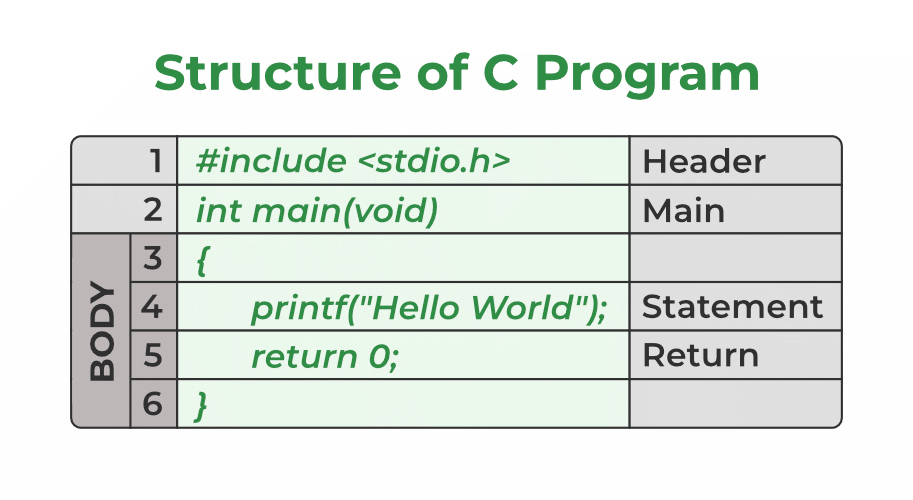
#include <stdio.h>

int main() {
    int a; // Declaration: 'a' is an integer variable.
    float b; // 'b' is a floating-point variable.
    char c; // 'c' is a character variable.

    a = 10; // Assignment: Storing the value 10 into 'a'.
    b = 20.5f;
    c = 'X';

    printf("Value of a: %dn", a);
    printf("Value of b: %.1fn", b);
    printf("Value of c: %cn", c);

    // Declaration and Initialization in one step
    int answer = 42;
    printf("Value of answer: %dn", answer);

    return 0;
}
In this example, a is a variable of type int. We first declare it, and then we assign it the value 10. This is how a acquires its meaning and purpose within the main function. Without declaration, the compiler wouldn’t know what a refers to.
Data Types and Their Significance
The data type associated with an identifier like a is paramount. It dictates:
- Memory Allocation: How many bytes of memory are set aside for
a(e.g.,inttypically uses 4 bytes,charuses 1 byte). - Range of Values: The minimum and maximum values
acan hold. - Operations: Which operations are valid for
a(e.g., you can perform arithmetic onints andfloats, but not typically onchars in the same way, though C treats characters as small integers). - Interpretation: How the raw bits in memory are interpreted as a meaningful value.
If a is declared as int, it will store whole numbers. If a is char, it will store a single character (which is internally represented as an integer ASCII value). Choosing the correct data type for a (or any variable) is crucial for efficient memory usage and accurate program logic.
Scope and Lifetime of Variables
The ‘visibility’ and ‘existence’ of a variable like a are defined by its scope and lifetime:
- Scope: Refers to the region of the program where the variable can be accessed.
- Local Scope: Variables declared inside a function (like
ainmainabove) or within a block ({...}) are local. They are only accessible within that function/block. - Global Scope: Variables declared outside any function are global. They can be accessed from any part of the program.
- File Scope: A specific type of global scope, where the variable is accessible only within the file where it’s declared (if declared
static).
- Local Scope: Variables declared inside a function (like
- Lifetime: Refers to the period during which the variable exists in memory.
- Automatic Lifetime: Most local variables have automatic lifetime. They are created when their scope is entered and destroyed when the scope is exited.
- Static Lifetime: Variables declared with the
statickeyword (either local or global) have static lifetime. They are created once at program startup and persist until the program terminates. - Dynamic Lifetime: Memory allocated using
mallocorcallochas dynamic lifetime and persists until explicitly freed byfree.
Understanding scope and lifetime is critical to avoid naming conflicts (e.g., having multiple a variables in different functions that don’t interfere with each other) and managing memory effectively. A locally declared int a; in one function is entirely separate from int a; in another.
Beyond Simple Variables: Other Uses of ‘a’
While its role as a variable is the most common, ‘a’ can be an identifier for other powerful constructs in C, demonstrating the flexibility of the language’s naming conventions.
Functions, Arrays, and Pointers
- Functions: A function is a block of code designed to perform a specific task. You can name a function
a(), though it’s highly unrecommended due to poor readability. For example:
c

void a() { // Function named 'a'

    printf("This is function 'a'.n");

}

// ... later in main()

a(); // Calling function 'a'
- Arrays: An array is a collection of elements of the same data type, stored in contiguous memory locations. You could declare an array named
a:
c

int a[5]; // An array named 'a' capable of holding 5 integers

a[0] = 10; // Accessing the first element of array 'a'
Here,arefers to the entire array, whilea[0]refers to its first element. - Pointers: A pointer is a variable that stores the memory address of another variable. You could have a pointer variable named
a:
c

int value = 100;

int *a = &value; // 'a' is a pointer storing the address of 'value'

printf("Value pointed to by a: %dn", *a); // Dereferencing 'a'
In this case,arefers to the pointer itself, while*arefers to the value at the addressapoints to.
Structs, Unions, and Enums
Identifiers also extend to user-defined data types in C:
-
Structures (structs): A
structallows you to group different data types into a single unit. You can name a struct typeAor declare a variable of a struct type nameda.struct Point { int x; int y; }; struct Point a; // 'a' is a variable of type 'struct Point' a.x = 10; a.y = 20; -
Unions: Similar to structs, but all members share the same memory location.
“`c
union Data {
int i;
float f;
char s[20];
};
union Data a; // 'a' is a variable of type 'union Data'
```
-
Enumerations (enums): Enums define a set of named integer constants. You can name the enum type
Aor an enum variablea.enum Status { SUCCESS, FAILURE }; enum Status a = SUCCESS; // 'a' is an enum variable
Preprocessor Macros
The C preprocessor, which runs before compilation, allows you to define macros. These are symbolic names or code snippets that are replaced by their definitions before the actual compilation process. While less common for a single character like ‘a’, it’s possible to define a macro:
#define A 100 // Preprocessor directive: 'A' will be replaced by 100
// ... later in code ...
int value = A; // 'value' will become 100 after preprocessing
Note the convention of using uppercase for macros to distinguish them from variables and functions. Here, A is an identifier for a macro, not strictly a C language construct like a variable.
The Impact of Good Naming on Code Readability and Maintainability
While the C compiler doesn’t care if you name your variables a, b, c, or temp1, temp2, temp3, human programmers (including your future self) care immensely. The choice of identifier, including whether to use something as generic as ‘a’, has a profound impact on the long-term viability of software.
Why Meaningful Names Matter
Consider two pieces of code that achieve the same result:
Example 1 (Poor Naming):
int a = 10;
int b = 20;
int c = a + b;
printf("%dn", c);
Example 2 (Good Naming):
int num_students = 10;
int num_teachers = 20;
int total_people = num_students + num_teachers;
printf("Total people in the building: %dn", total_people);
Both are functionally identical, but the second example immediately conveys its purpose. If you revisit the first example six months later, you’d spend time deciphering what a, b, and c represent. In a large project with thousands of lines of code, this cognitive load quickly becomes unsustainable. Meaningful names:
- Improve Readability: Code becomes easier to understand at a glance.
- Reduce Bugs: Clearer code is less prone to misinterpretation and errors.
- Facilitate Collaboration: Other developers can quickly grasp your intentions.
- Aid Maintenance: Modifying or extending code is simpler when its components are clearly labeled.
- Self-Documentation: Well-named identifiers often eliminate the need for excessive comments.
Avoiding Ambiguity and Common Pitfalls
Using generic identifiers like a or temp can lead to ambiguity. If you have several temporary variables, naming them temp1, temp2, temp3 might be marginally better than a, b, c, but still hints at a lack of specific purpose. A common pitfall is to reuse a generic name in different contexts within the same scope, leading to confusion about which a is being referred to. While C’s scope rules prevent outright conflicts in different functions, within a large function, a proliferation of single-letter variables can be a nightmare.
It’s also important to avoid names that are too long or overly verbose. There’s a balance between descriptiveness and conciseness. student_count_in_the_current_semester is probably too long; student_count or num_students is usually sufficient.
Practical Examples and Common Scenarios
Let’s look at how ‘a’ might appear in various practical C programming scenarios, understanding its context.
‘a’ in Arithmetic Operations
The most straightforward use of ‘a’ as a variable is in arithmetic expressions.
#include <stdio.h>

int main() {
    int a = 5;
    int b = 10;
    int sum = a + b; // 'a' is an operand in an addition operation
    printf("Sum: %dn", sum);

    a = a * 2; // 'a' is reassigned its current value multiplied by 2
    printf("New value of a: %dn", a);
    return 0;
}
Here, a first holds 5, then becomes 10 after the multiplication. Its purpose is clear within this small, confined example.
‘a’ in Control Flow Statements
‘a’ can also be used as part of conditional statements (if/else), loops (for/while), or switch statements.
#include <stdio.h>

int main() {
    int a = 7;

    // 'a' in an if-else statement
    if (a > 5) {
        printf("'a' is greater than 5.n");
    } else {
        printf("'a' is 5 or less.n");
    }

    // 'a' as a loop counter (though 'i' is more common)
    for (int count = 0; count < a; count++) { // 'a' defines the loop's upper limit
        printf("Loop iteration: %dn", count);
    }

    return 0;
}
In these cases, a dictates the flow of execution, either by being compared against a value or by setting a limit for iterations.
‘a’ in String and Character Manipulation
When dealing with characters and strings, ‘a’ can represent a single character or an array of characters.
#include <stdio.h>

int main() {
    char a = 'K'; // 'a' holds a single character literal 'K'
    printf("Character value: %cn", a);

    char message[] = "Hello"; // 'message' is an array of characters (a string)
    // No 'a' here, but imagine if we needed to store 'a' inside the string.

    // Using 'a' in character comparison
    char input_char = 'a';
    if (input_char == 'a') { // Comparing the variable 'input_char' with the literal 'a'
        printf("Input character is 'a'.n");
    }

    return 0;
}
It’s important to differentiate between the character literal 'a' (which is the actual letter) and the identifier a (which is a variable name). In if (input_char == 'a'), we are comparing the value of the variable input_char to the value of the character literal 'a'.
The journey from “what is ‘a’?” to understanding its nuanced role as an identifier is fundamental for any aspiring C programmer. It highlights not just the syntax of the language but also the crucial principles of code organization, readability, and maintainability. While ‘a’ might be a simple letter, its potential meanings within a C program are vast, and mastering the art of naming things thoughtfully is a cornerstone of effective software development.
aViewFromTheCave is a participant in the Amazon Services LLC Associates Program, an affiliate advertising program designed to provide a means for sites to earn advertising fees by advertising and linking to Amazon.com. Amazon, the Amazon logo, AmazonSupply, and the AmazonSupply logo are trademarks of Amazon.com, Inc. or its affiliates. As an Amazon Associate we earn affiliate commissions from qualifying purchases.