
In the vast landscape of the internet, every action—from loading a webpage to sending an encrypted message—relies on a complex system of addressing and delivery. While most users are familiar with IP addresses as the “location” of a server, there is a secondary, equally vital component that ensures data reaches the correct application on that server: the port. Specifically, the HTTP port acts as the gateway for the hypertext transfer protocol, serving as the foundational infrastructure for the World Wide Web.
To understand what an HTTP port is, one must first visualize the architecture of a server. If an IP address is equivalent to the street address of a large apartment building, a port is the individual apartment number. Without the apartment number, the mail carrier (data packet) knows which building to go to but has no idea which resident (application) should receive the delivery. In the context of technology and digital security, understanding these ports is essential for developers, IT professionals, and cybersecurity enthusiasts alike.
Understanding the Role of Ports in Network Communication
At the core of internet communication lies the TCP/IP (Transmission Control Protocol/Internet Protocol) suite. When a computer communicates with a server, it uses a combination of an IP address and a port number, collectively known as a “socket.” This system allows a single server with a single IP address to host multiple services simultaneously—such as a web server, an email server, and a file transfer server—without the data streams getting crossed.
The IP Address vs. The Port Number
An IP address identifies a hardware device on a network. However, modern operating systems are multitasking environments where many different software processes run at once. A port is a 16-bit unsigned integer, ranging from 0 to 65535, that designates a specific “channel” for a service.
Ports are categorized into three main ranges:
- Well-Known Ports (0–1023): These are reserved for standardized services and protocols. HTTP (80) and HTTPS (443) fall into this category.
- Registered Ports (1024–49151): These are used by specific companies or applications for services like databases (e.g., MySQL on 3306).
- Dynamic or Private Ports (49152–65535): These are usually assigned temporarily by the client’s operating system when initiating a connection.
How Port Assignments Facilitate the Web
When you type a URL into your browser, such as http://www.example.com, your browser automatically assumes you want to connect via the standard HTTP port. Behind the scenes, the browser appends :80 to the IP address. If the website uses a secure connection (https://), the browser defaults to port 443. This standardization is what makes the web user-friendly; without it, users would have to manually enter port numbers for every site they visited.
Port 80 and Port 443: The Engines of the Web
While there are thousands of available ports, two define the modern web experience: Port 80 and Port 443. Their evolution represents the broader history of the internet, moving from open, readable data to the encrypted, secure environment we expect today.
Port 80: The Standard for HTTP
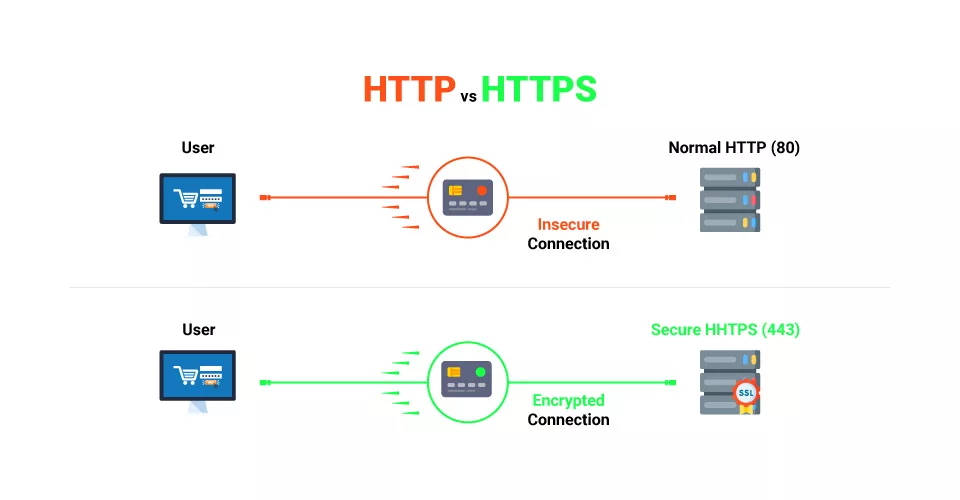
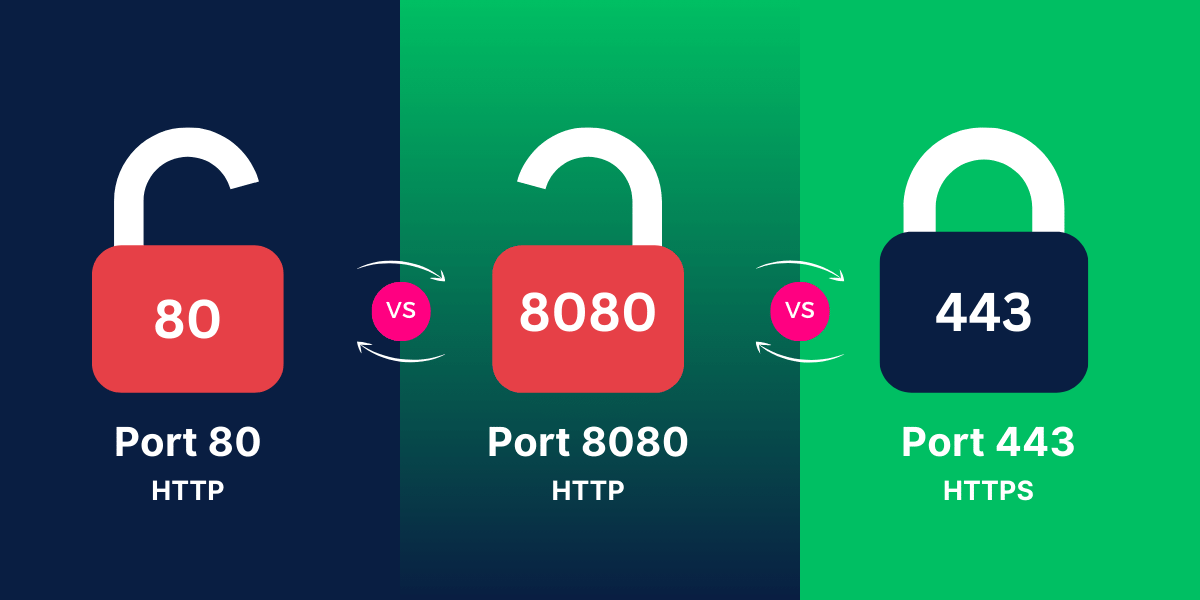
Port 80 is the default port for unencrypted web traffic. When the Hypertext Transfer Protocol (HTTP) was first standardized, Port 80 was designated as the primary “listening” port for web servers. When a request hits Port 80, the server responds by sending HTML files, images, and scripts back to the client in “cleartext.”
The primary issue with Port 80 in a modern tech context is security. Because the data is unencrypted, it is vulnerable to “man-in-the-middle” attacks. Anyone sitting on the same network—such as a public Wi-Fi hotspot—could theoretically intercept the packets and read the data being exchanged. For this reason, Port 80 is now largely used for a single purpose: redirecting users to the secure version of the site on Port 443.
Port 443: The Security Evolution (HTTPS)
Port 443 is the standard port for HTTPS (HTTP Secure). It utilizes encryption protocols—originally SSL (Secure Sockets Layer), now evolved into TLS (Transport Layer Security)—to wrap the data packets. When a connection is established on Port 443, the client and server perform a “handshake” to exchange cryptographic keys.
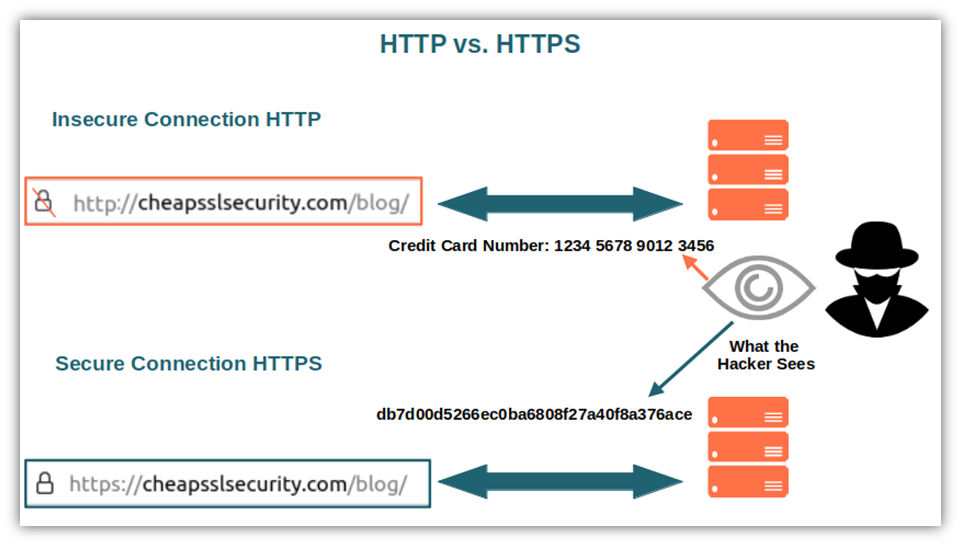
From a digital security standpoint, Port 443 is non-negotiable. It ensures that sensitive information, such as login credentials, credit card numbers, and personal data, remains unreadable to unauthorized parties. Today, search engines like Google penalize websites that do not use HTTPS, effectively making Port 443 the universal standard for web traffic.
Why the Shift to HTTPS Became Mandatory
The transition from Port 80 to Port 443 wasn’t just about privacy; it was about integrity. Without encryption, ISPs or malicious actors could inject code, advertisements, or malware into a webpage before it reached the user. By standardizing communication on Port 443, the tech industry created a “trust layer” for the internet. Browsers now display a padlock icon to signify a successful Port 443 connection, providing visual confirmation that the data is secure and the server’s identity has been verified by a Certificate Authority (CA).
Technical Implementation and Security Implications
For software engineers and network administrators, managing HTTP ports involves more than just selecting a number. It requires a deep understanding of how firewalls, load balancers, and proxies interact with these ports to maintain both performance and security.
Firewalls and Port Filtering
A firewall acts as a security barrier that monitors and controls incoming and outgoing network traffic based on predetermined security rules. In a standard web server configuration, a “default-deny” policy is often applied. This means all ports are closed except for the ones explicitly needed. For a web server, an administrator will “open” Port 80 and Port 443 to allow public traffic while keeping other ports (like Port 22 for SSH or Port 3306 for databases) restricted to specific IP addresses.
Port Forwarding and Reverse Proxies
In complex software architectures, a technique called port forwarding is used to redirect traffic from one port to another. This is common in containerized environments like Docker. For instance, a web application might be running inside a container on internal port 5000, but the server redirects all incoming Port 80 traffic to that container.
Similarly, reverse proxies (like Nginx or HAProxy) often sit at the edge of a network. They listen on Port 80 and 443, handle the SSL termination (the heavy lifting of decryption), and then pass the traffic to “backend” servers on different, non-standard ports. This adds a layer of security, as the actual application servers are never directly exposed to the public internet.
Common Vulnerabilities Associated with Open Ports
Open ports are essentially open doors. If a service listening on a port has a software vulnerability, an attacker can use that port as an entry point. For HTTP ports, common threats include:
- DDoS Attacks: Flooding Port 80 or 443 with massive amounts of traffic to crash the server.
- Cross-Site Scripting (XSS): Delivering malicious scripts through standard web traffic.
- SQL Injection: Sending malicious database queries through web forms processed via HTTP ports.
Because Port 80 and 443 must remain open for a website to function, they are the most frequent targets for automated scanning tools used by hackers.
Modern Alternatives and Specialized Web Ports
As web technology has evolved, so has the use of non-standard ports. Developers often use alternative ports during the testing and staging phases of software development to avoid conflicts with production traffic.
Non-Standard Ports: 8080 and 8443
Port 8080 is the most common “alternative” to Port 80. It is frequently used for web proxy servers, caching nodes, or running a secondary web server on the same machine. Similarly, Port 8443 is often used as an alternative for HTTPS. In local development environments—such as when running a Node.js or React application—it is standard practice to use ports like 3000 or 5000 to view the application before it is deployed to the standard HTTP ports.
WebSockets and Real-Time Communication
Modern apps that require real-time updates (like chat apps or live sports scores) often use WebSockets. While WebSockets start their lifecycle as a standard HTTP request on Port 80 or 443, they “upgrade” the connection to a persistent, full-duplex tunnel. This allows data to flow back and forth instantly without the overhead of repeatedly opening and closing ports. This evolution demonstrates how the original HTTP port architecture has been stretched to support technologies that the original creators of the web never imagined.
The Future: HTTP/3 and QUIC
The future of web ports is currently being rewritten with the introduction of HTTP/3. Unlike HTTP/1.1 and HTTP/2, which rely on the TCP protocol, HTTP/3 uses QUIC (Quick UDP Internet Connections). While it still primarily utilizes Port 443, it shifts from TCP to UDP (User Datagram Protocol). This change reduces latency and improves performance on unstable networks, such as mobile data. For the tech world, this represents a significant shift in how we perceive the “reliability” of a port connection, prioritizing speed and encryption from the very first packet.
Ultimately, the HTTP port is much more than a simple number. It is a fundamental protocol that enables the global exchange of information. Whether it is the legacy of Port 80, the security mandates of Port 443, or the high-performance future of QUIC, these ports remain the invisible doorways through which the entirety of the digital age passes. Understanding their function is the first step in mastering the mechanics of the modern internet.
aViewFromTheCave is a participant in the Amazon Services LLC Associates Program, an affiliate advertising program designed to provide a means for sites to earn advertising fees by advertising and linking to Amazon.com. Amazon, the Amazon logo, AmazonSupply, and the AmazonSupply logo are trademarks of Amazon.com, Inc. or its affiliates. As an Amazon Associate we earn affiliate commissions from qualifying purchases.