
In the ever-evolving landscape of digital interaction, privacy and control over one’s online footprint have become paramount concerns. As we navigate the vast expanse of the internet, the traces we leave behind, from browsing history to cookies, can paint an intimate portrait of our habits, preferences, and even our vulnerabilities. In response to these growing concerns, web browsers have introduced features designed to offer users a more private browsing experience. Among the most widely recognized of these is Google Chrome’s “Incognito Mode,” often referred to as an “Incognito Window.” But what exactly is an Incognito Window, and how does it function to protect your digital privacy? This exploration delves into the intricacies of this feature, clarifying its capabilities, limitations, and its place within the broader spectrum of digital security.

Understanding the Core Functionality of Incognito Mode
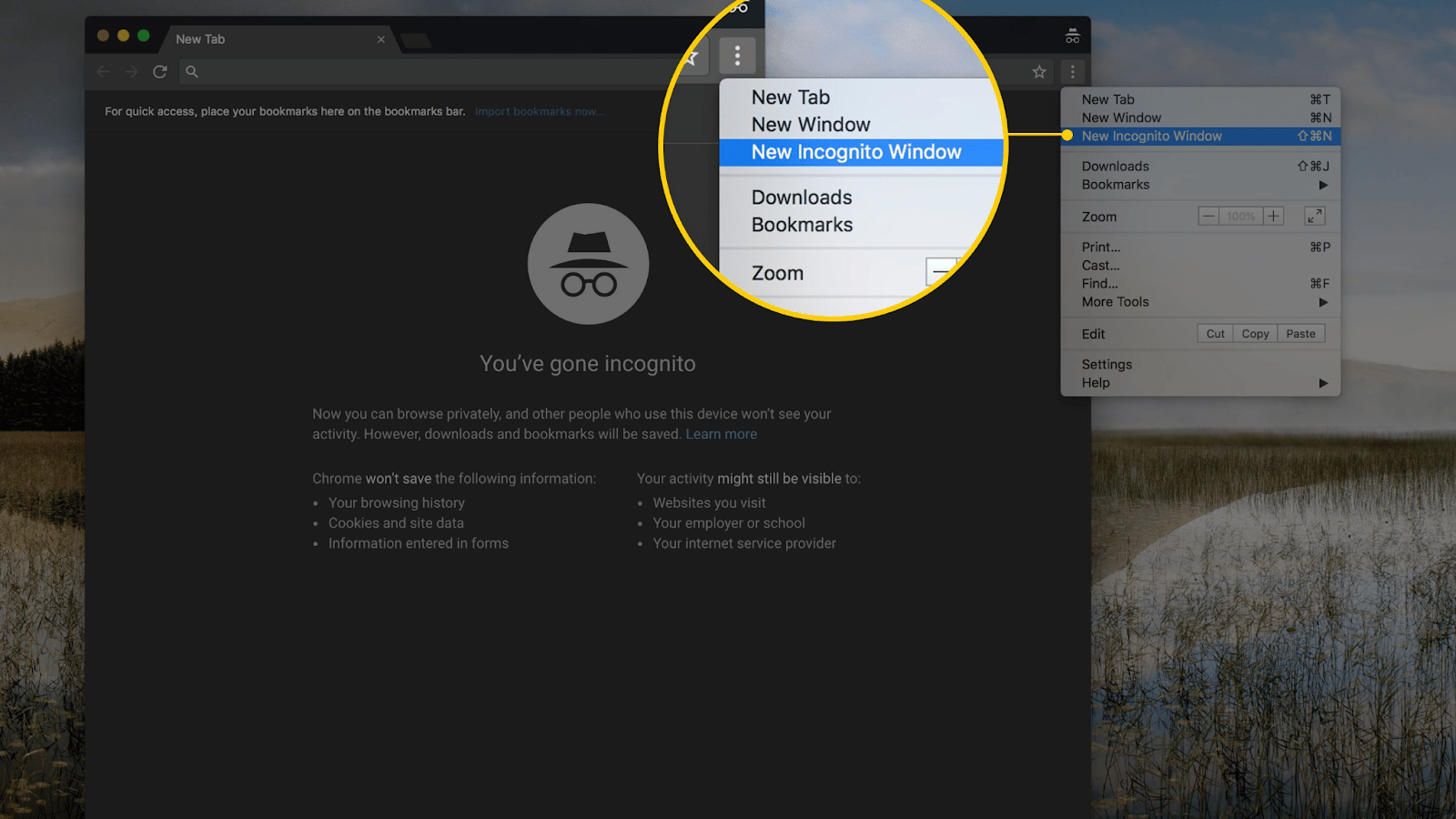
At its heart, an Incognito Window in Google Chrome is a temporary browsing session that aims to prevent your local device from storing certain types of browsing data. This means that after you close all Incognito Windows, your browsing history, cookies, site data, and information entered in forms will be automatically deleted from your computer or mobile device. This fundamental aspect is what sets it apart from a standard browsing session.
How Incognito Mode Prevents Local Data Storage
When you open a standard Chrome window, the browser diligently records a wealth of information. This includes every website you visit, the search queries you make, and the login credentials you use. This data is stored locally, allowing for faster loading of frequently visited sites through cached information and providing a convenient history for users to revisit. However, this same storage mechanism can be a point of concern for those who value their privacy, especially on shared devices.
Incognito Mode, conversely, operates on a different principle. It essentially creates a sandboxed browsing environment. In this environment, any data generated during the session is ephemeral. For instance, when you visit a website in Incognito Mode, Chrome does not save the URL to your history. If you log into a website, the cookies associated with that session are not stored after the window is closed. Similarly, any autofill data you enter into forms is not retained for future use. This “disappearing” nature of the data is the primary appeal of Incognito Mode for many users.
Distinguishing Incognito from Private Browsing in Other Browsers
It’s important to note that “Incognito Mode” is Google Chrome’s specific terminology. Other web browsers offer similar functionalities under different names. For example, Mozilla Firefox calls it “Private Browsing,” while Microsoft Edge uses “InPrivate Browsing,” and Apple’s Safari utilizes “Private Browsing” as well. While the underlying principle of preventing local data storage is generally the same across these browsers, the specific implementation and the extent of privacy offered can vary subtly. Understanding the terminology of your chosen browser is crucial for leveraging these privacy features effectively. However, the core concept of a temporary, locally non-saving browsing session remains consistent.
The Nuances of Incognito Mode: What It Does and What It Doesn’t Do
While Incognito Mode offers a significant step up in local privacy, it is not a cloak of invisibility. Many users misunderstand its capabilities, leading to a false sense of complete anonymity. It is crucial to clarify what Incognito Mode truly protects and where its limitations lie.
What Incognito Mode Protects: Your Local Browsing Footprint
As previously detailed, the primary benefit of Incognito Mode is the removal of your browsing activity from your local device. This is particularly useful in situations where you are using a shared computer, such as in a library, at a friend’s house, or on a family computer. By using Incognito Mode, you prevent others who use the same device from seeing:
- Your browsing history: Websites you have visited will not appear in the browser’s history log.
- Cookies and site data: Websites will not be able to store cookies on your device, which are often used to track your activity across different sites or to remember your login status. This means you will be logged out of accounts when you close the Incognito Window.
- Information entered in forms: Any text you type into web forms, such as usernames, passwords, or search queries, will not be saved for autofill purposes.
- Permissions granted to websites: Websites will not remember any permissions you granted them within the Incognito session.
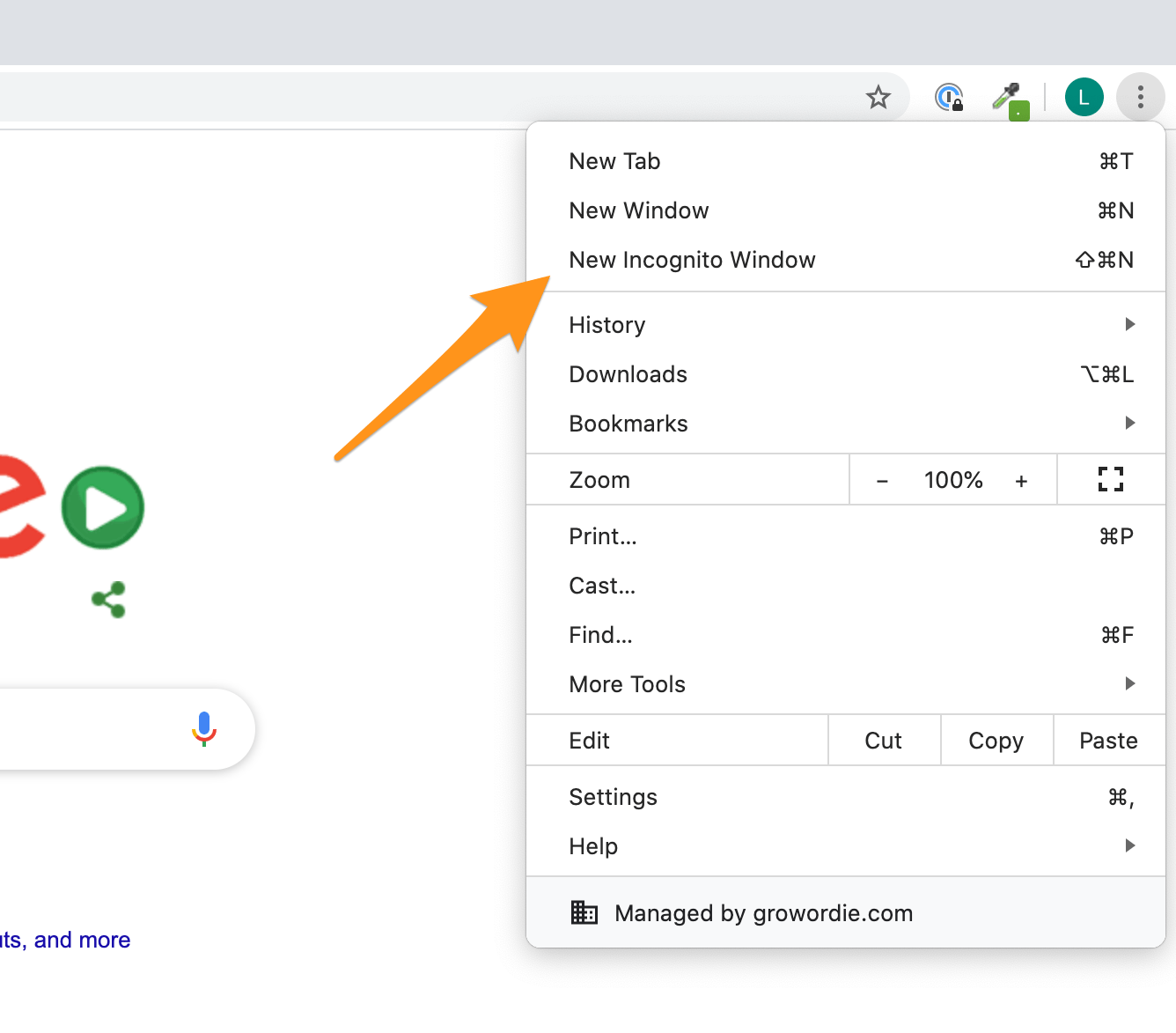
This localized data deletion significantly enhances privacy on devices that are not exclusively yours. It prevents casual snooping and ensures that your browsing activities are not readily available to the next user of the device.
What Incognito Mode Does NOT Protect: Your Online Presence
This is where many common misconceptions about Incognito Mode arise. It is vital to understand that Incognito Mode does not make you anonymous on the internet. Your online activities are still visible to various entities:
- Your Internet Service Provider (ISP): Your ISP can still see all the websites you visit, regardless of whether you are using Incognito Mode. They route your internet traffic and can monitor its destination.
- The websites you visit: Websites you visit can still track your activity while you are on their site. They can see your IP address, which can be used to approximate your location. They can also employ sophisticated tracking techniques, even without cookies, that are not prevented by Incognito Mode.
- Your employer or school: If you are browsing on a network provided by your employer or educational institution, they can monitor your internet activity. Their network administrators have the tools to log and inspect traffic.
- Search engines (like Google): While Incognito Mode prevents Chrome from saving your search history locally, Google and other search engines may still log your search queries associated with your account if you are logged in to them. This is distinct from your local browser history.
- Third-party trackers: Many websites embed third-party trackers (e.g., advertising networks, analytics services) that can collect data about your browsing habits across multiple sites. Incognito Mode does not block these trackers.
Therefore, while Incognito Mode shields your activity from other users of your device, it offers no protection against surveillance by your ISP, websites you visit, or network administrators. For true online anonymity, more robust tools like Virtual Private Networks (VPNs) are necessary.
Advanced Considerations and Best Practices for Using Incognito Mode
To maximize the utility of Incognito Mode and avoid potential pitfalls, it’s beneficial to understand its advanced implications and adopt smart usage habits. This includes recognizing when it’s most effective and understanding its role in a broader privacy strategy.
When to Use Incognito Mode: Practical Scenarios
Incognito Mode shines in specific situations where preventing local data retention is the primary goal. Consider using it when:
- Using a shared or public computer: As mentioned, this is perhaps the most common and effective use case. Whether it’s a library computer, a hotel computer, or a friend’s laptop, Incognito Mode ensures your browsing leaves no trace on that machine.
- Researching sensitive topics: If you’re researching a medical condition, a financial product, or any topic you prefer not to have associated with your personal browsing history, Incognito Mode is a good choice. This prevents your regular browsing history from showing potentially private searches.
- Logging into multiple accounts on the same site: Sometimes you might need to log into two different accounts for the same service (e.g., two different Gmail accounts) on the same device. Incognito Mode can help prevent cookie conflicts that might occur in a standard session.
- Avoiding personalized advertising based on recent activity: While not a perfect solution, using Incognito Mode for a browsing session might prevent some websites from immediately tailoring ads to your very latest searches within that session, as cookies that track this are discarded.
- Testing website behavior without cached data: For web developers or designers, Incognito Mode is invaluable for testing how a website appears and functions for a first-time visitor without any pre-existing cookies or cached data influencing the experience.
The Role of Incognito Mode in a Comprehensive Digital Security Strategy
It is crucial to reiterate that Incognito Mode is not a substitute for comprehensive digital security measures. It addresses a specific aspect of privacy – the local storage of browsing data. To achieve a more robust level of online privacy and security, consider integrating Incognito Mode with other tools and practices:
- Virtual Private Networks (VPNs): A VPN encrypts your internet traffic and routes it through a server in a location of your choosing, masking your IP address and making your online activity invisible to your ISP and potentially the websites you visit. This is far more effective for true online anonymity and security than Incognito Mode alone.
- Strong, unique passwords and two-factor authentication (2FA): Incognito Mode does not protect your login credentials. Using strong, unique passwords for each online account and enabling 2FA wherever possible are fundamental security practices.
- Ad blockers and anti-tracking extensions: Browser extensions can help block intrusive ads and prevent third-party trackers from collecting data about your browsing habits.
- Regularly clearing your browser’s cache and cookies: Even in standard browsing mode, periodically clearing your browser’s cache and cookies can help reduce the amount of data stored about your online activity.
- Being mindful of what you share online: Ultimately, the most effective privacy measure is to be conscious of the information you voluntarily share on the internet.
By understanding both the strengths and limitations of Google Chrome’s Incognito Window, users can leverage this feature effectively to enhance their local browsing privacy while also recognizing the need for more comprehensive security solutions for true online anonymity.
aViewFromTheCave is a participant in the Amazon Services LLC Associates Program, an affiliate advertising program designed to provide a means for sites to earn advertising fees by advertising and linking to Amazon.com. Amazon, the Amazon logo, AmazonSupply, and the AmazonSupply logo are trademarks of Amazon.com, Inc. or its affiliates. As an Amazon Associate we earn affiliate commissions from qualifying purchases.