
In the interconnected landscape of the 21st century, we often take for granted the seamless flow of data that powers our digital lives. Whether you are streaming a high-definition video, sending an urgent corporate email, or accessing a cloud-based AI tool, your data travels through a complex web of hardware and protocols. At the heart of this communication lies a fundamental yet often misunderstood component: the default gateway.
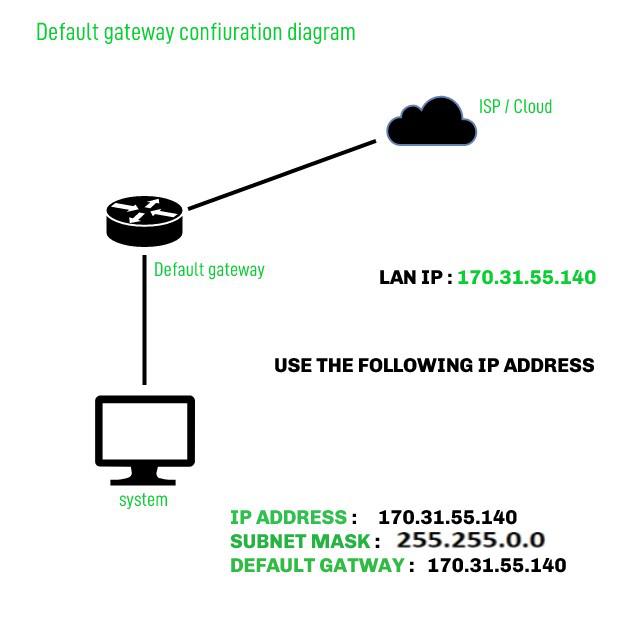
To the average user, a network is simply “the Wi-Fi,” but to a technologist, a network is a structured map of nodes and paths. The default gateway serves as the critical exit point—the “front door” of your local network—that allows your devices to communicate with the vast expanse of the internet. Without it, your computer would be an island, capable of talking to other devices in your home or office but utterly cut off from the rest of the world. Understanding the default gateway is not just a matter of technical curiosity; it is essential for troubleshooting connectivity, optimizing network performance, and ensuring digital security.
The Anatomy of a Default Gateway
To understand what a default gateway is, one must first understand the concept of a Local Area Network (LAN) versus a Wide Area Network (WAN). Most homes and businesses operate on a LAN. Within this local bubble, devices like laptops, printers, and smart thermostats can see and talk to each other directly using their internal IP addresses. However, these internal addresses are not recognized by the global internet.
How Data Moves Across Networks
When you request a website, your device first checks if the destination is local. If the IP address you are trying to reach is not within your local subnet, your device realizes it doesn’t know the direct path to that destination. This is where the “default” logic comes into play. The device essentially says, “I don’t know where this packet goes, so I will send it to the default destination.” That destination is the default gateway.
The Role of the Router
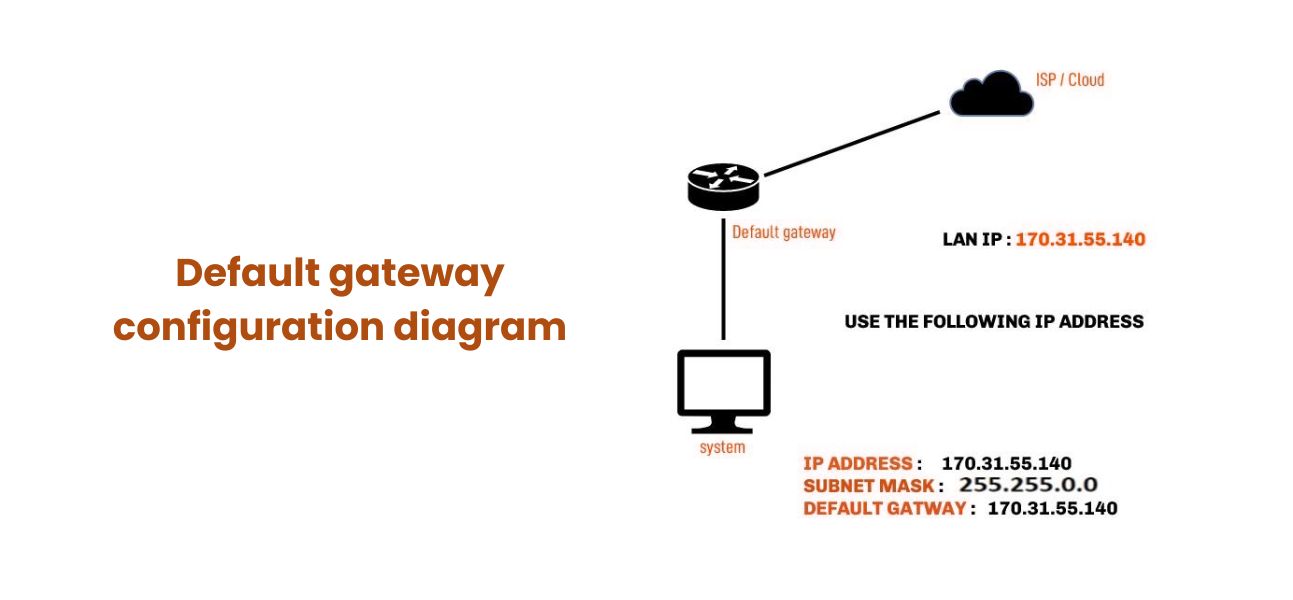
In most residential and small business setups, the router serves as the default gateway. It is a dual-homed device, meaning it has one foot in your private network and one foot in the public internet. It possesses two IP addresses: a private one (usually something like 192.168.1.1) that your local devices recognize as the gateway, and a public one assigned by your Internet Service Provider (ISP). The gateway’s job is to act as a translator and a traffic controller, ensuring that packets intended for the outside world are formatted correctly and sent on their way.
Distinguishing Between Local and Public Traffic
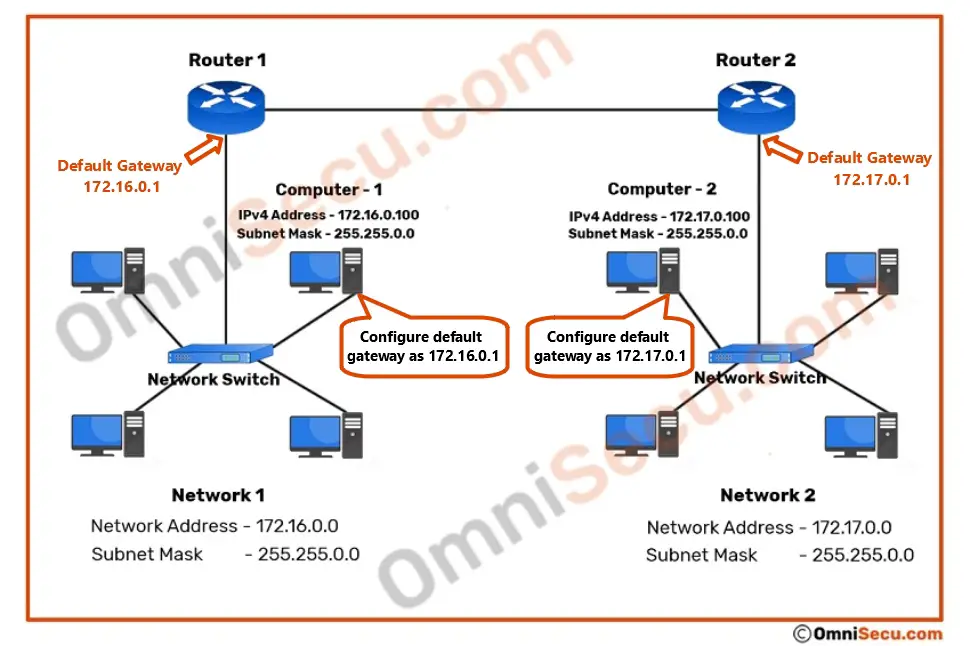
The default gateway utilizes a “Subnet Mask” to determine whether a destination is local or remote. If your computer’s IP is 192.168.1.15 and you want to send a file to 192.168.1.20, the subnet mask tells the computer that this is a local “conversation.” The data stays within the switch or Wi-Fi signal. However, if you try to reach a server at 142.250.190.46 (Google), the computer sees this is outside its subnet and immediately forwards the data to the default gateway address.
How the Default Gateway Operates
The technical operation of a gateway involves more than just passing data; it involves sophisticated routing logic and address translation. It is the bridge that converts your private digital identity into a public one and back again.
IP Addressing and the Gateway’s Identity
Every device on a TCP/IP network must be configured with a default gateway address if it intends to communicate beyond its local segment. In a typical configuration via DHCP (Dynamic Host Configuration Protocol), your router automatically assigns this address to your device the moment you connect to the Wi-Fi. This ensures that the device knows exactly where to send “out-of-network” traffic without manual user intervention.
The Routing Table Mechanism
Inside every router (the gateway) is a routing table. Think of this as a sophisticated map. While your PC only knows its “default” path, the gateway knows many paths. When the gateway receives a packet from your laptop, it inspects the destination IP header. It then consults its routing table to determine which “hop” comes next. If the gateway doesn’t have a specific route for that IP, it sends it to its own “upstream” gateway—usually a larger router managed by your ISP. This chain continues until the data reaches its destination.
NAT (Network Address Translation)
One of the most critical functions performed at the gateway level is Network Address Translation (NAT). Because the world has run out of IPv4 addresses, thousands of devices might share a single public IP address provided by an ISP. The default gateway tracks every outgoing request from your local devices. When a response comes back from the internet, the gateway uses NAT to remember which local device (e.g., your smartphone vs. your roommate’s laptop) requested that specific piece of data, ensuring the right information gets to the right screen.
Finding and Configuring Your Default Gateway
There are many scenarios where you might need to identify your gateway’s IP address. Perhaps you need to log into your router’s web interface to change your Wi-Fi password, or you are setting up a static IP for a gaming server or a NAS (Network Attached Storage) device.
Locating Your Gateway on Windows and macOS
For Windows users, the quickest way to find the gateway is through the Command Prompt. By typing ipconfig and hitting Enter, you will see a list of network adapters. Look for the “Default Gateway” line under your active connection. On a Mac, the process is equally simple via the Terminal using the command netstat -nr | grep default, or more visually through System Settings > Network > [Your Connection] > Details > TCP/IP. In both cases, the address is typically the first usable IP in the range, such as 192.168.0.1 or 10.0.0.1.
Identifying Gateway IP on Mobile Devices
On an iPhone or Android device, the gateway information is nested within the Wi-Fi settings. By tapping the “i” or the gear icon next to your connected network, you can view the “Router” or “Gateway” IP. This is often the first step in troubleshooting a “Connected, no internet” error, as a missing gateway address indicates a failure in the DHCP process.
When and Why to Change Gateway Settings
In advanced enterprise environments, a network might have multiple gateways for redundancy. Technicians might configure “Static Routes” to tell a computer to use one gateway for certain traffic (like a local database) and another gateway for general internet traffic. Additionally, power users often change their gateway settings to point to a VPN (Virtual Private Network) appliance, ensuring that all traffic leaving the local network is encrypted before it even hits the ISP.
Troubleshooting and Security Considerations
Because the default gateway is the single point of failure for internet access, it is a frequent focus of both troubleshooting and cybersecurity efforts. If the gateway goes down, the entire network’s external communication ceases.
Common Gateway Failures and Fixes
The most common error users encounter is “Default Gateway is not available.” This is frequently caused by outdated network adapter drivers, conflicting IP addresses, or a router that needs a power cycle. In more complex scenarios, it could be a “Double NAT” issue, where two routers are daisy-chained, creating confusion about which device is the true gateway to the internet. Resetting the TCP/IP stack or ensuring only one device handles NAT often resolves these connectivity bottlenecks.
Security Risks: Gateway Spoofing and MITM Attacks
From a security perspective, the gateway is a high-value target. In a “Man-in-the-Middle” (MITM) attack, a malicious actor might use “ARP Spoofing” to trick your computer into thinking their device is the default gateway. If successful, all your outgoing traffic—passwords, emails, and browsing history—flows through the attacker’s machine before being passed to the real router. This is why securing the gateway with strong administrative passwords and utilizing features like “ARP Inspection” on managed switches is vital for corporate digital security.
The Future of Gateways in an IPv6 World
As the tech world transitions from IPv4 to IPv6, the concept of the default gateway is evolving. IPv6 uses “Neighbor Discovery Protocol” (NDP) instead of ARP and often utilizes “Link-Local” addresses for gateways. While the underlying logic remains the same—finding a way out of the local network—the automation and efficiency of these gateways are increasing. Modern gateways are also becoming “smarter,” integrating AI-driven threat detection and traffic shaping to prioritize bandwidth for critical applications like VoIP or remote surgery.
In conclusion, the default gateway is much more than a string of numbers in a settings menu. It is the tactical bridge that enables the global exchange of information. By understanding how it functions, how to locate it, and how to secure it, users and IT professionals alike can ensure more stable, faster, and safer digital experiences. Whether you are a casual surfer or a tech enthusiast, the gateway is your primary link to the digital universe.
aViewFromTheCave is a participant in the Amazon Services LLC Associates Program, an affiliate advertising program designed to provide a means for sites to earn advertising fees by advertising and linking to Amazon.com. Amazon, the Amazon logo, AmazonSupply, and the AmazonSupply logo are trademarks of Amazon.com, Inc. or its affiliates. As an Amazon Associate we earn affiliate commissions from qualifying purchases.