
The ubiquitous nature of WhatsApp has made it an indispensable tool for communication for billions worldwide. From casual chats with friends and family to crucial business discussions, it’s woven into the fabric of our daily digital interactions. But what happens when the urge to declutter, to regain privacy, or simply to explore alternatives leads you to consider deleting the app? This seemingly simple action can have a cascade of effects, impacting your connections, your data, and even your digital footprint.
Understanding the consequences of deleting WhatsApp requires delving into several key areas, primarily revolving around your digital communication channels, the fate of your data, and the potential ripple effects on your personal and professional life.
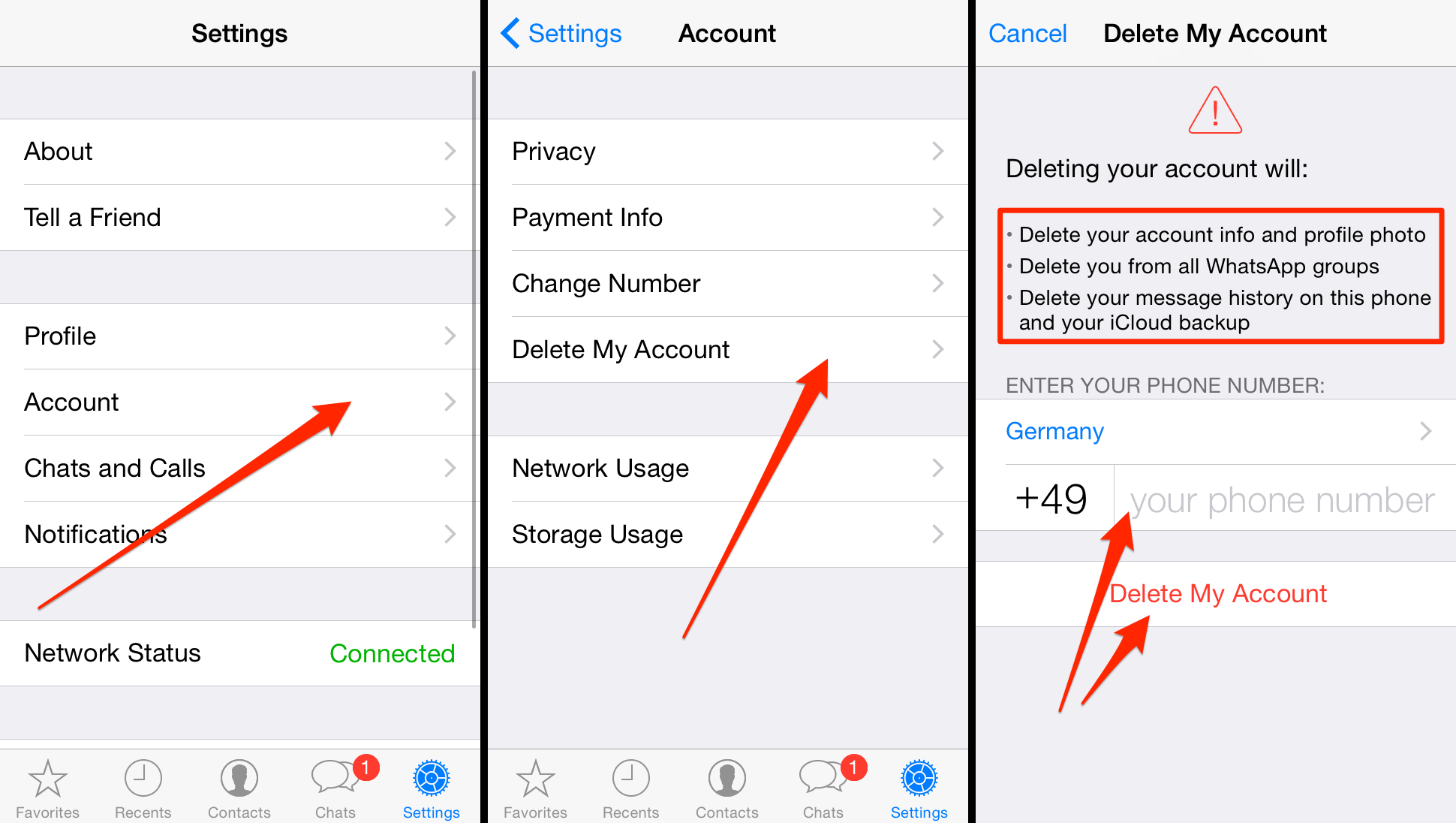
Deactivating Your Account: The Immediate Aftermath
When you decide to remove WhatsApp from your device, the process typically involves two distinct stages: uninstalling the app and then deactivating your account. While uninstalling simply removes the application from your phone, deactivating your account is the more significant step that triggers a series of irreversible changes.
Losing Access to Your Chats and Contacts
The most immediate and perhaps most impactful consequence of deactivating your WhatsApp account is the permanent loss of access to all your chat history. This includes messages, photos, videos, voice notes, and documents shared within your conversations. Unlike some platforms where data might be retrievable if you log back in, WhatsApp’s account deactivation is final. Your message history is not stored on their servers for later retrieval; it resides locally on your device and is tied to your account.
Furthermore, your profile information – your name, status, and profile picture – will be removed from WhatsApp. While your contacts will still have your phone number, they will no longer see you as a WhatsApp user. If you had saved their contact information on your phone, they will remain there, but their WhatsApp status and the ability to message them directly through the app will be gone.
The Fate of Your Data: Backups and Beyond
A crucial aspect to consider before deactivating is your backup strategy. WhatsApp offers the option to back up your chat history to cloud storage services like Google Drive (for Android) or iCloud (for iOS). These backups are your lifeline to recovering your conversations if you ever decide to reinstall WhatsApp in the future.
What Happens to Existing Backups?
- If you don’t manually delete your cloud backup before deactivating your account: Your backup will remain stored on Google Drive or iCloud. This means that if you decide to reinstall WhatsApp on the same phone number and using the same Google or Apple account, you will be prompted to restore your chat history from the backup.
- If you delete your cloud backup before deactivating your account: This data is lost permanently. There will be no way to recover your chat history.
It’s vital to understand that the backup itself doesn’t keep your account active. It’s merely a snapshot of your data. Deactivating your account is what severs your connection to the WhatsApp network and removes your profile from the service.
Your Number’s Status on WhatsApp
When you deactivate your account, your phone number is essentially removed from the WhatsApp user database. This has a few implications:
- Your number will not be available for anyone else to register on WhatsApp for 90 days. This is a security measure to prevent someone from impersonating you if you were to reactivate your account later.
- After 90 days, your number can be registered by another WhatsApp user. This means that if you decide to return to WhatsApp after this period, you might be taking over a number that was previously associated with another WhatsApp account.
Beyond the App: The Broader Digital and Social Repercussions
Deleting WhatsApp is not just about the app itself; it’s about how we communicate and interact in our digital and social lives. The ripple effects can be far-reaching, impacting how you stay connected, manage your information, and even how you perceive your digital presence.
Exploring Alternative Communication Channels

The act of deleting WhatsApp often stems from a desire to diversify communication methods or to move to platforms that align better with your privacy concerns or feature preferences. This can lead to the adoption of:
- Signal: Renowned for its end-to-end encryption and focus on privacy, Signal is a popular choice for those seeking a more secure messaging experience.
- Telegram: Offering a wide range of features, including large group chats, channels, and robust cloud storage for messages, Telegram is another strong contender.
- Messages (iMessage for Apple users): For users within the Apple ecosystem, iMessage provides a seamless and integrated messaging experience.
- Other regional or niche messaging apps: Depending on your location and social circles, other apps might be more prevalent.
The transition to new platforms requires informing your contacts of your new preferred method of communication. This can be an exercise in personal branding, where you curate how you present yourself and your communication preferences to your network. It can also involve a degree of marketing effort on your part to encourage your contacts to join you on the new platform.
Impact on Personal and Professional Networks
For many, WhatsApp has become a primary conduit for maintaining relationships. Deleting the app can feel like severing ties, especially if your close friends, family, or colleagues are solely relying on WhatsApp for communication.
- Personal Relationships: Keeping in touch with loved ones might require more proactive effort. You might need to rely on SMS, email, or other social media platforms. This can sometimes lead to a feeling of disconnection if others are not as proactive in adopting alternative communication methods.
- Professional Communication: In the business world, WhatsApp has carved out a niche for quick client communication, team updates, and informal project discussions. Deleting the app can necessitate a shift to more formal channels like email, Slack, or dedicated business communication platforms. This transition can impact workflow efficiency and require a re-evaluation of your professional brand’s communication strategy. It’s crucial to ensure that your clients and colleagues are aware of your preferred business communication channels to avoid missed opportunities or miscommunication.
The Digital Footprint and Data Management
While you might be deleting the WhatsApp app, it’s important to consider your overall digital footprint. The data you’ve shared on WhatsApp, even if it’s removed from your account, might have been saved by your contacts.
- Data Ownership and Privacy: Understanding who owns your data and how it’s used is a fundamental aspect of digital security. While WhatsApp’s privacy policy is designed to protect user data on its servers, once messages are delivered, they are essentially in the hands of the recipient. Deleting your account doesn’t magically erase the copies of messages or media that your contacts may have saved.
- Reclaiming Digital Space: For some, deleting the app is about reclaiming digital space and reducing the constant influx of notifications. This can lead to improved productivity and a more mindful approach to technology use. It’s an act of digital hygiene, similar to decluttering your physical living space.
Reinstalling WhatsApp: A Second Chance?
The decision to delete WhatsApp isn’t always permanent. For many, it’s a temporary break, a way to reset their digital habits. Fortunately, WhatsApp allows for account reactivation.
The Process of Reactivation
If you’ve deactivated your account and wish to return, the process is relatively straightforward:
- Install the WhatsApp app on your smartphone.
- Verify your phone number. You’ll receive an SMS with a verification code.
- Restore your chat history if you have a backup available. WhatsApp will detect the backup on your connected cloud storage and prompt you to restore it.
Important Considerations for Reinstallation:
- Time Sensitivity: If your account was deactivated for more than 30 days, your chat history may have been deleted from WhatsApp’s servers. However, if you have a cloud backup, you can still restore it.
- New Users: If your phone number was registered by another WhatsApp user after your account was deactivated for over 90 days, you will not be able to reclaim your old account and its history. You would have to start fresh with a new account.

The Decision to Return: Re-evaluating Your Needs
The decision to reinstall WhatsApp often comes after re-evaluating your communication needs and considering whether the alternatives you explored truly met your requirements. It’s an opportunity to establish new boundaries and habits for using the app more intentionally. This could involve:
- Managing notifications: Limiting which contacts can notify you or setting quiet hours.
- Utilizing features like “disappearing messages”: For more ephemeral conversations.
- Being more selective about group memberships: To avoid overwhelming chat feeds.
Ultimately, the act of deleting and potentially reinstalling WhatsApp is a personal journey through your digital communication landscape. It highlights the central role such apps play in our lives and encourages a thoughtful approach to how we stay connected, manage our data, and maintain our digital presence. By understanding the implications, you can make informed decisions that best serve your personal and professional goals in an increasingly interconnected world.
aViewFromTheCave is a participant in the Amazon Services LLC Associates Program, an affiliate advertising program designed to provide a means for sites to earn advertising fees by advertising and linking to Amazon.com. Amazon, the Amazon logo, AmazonSupply, and the AmazonSupply logo are trademarks of Amazon.com, Inc. or its affiliates. As an Amazon Associate we earn affiliate commissions from qualifying purchases.