
In an era where digital communication is instantaneous and constant, the ability to manage your boundaries is essential. WhatsApp, the world’s most popular messaging platform, provides users with granular control over who can contact them. Blocking a contact is the ultimate digital firewall—a definitive action that stops an individual from reaching you within the app. However, because WhatsApp prioritizes user privacy, it does not send a notification to the person you have blocked. This leads to a complex web of behavioral cues that the blocked party may notice over time. Understanding the technical mechanics of this feature is vital for anyone looking to curate their digital environment.
The Immediate Technical Implications of Blocking
When you tap that “Block” button, you initiate a series of backend protocols designed to restrict the flow of data between your account and the other party. The action is immediate, but its effects manifest in stages, creating a quiet buffer between you and the contact.
Delivery Status and Message Routing
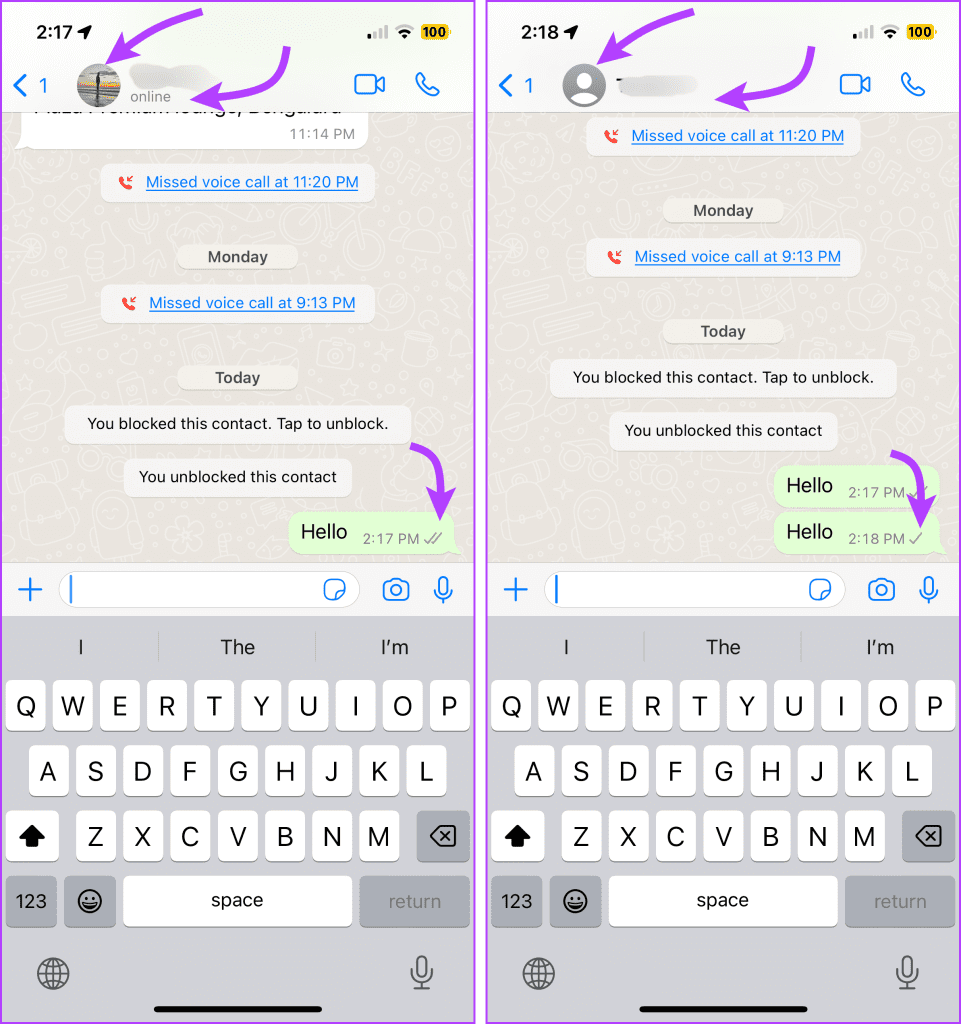
The most common way people realize they have been blocked is through the message delivery indicators. Under normal circumstances, a single grey checkmark means the message was sent, and a double grey checkmark confirms delivery to the recipient’s device. When you block someone, any message they attempt to send you will remain stuck with a single grey checkmark indefinitely. The WhatsApp servers receive the message, but they are instructed not to relay it to your device. Consequently, the sender sees the message as “sent” but never “delivered.” This serves as a significant indicator for the blocked user, although it is not definitive proof, as network connectivity issues or a powered-down phone could produce the same result.
Profile Visibility and Status Updates
Blocking triggers a change in the visibility of your personal metadata. Once blocked, the other party will no longer be able to see your profile picture. In its place, they will see the default grey avatar. Furthermore, your “About” section—often used for short text bios—will disappear from their view. Most importantly, your “Last Seen” and “Online” status updates will be hidden. Even if you are actively using the app, the blocked contact will see a blank space where your status should be. These changes are intentional privacy measures designed to prevent the blocked party from tracking your activity or gauging your availability.
Group Chat Dynamics
One of the most frequently misunderstood aspects of the blocking feature is how it functions within group settings. Blocking someone on WhatsApp does not remove them from a group chat you both share, nor does it remove you. You will still see messages from the blocked user within the group, and they will see yours. However, the block remains effective for private, one-on-one interactions. This is a critical distinction: the block is a tool for individual communication, not a mechanism for total disconnection in shared digital spaces. If you find yourself in a group with someone you have blocked, be aware that your participation remains visible to them.
The Subtle Behavioral Cues
Because WhatsApp avoids sending a “You have been blocked” alert, users are left to interpret the silence. Over days or weeks, the cumulative effect of these missing signals often leads the blocked party to conclude that they have been restricted.
The “Call” Failure
Attempts to initiate a WhatsApp voice or video call with a blocked contact will fail immediately. Unlike a normal call where the phone rings indefinitely or goes to voicemail, a call placed to a person who has blocked you will simply show “Calling” for a fleeting moment before ending or failing to connect. This is perhaps the most reliable technical test for a blocked status, as it behaves differently than a device that is simply offline or out of range.

Attempting to Add to Groups
Another method some users employ to test their status is attempting to add the contact to a new group. If you have blocked a user, they will receive an error message when they attempt to add you to a group chat. The system will inform them that they do not have the authorization to add you, which serves as a definitive sign that their permission to interact with your account has been revoked.
Privacy, Security, and Managing Digital Boundaries
Blocking is not merely a social tool; it is a fundamental component of your digital security. By restricting access to your personal data—specifically your profile photo and activity status—you reduce your digital footprint and protect your information from potential bad actors or individuals who might misuse your data for social engineering.
Understanding the Difference Between Blocking and Deleting
It is important to distinguish between blocking and deleting a contact. Deleting a contact from your phone’s address book removes them from your WhatsApp contact list, but it does not stop them from messaging you if they have your phone number. Blocking, conversely, is a server-side command that prevents the incoming communication entirely. If you wish to stop someone from reaching you, deleting is insufficient; blocking is the necessary step to ensure the communication channel is severed.
When to Utilize the Block Feature
The decision to block someone should be based on your comfort and safety. Whether it is a persistent spammer, an individual harassing you, or simply a social boundary you wish to maintain, the feature exists to protect your mental well-being. Once blocked, the user cannot call, message, or view your status updates. If you ever decide to reverse this, you can unblock the contact via your Privacy settings in the Account menu. Upon unblocking, you will not receive the messages that were sent while the block was active; those messages are permanently purged from the server as they were never delivered to your device.
Best Practices for Digital Hygiene
Maintaining a healthy WhatsApp experience requires proactive management of your privacy settings. Beyond blocking, there are several auxiliary settings that complement your security posture.
Customizing Privacy Settings
Before resorting to a permanent block, consider adjusting your “Privacy” settings to restrict who can see your “Last Seen,” “Profile Photo,” and “About” information to “My Contacts” or “Nobody.” This creates a tiered approach to security, allowing you to filter visibility without necessarily cutting off communication entirely. This is often an effective strategy for dealing with acquaintances or professional contacts with whom you prefer to maintain a lower level of intimacy.
The Role of Reporting
If you are blocking a user due to harassment, scams, or unsolicited content, WhatsApp provides a “Report” function alongside the block option. Reporting shares the last five messages from the interaction with WhatsApp’s moderation team, allowing them to take action against accounts that violate the platform’s terms of service. This is a critical step in contributing to the broader safety of the digital ecosystem. By reporting abusive behavior, you help the platform identify malicious actors, potentially saving other users from similar experiences.

Maintaining Control
The power to block is a fundamental right within the digital space. Users should feel empowered to curate their WhatsApp experience to reflect their personal comfort levels. Because the app does not alert the other party, you can manage your boundaries discreetly and effectively. Whether you are seeking to minimize distractions, protect your privacy, or remove toxic interactions from your life, the blocking feature is a robust, well-integrated component of the software designed to give the power back to the user. By understanding exactly how these features work, you can navigate the complexities of digital communication with confidence and clarity.
aViewFromTheCave is a participant in the Amazon Services LLC Associates Program, an affiliate advertising program designed to provide a means for sites to earn advertising fees by advertising and linking to Amazon.com. Amazon, the Amazon logo, AmazonSupply, and the AmazonSupply logo are trademarks of Amazon.com, Inc. or its affiliates. As an Amazon Associate we earn affiliate commissions from qualifying purchases.