
For over a decade, GeForce Experience served as the primary gateway for millions of PC gamers using NVIDIA hardware. It was the hub for driver updates, game optimizations, and the legendary ShadowPlay recording software. However, in recent years, the software began to show its age. Users complained about the mandatory login requirements, a sluggish user interface, and the jarring disconnect between the modern GeForce Experience and the ancient-looking NVIDIA Control Panel.
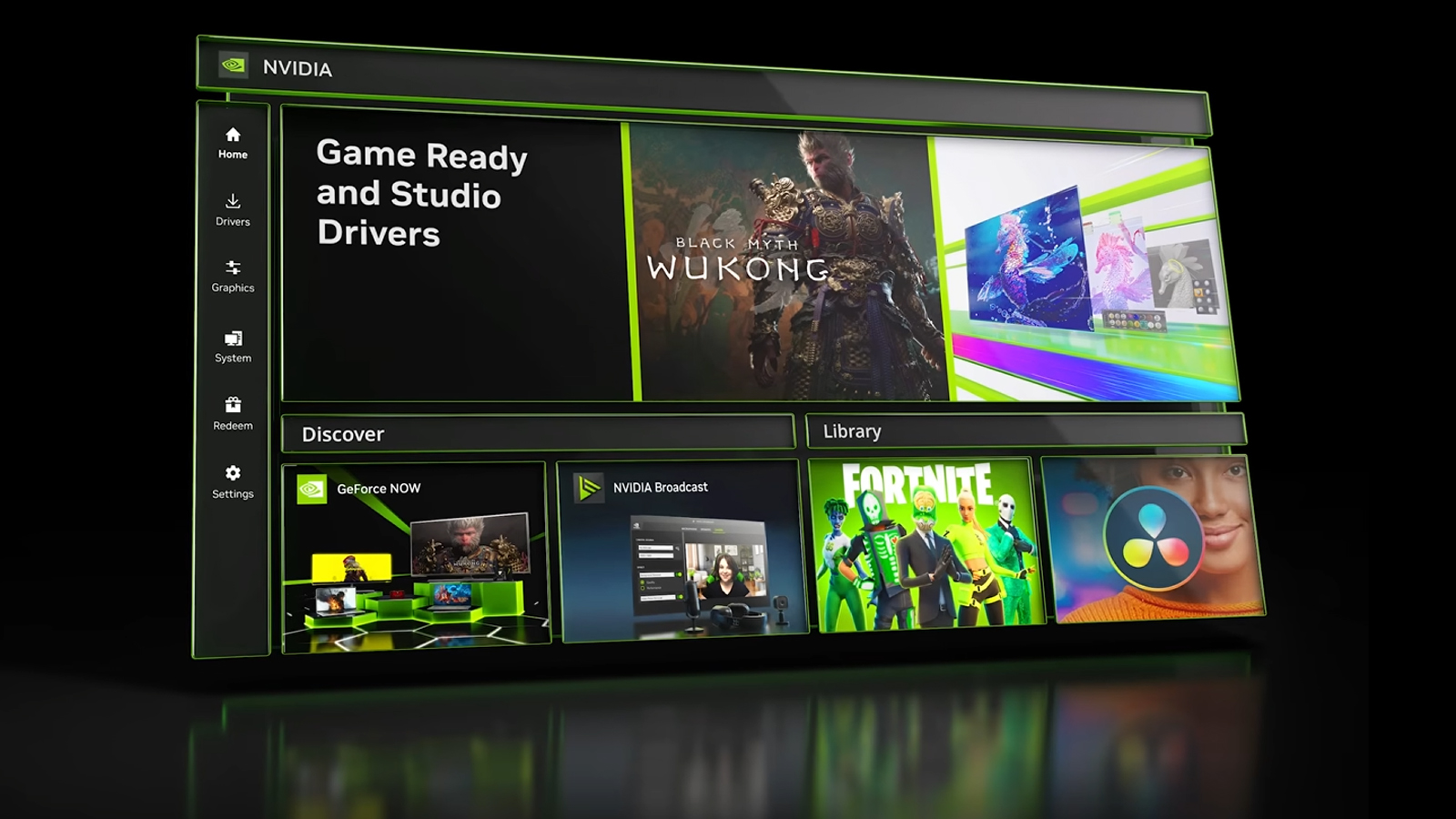
If you have noticed a shift in how NVIDIA handles its software suite, you are witnessing the beginning of the end for GeForce Experience. It is being replaced by the unified “NVIDIA App,” a streamlined, modernized, and significantly faster application designed to consolidate all NVIDIA tools into a single ecosystem. This transition marks a pivotal moment in PC gaming software, addressing years of user feedback while introducing cutting-edge AI features.

The Evolution of NVIDIA’s Software Suite: Why Change Was Necessary
To understand what happened to GeForce Experience, one must first look at the fragmented state of NVIDIA’s software ecosystem over the last several years. Previously, users were forced to navigate three distinct interfaces to manage their GPUs: the NVIDIA Control Panel (for low-level display and 3D settings), GeForce Experience (for drivers and game features), and NVIDIA Broadcast (for AI-powered audio and video enhancements).
The NVIDIA Control Panel, while functional, looks like a relic of the Windows XP era. It is slow to load and lacks the responsiveness expected by modern users. Conversely, GeForce Experience offered a modern aesthetic but was bogged down by a mandatory account login—a move that was widely criticized by the community for being unnecessary and invasive.
Furthermore, GeForce Experience was built on aging architecture. As the feature set grew to include things like Freestyle filters, Ansel photography, and performance monitoring, the application became increasingly bloated. The “NVIDIA App” is the solution to this technical debt. By rebuilding the software from the ground up, NVIDIA has focused on speed, efficiency, and the unification of legacy tools.
The Problem with Mandatory Logins
One of the most significant changes in this transition is the removal of the mandatory login requirement. For years, GeForce Experience users were frustrated by the fact that they could not download a simple driver update without creating an account and staying signed in. The new NVIDIA App removes this barrier. While you can still sign in to claim rewards or access certain cloud features, the core functionality—driver updates, game optimization, and recording—is now accessible offline and without an account.
Performance and Responsiveness
The new architecture of the NVIDIA App is significantly more efficient than its predecessor. According to technical benchmarks, the new app installs in half the time and provides a UI that is 50% more responsive. For gamers who want to jump into a match without waiting for their software suite to “phone home” or load heavy assets, this speed increase is the most tangible benefit of the transition.
The Successor: Introducing the NVIDIA App
The NVIDIA App is currently in a transitional phase, functioning as a “Beta” that is rapidly absorbing the features of GeForce Experience. If you have been looking for GeForce Experience and found a prompt to download the NVIDIA App instead, this is why. NVIDIA is moving toward a single, cohesive interface that handles everything from driver management to AI-powered image enhancement.
A Unified Control Center
The primary goal of the NVIDIA App is to merge the “GeForce Experience” side of things with the “NVIDIA Control Panel.” While the transition is not yet 100% complete, the new app already features a “Graphics” tab that allows users to adjust both global and per-game settings. This replaces the old method of having to open the Control Panel to change V-Sync or Max Frame Rate and then opening GeForce Experience to optimize graphics quality. Everything is now under one roof.
Redesigned In-Game Overlay
The in-game overlay has also seen a massive overhaul. The old GeForce Experience overlay was functional but somewhat intrusive. The new version is cleaner and more informative. It provides real-time performance monitoring with a much lower overhead on system resources. Users can customize the statistics they see—such as FPS, latency, GPU utilization, and temperature—without needing third-party tools like MSI Afterburner or Rivatuner.
Enhanced Driver Information
One of the most useful features of the new app is the expanded “Drivers” section. Instead of just a “Download” button, the NVIDIA App provides a detailed breakdown of what is included in each driver update. It highlights which new games are supported and summarizes the bug fixes included in the release. This transparency helps users decide whether an update is necessary for their specific library of games.

New Features and AI Integration
The shift away from GeForce Experience isn’t just about cleaning up the interface; it is about introducing new capabilities that were not possible on the old platform. The NVIDIA App leverages the power of Tensor Cores found in RTX GPUs to provide AI-driven enhancements that redefine the visual experience of gaming.
RTX Dynamic HDR
Perhaps the most impressive feature introduced with the new software is RTX Dynamic HDR. Many PC games, especially older titles, do not natively support High Dynamic Range (HDR). Using the power of generative AI, the NVIDIA App can convert Standard Dynamic Range (SDR) games into HDR in real-time. This allows gamers with HDR-capable monitors to experience deeper blacks and more vibrant colors in thousands of legacy titles that were never originally designed for it.
RTX Digital Vibrance
Another AI-powered addition is RTX Digital Vibrance. While “Digital Vibrance” has been a setting in the NVIDIA Control Panel for years, it was a blunt instrument that increased color saturation across the entire screen, often leading to crushed detail or unnatural skin tones. The AI-powered version is more sophisticated; it enhances color clarity and “pop” while maintaining color accuracy and ensuring that the image doesn’t look over-processed.
AV1 Support and ShadowPlay Improvements
For content creators, the transition brings significant upgrades to recording. The NVIDIA App now supports the AV1 codec for 4K 120fps recording. AV1 is 40% more efficient than the traditional H.264 codec, meaning you can record higher-quality video at lower bitrates, saving significant disk space without sacrificing visual fidelity. This is a massive leap forward for streamers and YouTubers who want the best possible quality for their gameplay captures.
What Was Left Behind? (Deprecated Features)
In the process of streamlining the software, NVIDIA has decided to remove several features that were part of GeForce Experience but saw low usage or were redundant. Part of “what happened” to GeForce Experience involves a purposeful pruning of features to ensure the new app remains lean.
Twitch and YouTube Broadcasting
Surprisingly, NVIDIA has removed the ability to broadcast directly to Twitch and YouTube from the in-game overlay. While this might seem like a step backward, the reality is that the vast majority of streamers use dedicated software like OBS (Open Broadcaster Software). By removing these features, NVIDIA has reduced the complexity of the app and focused on the core recording and “Instant Replay” features that are most popular among its user base.
360-Degree Photography and Ansel Changes
NVIDIA Ansel, the advanced in-game photography tool, has also been reworked. While many filter and capture features remain, some of the more niche options—like 360-degree stereo captures—have been scaled back. The focus has shifted toward “Freestyle” filters, which are more widely used for adjusting the look and feel of a game in real-time.
Photo Grid and Legacy Social Features
Certain social sharing features and the “Photo Grid” interface have been simplified. NVIDIA is moving away from trying to be a social platform for gamers and is instead focusing on being a high-performance utility. Most users now prefer to share their captures via Discord, X, or Reddit manually, making the built-in social uploading tools of the old GeForce Experience unnecessary.
The Future: A Complete Unification
The transition from GeForce Experience to the NVIDIA App is currently in its final stages of beta testing. For now, users can choose to stick with the old software or move to the new one. However, the roadmap is clear: GeForce Experience will eventually be retired entirely.
Migrating the Remaining Control Panel Features
The final hurdle for the NVIDIA App is the complete migration of all “NVIDIA Control Panel” settings. While basic 3D settings and display options have been moved over, more granular controls—such as workstation settings, multi-monitor management, and G-Sync configuration—are still being integrated. Once these are fully ported, the legacy Control Panel will be phased out alongside GeForce Experience.
A Faster Development Cycle
By unifying the codebase, NVIDIA can now push updates more frequently. In the past, updates to the Control Panel were rare because of its fragile legacy code. Now, as part of a modern app ecosystem, we can expect monthly updates that bring new AI filters, better performance optimizations, and tighter integration with the latest GPU architectures.
Conclusion
What happened to GeForce Experience is not a disappearance, but an evolution. It is the story of a software suite growing up. By shedding the mandatory logins, the sluggish UI, and the fragmented menus, NVIDIA is providing a tool that finally matches the power of the hardware it supports. Whether you are a competitive gamer looking for the lowest possible system latency or a creator wanting to utilize AV1 encoding, the transition to the NVIDIA App represents a major upgrade in the PC gaming experience. If you haven’t made the switch yet, the new era of NVIDIA software is ready, and it is faster, cleaner, and more powerful than GeForce Experience ever was.
aViewFromTheCave is a participant in the Amazon Services LLC Associates Program, an affiliate advertising program designed to provide a means for sites to earn advertising fees by advertising and linking to Amazon.com. Amazon, the Amazon logo, AmazonSupply, and the AmazonSupply logo are trademarks of Amazon.com, Inc. or its affiliates. As an Amazon Associate we earn affiliate commissions from qualifying purchases.