
The world of Minecraft is a vast, pixelated sandbox offering endless possibilities for creation and exploration. Beyond the survival aspects and aesthetic building, a sophisticated layer of engineering exists, powered by the ingenious Redstone mechanics. At the heart of many complex contraptions lies a component that often puzzles newcomers: the Redstone Comparator. This seemingly simple block, with its distinctive arrow and two distinct modes, is a cornerstone of advanced Redstone circuitry, enabling players to craft intricate automated systems, logic gates, and dynamic mechanisms. Understanding its function is crucial for any aspiring Redstone engineer looking to elevate their creations from basic structures to intelligent, responsive machines.

The Fundamental Mechanics: Signal Strength and Comparison
At its core, the Redstone Comparator is a device that manipulates and analyzes Redstone signals. Unlike a standard Redstone Torch or Repeater, which primarily transmit or amplify signals, the Comparator introduces the concept of signal strength. Redstone dust, when powered, transmits a signal that has a strength value, ranging from 0 to 15. This strength dictates how far the signal can travel and how effectively it can activate other Redstone components.
Signal Strength Propagation and Attenuation
Redstone dust itself experiences signal attenuation. Each block of Redstone dust reduces the signal strength by one. This means a signal originating from a strong power source, like a fully powered Redstone block or a lever at maximum strength, will gradually weaken as it travels through a long trail of dust. A Comparator is keenly aware of this diminishing power. It can read the incoming signal strength and either output a signal of equal strength or a modified one, depending on its configuration and the surrounding environment. This ability to measure and transmit varying signal strengths is fundamental to building more nuanced Redstone circuits.
The “Subtract” Mode: Comparing Input Strengths
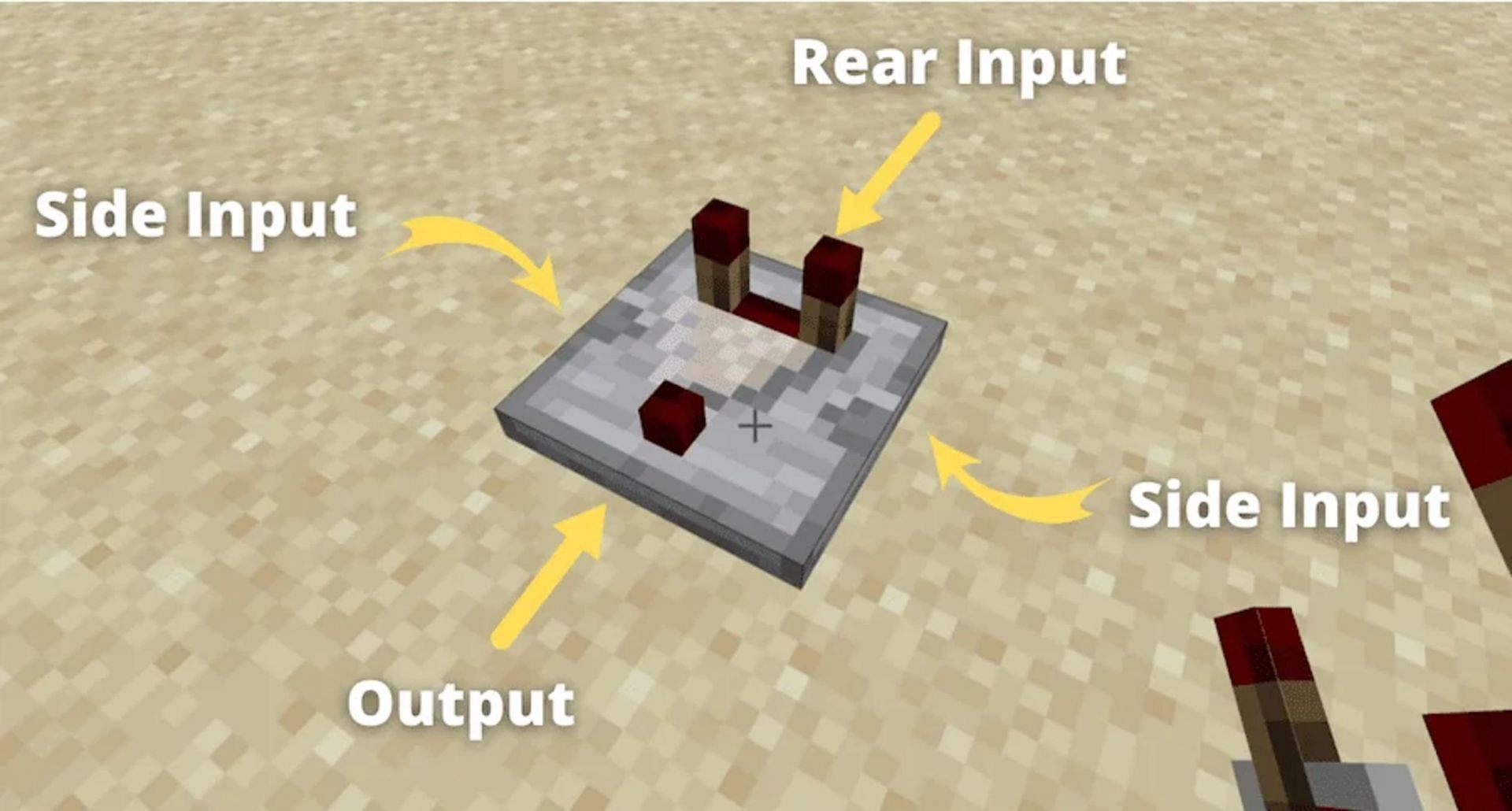
The primary function of the Redstone Comparator lies in its ability to compare signal strengths from two distinct inputs. When placed and configured in its default “subtract” mode (indicated by the arrow pointing away from the block), it receives a signal from two sources:
- The back input: This is the main input, where the primary Redstone signal is received.
- The side input: This is a secondary input, positioned on the side of the Comparator.
In subtract mode, the Comparator outputs a Redstone signal whose strength is the difference between the back input signal strength and the side input signal strength. However, there’s a crucial caveat: the side input signal strength cannot exceed the back input signal strength. If the side input is stronger than the back input, the Comparator will simply output a signal strength of 0.
Example: If the back input has a signal strength of 10 and the side input has a signal strength of 3, the Comparator will output a signal of strength 7 (10 – 3 = 7). However, if the back input has a strength of 5 and the side input has a strength of 8, the output will be 0 because the side input is stronger.
This subtraction mechanism opens up a world of possibilities for controlling systems based on relative power levels. For instance, you could have a large farm with dispensers that dispense water based on how full the crops are. As crops grow, they fill a comparator’s side input with a stronger signal, and when they are ready, they reduce the signal strength to the back input, causing the comparator to output a signal, triggering the dispensers.
The “Compare” Mode: Direct Signal Transmission
By right-clicking on a Redstone Comparator, its mode can be toggled. When the torch on the side of the Comparator is lit, it is in “compare” mode. In this mode, the Comparator functions more like a standard Redstone Repeater, but with a twist.
In compare mode, the Comparator’s output signal strength is determined by the signal strength of its back input. It essentially copies the signal strength from the back input. The side input in this mode has a different, yet equally powerful, function: it acts as an “enable” or “disable” switch for the output. If the side input receives any Redstone power, the Comparator will then output the signal from its back input. If the side input is unpowered, the Comparator will output a signal strength of 0, effectively shutting off the signal from the back input.
Example: If the back input has a signal strength of 12 and the side input is unpowered, the output is 0. If the back input has a signal strength of 12 and the side input receives even a weak signal of strength 1, the Comparator will output a signal of strength 12.
This compare mode is invaluable for creating complex logic gates and enabling or disabling entire sections of a Redstone circuit based on specific conditions. It allows for intricate control, where one part of a system can act as a master switch for another.

Advanced Applications: Unlocking Intricate Systems
The true power of the Redstone Comparator is revealed when we move beyond basic comparisons and explore its integration into more complex Redstone contraptions. Its ability to read and manipulate signal strengths makes it indispensable for building automated systems, advanced farms, and intricate Redstone logic.
Container and Block Interaction: Sensing Contents
One of the most unique and powerful features of the Redstone Comparator is its ability to detect the contents of containers and the state of certain blocks. This interaction is particularly fascinating as it allows for automation based on inventory levels or block properties.
- Chests, Furnaces, and Hoppers: When a Redstone Comparator is placed facing a chest, furnace, or hopper, it will output a Redstone signal whose strength is proportional to the fullness of the container. A completely empty container will produce a signal strength of 0, while a full container will produce a signal strength of 15. Intermediate fullness levels result in intermediate signal strengths. This is the bedrock of automated sorting systems, where items are automatically moved to their designated chests, and the Comparator can detect when a particular chest is full and redirect items elsewhere. Similarly, it can monitor furnaces to know when they are finished processing items.
- Brewing Stands and Item Frames: Comparators can also interact with brewing stands and item frames. With brewing stands, the signal strength indicates the number of potion slots filled. With item frames, the signal strength corresponds to the orientation of the item within the frame. This level of granularity allows for very precise control over automated systems.
- Note Blocks: When a Redstone Comparator is placed behind a note block, the signal strength it outputs corresponds to the pitch of the note block. This is a more niche application but can be used for musical contraptions or intricate timing mechanisms.
Building Sophisticated Logic Gates
Logic gates are the fundamental building blocks of all digital computers, and in Minecraft, they are built using Redstone components. The Redstone Comparator, with its subtract and compare modes, is a key ingredient in constructing advanced logic gates that go beyond the capabilities of simpler Redstone components.
- Advanced XOR Gates: While basic XOR gates can be made with standard Redstone, using Comparators allows for more compact and efficient designs that can handle varying signal strengths.
- RS NOR Latches and Flip-Flops: These are essential memory components in Redstone circuitry. Comparators can be integrated into these designs to create more robust and customizable memory units, capable of storing information based on complex input conditions.
- Conditional Logic and Decision Making: The subtract mode is particularly useful for creating systems that make decisions based on thresholds. For example, a dispenser could be activated only when a specific item count in a chest exceeds a certain number. This allows for dynamic and intelligent automation, where the Redstone system “thinks” and reacts to changing in-game conditions.
Practical Implementations: Transforming Gameplay
The theoretical understanding of the Redstone Comparator’s functions translates into tangible, game-changing applications within Minecraft. From highly efficient resource management to intricate puzzle designs, its versatility makes it an indispensable tool for players seeking to optimize their gameplay and push the boundaries of what’s possible.
Automated Farms and Resource Management
The ability of the Redstone Comparator to sense the fullness of containers is a game-changer for automated farms. Consider a wheat farm: as the wheat grows, it can be harvested by pistons or water. The harvested wheat then falls into hoppers and subsequently into chests.
- Fullness Detection for Harvesting: A Comparator placed behind the collection chest can monitor its fullness. When the chest reaches a certain capacity, triggering a signal from the Comparator, it can activate a mechanism to stop the harvesting process, preventing items from being lost or overwhelming the system.
- Item Sorting Systems: In conjunction with hoppers and other Redstone components, Comparators are the backbone of complex item sorters. By detecting the presence of specific items in hoppers or the fullness of designated storage chests, they can intelligently route items to their correct locations. This is crucial for managing vast inventories generated by large-scale farms.
- Automatic Smelting Arrays: By monitoring the output chest of furnaces with Comparators, players can create fully automated smelting systems. When the output chest reaches a certain fullness, it can signal for more fuel to be added to the furnaces or for the furnaces to be deactivated to prevent waste.
Interactive Maps and Mini-Games
The Redstone Comparator also lends itself to the creation of engaging and interactive player experiences, particularly in the realm of adventure maps and mini-games.
- Puzzle Design: The ability to trigger events based on specific item counts or container states allows for intricate puzzle design. Players might need to deposit a certain number of items into a chest to unlock a door or progress through a challenge. The Comparator’s signal strength can be used to verify the correct number of items have been deposited.
- Player Input Mechanisms: Comparators can be used to detect player actions within a game. For instance, placing a specific item in an item frame, or filling a certain number of slots in a brewing stand, can be used as a trigger for in-game events, creating dynamic and responsive game environments.
- Scorekeeping and Progression Tracking: For mini-games or competitive maps, Comparators can be integrated into systems that track player progress or score. By monitoring the contents of chests that represent points or collected items, the system can dynamically update and display player performance.
Conclusion: The Unsung Hero of Redstone Engineering
The Redstone Comparator, often overlooked by casual players, is in reality a sophisticated and indispensable tool for anyone venturing into the deeper realms of Minecraft Redstone engineering. Its ability to measure and compare Redstone signal strengths, interact with container contents, and enable conditional logic transforms it from a mere component into the brain behind many automated systems. Whether you are building sprawling automated farms, intricate logic gates, or engaging interactive maps, a thorough understanding and skillful application of the Redstone Comparator are paramount to achieving your most ambitious Redstone designs. It is a testament to the depth and complexity that can be achieved within the seemingly simple mechanics of Minecraft, proving that with a little ingenuity and the right tools, players can indeed craft worlds that are not only visually stunning but also functionally intelligent.
aViewFromTheCave is a participant in the Amazon Services LLC Associates Program, an affiliate advertising program designed to provide a means for sites to earn advertising fees by advertising and linking to Amazon.com. Amazon, the Amazon logo, AmazonSupply, and the AmazonSupply logo are trademarks of Amazon.com, Inc. or its affiliates. As an Amazon Associate we earn affiliate commissions from qualifying purchases.