
In the digital age, an uninterrupted internet connection has transitioned from a luxury to a fundamental necessity. From streaming high-definition content to participating in critical video conferences, our reliance on robust and stable connectivity continues to grow. Yet, despite its omnipresence, many users interact daily with a crucial piece of hardware without fully understanding its purpose or intricate operations: the modem.
Often mistaken for a router or bundled into a single device, the modem holds a distinct and indispensable role at the very frontier of your home or office network. It is the gatekeeper, the translator, the essential bridge that allows the vast, complex digital world of the internet to communicate with your local devices. Without a modem, your router would be a sophisticated but isolated island, and your devices would remain cut off from the global information superhighway.
This article delves into the precise functions of the modem, exploring its technical underpinnings, the various forms it takes, how it differentiates itself from other networking equipment, and what considerations are paramount when integrating it into your digital ecosystem. Understanding the modem is not just about appreciating a piece of technology; it’s about gaining insight into the foundational elements that empower our connected lives.
The Fundamental Role of the Modem: Bridging Digital and Analog Realities
At its heart, the word “modem” is a portmanteau derived from modulator-demodulator. This very name encapsulates its dual, essential function: converting digital signals into analog signals for transmission and then converting analog signals back into digital signals for reception. This intricate dance of data transformation is what enables the flow of information across disparate communication mediums.
From Digital Bits to Analog Waves: The Modulation Process
The devices we use every day – computers, smartphones, smart TVs – operate purely on digital information. This information is represented as discrete electrical pulses, sequences of ones and zeros (binary code). However, the physical infrastructure that carries internet signals over long distances, such as telephone lines, coaxial cables, or fiber optic lines, is designed to transmit continuous analog waves. These waves vary in properties like amplitude, frequency, or phase.
Here’s where the “modulator” part of the modem comes into play. When you send data (e.g., uploading a file, sending an email), your modem takes that digital stream of ones and zeros and converts it into an analog signal suitable for transmission over the specific physical medium. This process, known as modulation, encodes the digital data onto the analog carrier wave. For example, a “1” might be represented by a wave of a certain frequency, and a “0” by a different frequency, or by changes in the wave’s phase or amplitude. Without this conversion, your digital data would be unintelligible to the analog transmission lines, akin to trying to read a binary code with your eyes.
Deciphering Analog Signals: The Demodulation Process
Conversely, when data arrives from the internet (e.g., streaming a video, browsing a website), it travels across the internet infrastructure as an analog signal. Upon reaching your home, this analog signal is received by your modem. The “demodulator” component then performs the inverse operation: demodulation. It interprets the variations in the incoming analog wave, deciphers the encoded digital information, and converts it back into the discrete digital ones and zeros that your computer or router can understand.
This seamless, real-time modulation and demodulation cycle is fundamental. It ensures that the digital language of your devices can communicate fluently with the analog language of the physical internet infrastructure and vice versa. It’s the essential translation service that bridges two fundamentally different forms of data transmission.
The OSI Model’s Physical Layer: Where the Modem Operates
To understand the modem’s place in the broader network architecture, it’s helpful to consider the Open Systems Interconnection (OSI) model. This conceptual framework divides network communication into seven layers. The modem primarily operates at the Physical Layer (Layer 1), which is responsible for the physical transmission of data bits over a communication medium.
It deals with the electrical, mechanical, procedural, and functional interfaces that allow data to be transmitted. While some advanced modems might have features that touch upon the Data Link Layer (Layer 2), their core function of signal conversion firmly plants them at the very base of the networking pyramid, acting as the critical interface between your internal network and the outside world.
Types of Modems: Tailoring Connectivity to Infrastructure
The exact technology used by a modem is dictated by the type of physical line it’s designed to connect to. Different infrastructures require different modulation and demodulation techniques, leading to a variety of modem types, each optimized for its specific transmission medium.
DSL Modems: Leveraging Traditional Phone Lines
Digital Subscriber Line (DSL) modems utilize existing copper telephone lines to transmit data. Unlike old dial-up modems which monopolized the phone line, DSL uses higher frequencies for data transmission, allowing voice calls and internet usage simultaneously. DSL speeds vary depending on the distance from the telephone company’s central office, generally offering moderate speeds suitable for everyday browsing and light streaming. DSL modems connect to the phone jack and typically have an Ethernet port to connect to a router.
Cable Modems: High-Speed Over Coaxial Cables
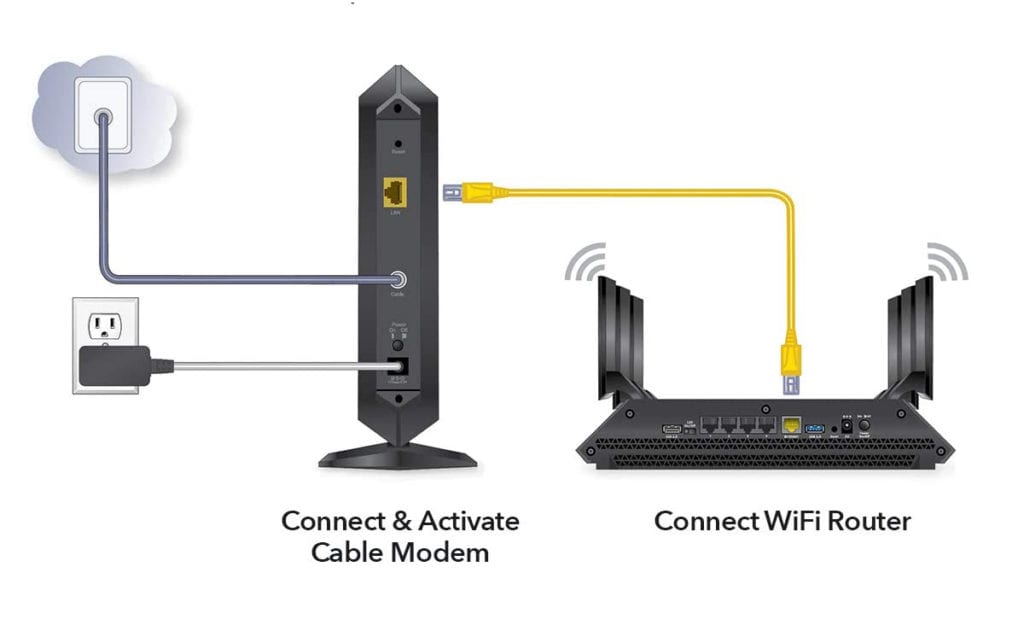
Cable modems connect to the coaxial cables originally laid for cable television services. This infrastructure offers significantly higher bandwidth than traditional phone lines, making cable internet a popular choice for faster speeds. Cable modems adhere to DOCSIS (Data Over Cable Service Interface Specification) standards (e.g., DOCSIS 3.0, 3.1, 4.0), with newer standards supporting exponentially faster download and upload speeds. They connect via a coaxial cable to a wall outlet and provide Ethernet output for your router.
Fiber Optic Modems (ONT/ONU): The Future of Broadband
Fiber optic internet, utilizing strands of glass or plastic to transmit data as light pulses, represents the cutting edge of broadband technology, offering unparalleled speeds and reliability. While technically not always called “modems,” the devices used for fiber optic connections perform a similar function of converting optical signals into electrical signals. These are often referred to as Optical Network Terminals (ONTs) or Optical Network Units (ONUs). They are typically installed either inside or outside your home and connect directly to the fiber optic line, converting the light signals into standard Ethernet for your router.
Dial-up Modems: A Historical Perspective
For many, the screeching, handshake sounds of a dial-up modem evoke a sense of nostalgia, or perhaps dread. These modems, prevalent in the early days of the internet, used standard voice-grade telephone lines and operated at painfully slow speeds (up to 56 kbps). They essentially treated digital data as audio signals, “dialing up” an internet service provider just like making a phone call, and tied up the phone line during use. While largely obsolete for primary internet access, their historical significance in shaping early internet adoption is undeniable.
Satellite Modems: Connectivity Beyond Terrestrial Lines
In remote areas where terrestrial broadband options are unavailable, satellite modems provide internet access by communicating with geostationary satellites orbiting Earth. While a vital solution for underserved regions, satellite internet typically features higher latency (due to the immense distance data must travel to space and back) and can be affected by weather conditions. These modems connect to a satellite dish and provide Ethernet output.
Cellular Modems: Mobile Data on the Go
Cellular modems utilize cellular networks (like 4G LTE or 5G) to provide internet access. They are commonly found in mobile hotspots, USB dongles, or integrated into laptops and tablets, enabling connectivity wherever there’s cellular coverage. These modems convert cellular radio signals into standard Ethernet or Wi-Fi, offering portable and flexible internet solutions.
Modem vs. Router: Understanding the Distinction
One of the most frequent points of confusion for internet users is differentiating between a modem and a router. While they are often physically combined into a single “gateway” device, their individual functions are distinct and complementary.
The Modem’s Singular Purpose: Data Conversion
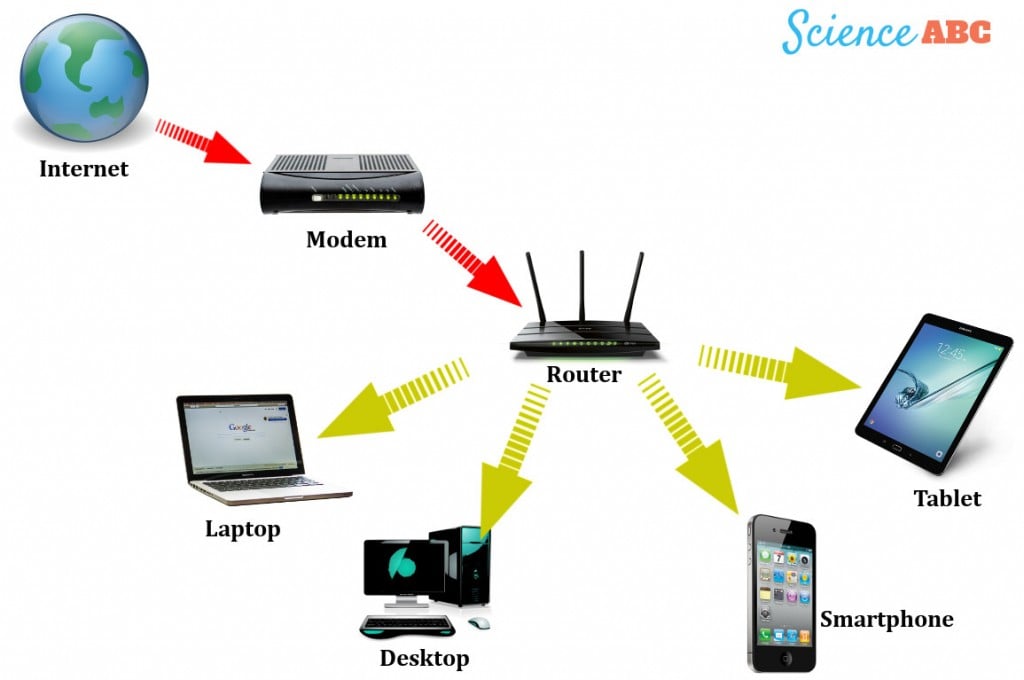
As established, the modem’s primary, almost singular purpose is the translation of signals: converting digital data from your network into an analog format for your ISP’s line and vice versa. It receives a single, external IP address from your Internet Service Provider (ISP), essentially acting as the public-facing gateway for your entire home network. Its job ends once it delivers the translated digital data to a single device – typically your router. Think of the modem as the sole diplomat communicating with the outside world on behalf of your household.
The Router’s Expansive Role: Network Management and Distribution
The router, on the other hand, is a sophisticated device with a much broader scope of responsibilities, all centered around managing and distributing internet access within your local network.
-
Network Address Translation (NAT): A router takes the single public IP address provided by the modem and assigns private IP addresses to all the devices within your home (e.g., 192.168.1.x). This allows multiple devices to share that single internet connection.
-
Packet Routing: As its name suggests, a router directs data packets between your devices and the internet, ensuring that information reaches its correct destination.
-
Wi-Fi Connectivity: Most modern routers include a wireless access point, enabling devices to connect to the internet wirelessly.
-
Firewall and Security: Routers typically incorporate a basic firewall to protect your internal network from external threats.
-
Network Management: They often provide features like parental controls, Quality of Service (QoS) for prioritizing traffic, and guest networks.
Essentially, the modem connects your home to the internet, while the router connects your devices to each other and then to the modem.
Combo Devices: The All-in-One Solution
Many ISPs provide a single device that combines the functionalities of both a modem and a router. These “modem-router gateways” or “all-in-one” devices simplify setup and reduce cable clutter. While convenient, they can sometimes offer less flexibility in terms of advanced networking features, and if one component fails, the entire unit needs to be replaced. For users with specific needs or who prefer more control over their network, separate modems and routers are often the preferred setup.
Key Features and Considerations When Choosing a Modem
While many users simply accept the modem provided by their ISP, choosing your own can offer performance benefits, cost savings (by avoiding rental fees), and greater control. However, careful consideration is key.
Speed and Bandwidth Capabilities
The modem you choose must be capable of handling the speed of your internet plan. A modem designed for 100 Mbps will bottleneck a 1 Gbps internet service. For cable modems, this means looking at the DOCSIS standard (e.g., DOCSIS 3.1 for gigabit speeds). For fiber, the ONT/ONU is typically dictated by the ISP.
Compatibility with Your ISP
This is paramount. Not all modems work with all internet service providers. ISPs often maintain a list of approved or compatible modems on their websites. Purchasing an unsupported modem could result in an inability to connect to the internet.
DOCSIS Standards (for Cable Modems)
For cable internet users, understanding DOCSIS versions is crucial. DOCSIS 3.0 supports speeds up to about 1 Gbps, while DOCSIS 3.1 enables multi-gigabit speeds. DOCSIS 4.0 is emerging with even higher symmetrical speeds. Investing in a newer standard can future-proof your setup for faster plans.
Security Features
While the router handles most network security, some modems may have basic firewall capabilities or support for secure protocols. Ensure any device you choose comes from a reputable manufacturer with a history of regular firmware updates to patch vulnerabilities.
Longevity and Future-Proofing
Technology evolves rapidly. While you don’t need the absolute latest, opting for a modem that supports the next generation of speed standards (e.g., DOCSIS 3.1 instead of just 3.0) can extend its useful life and save you from needing an upgrade sooner than expected.
Port Types (Ethernet, Coaxial, DSL)
Confirm the physical ports on the modem match your internet service’s input (coaxial for cable, RJ11 for DSL, fiber optic for fiber) and provide the standard Ethernet output (RJ45) to connect to your router.
Troubleshooting Common Modem Issues
Even the most robust modems can encounter issues. Understanding basic troubleshooting steps can often resolve common connectivity problems without needing to call your ISP.
No Internet Connection: Diagnosis Steps
If your internet connection drops entirely, start by checking the modem’s indicator lights. Each light typically represents a specific status (power, downstream, upstream, internet, activity). Consult your modem’s manual to understand what each light signifies. A common fix is to power cycle the modem: unplug it from power for 30-60 seconds, then plug it back in. This often clears temporary glitches. Also, check all physical cable connections to ensure they are snug and undamaged.
Slow Speeds: Potential Causes and Solutions
Sluggish internet can stem from various sources. First, ensure your internet plan is actually capable of the speeds you expect. Beyond that, a modem that is outdated or not rated for your current plan’s speed can be a bottleneck. Overheating can also degrade performance; ensure your modem has adequate ventilation. If multiple devices are heavily using the network simultaneously, it can cause congestion. Test speeds directly connected to the modem (bypassing the router) to determine if the issue lies with the modem or the router/internal network.
Intermittent Connectivity: Identifying the Root Problem
If your internet connection drops sporadically, it could be due to loose cables, signal interference (especially for DSL or cable), an aging or failing modem, or even issues on your ISP’s side (e.g., line noise, infrastructure problems). Check event logs on your modem (if accessible via its IP address) for error messages. If power cycling and cable checks don’t help, and the issue persists across different devices, it might indicate a hardware fault or an ISP-related problem.
Firmware Updates: Keeping Your Modem Optimized
Like all digital devices, modems run on firmware – specialized software that controls its operations. ISPs typically manage firmware updates for provided modems, but if you own your modem, you might need to check the manufacturer’s website periodically for updates. Firmware updates often include performance enhancements, bug fixes, and security patches, all crucial for optimal and secure operation.

Conclusion
The modem, though often overlooked, is the unsung hero of our internet-connected lives. It’s the essential translator that allows the complex digital world to flow into our homes and devices via the various analog and optical mediums that constitute the physical internet. Understanding its distinct role, its various types, its relationship with the router, and the factors that influence its performance empowers users to make more informed decisions about their home networks and troubleshoot issues more effectively. As our reliance on seamless connectivity deepens, appreciating the fundamental technology that makes it all possible becomes ever more important.
aViewFromTheCave is a participant in the Amazon Services LLC Associates Program, an affiliate advertising program designed to provide a means for sites to earn advertising fees by advertising and linking to Amazon.com. Amazon, the Amazon logo, AmazonSupply, and the AmazonSupply logo are trademarks of Amazon.com, Inc. or its affiliates. As an Amazon Associate we earn affiliate commissions from qualifying purchases.