
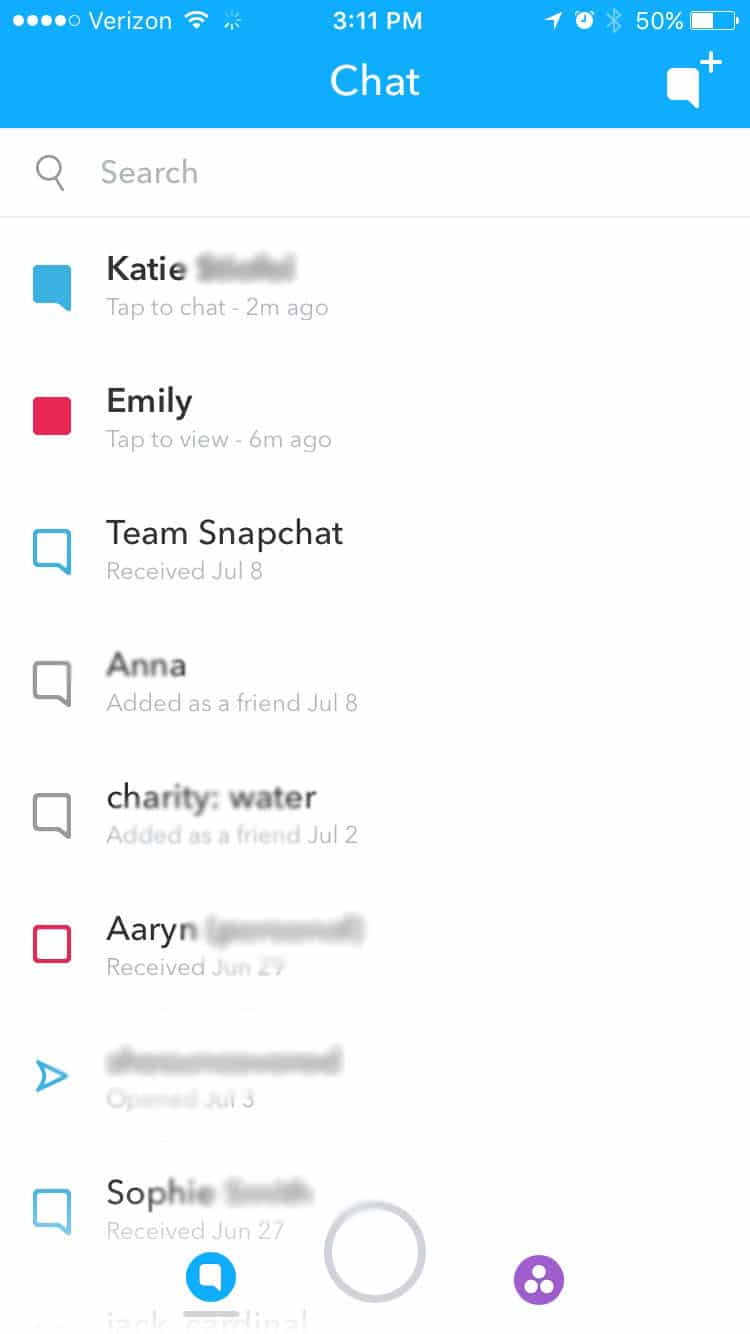
Snapchat has revolutionized the way we perceive digital communication, moving away from the permanent archives of traditional social media toward a more ephemeral, moment-to-moment experience. Central to this experience is its complex system of icons—colored squares, arrows, and chat bubbles that dictate the status of every interaction. While most users are familiar with the vibrant red, purple, and blue boxes that signify snaps and chats, the appearance of the “grey box” often triggers a sense of confusion.
In the realm of software UI/UX design, colors are intentional. In Snapchat’s technical ecosystem, the grey box is a critical indicator of a breakdown or a pending state in the peer-to-peer connection. Understanding what this symbol means requires a deep dive into the app’s privacy protocols, server-side communication, and user-management algorithms.
Decoding Snapchat’s Visual Language: The Grey Box Explained
Snapchat’s interface is built on the principle of transparency regarding message delivery. When you send a snap, the app provides real-time feedback on whether that data packet has reached its destination. The grey box, formally known as the “Pending” icon, serves as a placeholder for a communication attempt that cannot be completed due to specific technical or social barriers.
The Pending Status: A Waiting Game
The most common reason for the grey box is a “Pending” status. From a technical standpoint, this means your device has successfully uploaded the media to Snapchat’s servers, but the servers are unable to push that data to the recipient’s device. Unlike a red box (image) or purple box (video) which indicates a successful delivery to a “Friend,” the grey box indicates that the connection is currently unauthorized.
Privacy Settings and Friend List Management
Snapchat’s software architecture prioritizes user privacy. If you attempt to send a snap to someone who has not added you back, or someone who has set their privacy settings to “Friends Only,” the app will default to the grey box. This is a deliberate software design choice to prevent unsolicited media from appearing in a user’s inbox while still allowing the sender to see that their message is “queued” in the event the recipient chooses to accept the friend request.
Connectivity and Server-Side Synchronization
Occasionally, the grey box can be the result of a synchronization lag. When a user adds or removes a contact, the change must be propagated across Snapchat’s global server network. If you send a snap during this synchronization window, the client-side UI might display a grey box because it hasn’t yet received the updated “Friend” status from the central database.
Technical Reasons Behind the Grey Box Indicator
Beyond simple friend requests, the grey box serves as a diagnostic tool for understanding the current state of a digital relationship or the app’s internal logic. To understand why the icon appears, one must look at how the software handles permissions and account states.
User Permissions and “Everyone” vs. “Friends Only”
In the “Settings” menu of the Snapchat application, users can toggle their “Contact Me” permissions. If a user selects “Everyone,” you will see colored boxes even if you aren’t mutual friends. However, if they toggle this to “My Friends,” any message sent from an unapproved account will be intercepted by the app’s gatekeeping logic and displayed as a grey pending box. This is a fundamental aspect of Snapchat’s digital security framework, designed to mitigate spam and harassment.
Account Deactivation and Deletion Scenarios
The grey box can also be a byproduct of account lifecycle changes. If a user deactivates their account or if their account is flagged and suspended by Snapchat’s automated moderation systems, existing conversations may revert to a grey box status. In this scenario, the software is unable to find a valid destination “handle” for the data, resulting in a permanent pending state.
Troubleshooting App Glitches and Cache Issues
Not every grey box is a sign of a social disconnect; sometimes, it is a software glitch. Snapchat caches a significant amount of data on your local device to speed up the interface. If this cache becomes corrupted, the app might fail to pull the correct icon assets or status updates from the server. Tech-savvy users often resolve this by navigating to Settings > Account Actions > Clear Cache. This forces the app to re-sync with the server and can turn a stuck grey box back into its appropriate color.

The Social Dynamics of Digital Indicators
The transition from a colored box to a grey box often carries significant social weight. Because Snapchat’s UI is so focused on “streaks” and constant contact, a change in the visual status of a contact is a primary way users detect changes in their social standing within the app.
Understanding the “Unfriended” Signal
If you were previously able to send snaps to a contact (indicated by red or purple boxes) and suddenly those messages turn grey and say “Pending,” the technical implication is that the recipient has removed you from their friend list. The software has revoked your “Authorized Sender” status, and your future communications are now being held in a digital purgatory.
Blocked vs. Deleted: Distinguishing the Technical Differences
There is a subtle but important technical distinction between being deleted and being blocked. If you are deleted, you may still see the person’s name in your chat list, but with a grey box. If you are blocked, the user’s entire profile usually vanishes from your interface, and your search queries for their username will return no results. The grey box is the software’s way of saying, “The door is closed, but the house is still there.”
Maintaining Digital Boundaries in the Snapchat Ecosystem
The grey box is an essential component of Snapchat’s commitment to “Digital Wellbeing.” By providing a clear visual cue that a message has not been delivered, the app prevents the ambiguity that often leads to “ghosting” anxiety. It provides a definitive technological boundary, ensuring that users have total control over who can occupy their digital space and consume their bandwidth.
Advanced Snapchat Management and Security
As social media apps evolve, the complexity of their notification systems increases. The grey box is just one part of a larger suite of tools Snapchat uses to manage data flow and user security.
Managing Your Visibility and Privacy Controls
For users who value their digital footprint, understanding the grey box from the recipient’s side is equally important. By setting your account to “My Friends,” you ensure that any “Grey Box” messages you receive are filtered into a separate requests folder, preventing them from triggering push notifications. This is a key strategy for managing digital distractions and maintaining high-level security against phishing attempts via snaps.
Two-Factor Authentication and Account Integrity
Sometimes, a grey box appears because a user’s account has been compromised, and the security settings were changed by an unauthorized party. Ensuring that your own account is secure via Two-Factor Authentication (2FA) prevents your friends from seeing that dreaded grey box next to your name. From a software perspective, 2FA adds a layer of encrypted verification that ensures the “Friend” status remains valid and uninterrupted by session hijacking.
The Future of Ephemeral Communication Tech
As we look toward the future of apps like Snapchat, we may see the grey box evolve. With the integration of AI-driven moderation and more granular privacy controls, the “Pending” state might eventually provide more context—such as whether a message was filtered due to content or simply due to a lack of mutual friendship. However, the core tech remains the same: a visual representation of a logical “IF/THEN” statement in the app’s code.

Conclusion: Navigating the Evolution of Instant Messaging
The grey box on Snapchat is more than just a simple icon; it is a manifestation of the complex interplay between user privacy, server-side logic, and UI design. It serves as a silent communicator, informing users about their connection status without the need for intrusive error messages or pop-up notifications.
In the rapidly shifting landscape of mobile software, understanding these technical nuances is vital. Whether it’s a sign of a friend list cleanup, a privacy setting adjustment, or a temporary server glitch, the grey box remains a foundational element of the Snapchat experience. By mastering the language of these icons, users can better navigate the digital world, ensuring their communication is both secure and intentional. As Snapchat continues to update its software and introduce new features, the grey box will likely remain the gold standard for representing the “Pending” state in ephemeral tech.
aViewFromTheCave is a participant in the Amazon Services LLC Associates Program, an affiliate advertising program designed to provide a means for sites to earn advertising fees by advertising and linking to Amazon.com. Amazon, the Amazon logo, AmazonSupply, and the AmazonSupply logo are trademarks of Amazon.com, Inc. or its affiliates. As an Amazon Associate we earn affiliate commissions from qualifying purchases.