
In the vast and ever-evolving landscape of technology, acronyms serve as convenient shorthand, condensing complex concepts into concise labels. However, this efficiency often comes with a caveat: many acronyms are overloaded, meaning they can represent entirely different things depending on the specific domain or context. The acronym “PTR” is a prime example of this phenomenon. While seemingly simple, its meaning can pivot dramatically from the fundamental building blocks of software development to the intricate workings of network infrastructure, and even to the pre-release environments of digital entertainment.
This article delves into the primary meanings of “PTR” within the technology sector, dissecting its significance in programming, networking, and other specialized contexts. By exploring these different interpretations, we aim to provide a comprehensive understanding of what “PTR” signifies, highlighting its critical roles and the nuances that differentiate its various applications. Understanding these distinctions is not merely an academic exercise; it is crucial for effective communication, problem-solving, and innovation across diverse technological disciplines.

PTR as a Pointer in Programming: Navigating Memory’s Labyrinth
Perhaps the most fundamental and historically significant meaning of “PTR” in computer science is its designation as a “pointer” in programming. A pointer is a variable that stores the memory address of another variable or a memory location. Instead of holding a direct value, it “points” to where that value is stored in the computer’s RAM. This concept is central to low-level programming languages like C and C++, offering unparalleled control over memory management and data manipulation.
The Fundamental Concept: What is a Pointer?
Imagine your computer’s memory as a vast grid of numbered mailboxes, each capable of holding a piece of data. A regular variable, say int x = 10;, would mean mailbox #001 contains the value 10. A pointer, int *ptr = &x;, would mean mailbox #002 contains the address #001. So, ptr doesn’t hold 10 directly; it holds the address where 10 is stored. The asterisk (*) typically denotes a pointer variable, and the ampersand (&) is the “address-of” operator, retrieving the memory address of a variable. Dereferencing a pointer (using *ptr) allows you to access or modify the value at the memory address it holds.
Why Pointers Matter: Memory Management and Performance
Pointers are a cornerstone of efficient programming for several reasons:
-
Direct Memory Access: They allow programs to interact directly with memory, enabling fine-grained control over where data is stored and how it’s accessed. This can lead to highly optimized code, especially in systems programming, operating systems, and embedded development where resources are constrained.
-
Dynamic Memory Allocation: Pointers are indispensable for dynamic memory allocation, where memory is requested from the system during runtime rather than being set aside at compile time. Functions like
mallocandfree(in C) ornewanddelete(in C++) rely on pointers to manage memory on the heap, allowing programs to handle data of variable sizes or unknown quantities until execution. -
Efficient Data Handling: For large data structures or when passing data to functions, passing a pointer (which is just a memory address) is significantly more efficient than copying entire data blocks. This reduces overhead and improves performance, particularly with complex objects or arrays.
Common Use Cases and Applications
Pointers underpin numerous programming paradigms and data structures:
-
Dynamic Memory Allocation: As mentioned, creating arrays or objects whose size isn’t known until the program runs. For instance, a program reading an unknown number of records from a file might use pointers to allocate memory as needed.
-
Data Structures: Pointers are fundamental to building complex data structures like linked lists, trees, and graphs. In a linked list, each node contains data and a pointer to the next node, forming a chain. Similarly, tree structures use pointers to connect parent nodes to child nodes, enabling efficient data organization and retrieval.
-
Function Pointers: Pointers can also point to functions, allowing for dynamic function calls, implementing callback mechanisms, and enabling polymorphic behavior in certain contexts. This is powerful for designing flexible and extensible software architectures.
The Double-Edged Sword: Risks and Best Practices
While incredibly powerful, pointers introduce complexities and potential pitfalls that can lead to subtle yet severe bugs:
-
Memory Leaks: Forgetting to
freeordeletedynamically allocated memory can lead to memory leaks, where the program continuously consumes memory without releasing it, eventually leading to system instability or crashes. -
Dangling Pointers: When memory pointed to by a pointer is deallocated, but the pointer itself isn’t set to
NULL, it becomes a “dangling pointer.” Attempting to dereference a dangling pointer results in undefined behavior, often leading to crashes or security vulnerabilities. -
Buffer Overflows: If a program writes beyond the allocated bounds of an array or buffer that a pointer refers to, it can overwrite adjacent memory locations, corrupting data or even executing malicious code. This is a common source of security exploits.
-
Null Pointer Dereferencing: Attempting to use a pointer that points to
NULL(meaning it doesn’t point to valid memory) will typically cause a program to crash. -
Smart Pointers (C++ Modern Approach): To mitigate these risks, modern C++ introduced “smart pointers” (e.g.,
std::unique_ptr,std::shared_ptr). These are object wrappers around raw pointers that automatically manage memory deallocation through RAII (Resource Acquisition Is Initialization), significantly reducing the likelihood of memory leaks and dangling pointers, making memory management safer and more robust.
Despite their challenges, understanding and correctly utilizing pointers remains a cornerstone skill for any serious programmer working in low-level systems or performance-critical applications.
PTR as a Pointer Record in DNS: The Reverse Lookup Mechanism
Beyond the realm of programming, “PTR” takes on a distinctly different, yet equally critical, meaning within network infrastructure: a “PTR record” in the Domain Name System (DNS). While most people are familiar with DNS for translating human-readable domain names (like example.com) into IP addresses (like 192.0.2.1), PTR records facilitate the reverse process.
Understanding DNS: Forward vs. Reverse Lookups
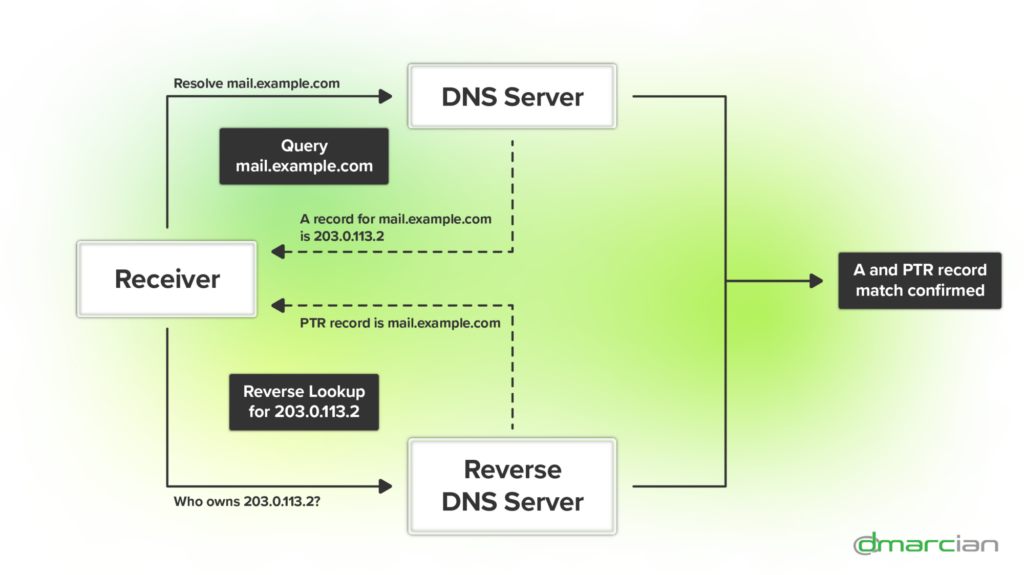
The standard DNS query is a “forward lookup,” where a hostname is mapped to an IP address. This is how your browser finds a website’s server. A “reverse lookup,” on the other hand, maps an IP address back to a hostname. This is precisely what a PTR record enables.
PTR records are stored in special domains: in-addr.arpa for IPv4 addresses and ip6.arpa for IPv6 addresses. For example, to find the hostname for 192.0.2.1, a DNS resolver would query for 1.2.0.192.in-addr.arpa, which would ideally return the hostname associated with that IP.
The Role and Importance of PTR Records

PTR records, often referred to as Reverse DNS (rDNS) records, play several vital roles in network operations and security:
-
Email Authentication: This is perhaps the most crucial application. Mail servers often perform reverse DNS lookups on the IP address of an incoming mail server to verify its authenticity. If a sending mail server’s IP address doesn’t resolve to a legitimate hostname (or resolves to something generic/suspicious), the receiving server might flag the email as spam or even reject it outright. This helps combat spam and phishing by ensuring the sender’s identity can be verified. SPF (Sender Policy Framework), DKIM (DomainKeys Identified Mail), and DMARC (Domain-based Message Authentication, Reporting, and Conformance) often integrate with or benefit from correctly configured PTR records.
-
Network Troubleshooting and Logging: When analyzing network logs or troubleshooting connectivity issues, having clear hostnames associated with IP addresses makes the data much more human-readable and actionable. Instead of seeing
192.0.2.1in a log, you might seemail.example.com, instantly providing context. -
Security and Trust: Many internet services, especially those sensitive to abuse like IRC servers, FTP servers, and certain VPNs, may require valid reverse DNS records for connections. It adds a layer of trust and accountability, as an IP address with a properly configured PTR record is generally considered more legitimate than one without.
-
Application Requirements: Some software applications or services specifically require correct reverse DNS to function properly or to establish secure connections, verifying that the connecting party is who they claim to be.
How PTR Records Work and Are Managed
Unlike forward DNS records which are usually managed by the domain owner (e.g., example.com), PTR records are typically managed by the owner of the IP address block. This is usually your Internet Service Provider (ISP), hosting provider, or cloud provider.
-
Delegation: The
in-addr.arpa(for IPv4) andip6.arpa(for IPv6) zones are managed hierarchically. Large blocks of IP addresses are delegated down to ISPs, who then manage the reverse lookup for their allocated ranges. -
Configuration: To set up a PTR record for a static IP address, you usually need to contact your ISP or hosting provider and request them to create or modify the PTR record for your IP address, pointing it to your desired hostname. For cloud services (AWS, Azure, Google Cloud), there are often interfaces within their control panels to manage reverse DNS entries for your assigned public IP addresses.
-
Verification: You can check a PTR record using command-line tools like
dig -x <IP_address>(on Linux/macOS) ornslookup <IP_address>(on Windows/Linux/macOS), or various online reverse DNS lookup tools.
In essence, while forward DNS tells you “what IP address does this name have?”, a PTR record tells you “what name does this IP address have?”. Both are crucial for the stable and secure operation of the internet.
Other Contexts of PTR: Expanding the Acronym’s Scope
While programming pointers and DNS PTR records are the most prominent technical meanings of “PTR,” the acronym surfaces in other specific domains within technology, demonstrating the pervasive nature of shorthand in specialized fields.
Public Test Realm (Gaming): Pre-Release Environments
In the world of online gaming, particularly with massively multiplayer online role-playing games (MMORPGs) like World of Warcraft or other live-service titles, “PTR” frequently stands for “Public Test Realm.”
-
Purpose and Benefits: A Public Test Realm is a dedicated server environment where players can access and test upcoming game patches, new features, content expansions, or balance changes before they are officially released to the main live servers. This serves several critical purposes:
-
Bug Detection: Thousands of players testing simultaneously can uncover bugs and glitches that internal QA teams might miss.
-
Balance Testing: For competitive games, PTRs allow developers to gather data and feedback on how proposed changes impact game balance, ensuring a more stable and fair experience upon live release.
-
Player Feedback: Players can provide direct feedback on new features, user interface changes, or story elements, allowing developers to make adjustments based on community input.
-
Community Engagement: It builds excitement and engages the player base by giving them a sneak peek and a voice in the development process.
-
-
How PTRs Function: Players typically opt-in to download a separate game client or patch to access the PTR servers. Characters might be copied from live servers or players might start with pre-made characters and resources to facilitate testing. Data on PTR servers is usually ephemeral and does not transfer back to live servers.
Performance Test Run (Software Quality Assurance)
In the realm of software quality assurance and development, “PTR” can also occasionally refer to a “Performance Test Run.” This meaning is less universally standardized but is used internally by some teams.
-
Measuring Application Performance: A Performance Test Run involves executing a series of tests to evaluate the responsiveness, stability, scalability, and resource usage of a software application under various workloads. The goal is to identify bottlenecks, measure performance metrics (like response time, throughput, CPU utilization, memory consumption), and ensure the application meets non-functional requirements.
-
Types of Performance Tests: These runs can encompass different types of tests:
-
Load Testing: Simulating expected user load to see how the system behaves.
-
Stress Testing: Pushing the system beyond its limits to find its breaking point and how it recovers.
-
Scalability Testing: Determining how effectively the system can handle increases in user load or data volume.
-
Endurance Testing: Checking if the system can sustain a certain load over a long period without degradation.
-
While “PTR” for Performance Test Run might be less common than the other interpretations, it highlights how specialized teams create their own acronyms for internal processes.
The Broader Implication: Context is King in Tech Acronyms
The multiple meanings of “PTR” vividly illustrate a fundamental truth in the technology world: context is paramount. Without understanding the specific domain or conversation, a single acronym can be entirely ambiguous, leading to confusion, miscommunication, and wasted effort.
The Challenge of Ambiguous Acronyms
The rapid pace of technological innovation and the need for concise communication have led to an explosion of acronyms. While invaluable for experts within a niche, this proliferation creates barriers for newcomers and even for seasoned professionals venturing into adjacent fields. An individual discussing a memory leak in C++ will mean something entirely different by “PTR” than a network administrator troubleshooting an email delivery issue, or a gamer excited about an upcoming game patch.
The Importance of Specificity and Domain Knowledge
To navigate this landscape effectively, it is crucial to:
-
Be Specific: When using acronyms, especially in cross-functional teams or external communications, consider briefly clarifying the full term or ensuring the context makes the meaning unambiguous.
-
Ask for Clarification: If you encounter an unfamiliar or ambiguous acronym, don’t hesitate to ask for its full form and context. This is a sign of good communication practice, not ignorance.
-
Cultivate Domain Knowledge: A broad understanding of various tech domains helps in quickly inferring the likely meaning of an acronym based on the surrounding topic.
In conclusion, “PTR” serves as a microcosm of the entire technological lexicon. From the fundamental binary dance of memory addresses in programming to the intricate web of network authentication and the dynamic testing grounds of digital entertainment, its meaning shifts, yet its importance remains constant within its respective domain. Mastering these distinctions is a testament to one’s fluency in the diverse and ever-expanding language of technology.
aViewFromTheCave is a participant in the Amazon Services LLC Associates Program, an affiliate advertising program designed to provide a means for sites to earn advertising fees by advertising and linking to Amazon.com. Amazon, the Amazon logo, AmazonSupply, and the AmazonSupply logo are trademarks of Amazon.com, Inc. or its affiliates. As an Amazon Associate we earn affiliate commissions from qualifying purchases.