
In the modern digital landscape, the way our devices communicate with the vast expanse of the internet is often taken for granted. We type a URL, hit enter, and a webpage appears. However, beneath this seamless interaction lies a complex architecture of protocols and pathways. One of the most critical, yet often misunderstood, components of this architecture is the “proxy setting.” Whether you are a remote worker trying to access a corporate database, a developer testing localized content, or a privacy-conscious user looking to mask your digital footprint, understanding what proxy settings are and how they function is essential to navigating the modern web.
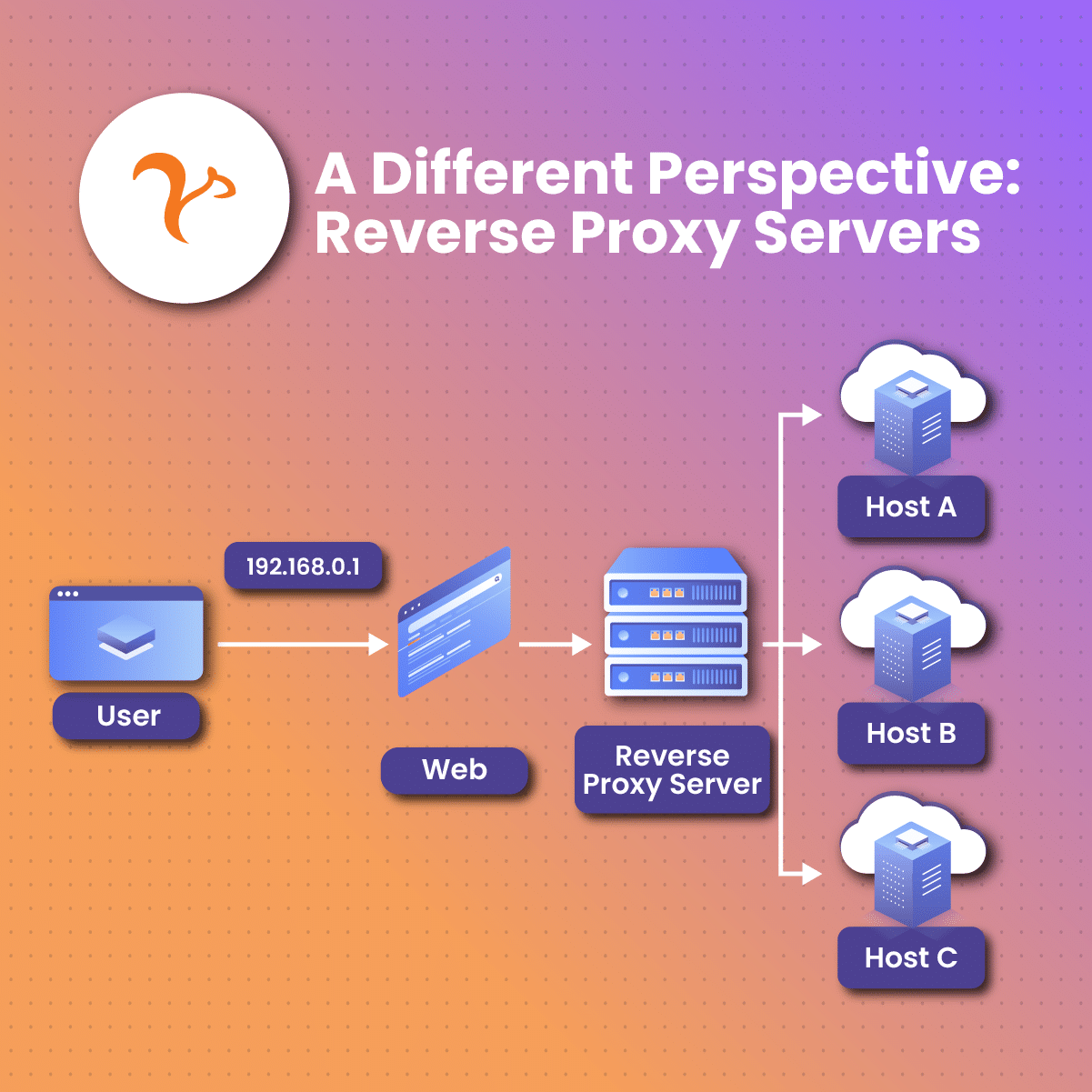
At its core, a proxy setting is a configuration that tells your device or specific software to use an intermediary server—known as a proxy server—to facilitate requests to other servers on the internet. Instead of your computer connecting directly to a website, it sends the request to the proxy server, which then forwards the request on your behalf. To the destination website, it appears as though the request originated from the proxy server, not from your specific device. This simple redirection opens a world of possibilities regarding security, speed, and digital accessibility.
Understanding the Mechanics of the Proxy Server
To understand proxy settings, one must first visualize the standard client-server model. Typically, when you access a website, your computer (the client) sends a request containing your IP address to the website’s server. The server receives this request and sends the data back directly to your IP address.
When proxy settings are enabled, this direct line is broken and replaced by a relay system. The proxy server acts as a gateway. When you enter a search query or a web address, the proxy intercepts the data packet. It may then change the IP address associated with the packet, scrub specific metadata, or even encrypt the data before sending it out to the destination. Once the destination server responds, the proxy receives that information and passes it back to you.
This intermediary role allows the proxy to perform several functions that a direct connection cannot. For instance, it can act as a firewall, filtering out malicious content before it reaches your local network. It can also act as a cache, storing copies of frequently visited websites so that they load faster for everyone on the same network. By adjusting your proxy settings, you are essentially defining the rules for how this “middleman” should handle your data.
Decoding Different Proxy Protocols and Types
Not all proxies are created equal. Depending on your needs—whether they are centered on anonymity, performance, or data scraping—the proxy settings you choose will vary significantly. Understanding these distinctions is key to technical fluency in network management.
HTTP and HTTPS Proxies
HTTP proxies are designed to interpret web traffic. They are particularly useful for web browsing and can be configured to filter content or bypass simple blocks. HTTPS proxies (also known as SSL proxies) add a layer of security by using the Secure Sockets Layer protocol. This ensures that the data moving between your device and the proxy is encrypted, preventing local network administrators or attackers from “sniffing” your traffic.
SOCKS5 Proxies
Unlike HTTP proxies, SOCKS5 (Socket Secure) proxies do not interpret web traffic. They operate at a lower level in the networking stack, making them much more versatile. A SOCKS5 proxy can handle any type of traffic, including POP3 and SMTP for emails, FTP for file transfers, and even P2P (peer-to-peer) traffic for torrenting. Because they don’t read the data packets, they are generally faster and more reliable for high-bandwidth tasks, though they lack the content-filtering capabilities of HTTP proxies.
Residential vs. Datacenter Proxies
This distinction refers to the origin of the IP address used by the proxy. Datacenter proxies come from secondary corporations and provide high speed and low cost. However, because they are easily identifiable as proxy IPs, they are frequently blocked by sophisticated websites. Residential proxies, on the other hand, use IP addresses assigned by Internet Service Providers (ISPs) to real households. These are much harder to detect and block, making them the gold standard for tasks like price monitoring or accessing region-locked streaming services.
Transparent, Anonymous, and High Anonymity Proxies
Proxy settings can also define how much information is revealed to the destination server.
- Transparent Proxies reveal your original IP address and identify themselves as proxies. They are mostly used for caching and content filtering in schools or offices.
- Anonymous Proxies do not reveal your IP address but do identify themselves as proxies to the destination server.
- High Anonymity (Elite) Proxies change your IP address and do not identify themselves as proxies, making your connection appear entirely like a standard, direct user connection.
Why Proxy Settings Matter for Digital Security and Privacy

In an era of increasing cyber threats and invasive data tracking, proxy settings serve as a primary line of defense. By masking your IP address, a proxy prevents websites from tracking your physical location and browsing habits. This is particularly important for journalists, activists, or researchers working in sensitive environments.
For businesses, proxy settings are indispensable for internal security. A corporate proxy can be configured to block access to known phishing sites or malware-distributing domains. It also provides a centralized point for logging web activity, which is crucial for compliance and forensic analysis after a security breach. Furthermore, by using a “Reverse Proxy,” a company can protect its own internal servers from the public internet. The reverse proxy sits in front of the web servers and handles all incoming requests, ensuring that the actual servers remain hidden and protected from direct attacks like Distributed Denial of Service (DDoS).
Beyond security, proxies are the primary tool for bypassing geo-restrictions. Many online services offer different content based on the user’s geographic location. By configuring proxy settings to route traffic through a server in a different country, users can access information and services that would otherwise be unavailable to them. This is not just about entertainment; it is a vital function for businesses conducting international market research or verifying that their global digital ad campaigns are appearing correctly in different regions.
How to Configure Proxy Settings Across Various Platforms
The process of adjusting proxy settings varies depending on the operating system and the specific application you are using. Most modern devices offer two ways to handle this: Automatic and Manual.
Automatic Proxy Configuration
Many organizations use a Web Proxy Auto-Discovery (WPAD) protocol or a Proxy Auto-Configuration (PAC) file. When your device is set to “Automatically detect settings,” it looks for these files on the network. The PAC file contains a set of rules (written in JavaScript) that tells the device which proxy to use for which specific URL. This is highly efficient for large-scale enterprise environments where proxy requirements might change based on the internal or external nature of the request.
Manual Configuration on Windows and macOS
On Windows, proxy settings are found under the “Network & Internet” section of the Settings menu. Here, users can toggle “Use a proxy server” and input the IP address and port number provided by their proxy service. macOS offers similar functionality under System Settings > Network > Advanced > Proxies. In both cases, these settings generally apply to the entire system, meaning all browsers and most applications will route their traffic through the specified server.
Browser-Level Settings
Some users prefer to limit proxy usage to their web browser. While Google Chrome and Microsoft Edge typically default to the system’s proxy settings, browsers like Mozilla Firefox allow for independent configuration. This is particularly useful for developers who need to test how a site behaves under different network conditions without affecting the rest of their computer’s connectivity.
Mobile Devices
On iOS and Android, proxy settings are typically configured on a per-Wi-Fi-network basis. Users must enter the Wi-Fi settings for their specific connection, select “Configure Proxy,” and choose between Manual or Automatic. This is often necessary for students or employees to connect to their institution’s restricted network.
Proxy Servers vs. VPNs: Navigating the Technical Differences
One of the most common points of confusion in tech is the difference between a proxy and a Virtual Private Network (VPN). While both serve as intermediaries and mask your IP address, they function differently at a structural level.
A proxy usually operates at the application level. If you set up a proxy in your browser, only the traffic from that browser is rerouted. Most proxies do not encrypt the data passing through them; they simply hide the origin. A VPN, conversely, operates at the system level. It creates an encrypted “tunnel” for all traffic leaving your device, from your browser to your background OS updates and email clients.
The choice between the two depends on the objective. If the goal is high-speed data scraping or bypassing a simple geographic block on a single app, a proxy is often the superior choice because it has less overhead and faster speeds. If the goal is total privacy, data encryption, and security on a public Wi-Fi network, a VPN is the more robust solution. Professional tech environments often use both in tandem to achieve a balance of speed, accessibility, and hardened security.

The Future of Proxy Technology in an AI-Driven World
As we look toward the future, proxy settings are becoming increasingly sophisticated. The rise of AI and machine learning has led to “smart proxies” that can automatically rotate IP addresses and solve CAPTCHAs to ensure uninterrupted data flow. For tech professionals, mastering these settings is no longer just a niche networking skill; it is a fundamental requirement for maintaining digital privacy, ensuring corporate security, and managing global data interactions. Understanding “what proxy settings mean” is the first step in taking full control over your digital presence in an interconnected world.
aViewFromTheCave is a participant in the Amazon Services LLC Associates Program, an affiliate advertising program designed to provide a means for sites to earn advertising fees by advertising and linking to Amazon.com. Amazon, the Amazon logo, AmazonSupply, and the AmazonSupply logo are trademarks of Amazon.com, Inc. or its affiliates. As an Amazon Associate we earn affiliate commissions from qualifying purchases.