
In our increasingly digital world, where smartphones have become extensions of ourselves, managing the vast array of applications we accumulate is a constant challenge. From productivity suites to social media, entertainment, and utilities, our devices quickly fill up, leading to dreaded “storage full” notifications and sluggish performance. While many users are familiar with the concept of deleting apps, a more nuanced and often overlooked solution exists, particularly for iPhone users: app offloading.
Offloading an app is a sophisticated feature designed to free up significant storage space on your device without losing the app’s associated data and documents. Unlike outright deletion, which wipes the application and all its user-generated data from your device, offloading selectively removes the app’s core program files while preserving its personalized settings, documents, and other user-specific information. This means that should you choose to reinstall the app in the future, it will be restored to its exact previous state, as if it had never left.
This article delves deep into the mechanics, benefits, and broader implications of offloading apps. We’ll explore its role in optimizing device performance, enhancing digital security, and even touching upon its relevance for app developers and the financial considerations for users. By understanding what app offloading does, you can transform your digital habits, ensuring a smoother, more efficient, and secure mobile experience.
The Core Concept: Understanding App Offloading
To truly grasp the power and utility of app offloading, it’s essential to first distinguish it from other forms of app removal and understand the underlying mechanism that makes it such an elegant solution to storage woes.
What Exactly is App Offloading?
At its heart, app offloading is a smart storage management technique primarily found on iOS devices (and similar concepts under different names on Android). When you offload an app, your operating system performs a surgical removal: it deletes the application itself – the executable code, assets, and library files that make up the app’s program. However, crucially, it leaves behind all the app’s data. This includes your user preferences, saved login information, downloaded content (if marked as persistent), game progress, documents, and any other files specific to your usage of that app.
Think of it like this: imagine you have a book on a shelf. Deleting the app is like throwing away both the book and all your notes, highlights, and bookmarks within it. Offloading the app is like taking the physical book off the shelf, but keeping all your personalized notes, highlights, and bookmarks separately stored. When you get a new copy of the book, you can immediately re-insert all your personalizations.
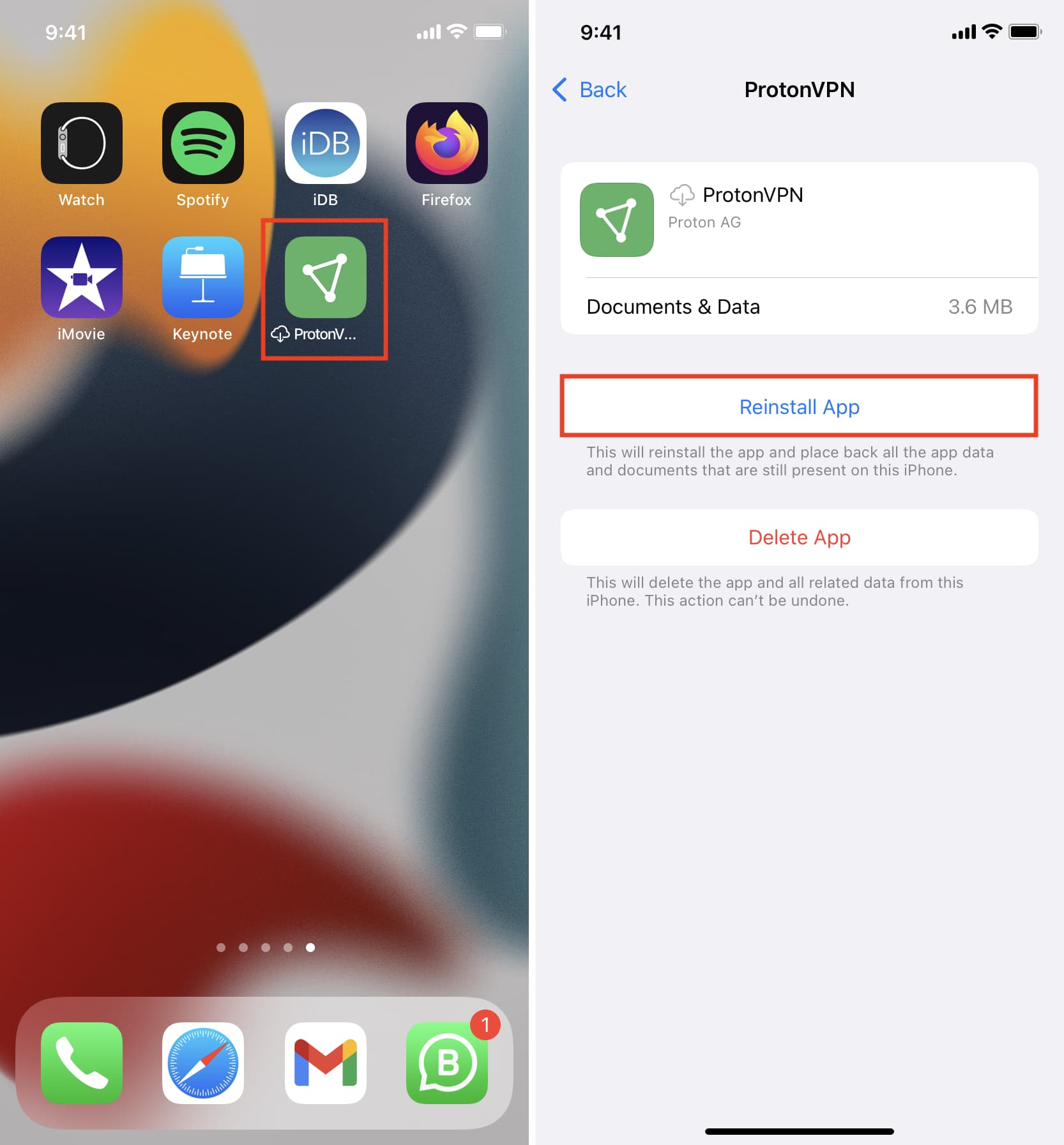
The primary goal is to reclaim the bulk of the storage space occupied by the app’s program files, which can often be hundreds of megabytes or even several gigabytes for large games or media-heavy applications. The app’s icon remains on your home screen, but it will appear with a small cloud icon next to its name, indicating that it has been offloaded. Tapping this icon will trigger a re-download of the app from the App Store, seamlessly restoring it with all your data intact.
Offloading vs. Deleting: A Crucial Distinction
The difference between offloading and deleting an app is fundamental and impacts both storage management and user experience.
- Deleting an App: When you delete an app, the operating system removes everything associated with it: the app’s program files, its cache, its user data, preferences, and documents. It’s a complete wipe. This is ideal for apps you no longer use and never intend to use again, or for troubleshooting a persistently buggy app where you want a completely fresh start. The downside is that if you ever want to use the app again, you’ll have to re-download it and set it up from scratch, potentially losing any unsynced data.
- Offloading an App: As discussed, offloading is a partial removal. It removes the core app files but preserves your personal data. This makes it an excellent choice for apps you use infrequently, but still want quick access to with your personalized settings when needed. Examples include apps for specific events, travel apps used once a year, or large games you cycle through. The benefit is convenience: re-installation is fast, and you pick up exactly where you left off.
Understanding this distinction empowers users to make informed decisions about managing their device storage, striking a balance between freeing up space and maintaining seamless access to their personalized digital ecosystem.
The Tangible Benefits of Offloading for Tech-Savvy Users
The implications of app offloading extend far beyond simply making more room on your device. For those who prioritize efficiency, performance, and a well-organized digital life, offloading offers a suite of tangible advantages that contribute to an overall superior user experience.
Reclaiming Valuable Storage Space
The most immediate and obvious benefit of offloading apps is the liberation of storage space. Modern apps, especially those with high-resolution graphics, extensive features, or offline content capabilities, can be enormous. A single game might consume several gigabytes, while even utility apps can easily exceed 200-300 MB. In an era where many users still opt for base-model storage devices (e.g., 64GB or 128GB), every megabyte counts.
By offloading infrequently used but large apps, users can free up substantial chunks of storage without the commitment of a full deletion. This can be particularly useful before major OS updates that require significant free space, or when preparing to download large media files like movies or extensive photo libraries. Instead of constantly monitoring storage and agonizing over what to permanently delete, offloading offers a flexible intermediate solution. This allows users to keep their favorite content on hand without being forced into expensive device upgrades solely for more storage.
Enhancing Device Performance and Longevity
While offloading primarily addresses storage, its ripple effects can significantly impact device performance and even extend its perceived lifespan. A device that is constantly running low on storage tends to perform poorly. The operating system needs free space to function optimally, for temporary files, caching, and virtual memory. When storage is critically low, the system struggles, leading to:
- Slower App Launches: Apps take longer to open and respond.
- Stuttering and Lag: General navigation, scrolling, and multitasking become less fluid.
- Reduced Battery Life: The processor works harder to manage resources under duress, draining the battery faster.
- Failed Updates: OS updates or app updates may fail due to insufficient space, leaving the device vulnerable or outdated.
By offloading apps and maintaining a healthy amount of free storage, you allow your device to breathe. This translates to snappier performance, smoother multitasking, and a more responsive user interface. Furthermore, by reducing the stress on your device’s components (like NAND flash memory, which has a finite number of write cycles), you can theoretically contribute to its longevity, meaning your phone feels fast and functional for longer, delaying the need for an expensive upgrade.
Streamlined App Management and Digital Decluttering
Beyond the technical benefits, offloading plays a crucial role in fostering better digital hygiene. Our devices can become digital junk drawers, overflowing with apps we downloaded on a whim and barely touched since. This clutter can be overwhelming, making it hard to find the apps we truly need and contributing to digital fatigue.
Offloading provides a pathway to declutter without the harshness of permanent deletion. You can remove the operational bulk of an app while retaining its memory and your connection to it. This allows for a more organized app library, where frequently used apps are readily accessible, and rarely used ones are stored efficiently but not entirely forgotten. It simplifies the decision-making process: instead of “do I really need this, or should I delete it forever?”, the question becomes “do I need to actively run this app right now?”. This nuanced approach leads to a more intentional and less stressful app management strategy.
A Nod to Digital Security and Data Management
While offloading doesn’t completely remove data, it can contribute indirectly to digital security and better data management practices. An app that is offloaded is not actively running in the background, nor is its executable code present on your device. This means:
- Reduced Attack Surface (Minor): An offloaded app cannot be directly exploited via its program vulnerabilities while inactive. Though its data remains, the active threat from the application’s executable code is neutralized until it’s re-downloaded.
- Clearer Data Footprint: By consciously offloading apps, users are prompted to consider which apps they truly need installed and active. This encourages a more mindful approach to app permissions and the data they collect. If an app isn’t physically on your device (even if its data is), it reinforces the idea that it’s not currently active or potentially transmitting information.
- Informed Data Retention: Offloading encourages users to think about which app data they truly value. If you offload an app and realize months later you don’t even remember what data was associated with it, it might be a good sign to fully delete it, thus reducing your digital footprint.
While not a primary security feature, offloading supports a more secure ecosystem by promoting better app management habits and reducing the number of actively installed applications on a device at any given time.
How to Offload Apps: A Practical Guide
Understanding the “what” and “why” of app offloading is crucial, but knowing “how” to do it is what truly empowers users. The process is straightforward, particularly on iOS, where the feature is natively integrated.
On iOS Devices
Apple has made app offloading incredibly user-friendly, offering both automatic and manual methods to suit different preferences.
-
Automatic Offloading (Recommended for most users):
- Go to
Settings. - Tap
General. - Tap
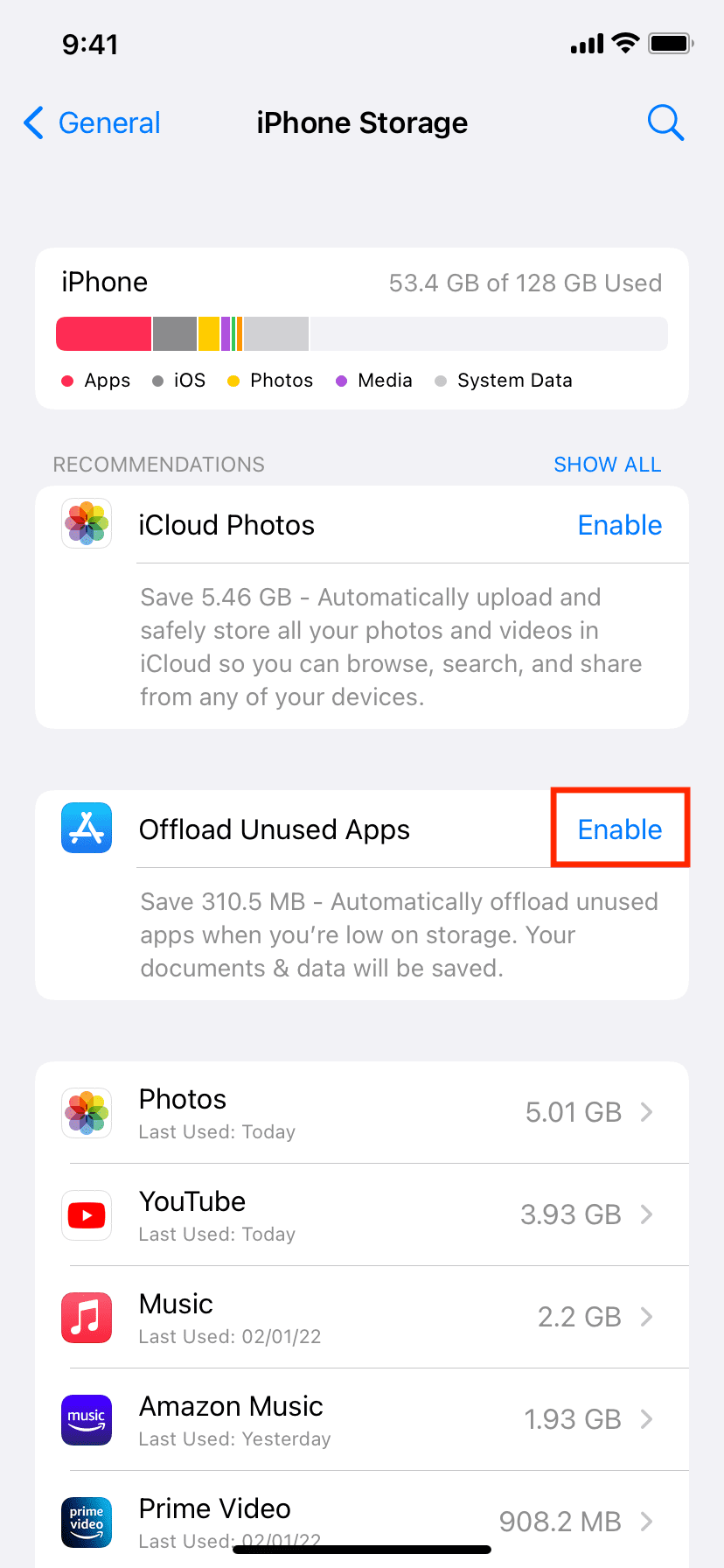
iPhone Storage(oriPad Storage). - You’ll see a recommendation at the top that says
Offload Unused Apps. TapEnablenext to it.
When enabled, your iPhone will automatically offload apps that you haven’t used for a long time when storage runs low. Your app data will remain, and the app icon will stay on your home screen with a cloud symbol.
- Go to
-
Manual Offloading (For specific control):
- Go to
Settings. - Tap
General. - Tap
iPhone Storage. - Scroll down to see a list of your apps, sorted by their storage consumption.
- Tap on the app you wish to offload.
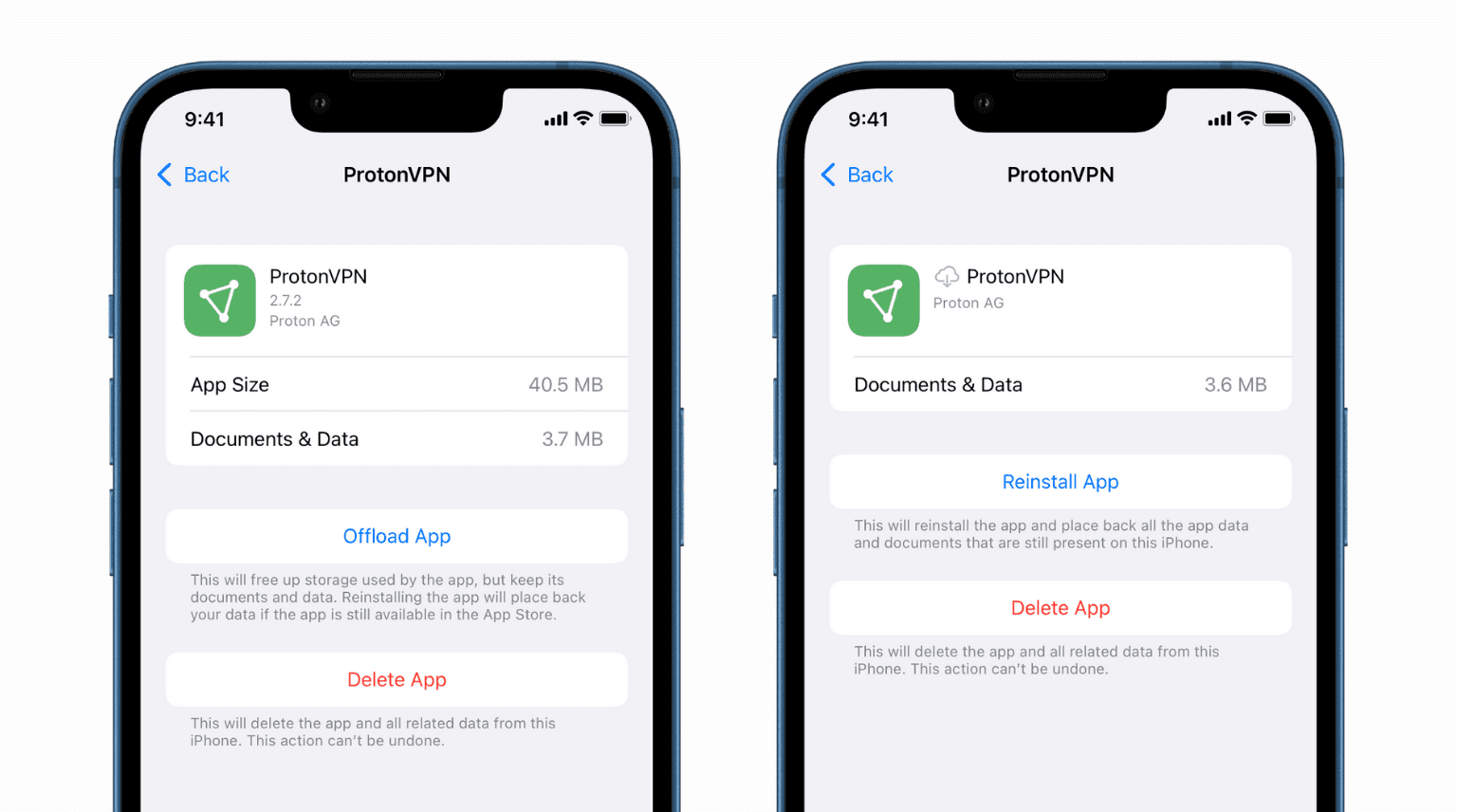
- On the next screen, you’ll see two options:
Offload AppandDelete App. TapOffload App. - Confirm your choice.
The app’s executable files will be removed, and the storage space will be reclaimed, but your data will persist. The app’s icon will remain on your Home screen, now adorned with a cloud symbol. To restore it, simply tap the icon, and it will re-download from the App Store, resuming exactly where you left off.
- Go to
Android Equivalents and Best Practices
While Android doesn’t have a direct, identically named “Offload App” feature as iOS, it offers similar functionalities that achieve much of the same effect through different means. Android’s open nature provides more granular control, though it requires a slightly different approach.
-
Clearing Cache and Data:
- Go to
Settings. - Tap
AppsorApps & Notifications. - Select the app you want to manage.
- Tap
Storage & cache. - You’ll see options for
Clear CacheandClear Storage(orClear Data).Clear Cacheremoves temporary files, which can free up some space without affecting your app’s data. This is a good first step for minor storage issues or troubleshooting.Clear Storage(orClear Data) removes all user data, settings, and files associated with the app, essentially resetting it to its fresh-installed state. This is similar to a full deletion on iOS, as you lose personalization.
While not offloading, clearing cache is a regular maintenance step, and clearing data followed by uninstalling (if you intend to reinstall) is the closest Android equivalent to a fresh start while preserving your option to reinstall from scratch.
- Go to
-
Uninstalling Rarely Used Apps: For apps you use very infrequently and don’t mind setting up again, a straightforward uninstall is often the best course of action on Android.
- Long-press the app icon on your home screen or app drawer.
- Drag it to the
Uninstalloption that appears (often at the top of the screen). - Confirm the uninstallation.
This frees up all space and removes all data. If you wish to retain some data, some apps (like certain games) offer cloud sync for progress, which can be an effective strategy before uninstalling.
-
Disabling Apps (for System Apps): Some pre-installed system apps cannot be uninstalled but can often be disabled. This removes them from your app drawer and prevents them from running in the background, freeing up some resources.
- Go to
Settings>Apps. - Select the system app.
- Tap
Disable(if available).
- Go to
While Android’s approach is less unified than iOS’s “Offload App,” users can achieve similar outcomes through judicious use of cache clearing, data clearing, and mindful uninstallation strategies, often complemented by cloud backup services for crucial app data.
Beyond the Device: Offloading’s Impact on Brands and Your Wallet
The implications of app offloading extend beyond individual user devices, touching upon the strategies of app developers (brands) and even influencing personal financial decisions.
The Brand Perspective: User Experience and Retention
For app developers and the brands they represent, user experience is paramount. An app that constantly demands more storage, contributes to device slowdowns, or forces users to make difficult deletion choices, risks losing users. Offloading presents a unique dilemma and opportunity for brands:
- User Retention: Offloading offers a middle ground that benefits user retention. If a user offloads an app instead of deleting it, the app’s icon remains visible, serving as a persistent reminder and making re-engagement frictionless. This is far better for a brand than a full deletion, after which a user might forget the app entirely or be deterred by the effort of setting it up again.
- App Size Optimization: The existence of offloading incentivizes developers to consider their app’s footprint. While offloading makes large apps more manageable, developers still strive for efficiency. A smaller initial download size means quicker adoption, and a smaller overall footprint means less likelihood of being offloaded or deleted. Brands need to balance rich features with efficient resource usage to satisfy both active and intermittent users.
- Cloud Sync and User Data: For offloading to be truly effective from a user perspective, apps must handle user data robustly. This means reliable cloud synchronization for critical information (like game progress, settings, and documents). Brands that prioritize seamless cloud integration ensure that offloaded data is safe and easily restored, enhancing user trust and satisfaction. This becomes a competitive advantage, as users are more likely to offload rather than delete apps that safeguard their data effectively.
- Marketing and Re-engagement: Brands can strategically use the knowledge of offloading. For instance, they might send a push notification to users whose apps have been offloaded, offering a new feature or incentive to re-download, knowing that the barrier to re-engagement is low.
Ultimately, offloading represents an evolution in user-centric app management. Brands that understand and adapt to this user behavior by ensuring data integrity and fostering easy re-engagement will strengthen their relationship with their user base.
The Money Angle: Saving on Storage and Extending Device Lifespan
From a personal finance perspective, app offloading offers tangible benefits that can save users money in the long run.
- Delaying Device Upgrades: One of the primary drivers for purchasing a new smartphone is often a lack of sufficient storage. Users find themselves constantly juggling apps and photos, reaching critical storage levels. By effectively managing space through offloading, users can significantly extend the usable life of their current device. This means delaying the need to spend hundreds or even over a thousand dollars on a new phone, resulting in substantial savings.
- Avoiding Higher-Tier Storage Costs: When buying a new device, upgrading to a higher storage tier (e.g., from 128GB to 256GB or 512GB) often comes with a premium of $100-$200 or more. By skillfully using offloading and other storage management techniques, users can confidently opt for lower storage tiers, knowing they can make the most out of their available space. This directly translates to immediate cost savings on the device purchase itself.
- Increased Productivity and Value Retention: A faster, less cluttered device is a more productive device. If your phone isn’t constantly lagging or prompting you to delete things, you can work, learn, and engage more efficiently. This contributes to your overall productivity and the return on investment you get from your device. Furthermore, a well-maintained device that performs optimally will often have a higher resale value when it’s time to upgrade, putting more money back in your pocket.
- Reduced Data Overages (Indirectly): While not a direct money-saver for data, managing app installations and background processes (which offloading helps with) can subtly reduce data consumption. Less active apps mean less background refresh, potentially saving cellular data and preventing costly overage charges for users on limited plans.
In essence, offloading apps is a smart financial habit. It’s about optimizing resources, making existing technology last longer, and avoiding unnecessary expenditures on upgrades or higher-priced models.
Conclusion
App offloading is more than just a trick to free up storage; it’s a sophisticated feature that embodies smart digital management. By understanding “what does offloading apps do,” users gain the power to reclaim valuable device space, enhance performance, and streamline their digital lives without the harsh finality of permanent deletion.
This intelligent approach ensures that your device remains snappy and responsive, extending its usability and potentially delaying costly upgrades. For app developers, it underscores the importance of seamless data synchronization and mindful app design, fostering stronger user retention. For the savvy consumer, it represents a tangible way to save money, manage technology more efficiently, and embrace a more intentional relationship with their digital tools.
In an age where digital clutter and device slowdowns are common frustrations, mastering app offloading stands out as an essential skill. It empowers you to maintain a lean, efficient, and personalized mobile experience, ensuring your device truly serves as a powerful extension of your productivity and lifestyle.
aViewFromTheCave is a participant in the Amazon Services LLC Associates Program, an affiliate advertising program designed to provide a means for sites to earn advertising fees by advertising and linking to Amazon.com. Amazon, the Amazon logo, AmazonSupply, and the AmazonSupply logo are trademarks of Amazon.com, Inc. or its affiliates. As an Amazon Associate we earn affiliate commissions from qualifying purchases.