
In the vast and interconnected world of technology, acronyms serve as linguistic shorthand, compressing complex concepts into digestible forms. Among these, “NIC” stands out as a fundamental term, particularly within the realm of computer networking. For anyone seeking to understand the foundational elements that enable our digital lives, deciphering what NIC means is an essential first step. Simply put, NIC primarily refers to a Network Interface Card, a critical hardware component that serves as your device’s gateway to a computer network and, by extension, the internet.
Without a NIC, your computer, server, smartphone, or any other internet-enabled device would be an isolated island, unable to communicate with other devices or access the boundless resources of the web. It is the unsung hero that translates digital information into signals that can travel across cables or through the air, and vice versa, making seamless data exchange possible. This article will delve into the intricacies of the Network Interface Card, exploring its function, evolution, types, and its indispensable role in modern computing.
The Essential Gateway: Understanding the Network Interface Card
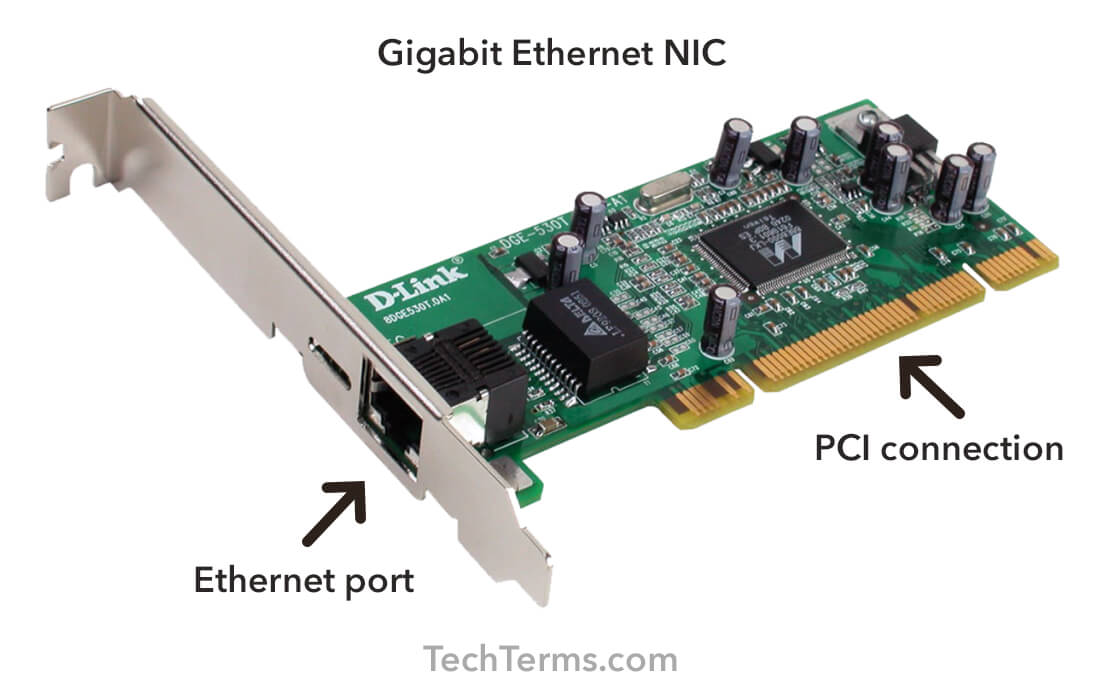
At its core, the Network Interface Card is the hardware that allows a computer to connect to a network. It’s a circuit board or chip that’s either integrated into the motherboard or installed as an expansion card. Its primary purpose is to prepare, send, and control data on the network.
Definition and Core Function
A Network Interface Card (NIC), also known as a Network Adapter, Ethernet Card, or LAN Adapter, is a piece of computer hardware that connects a computer to a computer network. When you send an email, stream a video, or browse a website, the data exchange wouldn’t be possible without a functioning NIC.
Its core functions can be broken down into several critical roles:
-
Physical Layer Connection: It provides the physical interface for network cabling (like Ethernet) or wireless signals (Wi-Fi).
-
Data Conversion: It translates the digital data from your computer into signals that can be transmitted over the network medium (electrical impulses for copper cables, light pulses for fiber optics, or radio waves for Wi-Fi). It also reverses this process for incoming data.
-
Data Framing: It organizes data into “frames” (packets) according to the network’s protocol (e.g., Ethernet). This includes adding source and destination addresses.
-
Media Access Control (MAC): Every NIC has a unique, hard-coded Media Access Control (MAC) address, which serves as its physical identifier on a local network. This address is crucial for directing data to the correct device.
-
Buffering: It temporarily stores data both before transmission and after reception to manage discrepancies in data rates between the computer and the network.
In essence, the NIC acts as a translator and traffic controller, ensuring that data flows smoothly and accurately between your device and the rest of the network.
A Brief History of Network Connectivity
The concept of networking computers dates back to the 1960s with early experiments like ARPANET. However, the commercial proliferation of NICs began in the 1970s and 1980s with the rise of local area networks (LANs). Early NICs were often proprietary and expensive, designed for specific network architectures like Token Ring or ARCnet.
The real game-changer arrived with the standardization of Ethernet technology in the early 1980s. Ethernet’s simplicity, cost-effectiveness, and increasing speed made it the dominant LAN technology, leading to the widespread adoption and integration of Ethernet NICs. Initially, NICs were large expansion cards that users had to install themselves. As technology advanced, NICs became smaller, more efficient, and eventually integrated directly into computer motherboards, making network connectivity a standard feature rather than an add-on. The advent of wireless technology further revolutionized NICs, freeing devices from physical cables and enabling the mobile computing landscape we know today.
Anatomy and Types of NICs
While the fundamental purpose of a NIC remains constant, their form factors, capabilities, and the technologies they support have diversified significantly. Understanding these variations helps in appreciating their versatility.
Internal vs. External NICs
NICs can generally be categorized by their physical placement:
-
Integrated NICs: The most common type today, these are built directly into the computer’s motherboard. Most laptops and desktop PCs come with integrated Ethernet ports and Wi-Fi modules, providing out-of-the-box network connectivity.
-
Expansion Card NICs: These are separate cards that users can install into an available expansion slot (like PCIe) on a motherboard. They are often used to upgrade existing systems (e.g., adding faster Ethernet, Wi-Fi 6E, or fiber optic capabilities), replace a faulty integrated NIC, or add multiple network ports for server applications.
-
External NICs: These connect via a USB port. They are particularly popular for adding Wi-Fi capability to older desktops, providing Ethernet connectivity to ultrabooks lacking a built-in port, or as a temporary solution for a malfunctioning internal NIC.
Wired NICs: Ethernet and Beyond
Wired NICs primarily handle connections through physical cables.
-
Ethernet NICs: These are by far the most prevalent wired NICs. They connect using Ethernet cables (RJ-45 connectors) and support various speeds, from Fast Ethernet (100 Mbps) to Gigabit Ethernet (1 Gbps), 2.5 Gbps, 5 Gbps, 10 Gbps, and even higher speeds like 25 Gbps or 100 Gbps for enterprise and data center environments.
-
Fiber Optic NICs: Used in high-speed, long-distance network environments, these NICs connect via fiber optic cables. They offer superior bandwidth and immunity to electromagnetic interference, making them ideal for backbone networks and data centers.
Wireless NICs: The World of Wi-Fi
Wireless NICs allow devices to connect to a network without physical cables, using radio waves.
-
Wi-Fi NICs: These are standard in almost all modern mobile devices, laptops, and many desktops. They adhere to the IEEE 802.11 family of standards (e.g., 802.11n, 802.11ac, 802.11ax/Wi-Fi 6, Wi-Fi 7), offering various speeds, ranges, and frequencies (2.4 GHz, 5 GHz, 6 GHz).
-
Bluetooth NICs: While primarily for short-range personal area networks (PANs) rather than full internet connectivity, many devices include Bluetooth capabilities alongside Wi-Fi, allowing connection to peripherals like keyboards, mice, and headsets.
Specialized NICs: Fiber Optic and Virtual
Beyond standard Ethernet and Wi-Fi, specialized NICs cater to specific needs:
-
Virtual NICs (vNICs): In virtualized environments (like virtual machines or cloud instances), a vNIC is a software-defined component that functions like a physical NIC, allowing virtual machines to communicate with the host’s physical network adapter and other virtual machines. This is crucial for cloud computing and server virtualization.
-
Power over Ethernet (PoE) NICs: While not a different type of network technology, some NICs are designed to be part of PoE systems, where network cables also carry electrical power to the device, simplifying cabling for IP cameras, VoIP phones, and IoT devices.
How a NIC Bridges Your Device to the Network
The sophisticated functionality of a NIC goes beyond merely plugging in a cable or connecting to Wi-Fi. It orchestrates the flow of data at a fundamental level.
The Role of MAC Addresses
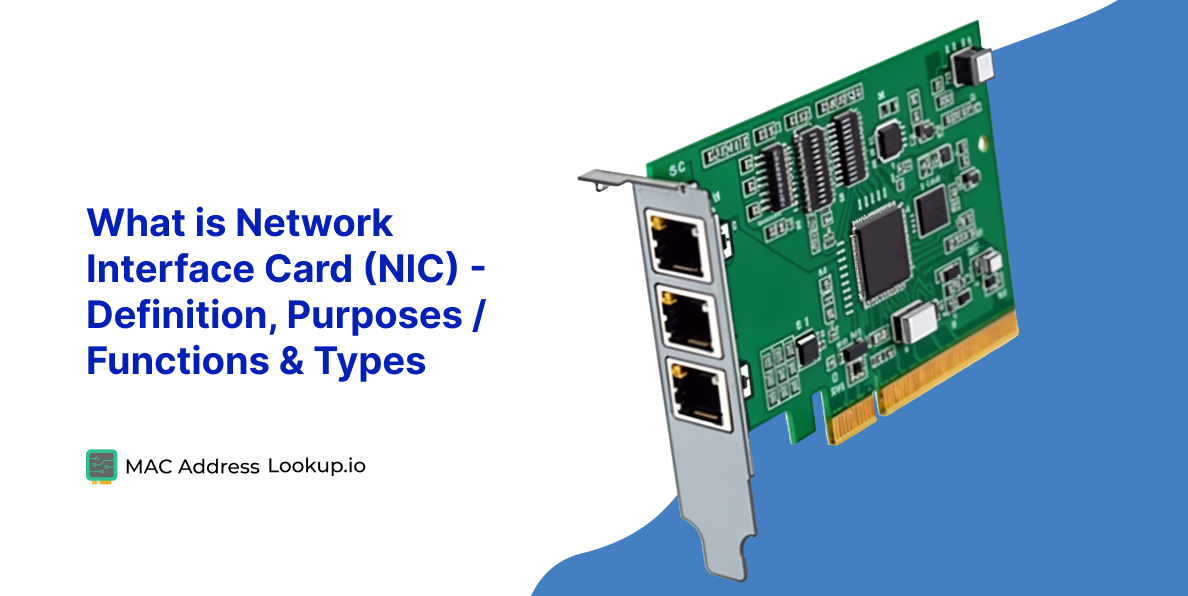
Every single physical NIC manufactured globally is assigned a unique 48-bit Media Access Control (MAC) address. This address, often referred to as the “physical address,” is hard-coded into the NIC by the manufacturer. It acts as a device’s unique identifier on a local network segment. When data is transmitted on a LAN, the NIC uses the MAC address to ensure that incoming data frames are directed only to the intended recipient and that outgoing data frames correctly identify their source. This mechanism operates at the data link layer (Layer 2) of the OSI model.
Data Transmission and Reception
When your computer wants to send data:
-
The operating system passes the data down the network stack to the NIC.
-
The NIC’s driver software formats the data into frames according to the network protocol (e.g., Ethernet frame). This includes adding the source and destination MAC addresses.
-
The NIC then converts these digital frames into electrical signals (for wired) or radio waves (for wireless).
-
These signals are then transmitted over the network medium (cable or air).
When your computer receives data:
-
The NIC continuously monitors the network medium for signals.
-
Upon detecting incoming signals, it converts them back into digital frames.
-
It checks the destination MAC address of each frame. If it matches the NIC’s own MAC address (or a broadcast/multicast address), the frame is accepted.
-
The NIC removes the framing information and passes the raw data up to the operating system for processing.
Interaction with Network Protocols
NICs work in conjunction with various network protocols. While the NIC itself handles the physical and data link layers (Layer 1 and Layer 2), it works seamlessly with higher-layer protocols like the Internet Protocol (IP) at Layer 3. The operating system uses the MAC address provided by the NIC to map to IP addresses (via ARP – Address Resolution Protocol), ensuring that data intended for a specific IP address can be correctly routed to the corresponding physical device on the local network. This layered approach is what makes complex global networks function efficiently.
The Evolution and Future of NIC Technology
NICs have come a long way from simple connectivity devices, continually evolving to meet the demands of faster networks, virtualized environments, and enhanced security.
From Basic Connectivity to Smart Adapters
Early NICs were solely focused on providing basic network access. Today’s NICs, especially those for servers and high-performance computing, are “smarter.” They incorporate features like:
-
Offloading Engines: These allow the NIC to handle certain tasks (e.g., TCP segmentation, checksum calculations) that would traditionally be handled by the CPU, freeing up CPU cycles for other computations.
-
Remote Direct Memory Access (RDMA): Enables direct memory access from one computer to another without involving the remote operating system’s CPU, reducing latency and increasing throughput, critical for high-performance computing and storage networks.
-
Single-Root I/O Virtualization (SR-IOV): Allows a single physical NIC to appear as multiple virtual NICs to different virtual machines, improving performance and efficiency in virtualized environments.
Performance Metrics: Speed, Latency, and Throughput
Key performance indicators for NICs include:
-
Speed: The maximum data transfer rate the NIC can support (e.g., 1 Gbps, 10 Gbps).
-
Latency: The delay in data transmission. Lower latency is crucial for real-time applications like online gaming or high-frequency trading.
-
Throughput: The actual amount of data successfully transferred over a period, often lower than the theoretical speed due to network overhead and congestion.
Modern NICs are designed to maximize these metrics, with advancements like multi-gigabit Ethernet and Wi-Fi 6/7 pushing the boundaries of speed and efficiency.
NICs in the Age of Cloud Computing and Virtualization
Cloud computing fundamentally relies on virtualization, where resources like computing power, storage, and networking are abstracted from the underlying hardware. Virtual NICs (vNICs) are central to this paradigm. They allow virtual machines to interact with the network as if they had their own dedicated physical NICs, even though they share the physical adapter of the host server. Advanced NICs support features like SR-IOV to optimize I/O performance for virtualized workloads, ensuring that cloud services remain responsive and performant.
Security Implications and Advanced Features
The NIC, as the network entry point, also plays a role in security. Features like:
-
Wake-on-LAN (WoL): Allows a network administrator to remotely power on a computer, useful for maintenance or power management.
-
Boot from Network (PXE Boot): Enables a computer to boot an operating system or other software directly from a network server, used for deploying operating systems or diskless workstations.
-
Intrusion Detection/Prevention System (IDS/IPS) Offload: Some advanced NICs can offload parts of these security functions, reducing the load on the CPU and improving the speed of security analysis.
As networks become more complex and threats more sophisticated, the role of the NIC in network security and management will only grow.
Choosing the Right NIC for Your Needs
Selecting the appropriate NIC is crucial for optimizing network performance, especially in scenarios ranging from home use to enterprise data centers.
Factors to Consider: Speed, Form Factor, and Features
When choosing a NIC, several factors come into play:
-
Speed Requirement: For general home use, a Gigabit Ethernet NIC and Wi-Fi 5 or 6 are usually sufficient. For gaming, media streaming, or demanding professional tasks, 2.5 Gbps, 10 Gbps Ethernet, or Wi-Fi 6E/7 might be desirable. Servers and data centers often require multi-gigabit or fiber optic NICs for massive data throughput.
-
Form Factor: Is an integrated NIC sufficient, or do you need an expansion card (PCIe) or an external USB adapter? Consider the available slots/ports on your device.
-
Wired vs. Wireless: Most devices benefit from both, but if absolute reliability and speed are paramount, wired is often preferred. Wireless offers unparalleled mobility.
-
Specialized Features: Do you need features like PoE, RDMA, SR-IOV, or specific security offloads? These are typically relevant for enterprise environments or specialized applications.
-
Compatibility: Ensure the NIC is compatible with your operating system and motherboard (for expansion cards).
Installation and Troubleshooting Basics
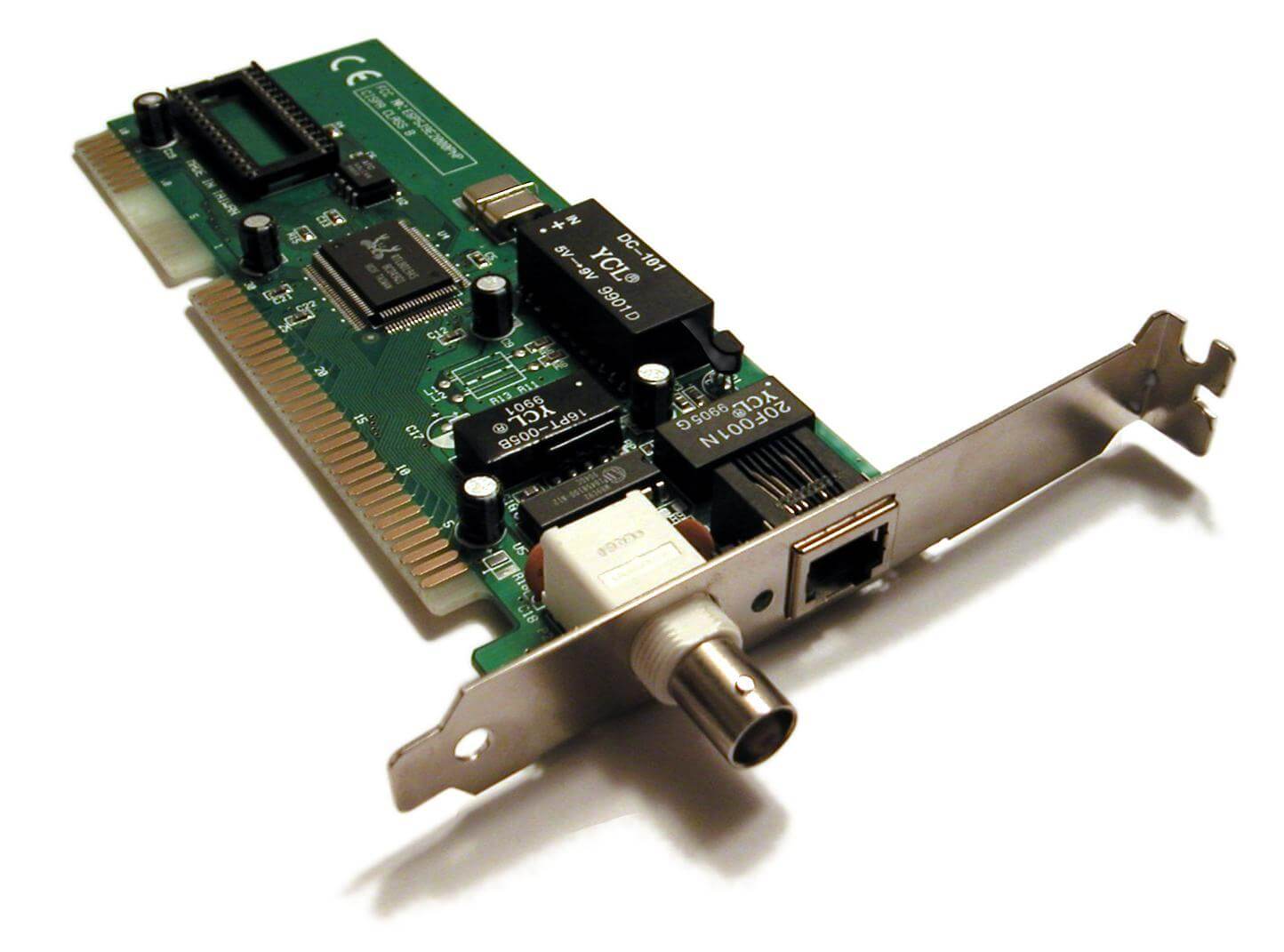
Installing an expansion card NIC typically involves powering down the computer, opening the case, inserting the card into a free PCIe slot, and then installing the necessary drivers. USB NICs are usually plug-and-play. Troubleshooting often involves checking physical connections, verifying driver installation, ensuring the NIC is enabled in the operating system’s network settings, and confirming proper network configuration (IP addresses, DNS settings). A faulty NIC can often be identified by a complete lack of network connectivity or intermittent, slow performance.
In conclusion, the Network Interface Card, or NIC, is far more than just a port on your device. It’s a sophisticated piece of engineering that underpins nearly every digital interaction we have. From its humble beginnings to its current role as a smart, high-speed gateway, the NIC remains an indispensable component in the ever-evolving landscape of technology, constantly adapting to keep us connected in an increasingly digital world. Understanding “what does NIC mean” is to grasp a fundamental pillar of modern computing.
aViewFromTheCave is a participant in the Amazon Services LLC Associates Program, an affiliate advertising program designed to provide a means for sites to earn advertising fees by advertising and linking to Amazon.com. Amazon, the Amazon logo, AmazonSupply, and the AmazonSupply logo are trademarks of Amazon.com, Inc. or its affiliates. As an Amazon Associate we earn affiliate commissions from qualifying purchases.