
In the vast and intricate landscape of computer networks, acronyms often serve as shorthand for complex technologies. One such acronym, frequently encountered yet often misunderstood, is NAT. For anyone navigating the digital realm, from home users to IT professionals, understanding NAT – Network Address Translation – is fundamental to comprehending how devices communicate across different networks, especially the internet. Far more than just a technical jargon, NAT is a critical protocol that has profoundly shaped the internet as we know it, enabling billions of devices to connect while simultaneously providing a layer of security. This comprehensive guide will demystify NAT, exploring its origins, operational mechanics, the vital role it plays, and the implications it carries for modern networking.

The Genesis and Fundamental Role of Network Address Translation (NAT)
To truly grasp the significance of NAT, we must first travel back to a foundational problem that emerged with the burgeoning growth of the internet: the scarcity of IP addresses. NAT wasn’t a feature designed from the outset; rather, it was an ingenious solution born out of necessity, a temporary fix that became an enduring pillar of network architecture.
The Problem IPv4 Posed: IP Address Exhaustion
The internet’s original addressing scheme, Internet Protocol version 4 (IPv4), was designed in an era when the sheer scale of global connectivity we experience today was unimaginable. IPv4 addresses are 32-bit numbers, meaning there are approximately 4.3 billion unique addresses. While this number seemed astronomical in the early days, the rapid proliferation of personal computers, smartphones, IoT devices, and servers quickly began to deplete this finite pool. Each device connected directly to the internet requires a unique public IP address, and with only 4.3 billion available, the world was rapidly heading towards an IP address crisis. Public IPv4 addresses were running out, threatening to stall the internet’s expansion.
How NAT Stepped In: A Temporary but Enduring Solution
Enter Network Address Translation. Conceived in the early 1990s, NAT offered a clever workaround to the impending IPv4 address exhaustion. Instead of assigning a unique public IP address to every single device, NAT allowed multiple devices within a private network (like your home or office LAN) to share a single public IP address when communicating with the internet. This meant that a household with half a dozen devices—laptops, phones, smart TVs—could all access the internet through one public IP address assigned by their Internet Service Provider (ISP), thereby conserving precious public IPv4 addresses. What started as a stopgap measure evolved into a widely adopted, indispensable technology.
Basic Definition: Bridging Private and Public Networks
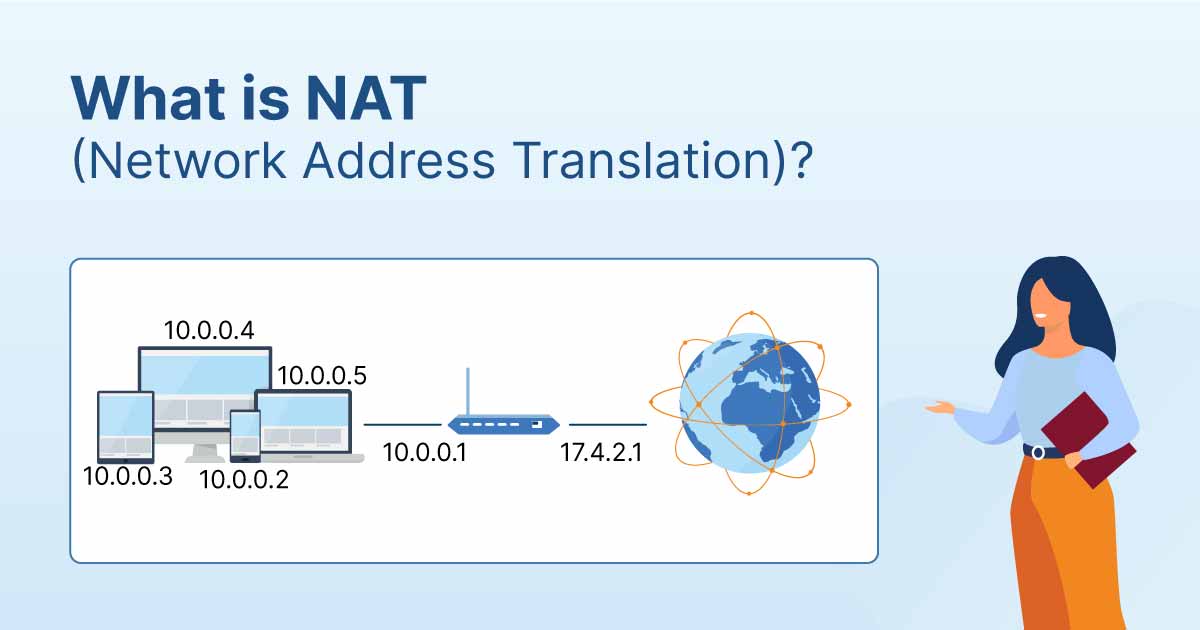
At its core, NAT is a methodology for remapping an IP address space into another by modifying network address information in the IP header of packets while they are in transit across a traffic routing device. In simpler terms, NAT acts as an intermediary or a translator between a private network (which uses a set of non-routable, private IP addresses) and a public network (the internet, which uses globally routable public IP addresses). When a device on a private network wants to communicate with a server on the internet, NAT translates its private IP address into the router’s public IP address, making it appear to the internet as if the request originated from the router itself. This process is crucial for facilitating internet access for the vast majority of connected devices today.
Unpacking the Mechanics: How NAT Functions
Understanding NAT means delving into the specific ways it performs its translation magic. It’s not a one-size-fits-all solution; various types of NAT exist, each serving slightly different purposes and handling address translation with distinct methodologies.
The Core Process: Translating Addresses on the Fly
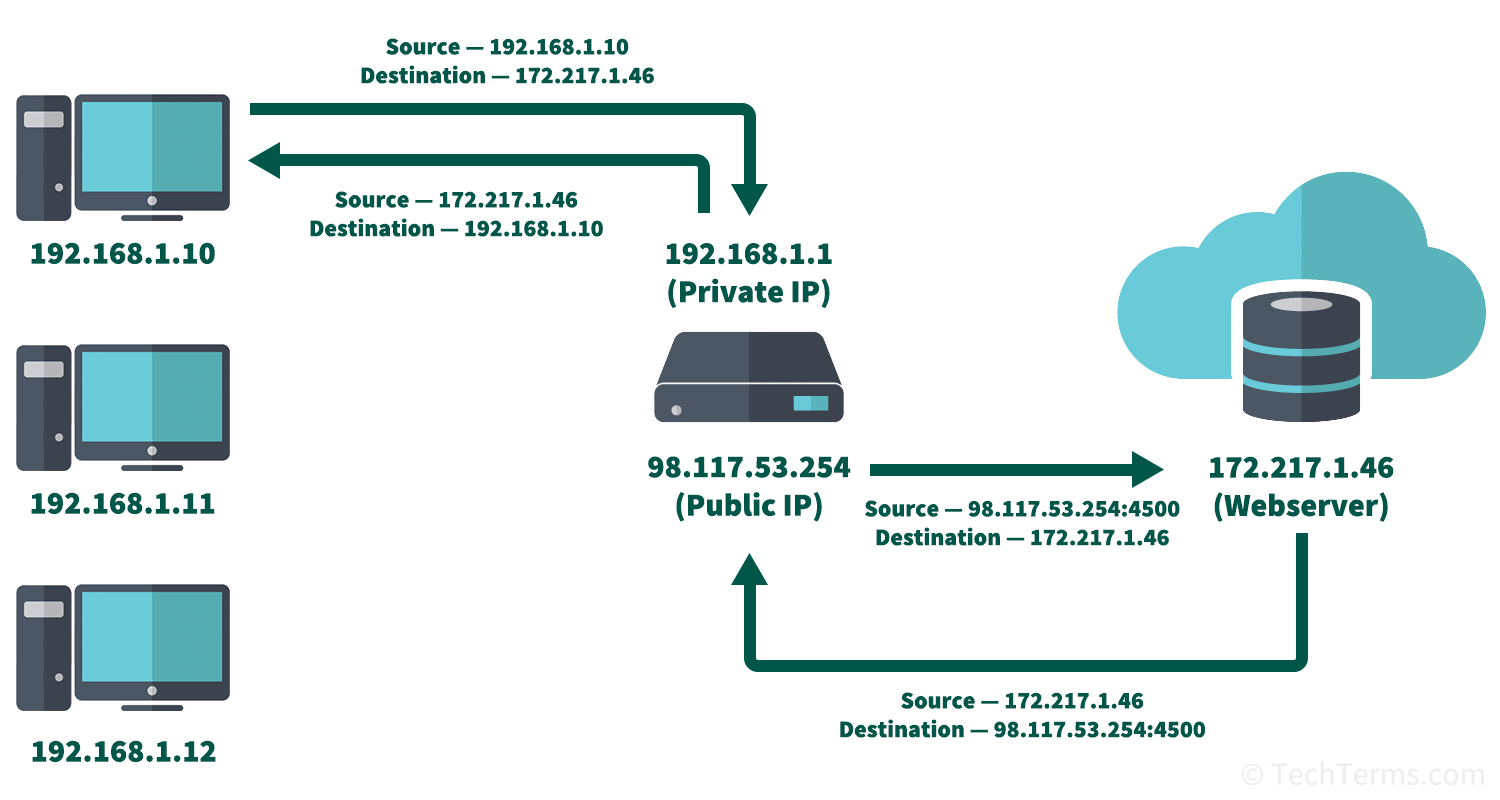
When a packet leaves a private network bound for the internet, a NAT-enabled router intercepts it. The router then replaces the packet’s source private IP address with its own public IP address. To ensure that the response packet from the internet finds its way back to the correct internal device, the router keeps a record, known as a NAT table or connection table, of the original private IP address and port number. When the response arrives, the router consults its NAT table, translates the destination public IP address back to the appropriate private IP address, and forwards the packet to the original internal device. This dynamic translation is what allows multiple devices to share a single public IP.
Types of NAT: A Spectrum of Translation Methods
While the core concept remains the same, NAT implementations vary based on how they manage the mapping between private and public addresses.
Static NAT: One-to-One Mapping
Static NAT, also known as one-to-one NAT, is the simplest form. It involves a permanent, fixed mapping between a single private IP address and a single public IP address. This means a device inside the private network always uses the same public IP address when communicating externally. Static NAT is typically used for devices that need to be consistently accessible from the internet, such as web servers or mail servers hosted within a private network. It doesn’t conserve public IP addresses efficiently but simplifies external access to specific internal resources.
Dynamic NAT: Many-to-Many Dynamic Pool
Dynamic NAT provides a more flexible approach. It maps private IP addresses to a pool of available public IP addresses on a first-come, first-served basis. When an internal device initiates communication, the NAT router picks an available public IP from its pool and assigns it temporarily for that session. Once the session ends, the public IP address is returned to the pool for reuse. While it offers better IP address conservation than static NAT, it still requires a pool of public IP addresses, making it less efficient for very large networks.
Port Address Translation (PAT) / NAT Overload: The Most Common Form
Also known as NAT Overload, Port Address Translation (PAT) is by far the most common and resource-efficient form of NAT. PAT allows multiple devices on a private network to share a single public IP address. It achieves this by assigning a unique port number to each outbound connection from a private device. When a private device sends a packet, the router not only translates the private IP address to its public IP address but also assigns a unique source port number. This combination of the router’s public IP address and the unique port number allows the router to differentiate between incoming responses and direct them to the correct internal device. This is the mechanism typically employed by your home broadband router, enabling dozens of devices to share one public IP provided by your ISP.
The Role of NAT Tables and Port Numbers
The efficiency and functionality of NAT, particularly PAT, heavily rely on the NAT table. This table is a dynamic database maintained by the NAT device (usually a router or firewall) that stores mappings between internal IP addresses and port numbers, and external IP addresses and port numbers. For example, if your laptop (private IP 192.168.1.10, port 12345) requests a webpage from google.com, the NAT router records that 192.168.1.10:12345 maps to its own publicIP:60000 (where 60000 is an arbitrarily chosen available public port). When Google responds to publicIP:60000, the router checks its table, sees the mapping, and forwards the packet to 192.168.1.10:12345. This clever use of port numbers is the secret sauce behind PAT’s ability to support so many devices with so few public IP addresses.
The Double-Edged Sword: Advantages and Disadvantages of NAT
Like any widely deployed technology, NAT comes with a set of distinct advantages that have cemented its place in networking, alongside specific disadvantages that pose challenges and limitations.
Key Benefits: Conserving IP Addresses and Enhancing Security
The primary benefit, as established, is the conservation of IPv4 addresses. Without NAT, the internet would have ground to a halt years ago due to address exhaustion. This ingenious solution has extended the lifespan of IPv4, giving the world valuable time to transition to IPv6.
Beyond address conservation, NAT inadvertently provides a significant security benefit. By hiding the internal IP addresses and network topology of a private network from the outside world, NAT acts as a basic firewall. External entities only see the public IP address of the NAT device, making it harder for malicious actors to directly target individual devices within the private network. This “security by obscurity” creates a natural barrier, protecting internal hosts from unsolicited inbound connections.
Notable Drawbacks: Latency, Application Compatibility, and End-to-End Connectivity Issues
Despite its advantages, NAT is not without its drawbacks. One significant issue is increased latency. The translation process itself, while fast, adds a slight delay to packet forwarding. For applications where milliseconds matter, such as real-time gaming or high-frequency trading, this can be a minor but noticeable impact.
Another major challenge arises with application compatibility. Certain applications that embed IP addresses within their data payload (rather than just the header) can break when their IP addresses are translated. This is particularly problematic for older protocols or specific VoIP and peer-to-peer applications that expect direct end-to-end communication and struggle with the address modification that NAT performs. NAT traversal techniques (discussed later) are often needed to resolve these issues.
Perhaps the most philosophical drawback of NAT is its violation of the end-to-end principle of the internet. The original internet design envisioned direct, unhindered communication between any two points. NAT breaks this by modifying packet headers and masking internal addresses, preventing direct, unsolicited inbound connections from the internet to devices within a private network unless explicitly configured (e.g., via port forwarding). This complicates direct communication, especially for server applications running on internal devices.
The Argument for IPv6: NAT’s Eventual Successor?
While NAT has been a phenomenal success as an IPv4 extender, it is ultimately a temporary solution. The long-term answer to IP address scarcity and the complexities introduced by NAT is IPv6. With its astronomically larger address space (3.4 x 10^38 addresses), IPv6 eliminates the need for NAT for address conservation. Every device can theoretically have its own globally unique public IPv6 address, restoring the end-to-end principle and simplifying network architecture. However, the transition to IPv6 has been slow, and IPv4 with NAT continues to be the dominant protocol for much of the internet today.
NAT in the Real World: Ubiquitous Applications and Modern Challenges
NAT is not an abstract concept; it is an invisible workhorse operating in the background of virtually every connected network. From the smallest home network to the largest ISP infrastructure, NAT plays a crucial role, albeit with varying implementations and challenges.
Home and Small Office Networks: Your Router’s Hidden Power
For most users, the most common encounter with NAT is through their home or small office broadband router. This device, often provided by an ISP, acts as a NAT gateway. It connects your internal network (your Wi-Fi and Ethernet devices) to the internet via a single public IP address. Every device in your home, from your laptop to your smart doorbell, shares this one public IP address thanks to PAT. Without it, your ISP would need to assign a unique public IP to every single device, an impossible task given IPv4 limitations. The router’s NAT functionality allows seamless internet browsing, streaming, and email for all connected devices.
Enterprise and Carrier-Grade NAT (CGN): Scaling for Large Networks
In larger enterprise networks, NAT is also used, often in conjunction with firewalls, to manage traffic between internal subnets and the internet. Here, it provides similar benefits of IP conservation and security. However, at the scale of Internet Service Providers, Carrier-Grade NAT (CGN), also known as Large-Scale NAT (LSN), takes the concept to another level. CGN is deployed by ISPs to allow multiple customers to share a single public IPv4 address. This involves a double layer of NAT, where the customer’s home router performs NAT (translating private IPs to a semi-public IP), and then the ISP’s CGN device performs another layer of NAT (translating the semi-public IP to a truly public internet IP). While extremely efficient for conserving addresses, CGN can introduce additional complexities for applications requiring direct inbound connections and can make troubleshooting or identifying specific users more challenging due to the shared public IP.
Impact on Gaming, VoIP, and Peer-to-Peer Applications
As mentioned, NAT can be particularly problematic for applications that rely on direct incoming connections or peer-to-peer (P2P) communication. Online gaming, Voice over IP (VoIP) services, and P2P file-sharing applications often struggle because NAT prevents unsolicited inbound connections from the internet to a specific internal device. A game server on the internet cannot directly initiate a connection to your console behind a NAT router without prior configuration. This often results in “NAT type” warnings in games (e.g., “strict NAT”), indicating potential connectivity issues with other players.
NAT Traversal Techniques: Bypassing the Barriers
To overcome the limitations NAT imposes on direct communication, various NAT traversal techniques have been developed. These methods aim to establish direct connections between devices that are both behind NAT gateways. Common techniques include:
-
Port Forwarding: Manually configuring the NAT router to direct specific incoming traffic on a particular public port to a specific internal IP address and port. This is often done for hosting game servers or accessing security cameras.
-
UPnP (Universal Plug and Play): A protocol that allows devices on a private network to automatically configure port forwarding on the NAT router, often used by gaming consoles and media servers. However, UPnP is often criticized for security vulnerabilities as it allows devices to open ports without explicit user approval.
-
STUN (Session Traversal Utilities for NAT), TURN (Traversal Using Relays around NAT), and ICE (Interactive Connectivity Establishment): These are more sophisticated protocols used by VoIP and video conferencing applications to discover the NAT type and find the best way to establish a direct connection, sometimes involving relay servers.
Practical Considerations: Managing and Understanding NAT
For network administrators, IT support staff, and even tech-savvy home users, a practical understanding of NAT is essential for troubleshooting, configuring, and optimizing network performance and security.
Common NAT-Related Issues and Troubleshooting Tips
Many common network problems, particularly those related to online gaming, VoIP, or accessing internal services from outside the network, often stem from NAT configurations.
-
“Can’t connect to server/other players”: Often indicates a strict NAT type, meaning your router isn’t forwarding the necessary ports for direct peer-to-peer communication.
-
“Port unreachable errors”: Suggests a firewall or NAT blocking the desired port.
-
“Slow downloads/uploads on P2P apps”: Can be due to NAT limiting the number of simultaneous connections or hindering direct peer discovery.
Troubleshooting usually involves checking router settings, ensuring port forwarding is correctly configured, or temporarily disabling UPnP if it’s causing issues (though this should be done with caution).
Port Forwarding vs. UPnP: Opening Doors in Your Network
Port forwarding offers precise control. You manually specify which external port maps to which internal IP address and port. This is secure because only the ports you explicitly open are accessible. It’s ideal for services that require consistent, defined access from the outside.
UPnP, conversely, automates this process. Devices can request port openings from the router without user intervention. While convenient, this automation can be a security risk. A malicious application on an internal device could potentially open a port, making your network vulnerable. For this reason, many security experts recommend disabling UPnP unless absolutely necessary, opting for manual port forwarding where possible.
Best Practices for Secure NAT Implementation
To harness the benefits of NAT while mitigating its risks, adhere to best practices:
-
Keep Router Firmware Updated: Patches often address security vulnerabilities in NAT implementations.
-
Disable UPnP If Not Needed: Reduce potential attack vectors.
-
Use Strong Passwords for Router Access: Prevent unauthorized configuration changes.
-
Implement a Firewall: NAT provides basic obscurity, but a dedicated firewall offers much more robust protection, controlling both inbound and outbound traffic with granular rules.
-
Understand Your Network Topology: Knowing which devices are behind NAT, which require public access, and how traffic flows is crucial for effective management.
In conclusion, NAT is a testament to human ingenuity in adapting technology to evolving needs. What began as a provisional fix for IPv4 address scarcity has blossomed into an indispensable component of global networking infrastructure, enabling the internet’s explosive growth and providing an implicit layer of security for countless private networks. While the eventual widespread adoption of IPv6 promises to render many of NAT’s address conservation functions obsolete, its role as a network boundary and a tool for managing specific communication flows ensures that Network Address Translation will remain a relevant and important concept for the foreseeable future. Understanding NAT isn’t just about knowing an acronym; it’s about comprehending a fundamental mechanism that keeps our digital world connected.
aViewFromTheCave is a participant in the Amazon Services LLC Associates Program, an affiliate advertising program designed to provide a means for sites to earn advertising fees by advertising and linking to Amazon.com. Amazon, the Amazon logo, AmazonSupply, and the AmazonSupply logo are trademarks of Amazon.com, Inc. or its affiliates. As an Amazon Associate we earn affiliate commissions from qualifying purchases.