
Modern smart home ecosystems rely heavily on interconnected sensor networks to ensure domestic safety. As the Internet of Things (IoT) landscape evolves, our standard home hardware has transitioned from simple, standalone plastic units into sophisticated, cloud-connected gadgets. Understanding the specific diagnostic signals—or “beeps”—emitted by these devices is no longer just a matter of home maintenance; it is a critical aspect of managing your residential tech infrastructure. When your smoke alarm begins to chirp or beep intermittently, it is communicating a specific system status that requires immediate technical troubleshooting to restore optimal functionality.

Decoding the Diagnostic Language of Smart Sensors
To effectively manage home security hardware, one must view the smoke alarm not merely as a buzzer, but as a digital diagnostic tool. Most modern devices utilize a specific cadence of audio signals to distinguish between a life-threatening emergency and a routine technical alert.
The Low Battery Alert Sequence
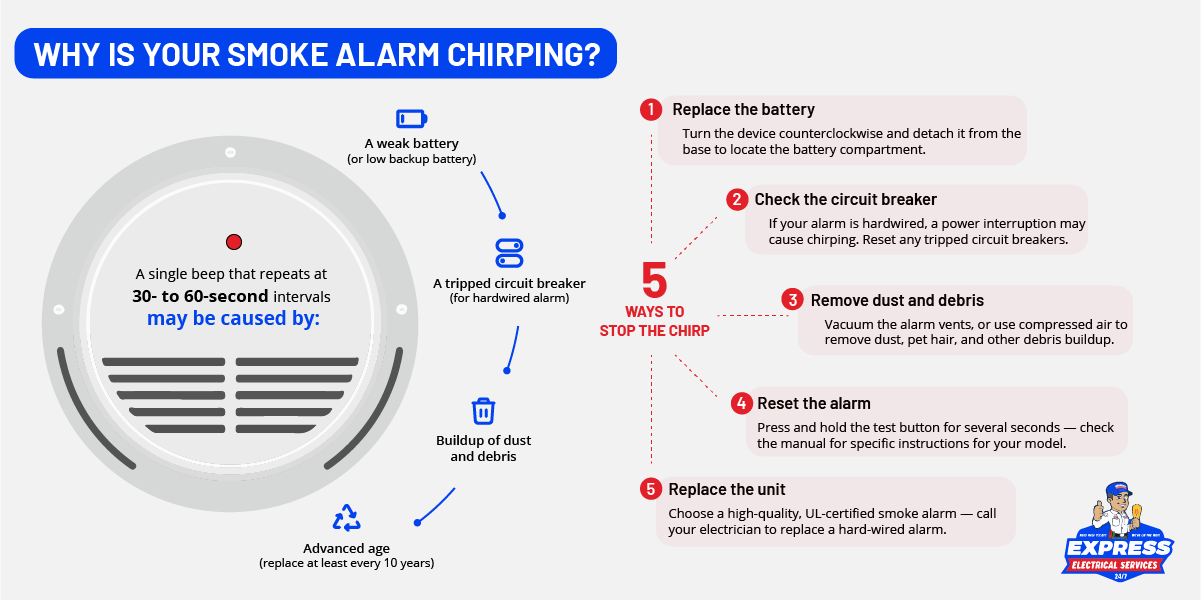
The most frequent cause for a singular, periodic chirp is a low voltage threshold in the power supply. Whether your device utilizes a 9V backup battery or a long-life lithium power cell, the internal voltage sensor monitors power levels in real-time. When the internal resistance climbs above a predetermined limit, the microchip triggers a “low battery” state. In many modern smart models, this is accompanied by a subtle flashing yellow or amber LED indicator. Ignoring this signal for an extended period may lead to a complete system failure, rendering the device incapable of detecting combustion markers.
The End-of-Life Notification
Advanced smoke detection hardware is programmed with an internal expiration timer—typically lasting seven to ten years. These devices house highly sensitive ionization or photoelectric chambers that degrade over time due to dust accumulation, chemical contamination, and the breakdown of radioactive isotopes or optical sensors. When the device reaches its operational limit, it will emit a distinct, persistent chirp that cannot be silenced by replacing the batteries. This is the hardware’s way of informing the user that the sensor’s reliability is compromised and the unit must be replaced to maintain code compliance and functional integrity.
Network and Connectivity Interruption
For those utilizing smart home platforms such as Nest Protect, Ring, or other Wi-Fi-enabled safety ecosystems, a beep may indicate a loss of network synchronization. When a device loses its handshake with the primary hub or local wireless access point, it may trigger an alert to warn the owner that the unit is no longer reporting its status to the cloud. In this scenario, the issue is not the battery or the sensor, but the digital signal path. Users should verify that their router is active and that the device hasn’t been moved outside the effective range of their mesh network.
Troubleshooting Your Home Security Hardware

When a smoke alarm begins to exhibit erratic behavior, it is imperative to follow a systematic troubleshooting flow to isolate the variable causing the disturbance. Moving from the simplest potential failure point to the most complex ensures that you do not waste time on redundant repairs.
The Power Cycle Protocol
Hardwired smoke alarms, which draw power directly from your home’s electrical grid, often feature an interconnected secondary power backup. If your hardwired unit is chirping, it may be experiencing a power spike or a wiring fault. The first step is to perform a hard reset. Locate the breaker controlling your smoke alarm circuit and toggle it to the ‘off’ position for approximately sixty seconds. During this time, remove the unit from its mounting bracket and detach the harness. Once the internal capacitor has drained, reconnect the harness and restore power. This cycle often clears temporary memory errors in the device’s logic board that cause “phantom” chirps.
Cleaning and Environmental Maintenance
Dust, cobwebs, and small insects are the primary enemies of optical smoke detection technology. If your alarm is chirping in the middle of the night—a common occurrence due to temperature fluctuations—it may be that the sensor chamber has been triggered by an accumulation of particulates. Using a compressed air canister, carefully clear the vents on the side of the unit. Avoid using harsh chemical sprays or vacuum cleaners with high-static suction, as these can damage the delicate internal circuits or the optical lens. Regular maintenance schedules, performed alongside your digital device updates, will significantly reduce the frequency of false hardware alerts.
Firmware Updates and Software Conflicts
If you are operating a smart, app-connected device, the beep may be a notification that a mandatory firmware update is pending. Just as your smartphone or laptop requires periodic software patches to maintain security and performance, smart home gadgets receive over-the-air (OTA) updates. Occasionally, a device will chirp to notify the user that an update has failed or is awaiting authorization within the mobile application. Check your specific manufacturer’s app to ensure that the firmware version is up to date and that there are no pending diagnostic codes displayed on your dashboard.
Integrating Safety Tech into Your Digital Ecosystem
Modernizing your home security strategy requires more than just installation; it requires active management and integration into your existing tech stack. The transition from passive safety devices to active, intelligent sensors allows for proactive rather than reactive safety measures.
The Role of Interconnectivity
Most modern home setups utilize interconnected alarms, where the activation of one unit triggers all devices throughout the residence. While this is an excellent safety feature, it can also lead to confusion when troubleshooting. When a network is interconnected, a single faulty unit or a low-battery device can transmit a signal that causes the entire fleet to chirp in unison. To identify the culprit, check the LED indicator on each individual unit. The device that is flashing in a non-standard pattern is typically the “master” error unit. Isolating this single device allows you to address the root cause without dismantling your entire security grid.
Maximizing Longevity Through Environmental Control
The performance of electronic safety hardware is inherently linked to the environment in which it operates. Humidity levels, extreme temperature variances, and electrical noise can all influence the lifespan of your smoke alarms. In tech-heavy households, ensure that your alarms are not installed directly adjacent to air conditioning vents or high-power radio frequency equipment, as these can create electrical interference that may cause intermittent false positives or hardware degradation. By optimizing the physical placement of your gadgets, you extend the operational lifespan of the components and reduce the likelihood of “nuisance” beeps.
Future-Proofing Your Home Safety
As we look toward the future of home automation, the integration of AI and predictive analytics is set to revolutionize safety hardware. We are moving toward sensors that can distinguish between burnt toast and actual structural fires, significantly reducing the occurrence of false alarms. When selecting new equipment, prioritize devices that offer comprehensive mobile telemetry. The ability to receive a push notification explaining why a device is chirping—rather than having to guess based on an audio code—is the gold standard of the modern smart home. Investing in high-quality, reputable tech brands ensures that your hardware remains compatible with future software updates and security protocols, providing a seamless and secure living environment for years to come.
aViewFromTheCave is a participant in the Amazon Services LLC Associates Program, an affiliate advertising program designed to provide a means for sites to earn advertising fees by advertising and linking to Amazon.com. Amazon, the Amazon logo, AmazonSupply, and the AmazonSupply logo are trademarks of Amazon.com, Inc. or its affiliates. As an Amazon Associate we earn affiliate commissions from qualifying purchases.