
In the dynamic landscape of social media, managing digital interactions and maintaining a healthy online environment has become paramount. Platforms like Instagram continually evolve their feature sets to empower users with greater control over their privacy, safety, and overall experience. Among these tools, the “Restrict” feature stands out as a nuanced solution for users navigating unwanted or uncomfortable interactions without resorting to the more drastic measure of blocking. Understanding what it means to restrict someone on Instagram is crucial for anyone looking to fine-tune their digital boundaries and cultivate a more positive online presence.
Understanding Instagram’s “Restrict” Feature
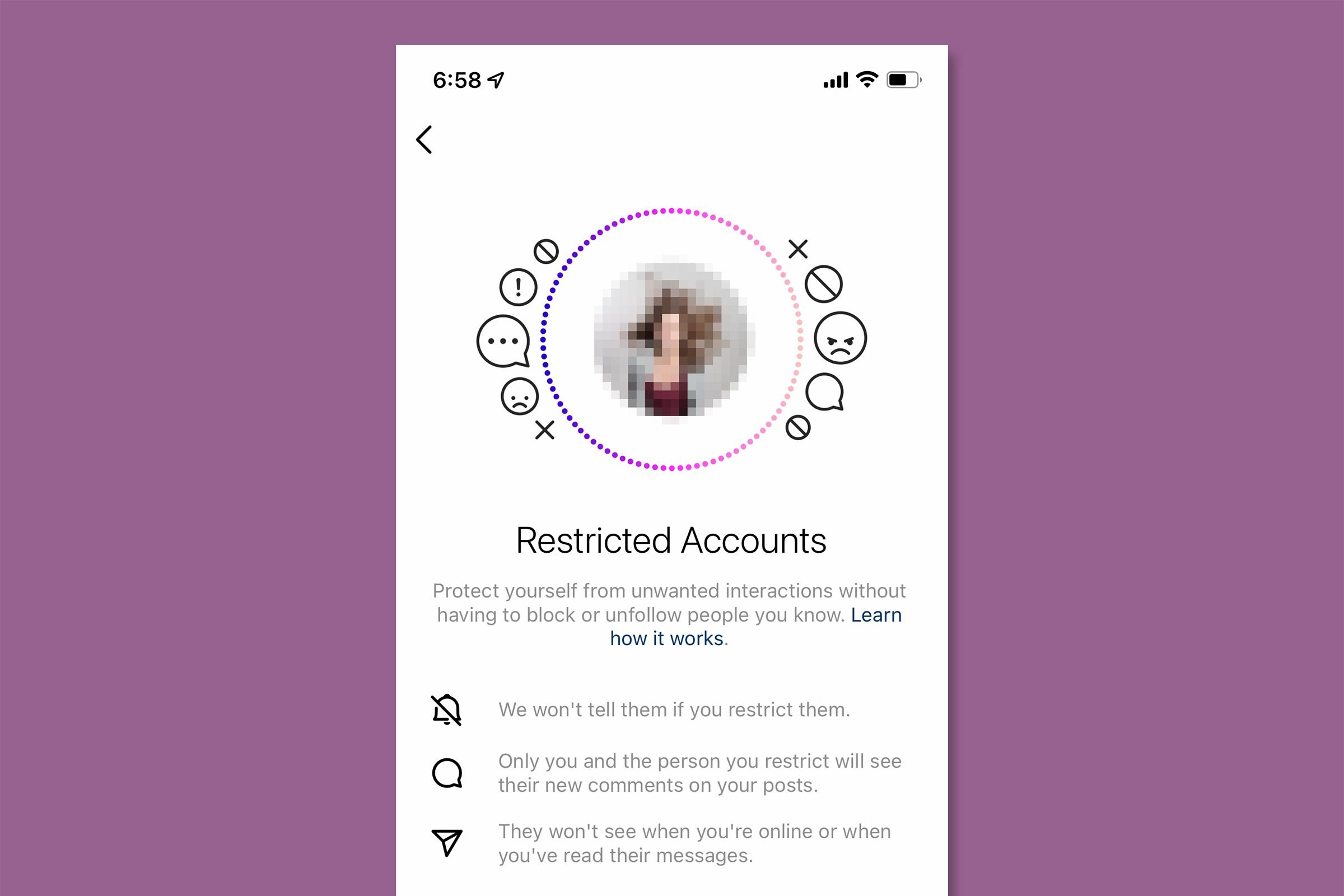
At its core, Instagram’s Restrict feature is a privacy tool designed to offer a middle ground between completely blocking a user and enduring their presence without any control. It’s a strategic response to the complexities of online relationships, where direct confrontation or complete severance might not always be the desired or practical solution. Introduced as a measure to combat bullying and unwanted interactions discreetly, “Restrict” allows users to manage their exposure to specific accounts without the restricted individual knowing about it.
Beyond Blocking: A Nuanced Approach to Digital Boundaries
Historically, when faced with an undesirable online interaction, users typically had two main options: ignore or block. Ignoring often meant tolerating unwanted comments or messages, while blocking, though effective, could lead to the blocked user realizing they’ve been cut off, potentially escalating the situation offline or creating social friction. The “Restrict” feature fills this crucial gap, offering a more subtle and less confrontational way to manage digital boundaries.
Unlike blocking, which completely severs all public and private interaction, restriction creates a semi-permeable barrier. The restricted user can still see your posts and send you direct messages, but their engagement with your content and their ability to directly reach you is significantly curtailed from your perspective. This allows you to maintain a facade of a normal connection while safeguarding your personal space and mental well-being. It’s particularly useful for situations involving acquaintances, colleagues, or distant relatives where a full block might cause awkwardness or escalate conflict in real-life interactions.
How Restriction Differs from Other Privacy Settings
To fully appreciate the utility of “Restrict,” it’s helpful to compare it with other related Instagram privacy features:
-
Blocking: This is the most absolute measure. A blocked user cannot see your profile, posts, stories, or send you messages. They are completely removed from your Instagram experience, and you from theirs. Instagram does not notify a user when they are blocked.
-
Muting: Muting an account means you won’t see their posts or stories in your feed, but they can still see yours, comment, and send messages. It’s about controlling what you see without affecting their ability to interact with you. The muted user is unaware they’ve been muted.
-
Unfollowing: Unfollowing an account removes their posts from your feed, and you no longer follow them. However, if your profile is public, they can still see your content, and if private, they would need to send a follow request. They can still send you direct messages.
-
Restricting: As described, this is about controlling what you see of their engagement and how their private messages reach you, while their comments on your posts become invisible to others. They can still see your content and send messages, but you have greater control over how you engage with these interactions. Crucially, the restricted user is not notified.
This spectrum of options provides users with increasingly granular control over their digital interactions, allowing them to tailor their experience to specific needs and relationships.
The Mechanics of Instagram Restriction: What Happens When You Restrict Someone?
When you choose to restrict an account on Instagram, several key changes occur, primarily affecting the visibility of their comments on your posts and the way their direct messages are handled. These changes are designed to minimize your exposure to unwanted content while maintaining the discretion of the action.
Comment Visibility: Controlling the Narrative
One of the most significant impacts of restricting someone is on their comments on your posts. When a restricted user leaves a comment on your photos or videos:
-
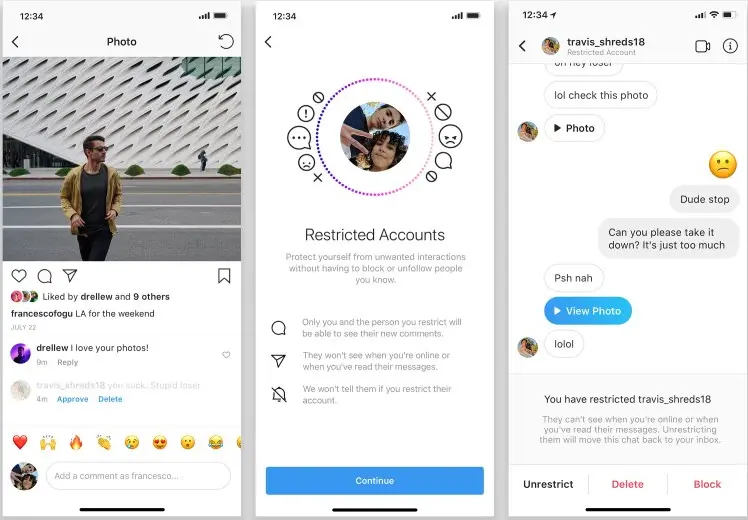
Only you and the restricted user can see their comment. This means that other followers or visitors to your profile will not see their comments.
-
You receive no notification for their comments.
-
You have the option to approve the comment. If you choose to approve it, the comment will then become visible to everyone, just like a regular comment. Otherwise, it remains hidden from public view.
-
You can delete the comment without the restricted user knowing, or you can leave it hidden.
This feature is particularly powerful for combating cyberbullying or passive-aggressive comments. It allows you to protect your public image and the integrity of your comment section without directly confronting the individual or letting them know their words are being filtered.
Direct Messages: Undisturbed Communication
The way direct messages (DMs) are handled also changes significantly:
-
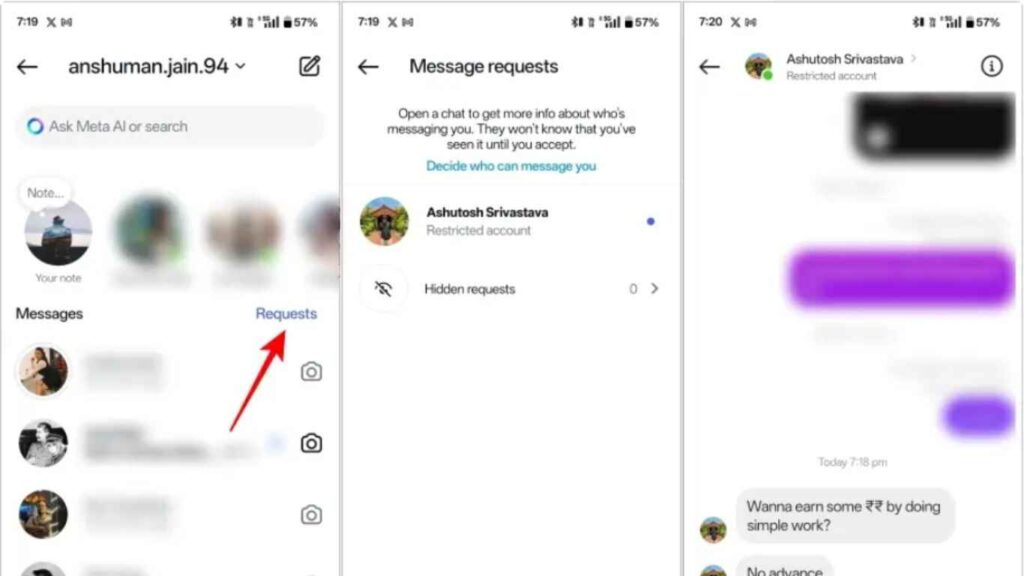
Messages from a restricted user will go to your “Message Requests” folder. They will not appear in your primary inbox, preventing immediate notification and direct intrusion.
-
You will not receive notifications for new messages from a restricted account.
-
You can read their messages without them knowing you’ve seen them. The “Seen” receipt will not appear on their end, preserving your privacy and allowing you to decide when and if to respond.
-
Your online status will be hidden from them. They won’t be able to see if you’re active on Instagram, further limiting their ability to engage you directly.
This ensures that unsolicited or uncomfortable messages don’t interrupt your daily Instagram usage, giving you complete control over when and if you choose to review or respond to their communications.
Tagging and Mentions: A Quiet Disengagement
While restricted users can still tag or mention you in their posts or stories, you will not receive notifications for these actions. This further minimizes their ability to get your attention or draw you into their content without your explicit consent. It reinforces the idea that you are controlling the flow of information and interaction, rather than being reactive to their attempts to engage.
No Notification for the Restricted User
Crucially, Instagram does not notify a user when they have been restricted. From their perspective, nothing has changed. They can still see your posts, send you messages (which you won’t be notified about), and comment on your content (which only they and you will see). This discreet nature is a cornerstone of the feature, allowing users to manage difficult relationships without causing offense or escalating potential conflicts.
Why and When to Use the Restrict Feature
The “Restrict” feature serves a specific set of needs, making it an invaluable tool for maintaining online well-being and managing complex social dynamics.
Addressing Harassment and Cyberbullying Discreetly
Perhaps the primary motivation behind the “Restrict” feature was to provide a mechanism for users to deal with harassment and cyberbullying without drawing further attention to themselves or provoking their tormentors. If you are experiencing unwanted comments, repetitive messages, or subtle forms of online aggression, restricting the account allows you to silence their public presence on your page and filter their private messages, all without them knowing they’ve been sidelined. This can be a vital step in reclaiming control over your online space and reducing psychological stress.
Managing Unwanted Interactions from Acquaintances
Not all undesirable interactions stem from malicious intent. Sometimes, you might have an acquaintance, a former friend, a colleague, or even a distant family member whose online behavior you find bothersome or intrusive. A full block might be too extreme and could lead to awkwardness or tension in real-life encounters. Restricting them allows you to politely and discreetly distance yourself from their digital engagement without severing the connection entirely. You can still see their profile if you choose, but their impact on your notifications and comment section is neutralized.
Curating Your Digital Experience
Beyond specific individuals, the “Restrict” feature contributes to a broader goal of curating a more positive and less stressful digital experience. By selectively filtering interactions, users can reduce the noise, negativity, and unsolicited attention that often plague social media. This contributes to better mental health, allowing you to enjoy Instagram for its intended purpose—connecting with content and people you genuinely value—without constant distractions or annoyances. It’s about taking proactive control over your digital environment rather than passively reacting to it.
Avoiding Direct Confrontation
For many, the thought of direct confrontation—whether online or offline—is a source of anxiety. The “Restrict” feature offers a non-confrontational escape route. It allows you to manage problematic interactions by silently changing the rules of engagement, rather than having to explain your boundaries or justify your actions to the other party. This can preserve relationships in a functional, albeit modified, state, and prevent unnecessary drama or conflict.
How to Restrict or Unrestrict Someone on Instagram
Instagram has made the process of restricting and unrestricting accounts straightforward, accessible from several points within the app.
Restricting Via Comments or Profile
There are a couple of primary ways to restrict an account:
-
From a Comment: If a user has left a comment you wish to manage:
-
On iOS: Swipe left on the comment, tap the speech bubble icon, then select “Restrict.”
-
On Android: Tap and hold on the comment, tap the “i” or exclamation mark icon, then select “Restrict.”
-
Alternatively, you can tap the three-dot menu icon in the top right corner of your post, select “Manage Comments,” then tap on the comment you wish to restrict, and choose “Restrict.”
-
-
From Their Profile:
-
Go to the profile of the user you wish to restrict.
-
Tap the three-dot menu icon (iOS) or the three-line menu icon (Android) in the top right corner of their profile.
-
Select “Restrict” from the options that appear. Instagram will ask you to confirm your decision.
-
Managing Your Restricted Accounts List
If you need to review who you’ve restricted or wish to unrestrict someone:
-
Go to your own profile.
-
Tap the three horizontal lines (hamburger menu) in the top right corner.
-
Select “Settings and privacy.”
-
Scroll down and tap on “Restricted accounts.”
-
Here, you’ll see a list of all accounts you have restricted. To unrestrict someone, simply tap the “Unrestrict” button next to their name.
The ability to easily manage this list ensures that “Restrict” remains a flexible tool, allowing you to adjust your digital boundaries as relationships evolve.
The Broader Implications of Digital Restriction
The “Restrict” feature, alongside other privacy and security tools, signifies a growing emphasis on user well-being and control within major social media platforms. It’s not just a technical tweak; it reflects a deeper understanding of the psychological and social complexities of online interaction.
Fostering Safer Online Environments
By providing discreet tools to manage harassment and unwanted attention, Instagram contributes to creating a safer online environment. Users, particularly younger demographics, often face significant pressure and bullying online. Features like “Restrict” empower them to take action without fear of retaliation or public escalation, which can be critical for their mental health and continued engagement with the platform. It encourages users to assert their boundaries more effectively.
Empowering Users with Granular Control
The evolution of privacy settings from simple public/private profiles to highly granular controls like “Restrict” showcases a commitment to user agency. Users are no longer passive recipients of content but active curators of their digital experience. This shift puts more power in the hands of individuals to tailor their social media interactions to their comfort levels, fostering a more personalized and less overwhelming online presence.
The Future of Digital Privacy Tools
The “Restrict” feature is likely just one iteration of what platforms will continue to develop in the realm of digital privacy. As online interactions become increasingly nuanced and the challenges of cyberbullying and digital well-being grow, we can expect more sophisticated, AI-driven tools that help users filter, manage, and report problematic content and interactions. The goal will remain the same: to provide users with the confidence and tools necessary to navigate the complexities of social media safely and positively, ensuring that platforms are spaces for connection and expression, not sources of anxiety or distress. Understanding and utilizing features like “Restrict” is a crucial step for any tech-savvy individual looking to master their digital footprint.
aViewFromTheCave is a participant in the Amazon Services LLC Associates Program, an affiliate advertising program designed to provide a means for sites to earn advertising fees by advertising and linking to Amazon.com. Amazon, the Amazon logo, AmazonSupply, and the AmazonSupply logo are trademarks of Amazon.com, Inc. or its affiliates. As an Amazon Associate we earn affiliate commissions from qualifying purchases.