
In the modern digital landscape, data management is the invisible backbone of everything from software development to personal file storage. Whether you are downloading a new application, receiving a large bundle of high-resolution images via email, or migrating a database, you will inevitably encounter “compressed” folders. When you interact with these folders, the most common action required is to “extract” them. But what does it mean to extract a file from a technical perspective, and why is this process so fundamental to how we navigate the digital world?
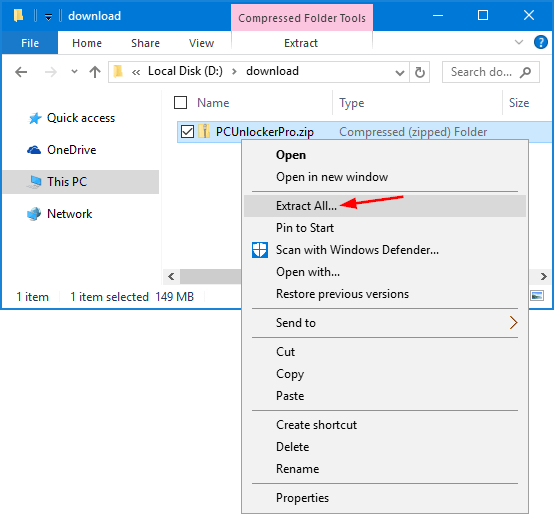
Extraction is the process of decompressing and retrieving files from a container format—often referred to as an archive—and restoring them to their original, usable state. To understand extraction, one must first understand the mechanics of compression, the algorithms that drive these processes, and the software ecosystem that makes it possible to move massive amounts of data across the internet with relative ease.
The Mechanics of File Compression: Why We Zip in the First Place
Before we can extract a file, it must first be compressed. File compression is a technological marvel that allows us to shrink the footprint of digital information. This is not merely about “squeezing” files; it is about rewriting data more efficiently.
Understanding Lossless vs. Lossy Compression
In the world of file extraction, we are almost exclusively dealing with lossless compression. Unlike lossy compression—which is used in JPEGs or MP3s to discard “unnecessary” data to save space—lossless compression ensures that every single bit of the original data remains intact. When you extract a file from a ZIP or RAR archive, the resulting file is a bit-for-bit identical copy of the original. This is crucial for software, documents, and system files where a single missing byte could lead to corruption or failure.
The Role of Archive Formats (.ZIP, .RAR, .7Z)
Different archive formats use different mathematical formulas, known as algorithms, to handle data. The most common format, .ZIP, is natively supported by almost every operating system. However, power users often turn to .7z (7-Zip) or .RAR due to their superior compression ratios. These formats use advanced algorithms like LZMA or AES encryption to not only make the files smaller but also to secure them. Understanding the format is the first step in successful extraction, as certain software is required to decode specific “languages” of compression.
Why Organization and Bandwidth Matter
Beyond saving storage space, compression allows for “bundling.” Instead of downloading 100 individual files, which would require 100 separate requests to a server, a user downloads one single archive. This reduces the overhead on network protocols and simplifies the user experience. Extraction is the final stage of this logistical chain, turning a streamlined package back into a functional folder structure.
The Extraction Process: From Compressed Archive to Usable Data
When you right-click a folder and select “Extract All,” your computer initiates a sophisticated series of operations. It isn’t just “opening” a box; it is rebuilding a puzzle.
How Extraction Algorithms Work
The extraction process involves the software reading a “dictionary” or a map created during compression. Most compression algorithms look for patterns. For example, if a document contains the word “Technology” 500 times, the compression software replaces that word with a short code. During extraction, the software reads that code, refers to its temporary dictionary, and replaces every instance of the code with the full word “Technology.” This happens at a lightning-fast pace across millions of bits, reconstructing the file structure in real-time.
Native OS Extraction Tools vs. Third-Party Software
Both Windows (via File Explorer) and macOS (via Archive Utility) have built-in tools to handle basic .ZIP files. However, these native tools often lack the features needed for complex tasks. Third-party applications like 7-Zip, WinRAR, or The Unarchiver offer deeper functionality. These tools allow for “partial extraction” (pulling out one file without decompressing the whole archive), “multi-part extraction” (combining several split archives into one), and the ability to handle obscure formats that standard operating systems cannot read.
The Temporary Directory and Final Destination
When a file is being extracted, the computer often uses a “Temp” folder as a staging area. If you attempt to run a program directly from inside a compressed folder without extracting it first, the OS might extract it to a temporary location behind the scenes. This is why many users experience errors when they try to save progress in a game or document that hasn’t been properly extracted to a permanent directory; the temporary files are wiped once the session ends.
Practical Applications and Best Practices in Tech Environments
In professional tech environments—from IT administration to software engineering—the act of extracting files is a daily necessity. Doing it correctly ensures system stability and data integrity.
Managing Large Software Installations
Most software is distributed as a compressed “installer” or a “portable” ZIP. When developers distribute code, they often use archives to maintain the directory hierarchy. If you extract the files but lose the folder structure, the software will fail to find its dependencies (like .DLL files or libraries). Proper extraction involves maintaining “Relative Paths,” a setting usually toggled on by default in professional extraction tools, ensuring the software’s internal “map” remains functional.
The Importance of “Extract to Folder”
A common mistake in digital organization is choosing “Extract Here” instead of “Extract to [Folder Name].” If an archive contains 500 loose files, “Extract Here” will clutter your current directory (like your desktop) with hundreds of icons. Best practices dictate creating a dedicated sub-directory for every extraction to keep the digital workspace clean and manageable.
Security Considerations: Scanned Archives and Malware
Extraction is a critical point for digital security. Because compressed files are essentially “wrapped,” some legacy antivirus programs struggle to see what is inside them until they are opened. Modern security suites now perform “on-the-fly” scanning during the extraction process. However, users should be wary of “Zip Bombs”—small files that, when extracted, expand into petabytes of data designed to crash a system—and password-protected archives from unknown sources, which are often used to bypass email filters.
Troubleshooting Common Extraction Issues
Even for seasoned tech enthusiasts, the extraction process can sometimes fail. Understanding the technical reasons behind these failures can save hours of frustration.
Corrupt Archives and Checksum Errors
Data can become corrupted during a download or due to a failing hard drive. Most archive formats include a “CRC” (Cyclic Redundancy Check). When you extract a file, the software calculates a checksum and compares it to the original. If they don’t match, you get a “Checksum Error.” This means the data is not an exact copy of the original. In these cases, the only solution is usually to re-download the archive or use a tool with a “Repair” function, which attempts to reconstruct damaged segments.
Encrypted and Password-Protected Files
Extraction often serves as a gatekeeper for sensitive information. AES-256 encryption is frequently applied to archives to protect data during transit. If you do not have the correct key or password, the extraction algorithm cannot “solve” the mathematical puzzle required to rebuild the files. It is important to note that if a password is lost for a high-level encrypted archive, the data is essentially unrecoverable, as modern encryption is designed to be resistant to brute-force attacks.
Insufficient Disk Space
It sounds elementary, but “Disk Space Full” is a frequent cause of extraction failure. Because the extracted files are often significantly larger than the compressed archive, you need enough “headroom” on your drive for both the original archive and the newly expanded files. A 5GB ZIP file might expand into 15GB of raw data; if your drive only has 10GB left, the extraction will fail halfway through, often leaving behind “ghost files” that take up space but don’t work.
The Future of Data Packaging: Beyond Traditional Extraction
As we move toward a cloud-centric world, the way we think about extracting files is evolving. We are shifting from manual decompression to automated, background processes.
Cloud-Based Extraction and Streaming Data
Services like Google Drive, Dropbox, and OneDrive now allow users to “peek” inside archives without downloading or extracting them locally. This is a form of server-side extraction, where the cloud infrastructure handles the heavy lifting and streams only the specific file you need to your browser. This reduces the strain on local hardware and allows for faster data auditing.
Real-Time Decompression in Modern OS
Future file systems are moving toward “transparent compression.” In this model, every file on your hard drive is technically compressed to save space, but the operating system extracts them into memory the millisecond you click on them. This blurs the line between a “compressed file” and a “normal file,” making extraction a background system process rather than a manual user task.

Conclusion: The Vital Role of Extraction in Digital Literacy
Understanding what it means to extract a file is more than just knowing where to click; it is an insight into how data is preserved, transported, and restored in a world that generates quintillions of bytes every day. From the algorithms that identify patterns in our code to the security protocols that protect our archives, extraction is the final, vital step in the lifecycle of digital data. As technology continues to scale, the efficiency and reliability of our extraction tools will remain a cornerstone of effective digital management.
aViewFromTheCave is a participant in the Amazon Services LLC Associates Program, an affiliate advertising program designed to provide a means for sites to earn advertising fees by advertising and linking to Amazon.com. Amazon, the Amazon logo, AmazonSupply, and the AmazonSupply logo are trademarks of Amazon.com, Inc. or its affiliates. As an Amazon Associate we earn affiliate commissions from qualifying purchases.