
In the digital ecosystem, the term “exporting” is foundational, yet it is frequently misunderstood or used interchangeably with “saving.” While saving your progress is a routine act of preserving data within a specific application’s proprietary format, exporting is an act of transformation. It is the process of converting data from the internal, often complex language of a specific program into a standardized, universal format that can be read, opened, or utilized by other software, operating systems, or devices.
To understand exporting is to understand digital interoperability. When you work within a professional suite—such as a video editor, a vector design program, or a complex spreadsheet—the software creates a “project file.” This file is a blueprint, containing layers, history, and metadata that only that specific software can interpret. Exporting is the bridge between that “blueprint” and the final product that the world can interact with.

The Technical Mechanics of File Transformation
At its core, exporting is a data translation process. When you initiate an export, your computer is not merely moving a file; it is rewriting the underlying code of your work into a format that adheres to a specific set of rules, known as a codec, container, or encoding standard.
Translating Proprietary Data
Every piece of specialized software utilizes a native file format. For example, an Adobe Premiere Pro project file (.prproj) holds the sequence of clips, color grades, and audio levels, but it is not a video file itself. If you were to send that file to a client, they would be unable to play it back unless they possessed the exact software, plugins, and raw assets. Exporting forces the software to “render” those instructions into a self-contained video file, such as an MP4 or MOV. During this transition, the computer processes the complex instructions and creates a flat, standardized file that any media player can decode.
Compression and Optimization
Exporting also serves as the primary gateway for data optimization. When working on a raw project, file sizes are often massive because the software needs to maintain high fidelity for editing. During the export process, you are usually prompted to choose settings that determine the final weight and quality of the file. This might involve lossy compression—where redundant or invisible data is discarded to shrink the file size—or lossless compression, which preserves original quality at the expense of larger file sizes. Understanding the relationship between bitrate, resolution, and format is the hallmark of a technical workflow, as these decisions dictate whether your file is suitable for a professional print house, a social media upload, or archival storage.
Exporting in Professional Workflows
Different industries rely on specific export workflows to ensure that data remains consistent as it moves from one stage of production to the next. The “export” function is the critical hand-off point in the creative and professional pipeline.
Design and Print Production
In graphic design, exporting is a matter of compatibility. A vector file created in Adobe Illustrator (.ai) is perfect for editing, but a print shop requires a high-resolution PDF with specific color profiles, such as CMYK. Exporting allows the designer to flatten the layers, convert fonts into outlines, and embed color profiles so that the output looks identical on paper as it did on the screen. Failure to export correctly—for instance, leaving a file in the RGB color space when the printer requires CMYK—can lead to disastrous visual inconsistencies.
Data Management and Interoperability
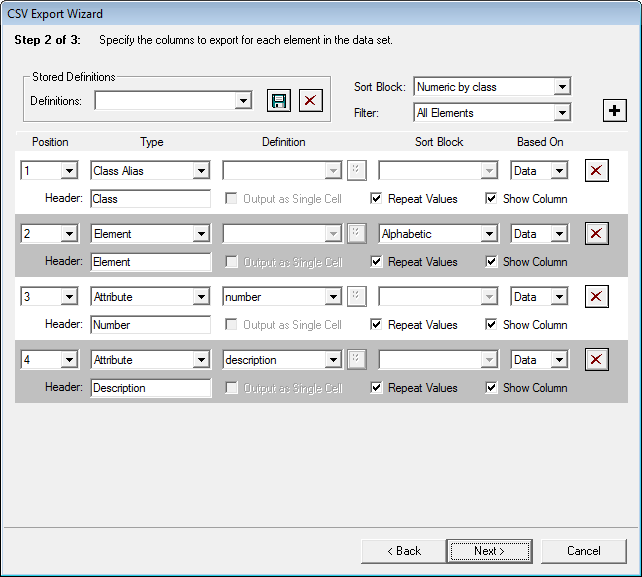
In the realm of finance and database management, exporting is the backbone of cross-platform analysis. You might store thousands of client records in a complex CRM (Customer Relationship Management) system. If you need to analyze this data in a different application, such as a specialized data visualization tool, you would export the database as a CSV (Comma Separated Values) or XML file. By stripping away the CRM’s specific user interface and proprietary backend, you are left with the raw data, which can then be ingested by any software capable of reading text-based, structured tables. This portability is what allows businesses to switch software providers without losing their historical data.
Best Practices for Choosing Export Formats
Choosing the right format when exporting is as important as the act of exporting itself. The decision should be guided by your end goal: Is the file meant for editing, viewing, or archiving?
Choosing for Compatibility
If your goal is universal access, you should prioritize standard, widely supported formats. For text documents, PDF (Portable Document Format) is the gold standard because it preserves formatting, fonts, and images regardless of the hardware used to view it. For images, PNG is preferred for graphics requiring transparency, while JPEG is the standard for photographs due to its balance of quality and small file size. Using obscure or proprietary formats during an export can result in “file blindness,” where recipients cannot open your work, or worse, the data is corrupted during the opening process.
Preservation and Archiving
When exporting for the purpose of long-term storage, the “lossless” approach is essential. If you export a photo or video into a highly compressed format, you lose data that can never be recovered. For archival purposes, professionals often export to “master” formats, such as TIFF for images or ProRes for video. These files are significantly larger and technically demanding, but they preserve the integrity of the original asset, ensuring that if you need to perform further edits five years down the line, you are working from a high-quality foundation rather than a degraded version.
The Future of Exporting in an AI-Driven Landscape
As software becomes more interconnected through APIs and cloud-based architecture, the traditional “File > Export” menu is evolving. We are moving toward a paradigm of seamless integration where manual exporting is being replaced by background data synchronization. However, the conceptual requirement for exporting remains constant.
The Shift to “Export-Free” Workflows
Modern AI tools and collaborative platforms, such as Figma or Google Workspace, have minimized the need for traditional exporting by operating entirely in the cloud. In these environments, the data is “live,” and the transition between an editable project and a viewable asset happens in real-time. Yet, even in these systems, the moment you need to move your work from the cloud to a local server, or from a collaborative suite to a specialized third-party tool, you are still triggering an export process behind the scenes.
Understanding Metadata and Security
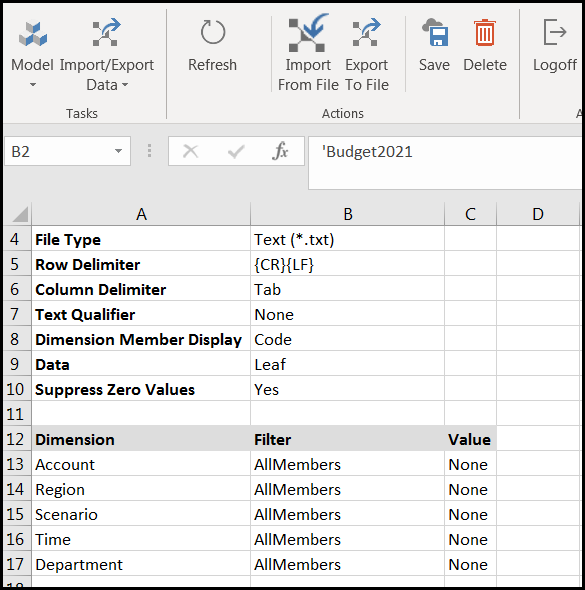
Modern exporting is not just about the visual content; it is also about the “hidden” data. Advanced exporting tools now allow users to strip metadata—such as GPS locations, camera settings, or author information—before a file is sent out. This is a critical aspect of digital security and privacy. As data privacy laws become more stringent, understanding how to “clean” a file during the export process has become a core skill for professionals handling sensitive information. Whether you are exporting a spreadsheet for an audit or a photo for a public website, the ability to control what information is contained within that exported package is an essential layer of digital literacy.
In conclusion, exporting is the bridge between creation and consumption. It is the process that transforms the ephemeral, internal language of software into a permanent, portable asset. By mastering the settings, formats, and implications of the export function, you gain full control over the lifecycle of your digital projects, ensuring they remain accessible, secure, and ready for whatever purpose they may serve.
aViewFromTheCave is a participant in the Amazon Services LLC Associates Program, an affiliate advertising program designed to provide a means for sites to earn advertising fees by advertising and linking to Amazon.com. Amazon, the Amazon logo, AmazonSupply, and the AmazonSupply logo are trademarks of Amazon.com, Inc. or its affiliates. As an Amazon Associate we earn affiliate commissions from qualifying purchases.