
In the modern era of the “Smart Home,” appliances are no longer mere mechanical tools; they are sophisticated nodes within a digital ecosystem. Samsung, a pioneer in integrating IoT (Internet of Things) and advanced sensors into home hardware, has transformed the humble laundry dryer into a high-tech machine capable of self-diagnosis. However, with increased sophistication comes the complexity of digital communication. When your Samsung dryer flashes the “HC” or “hC” code, it isn’t just a random error—it is a critical status report from the machine’s internal microcontroller.
Understanding the HC error code requires a deep dive into the thermal management systems, sensor arrays, and circuit logic that define contemporary laundry technology. This guide provides a technical breakdown of what the HC code signifies, why it occurs, and how to navigate the troubleshooting process using modern diagnostic methods.
Understanding the HC/HE Code: The Science of Thermal Regulation
The “HC” error code on a Samsung dryer is a shorthand for “Heating Control.” Depending on the specific model and the age of its firmware, this might also appear as “HE” or “1He.” At its core, this code is a failsafe mechanism designed to protect both the machine’s hardware and the safety of your home.
What Does HC Actually Mean?
In technical terms, the HC error indicates that the dryer has detected an abnormal temperature reading. Specifically, the thermistor—a thermal resistor whose resistance changes with temperature—has sent a signal to the Main Control Board (PCB) indicating that the internal drum temperature is either too high or is rising at an uncontrolled rate.
When the PCB detects “Thermal Runaway” (an uncontrolled increase in temperature), it immediately triggers a relay to cut power to the heating element or gas valve while keeping the blower motor running to dissipate the excess heat. The HC code is the digital manifestation of this emergency shutdown.
The Role of the Thermistor and Control Board
The relationship between the thermistor and the PCB is the heart of the dryer’s logic. The thermistor acts as the “eyes” of the system. In a Samsung dryer, the thermistor typically has a specific resistance (measured in Ohms) at room temperature. As the dryer heats up, the resistance drops. The PCB monitors this voltage drop in real-time. If the resistance values fall outside the pre-programmed “safe zone” or if the circuit is shorted, the logic processor interprets this as a critical failure and displays the HC code to prevent a potential fire hazard.
Common Technical Triggers for Samsung Dryer Heating Issues
While the HC code points to a heating control failure, the root cause can range from simple airflow physics to complex electronic component degradation. Identifying the specific trigger requires an understanding of how these systems interact.
Airflow Restrictions: The Digital vs. Physical Conflict
The most frequent cause of the HC code is not a digital failure, but a physical one: restricted airflow. High-tech dryers rely on a precise volume of air moving across the heating element to carry heat away into the drum and out through the vent.
If the lint filter is clogged, or if the external ductwork is obstructed, heat builds up rapidly around the sensors rather than circulating. This creates a feedback loop where the heating element remains on, but the air is stagnant. The thermistor detects this localized heat spike, and the PCB shuts down the system. Modern Samsung dryers are sensitive to “back-pressure,” and even a 20% reduction in airflow can trigger a diagnostic alert.
Power Supply Inconsistencies and Voltage Spikes
Samsung dryers are sensitive to the quality of the electricity they receive. The HC code can sometimes be triggered by an “Over-Voltage” condition. If your home experiences a power surge or if the 240V outlet (for electric models) is delivering inconsistent voltage, the heating element may draw more current than the control board’s relays are rated for. This electrical stress can cause the sensors to misinterpret the heat levels or, in some cases, can physically “weld” a relay shut, causing the heater to stay on indefinitely until the safety thermostat trips.
Sensor Failure: When Data Goes Wrong
Sometimes, the heat is perfectly fine, but the data is corrupted. Thermistors are sensitive components that can fail due to moisture, lint buildup, or simply age. If a thermistor’s internal semi-conductor material degrades, it may report a “short circuit” resistance value to the PCB. To the dryer’s “brain,” a shorted thermistor looks exactly like an over-heat condition. In this scenario, the machine is functionally healthy but is being misled by faulty telemetry.
Step-by-Step Diagnostic and Troubleshooting Protocol
When faced with an HC code, a systematic approach to troubleshooting is required to differentiate between a simple maintenance issue and a hardware failure.
Safety First: Power Cycling and Hard Resets
Before dismantling the chassis, the first step in any tech troubleshooting is a “Hard Reset.” Unplug the dryer or flip the circuit breaker for at least 60 seconds. This allows the capacitors on the Main Control Board to discharge and clears the temporary RAM of the microcontroller. If the HC code was caused by a transient software glitch or a minor voltage spike, a reset might resolve the issue. If the code returns immediately upon restarting the cycle, the problem is persistent hardware-based.
Inspecting the Venting System
Since airflow is the primary culprit, a thorough inspection of the exhaust path is mandatory. This involves:
- The Internal Lint Trap: Ensure it is chemically clean. Fabric softener residue can create an invisible film that blocks air.
- The Vent Hose: Check for “kinks” or crushed sections behind the dryer.
- The External Wall Hood: Ensure the flapper opens freely and is not blocked by bird nests or debris.
Samsung’s internal “Vent Sensor” technology often works in tandem with the HC code to alert users to these issues before they become terminal.
Using “Smart Care” and Diagnostic Apps
One of the advantages of Samsung’s tech-forward approach is the Samsung Smart Care app. By holding specific button combinations on the dryer (usually “Dry Level” and “Time” simultaneously), the dryer will display a visual pattern or a refined code. By scanning this with a smartphone camera through the app, users can access a deeper level of diagnostic data, which may specify whether the error is related to the thermistor (HC) or the heating relay (HE).
Advanced Technical Repairs: Evaluating Components
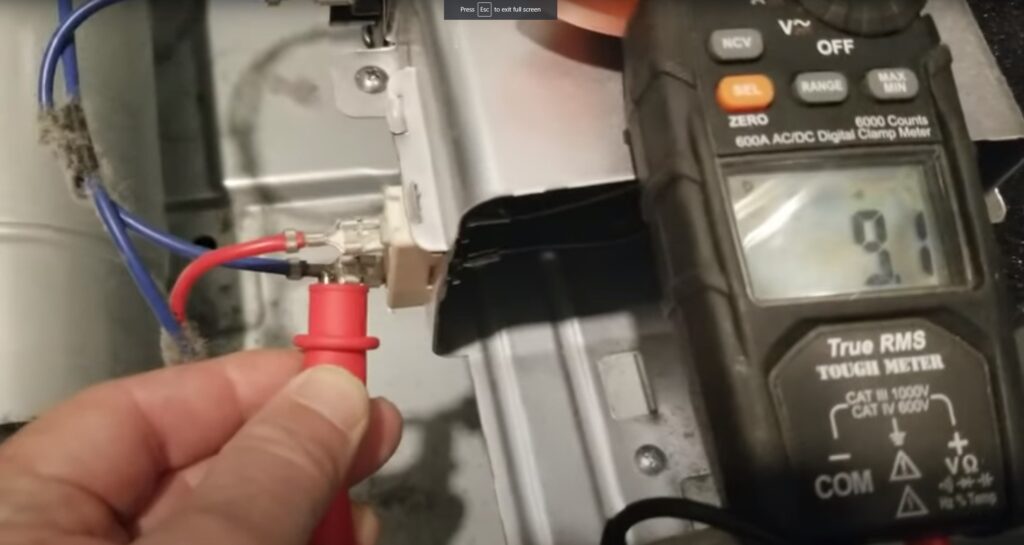
If basic troubleshooting fails, the focus shifts to the internal components. This requires a digital multimeter and a basic understanding of electrical resistance.
Testing the Heating Element and Thermostat
In electric Samsung dryers, the heating element is a resistive coil. Over time, these coils can sag or break. If a broken coil touches the metal housing (a “grounded” element), it may stay on even when the dryer is turned off, leading to an HC code. Using a multimeter, a technician looks for continuity. A reading of “OL” (Open Loop) indicates a broken element, while any continuity between the element and the heater casing indicates a short that must be addressed immediately.
Similarly, the High-Limit Thermostat acts as a secondary safety. If the HC code persists, it may be because this thermostat has tripped and failed to reset. Testing for continuity across the thermostat terminals will reveal if it has “blown” like a fuse.
Evaluating the Main Control Board (PCB)
The PCB is the “Command Center.” If the thermistor and heating element test fine, the fault likely lies in the PCB’s heating relay. In some cases, the solder joints on the back of the board can crack due to thermal expansion (thermal cycling), or the relay itself can fail in the “closed” position. Replacing a PCB is the most expensive repair, but it is often necessary if the machine’s logic has been compromised by electrical stress.
Preventive Maintenance in the Age of Smart Appliances
To avoid the HC error and extend the lifespan of high-tech appliances, users must adopt a proactive maintenance strategy that aligns with the machine’s design.
Optimizing Your Tech Ecosystem for Longevity
- Firmware and Connectivity: If your dryer is a “SmartThings” enabled model, ensure it is connected to your Wi-Fi. Samsung occasionally pushes firmware updates that can recalibrate sensor sensitivity and improve error-handling logic.
- Annual Vent Cleaning: Treat your dryer ducting like your computer’s cooling fans. Dust and debris are the enemies of efficiency. A professional duct cleaning once a year ensures the dryer operates within its designed thermal parameters.
- Load Management: Overloading the dryer prevents proper air circulation, forcing the heating element to work longer and hotter, which accelerates the wear on the thermistor.
In conclusion, the HC error code on a Samsung dryer is a vital communication from a sophisticated piece of technology. While it can be an inconvenience, it is a testament to the safety and diagnostic capabilities of modern appliances. By understanding the interplay between airflow, electrical resistance, and digital logic, users can effectively manage their smart home hardware and ensure their appliances remain safe, efficient, and functional for years to come.
aViewFromTheCave is a participant in the Amazon Services LLC Associates Program, an affiliate advertising program designed to provide a means for sites to earn advertising fees by advertising and linking to Amazon.com. Amazon, the Amazon logo, AmazonSupply, and the AmazonSupply logo are trademarks of Amazon.com, Inc. or its affiliates. As an Amazon Associate we earn affiliate commissions from qualifying purchases.