
In the ever-evolving landscape of computing, the Graphics Processing Unit (GPU) has transitioned from a niche component primarily for gaming and professional graphics to a ubiquitous powerhouse crucial for a vast array of tasks, from artificial intelligence and machine learning to complex scientific simulations. As the demands placed upon GPUs continue to escalate, so too does the importance of optimizing their performance. One of the key technologies enabling this optimization is Hardware Accelerated GPU Scheduling. This feature, often enabled within operating system settings, fundamentally alters how the CPU and GPU interact, aiming to unlock greater efficiency, responsiveness, and raw power from your graphics hardware.

At its core, Hardware Accelerated GPU Scheduling is a system-level feature that offloads the task of managing GPU tasks from the CPU to dedicated hardware within the GPU itself. Traditionally, the CPU would act as the central orchestrator, receiving instructions, processing them, and then handing them off to the GPU for execution. This sequential process, while functional, can create bottlenecks, especially when dealing with numerous simultaneous tasks or highly demanding applications. Hardware Accelerated GPU Scheduling streamlines this by allowing the GPU to manage its own workload more autonomously, leading to a more efficient and fluid computing experience.
Understanding the Fundamentals: CPU vs. GPU Scheduling
Before delving into the specifics of hardware acceleration, it’s essential to grasp the traditional scheduling process and the distinct roles of the CPU and GPU.
The CPU’s Traditional Role in GPU Management
The Central Processing Unit (CPU) is the brain of your computer, responsible for executing a vast majority of instructions and managing the overall flow of operations. In the context of graphics, the CPU has historically played a significant role in GPU scheduling. This involves:
- Task Decomposition: Breaking down complex graphical tasks, such as rendering a frame in a video game or processing an image, into smaller, manageable chunks that the GPU can understand and execute.
- Queue Management: Creating and managing queues of instructions (often referred to as command buffers) that are sent to the GPU for processing. The CPU decides the order in which these commands are executed.
- Resource Allocation: Allocating necessary resources, such as memory and processing time, to the GPU for its operations.
- Synchronization: Ensuring that the CPU and GPU operate in sync, preventing race conditions and data corruption.
While effective, this CPU-centric approach can become a bottleneck. The CPU has many other tasks to manage, and dedicating a significant portion of its processing power to orchestrating GPU operations can divert resources from other critical functions. This can lead to increased latency, stuttering in applications, and suboptimal GPU utilization, meaning the GPU might not be working at its full potential because it’s waiting for instructions from the CPU.
The GPU’s Evolving Capabilities
The Graphics Processing Unit (GPU), initially designed for parallel processing of graphics-related tasks, has become increasingly sophisticated. Modern GPUs possess thousands of cores capable of performing parallel computations at an astonishing rate. This parallel processing power is not only beneficial for graphics but also for general-purpose computing (GPGPU), making GPUs indispensable for AI, scientific research, and data analysis.
As GPUs evolved, so did their internal architecture. They gained the ability to manage certain aspects of their own operations more efficiently. This included:
- On-chip Queuing: Some GPUs have internal hardware queues that can hold and manage incoming command buffers.
- Task Prioritization: The GPU can be designed to prioritize certain types of tasks over others, allowing for more dynamic resource allocation.
- Direct Memory Access (DMA): GPUs can directly access system memory without constant CPU intervention, speeding up data transfer.
The inherent parallel processing power and evolving internal capabilities of the GPU presented an opportunity to shift some of the scheduling burden away from the CPU.
How Hardware Accelerated GPU Scheduling Works
Hardware Accelerated GPU Scheduling fundamentally redesigns the interaction between the CPU and GPU by leveraging the GPU’s built-in capabilities for task management.
Offloading Scheduling to the GPU
The core principle of Hardware Accelerated GPU Scheduling is to delegate the responsibility of managing and prioritizing GPU tasks from the CPU to dedicated hardware within the GPU. Instead of the CPU meticulously crafting and sending individual commands, the GPU takes a more active role in processing a batch of commands.
- Reduced CPU Overhead: By offloading scheduling, the CPU is freed from the intensive task of constantly managing the GPU’s workload. This allows the CPU to focus on other system processes, applications, and game logic, leading to a more responsive overall system.
- Improved Throughput: The GPU can manage its own command queues more efficiently, potentially reordering and prioritizing tasks in a way that maximizes its utilization. This can lead to a higher rate of task completion and a smoother experience in demanding applications.
- Lower Latency: With less reliance on the CPU to mediate every step of the process, the time it takes for a task to be initiated and completed by the GPU can be significantly reduced. This is particularly beneficial in real-time applications like gaming, where every millisecond counts.
- Enhanced Parallelism: Hardware acceleration allows the GPU to better exploit its inherent parallel processing capabilities. It can more effectively manage multiple threads and processes concurrently, leading to greater overall efficiency.
The Role of the Driver and Operating System
While the hardware itself plays a crucial role, the operating system’s graphics driver acts as the intermediary, enabling and configuring Hardware Accelerated GPU Scheduling.
- Driver Optimization: The graphics driver is responsible for translating instructions from applications into a format that the GPU can understand. With Hardware Accelerated GPU Scheduling enabled, the driver works in conjunction with the GPU’s hardware schedulers to optimize the flow of commands.
- Operating System Support: Operating systems like Windows (versions 10 and 11) provide the framework for Hardware Accelerated GPU Scheduling. Users can typically enable or disable this feature through system settings. The OS interacts with the driver to manage GPU resources and scheduling policies.
- DirectX and Vulkan: Modern graphics APIs like DirectX (specifically DirectX 12) and Vulkan are designed with modern hardware in mind and are often optimized to take advantage of Hardware Accelerated GPU Scheduling. These APIs provide lower-level access to GPU hardware, allowing applications to manage resources and scheduling more directly.
Benefits and Use Cases of Hardware Accelerated GPU Scheduling

The implementation of Hardware Accelerated GPU Scheduling brings tangible improvements across a range of computing scenarios.
Enhanced Gaming Performance
For gamers, Hardware Accelerated GPU Scheduling can translate into a more fluid and immersive experience.
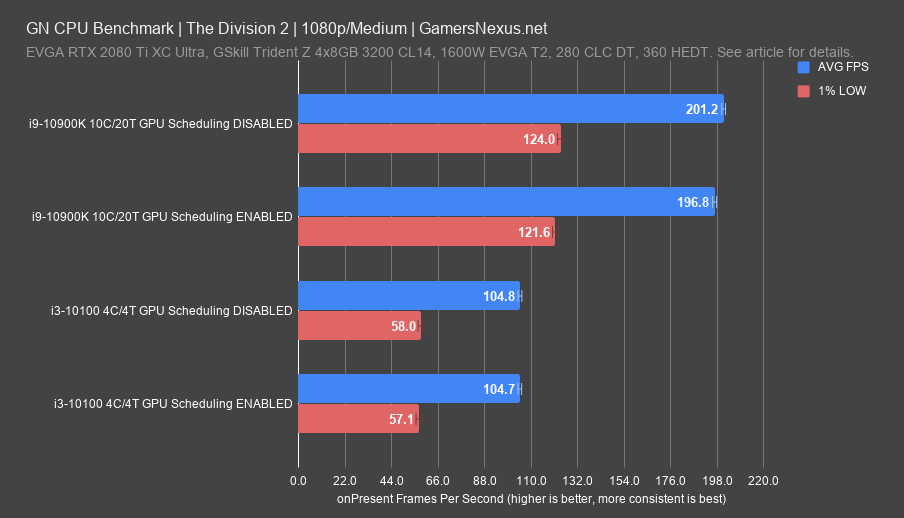
- Smoother Frame Rates: By reducing CPU bottlenecks and allowing the GPU to manage its workload more efficiently, games can achieve higher and more consistent frame rates. This means less stuttering and choppiness, especially in graphically intensive titles.
- Reduced Input Lag: The decrease in latency between issuing a command and seeing it rendered on screen can result in reduced input lag. This is critical for competitive gaming where split-second reactions can determine victory.
- Improved Responsiveness: Applications and games feel more responsive as the system can handle more tasks simultaneously without noticeable slowdowns. The overall experience becomes snappier and more immediate.
Impact on Professional Applications and Content Creation
Beyond gaming, content creators and professionals working with demanding applications can also reap significant benefits.
- Faster Rendering Times: In 3D rendering, video editing, and CAD software, tasks often involve complex computations that are heavily reliant on the GPU. Hardware Accelerated GPU Scheduling can help streamline the rendering pipeline, leading to shorter processing times and increased productivity.
- Smoother Playback and Editing: For video editors, this can mean smoother playback of high-resolution footage and a more responsive timeline. Manipulating complex visual effects also becomes less taxing on the system.
- Accelerated AI and Machine Learning Workloads: As AI and machine learning tasks increasingly rely on the parallel processing power of GPUs, efficient scheduling becomes paramount. Hardware acceleration can help manage the massive datasets and iterative computations involved, leading to faster model training and inference.
Improved Overall System Responsiveness
Even for users who don’t primarily engage in gaming or demanding professional tasks, Hardware Accelerated GPU Scheduling can contribute to a more pleasant computing experience.
- Multitasking Efficiency: When running multiple applications simultaneously, the CPU can dedicate more resources to each application rather than being bogged down by GPU scheduling. This makes switching between tasks smoother and prevents applications from becoming unresponsive.
- Reduced System Stuttering: The general efficiency gains can lead to fewer instances of the system stuttering or freezing, even when performing everyday tasks like web browsing with many tabs open or streaming media.
- Optimized Power Usage (Potentially): While not always a direct or primary benefit, by allowing the GPU to manage its workload more efficiently, it can sometimes lead to more optimal power consumption as the hardware is utilized in a more targeted manner.
Considerations and Potential Drawbacks
While Hardware Accelerated GPU Scheduling offers substantial advantages, it’s important to be aware of certain considerations and potential nuances.
Driver and Hardware Compatibility
The effectiveness of Hardware Accelerated GPU Scheduling is heavily dependent on the quality of the graphics driver and the GPU hardware itself.
- Driver Maturity: Early implementations of such features can sometimes have bugs or performance quirks. It’s crucial to ensure you have the latest stable drivers for your graphics card (NVIDIA, AMD, Intel). Manufacturers continually refine their drivers to optimize performance and stability.
- Hardware Support: While most modern GPUs support this feature, older hardware might not be as efficiently managed. The underlying architecture of the GPU plays a role in how well it can handle its own scheduling tasks.
- Specific Game/Application Optimization: While the system-level feature is beneficial, individual games and applications might be more or less optimized to take full advantage of it. Some older applications might not see as significant a benefit as newer ones built with modern graphics APIs in mind.
Potential for Instability or Regressions
In rare cases, enabling Hardware Accelerated GPU Scheduling might lead to unexpected issues.
- Software Conflicts: In rare instances, there could be conflicts with other software or system configurations, leading to instability, crashes, or graphical glitches.
- Troubleshooting: If you encounter problems after enabling the feature, the first step in troubleshooting is typically to disable it to see if the issue resolves. This helps isolate whether the scheduling feature is the cause.
- Benchmarking is Key: For users who prioritize maximum performance, benchmarking before and after enabling the feature in their specific workloads is recommended to confirm its positive impact. While generally beneficial, individual system configurations can yield slightly different results.
When to Consider Disabling
While the benefits are usually apparent, there might be specific scenarios where disabling Hardware Accelerated GPU Scheduling is advisable.
- Persistent Issues: If you experience ongoing system instability, application crashes, or visual artifacts that cannot be resolved through driver updates or other troubleshooting steps, disabling the feature is a logical diagnostic step.
- Older or Less Supported Software: For users running a significant amount of legacy software or games that are not optimized for modern scheduling techniques, the potential benefits might be negligible, and in some rare cases, it could even introduce minor issues.
- Specific Performance Quirks: In very niche cases, a particular application or game might exhibit unexpected performance regressions with hardware acceleration enabled. Benchmarking within that specific context can help determine the best setting.
Conclusion: Unlocking GPU Potential
Hardware Accelerated GPU Scheduling represents a significant advancement in how our computers manage their most powerful visual processing components. By intelligently offloading the complex task of command queue management from the CPU to the GPU itself, this technology unlocks a more efficient, responsive, and powerful computing experience. From smoother gaming frame rates and reduced input lag to faster rendering times in professional applications and improved overall system fluidity, the benefits are far-reaching.
As GPUs continue to evolve and their roles expand into areas like artificial intelligence and complex data analysis, efficient scheduling becomes not just a performance enhancement but a fundamental necessity. While it’s always prudent to ensure you have up-to-date drivers and to monitor your system for any potential anomalies, Hardware Accelerated GPU Scheduling is a feature that, for the vast majority of users, offers a clear pathway to maximizing the potential of their graphics hardware. It’s a testament to the ongoing innovation in computer architecture, pushing the boundaries of what’s possible and delivering a more seamless digital experience.
aViewFromTheCave is a participant in the Amazon Services LLC Associates Program, an affiliate advertising program designed to provide a means for sites to earn advertising fees by advertising and linking to Amazon.com. Amazon, the Amazon logo, AmazonSupply, and the AmazonSupply logo are trademarks of Amazon.com, Inc. or its affiliates. As an Amazon Associate we earn affiliate commissions from qualifying purchases.