
At its most fundamental level, equalization—commonly referred to as EQ—is the process of adjusting the balance between frequency components within an electronic signal. While the concept originated in the early days of telephony and radio to “equalize” the signal loss over long copper wires, it has evolved into one of the most powerful tools in the modern technological landscape. Whether you are a music producer, a podcast creator, a casual listener using a streaming app, or a developer working on voice-recognition AI, understanding what EQ does is essential for mastering the digital auditory experience.
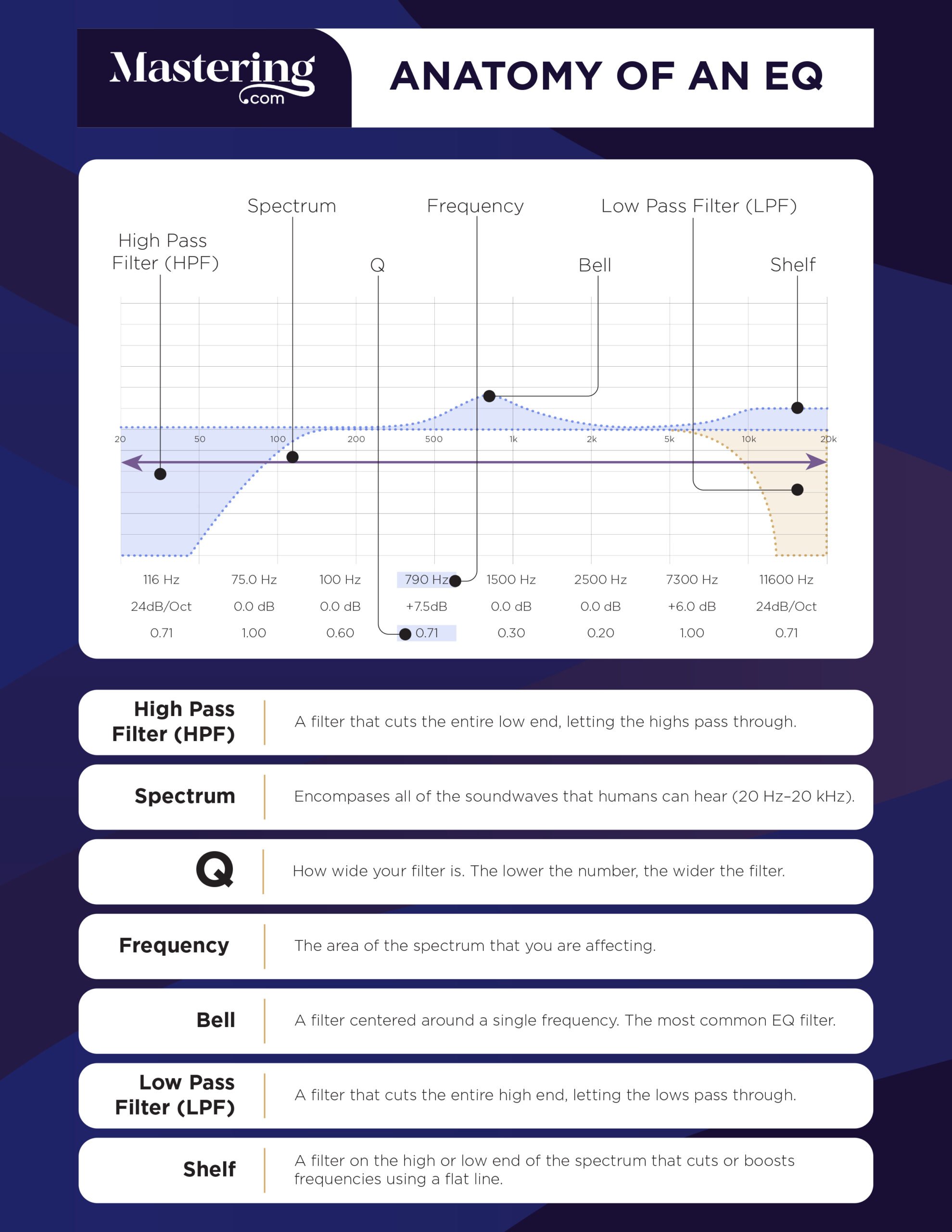
In contemporary tech, EQ functions as a precision sculptor. It allows users to carve away unwanted noise, highlight specific textures in a recording, and ensure that different sounds coexist harmoniously within a finite frequency spectrum. By boosting or cutting specific ranges of sound, EQ transforms the raw data of audio into a polished, professional product.
Understanding the Fundamentals of Frequency and Equalization
To understand what EQ does, one must first understand the nature of sound as a digital and physical phenomenon. Sound travels in waves, and the speed at which these waves vibrate determines their frequency, measured in Hertz (Hz). The human ear typically perceives frequencies ranging from 20 Hz (deep, earth-shaking bass) to 20,000 Hz (crystalline, piercing highs).
The Spectrum of Sound
The frequency spectrum is generally divided into several key regions, each contributing a different character to the audio:
- Sub-Bass (20 Hz to 60 Hz): This is the range you feel more than you hear. It provides the “weight” in cinematic soundscapes and club music.
- Bass (60 Hz to 250 Hz): This area contains the fundamental notes of rhythm instruments like the bass guitar and kick drum. Too much here causes “muddiness,” while too little makes the audio sound thin.
- Low Midrange (250 Hz to 500 Hz): Often called the “body” of the sound, this range houses the lower harmonics of most instruments and the human voice.
- Midrange (500 Hz to 2 kHz): This is where the human ear is most sensitive. It defines the clarity of speech and the “punch” of a mix.
- Upper Midrange (2 kHz to 4 kHz): High-frequency transients and the “attack” of sounds live here. Excessive boosting in this area can lead to listener fatigue.
- Presence and Brilliance (4 kHz to 20 kHz): This range provides clarity, “air,” and the fine detail that makes a recording feel lifelike.
How EQ Manipulates Sound Waves
An equalizer works by applying a gain adjustment (either positive or negative) to specific frequency bands. When you use an EQ, you aren’t just changing the volume of the entire track; you are changing the volume of a specific part of the sound. This is achieved through electronic circuits in hardware or complex algorithms in software. By manipulating these bands, EQ can correct deficiencies in a recording environment, such as a “boomy” room or a microphone that lacks high-end detail.
The Essential Tools: Types of Equalizers and Their Functions
In the realm of software and hardware, not all equalizers are created equal. Different types of EQ tools are designed for different tasks, ranging from broad tonal shaping to surgical precision.
Parametric EQ: The Precision Tool
The parametric equalizer is the most versatile and widely used tool in digital audio workstations (DAWs) and professional audio software. It offers total control over three primary parameters:
- Frequency: Choosing exactly which point in the spectrum to target.
- Gain: Deciding how much to boost or cut that frequency (measured in decibels).
- Q Factor (Bandwidth): Determining how wide or narrow the affected area is. A “high Q” targets a very specific frequency (useful for removing a hum or a whistle), while a “low Q” creates a broad, natural-sounding curve.
Graphic EQ: Visualizing the Curve
Graphic equalizers are easily recognizable by their rows of vertical sliders. Each slider represents a fixed frequency band. While they offer less precision than parametric EQs because the frequencies and bandwidths are pre-set, they are highly intuitive. They are commonly found in consumer audio apps, car stereo systems, and live sound consoles, allowing users to “draw” the desired frequency response visually.
Shelving and Filter EQs
Often used as the first step in audio processing, shelving EQs and filters help clean up the “edges” of the sound.
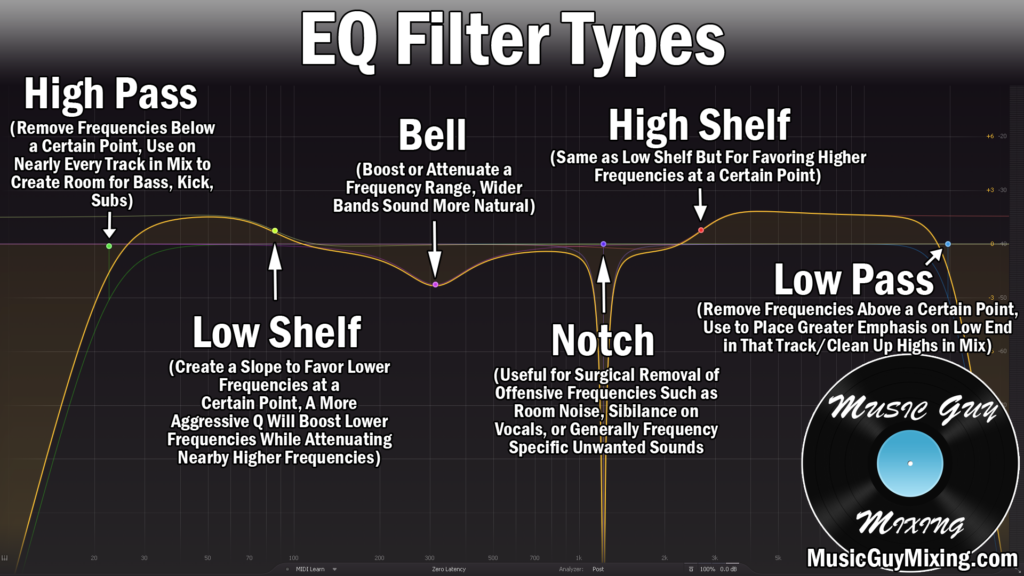
- High-Pass Filter (HPF): This removes all frequencies below a certain point. It is essential for cutting out low-end rumble from a vocal recording, such as the sound of an air conditioner or traffic.
- Low-Pass Filter (LPF): This removes frequencies above a certain point, which can help eliminate high-pitched hiss or make a sound feel more distant and “warm.”
- Shelving EQ: Unlike a filter that cuts sound entirely, a shelf boosts or cuts everything above or below a frequency by a set amount, similar to the “bass” and “treble” knobs on a home stereo.
Practical Applications of EQ in Modern Software and AI
The impact of EQ extends far beyond the recording studio. It is a foundational technology in software development, telecommunications, and artificial intelligence.
Music Production and Mixing
In music production, EQ is the primary tool used to create “space.” When multiple instruments are recorded, they often fight for the same frequency space. For example, a heavy guitar and a male vocal might both sit prominently in the 500 Hz range. By using EQ to slightly cut 500 Hz on the guitar and slightly boost it on the vocal, a producer can ensure both are heard clearly. This is known as “subtractive EQ,” a technique where you remove what you don’t need to make room for what you do.
Audio Restoration and Noise Reduction
Digital forensic tools and audio restoration software (like iZotope RX) use advanced EQ algorithms to “clean” audio. If a historical recording has a persistent 60 Hz hum from an old power supply, a narrow “notch filter” (a type of EQ) can remove that specific frequency without affecting the rest of the audio. Similarly, EQ is used in noise-canceling headphones to identify ambient noise frequencies and neutralize them.
Adaptive EQ and AI-Driven Tools
The latest frontier in tech is AI-driven equalization. Modern plugins can now analyze a piece of audio and compare its frequency profile to a “target” or “reference” track. If you want your podcast to sound like a professional BBC broadcast, AI EQ can analyze your voice and automatically apply the necessary boosts and cuts to match that professional tonal balance. These tools use machine learning to identify “masking”—where one sound hides another—and automatically fix the spectral balance in real-time.
Why EQ Matters for Content Creators and Audiophiles
As the barrier to entry for content creation lowers, the importance of high-quality audio has skyrocketed. EQ is often the difference between a “home-made” sound and a professional digital presence.
Enhancing Dialogue Clarity for Podcasts and Video
For YouTubers and podcasters, the “proximity effect” (where being close to a microphone boosts low frequencies) can make voices sound muddy or muffled. Using a high-pass filter to roll off everything below 80 Hz and adding a small “presence boost” around 3 kHz can make dialogue sound crisp, authoritative, and easier to understand, even on small smartphone speakers.
Personalizing the Listening Experience
On the consumer side, EQ allows users to overcome the limitations of their hardware. If a pair of inexpensive headphones has an overbearing bass response that drowns out the vocals, a user can use a software EQ app to lower the bass frequencies. Many streaming services, like Spotify and Apple Music, include built-in EQ presets (e.g., “Bass Booster,” “Vocal Booster,” “Small Speakers”) to help users tailor the tech to their specific environment.
Best Practices for Mastering the EQ Curve
While EQ is powerful, it is also easy to over-apply, leading to distorted or unnatural-sounding audio. The most important rule in professional audio is “less is more.”
- Prioritize Subtractive EQ: It is almost always better to cut a frequency that sounds bad than to boost one that sounds good. Cutting creates “headroom” in a digital signal, whereas excessive boosting can lead to digital clipping and distortion.
- Listen in Context: Never EQ a sound in isolation for too long. A guitar might sound “thin” when listened to alone, but when combined with a bass guitar, that thinness might be exactly what is needed to let the bass shine through.
- Check Your Monitoring: Your EQ moves are only as good as the speakers or headphones you are using. If your speakers have no bass, you might mistakenly boost the bass in your EQ, leading to a mix that sounds overwhelming on other systems.
- The “A/B” Test: Frequently toggle your EQ on and off. It is easy for the ears to adjust to a “bad” EQ curve. By constantly comparing the processed audio to the original, you can ensure you are actually making an improvement.
In conclusion, EQ is the silent workhorse of the digital world. It manages the invisible architecture of sound, ensuring that every frequency has its place. From the algorithms that power your favorite AI voice assistant to the mixing boards of world-class recording studios, equalization remains the most vital tool for anyone looking to control, enhance, and master the auditory landscape of technology.
aViewFromTheCave is a participant in the Amazon Services LLC Associates Program, an affiliate advertising program designed to provide a means for sites to earn advertising fees by advertising and linking to Amazon.com. Amazon, the Amazon logo, AmazonSupply, and the AmazonSupply logo are trademarks of Amazon.com, Inc. or its affiliates. As an Amazon Associate we earn affiliate commissions from qualifying purchases.