
In the landscape of modern social media, communication is defined not just by what we say, but by the metadata that accompanies every interaction. For Snapchat users, the “Delivered” status is a primary piece of feedback that indicates the success of a transmitted packet of data. While it may seem like a simple notification, the “Delivered” label represents a complex series of handshakes between your device, the Snapchat servers, and the recipient’s hardware. Understanding what “Delivered” means—and why it differs from other statuses—requires a look into the technical infrastructure of the app and the nuances of mobile operating systems.

Decoding the Snapchat Status Ecosystem
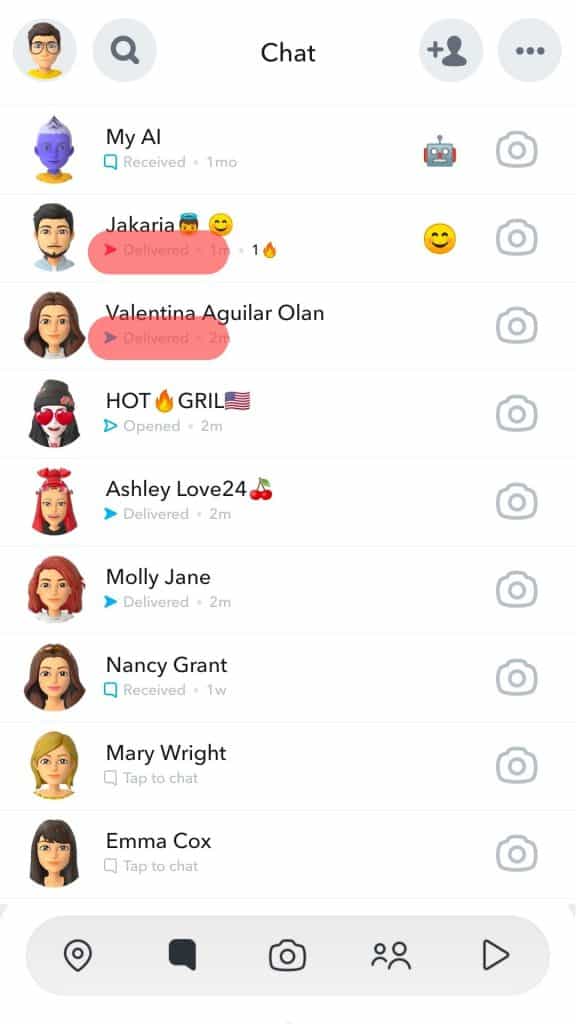
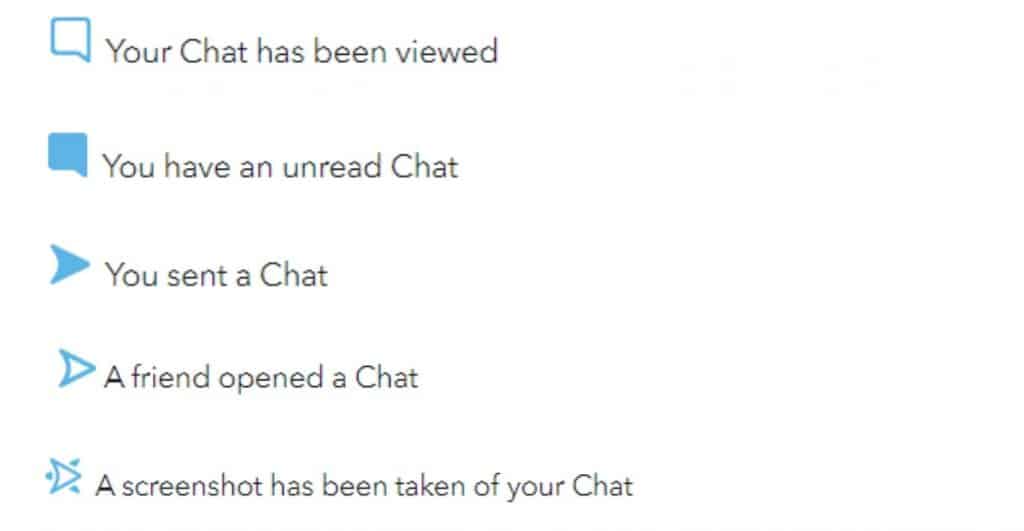
Snapchat’s user interface relies heavily on visual cues to convey the lifecycle of a message. These icons are color-coded and shape-oriented to provide immediate information about the state of a “Snap” or a “Chat.” To understand “Delivered,” one must first place it within the context of the three primary stages of digital transmission.
The “Sent” Status: Pushing Data to the Server
When you hit the send button on a Snap or a text-based Chat, the application first attempts to upload that data to Snapchat’s centralized servers. A “Sent” status—represented by a solid arrow (red for Snaps without audio, purple for Snaps with audio, and blue for Chats)—indicates that the data has successfully left your device and is now stored in the cloud. At this stage, the recipient’s device has not yet confirmed receipt. If a message stays in the “Sent” phase for an extended period, it usually indicates that the recipient’s device is offline, powered off, or lacks a stable data connection.
The “Delivered” Status: Reaching the Target Device
The “Delivered” status occurs once the Snapchat server successfully pushes the notification and the associated data packet to the recipient’s mobile device. Technically, this means the recipient’s phone has acknowledged the receipt of the data. However, “Delivered” does not imply that the user has seen the notification or opened the app. It is a technical confirmation of successful transport. On your end, the solid arrow remains, but the text beneath the recipient’s name changes from “Sent” to “Delivered,” often accompanied by a timestamp.
The “Opened” Status: User Engagement
The final stage of the lifecycle is “Opened,” represented by a hollow arrow icon. This status is triggered by a specific user action: the recipient tapping on your name and viewing the content. From a technical standpoint, the app sends a read receipt back to the server, which then updates your interface. It is important to note that “Delivered” is the bridge between the technical transmission of data and the human interaction with that data.
The Technical Architecture Behind “Delivered”
To understand why a message moves from “Sent” to “Delivered,” we must look at the backend protocols that govern mobile messaging. Snapchat uses a combination of proprietary protocols and standardized push notification services to ensure near-instantaneous delivery.
Push Notification Gateways
When a message reaches Snapchat’s servers, the system doesn’t just wait for the recipient to open the app. It utilizes the Apple Push Notification service (APNs) for iOS devices and Firebase Cloud Messaging (FCM) for Android devices. These gateways act as the “postal service” of the mobile world.
When your Snap is “Delivered,” it means the Snapchat server has successfully handed the message to APNs or FCM, and that service has successfully pinged the recipient’s device. If the recipient has “Background App Refresh” enabled, the device may even download a portion of the data in the background so that it is ready for instant viewing.
Network Latency and Packet Loss
The transition from “Sent” to “Delivered” can be delayed by network latency. In areas with poor cellular reception or congested Wi-Fi, the “handshake” between the Snapchat server and the recipient’s phone may fail. If the recipient’s device is in “Airplane Mode” or has no signal, the message will sit in a “Sent” state indefinitely on the sender’s screen. The server will periodically retry the delivery until the recipient’s device reconnects to the internet and acknowledges the packet.
Battery Optimization and Doze Mode
Modern operating systems, particularly Android, utilize aggressive battery optimization techniques like “Doze Mode.” When a phone has been stationary and the screen has been off for a while, the OS limits background data and app activity to save power. In these instances, a Snap might remain “Sent” until the recipient picks up their phone or the device enters a “maintenance window” where it allows apps to sync. This technical hurdle is one of the most common reasons for a delay in the “Delivered” status.
Why a Message Stays “Delivered” Without Being Opened
One of the most frequent points of confusion for users is when a message remains in the “Delivered” state for hours or days. While this can be a social signal (such as “ghosting”), there are several technical and software-related reasons why this happens.
Notification Management and Muting
Snapchat allows users to customize notifications for specific individuals. If a recipient has “Muted” your notifications or has “Do Not Disturb” enabled on their device, the Snap will be technically “Delivered” to their phone, but they will not be alerted to its presence. The data is sitting on their device, but the user hasn’t interacted with the app’s foreground layer to trigger the “Opened” status.
The “Half-Swipe” Technique
In the realm of user behavior and app exploitation, some users utilize a “half-swipe” to preview messages without triggering the “Opened” status. By slowly dragging the chat screen to the right, a user can read a text-based Chat without the app sending an “Opened” receipt back to the server. Technically, the message remains “Delivered” because the full viewing threshold—as defined by the app’s code—has not been met.
Account Restrictions and Privacy Settings
Privacy settings play a significant role in how delivery statuses are reported. If a user has their account set to only receive Snaps from “Friends,” and you are not on their friend list, your message may sit in a “Pending” or “Sent” state. However, if they have recently removed you, the message might still show as “Delivered” if it was sent before the system fully propagated the change in your friendship status across its distributed database nodes.
Troubleshooting Delivery Issues in the Snapchat App
If you find that your Snaps are consistently failing to reach the “Delivered” status, or if you are on the receiving end and not seeing messages that friends claim to have sent, there are several technical optimizations to consider.
Clearing the App Cache
Snapchat is a data-heavy application that stores a significant amount of temporary files to speed up performance. Over time, this cache can become corrupted, leading to synchronization issues. Users can navigate to the app settings and select “Clear Cache.” This does not delete your Snaps or Chats, but it forces the app to re-sync with the server, which can often resolve stuck “Sent” or “Delivered” statuses.
Software Versioning and Compatibility
The Snapchat ecosystem is constantly evolving, with frequent updates to its API and security protocols. If either the sender or the recipient is using an outdated version of the app, the communication protocols may not align perfectly. Ensuring that both parties are on the latest build of the software is essential for the reliable reporting of delivery statuses.
System-Level Permissions
For “Delivered” to function correctly, the app must have permission to use background data. On iOS, this is found under “Settings > Snapchat > Background App Refresh.” On Android, it is under “App Info > Mobile Data & Wi-Fi > Background Data.” If these are disabled, the app cannot acknowledge the receipt of a message unless it is actively open on the screen, causing a delay in the delivery confirmation for the sender.
The Future of Messaging Statuses in Augmented Reality
As Snapchat moves further into the realm of Augmented Reality (AR) and wearable technology, such as Spectacles, the definition of “Delivered” is likely to evolve. In a future where messages are projected onto a user’s field of vision via AR glasses, the distinction between “Delivered” and “Opened” may become even more granular.
We may eventually see statuses that indicate whether a message was “Rendered” in a user’s AR space, or “Glanced” at via eye-tracking technology. For now, the “Delivered” status remains a foundational element of the Snapchat experience—a vital piece of technical feedback that confirms the digital bridge between two users is intact. It is the silent confirmation that in the vast, complex web of global data centers and cellular towers, your message has successfully found its way to its intended destination.
aViewFromTheCave is a participant in the Amazon Services LLC Associates Program, an affiliate advertising program designed to provide a means for sites to earn advertising fees by advertising and linking to Amazon.com. Amazon, the Amazon logo, AmazonSupply, and the AmazonSupply logo are trademarks of Amazon.com, Inc. or its affiliates. As an Amazon Associate we earn affiliate commissions from qualifying purchases.