
In the dynamic world of technology, phrases often carry layered meanings, evolving with advancements and user contexts. “Changing terminals” is one such phrase, seemingly simple yet encompassing a broad spectrum of actions, from swapping physical hardware to switching between sophisticated software environments. For anyone navigating the digital landscape, from the casual user to the seasoned developer, understanding these nuances is crucial for optimizing workflows, enhancing security, and even impacting financial outcomes. This article delves into the multifaceted interpretations of “changing terminals,” exploring its significance across technology, branding, and finance, and offering insights into making informed decisions in an increasingly interconnected world.
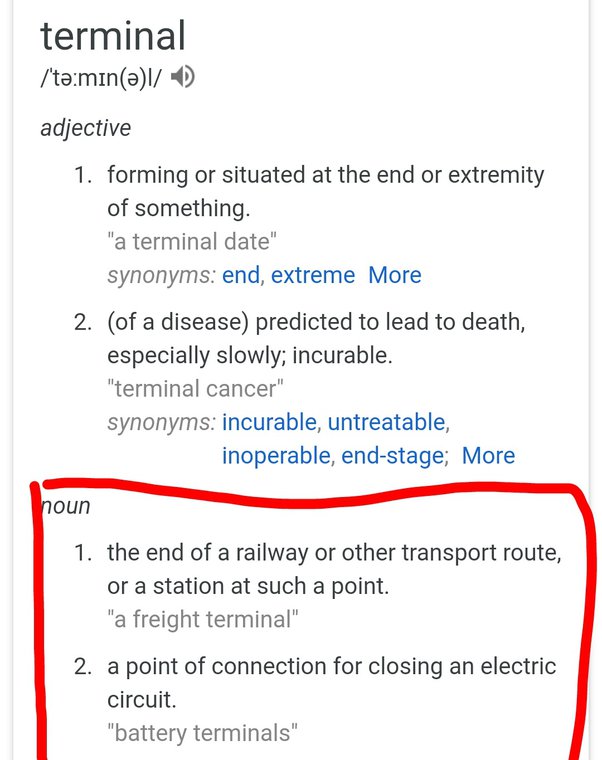
Decoding “Terminal”: A Multifaceted Concept
At its core, a “terminal” represents an interface through which a user interacts with a computer system. Historically, this meant a physical device, often quite rudimentary, connected to a powerful mainframe. Today, the concept has expanded dramatically, largely thanks to software innovation. To truly grasp “changing terminals,” we must first understand the different forms a terminal can take.
The Command Line Interface (CLI) and Terminal Emulators
For many in the tech world, when they speak of a “terminal,” they are referring to a terminal emulator – a software application that provides a text-based interface to an operating system or a remote server. This is where the Command Line Interface (CLI) comes alive, allowing users to execute commands by typing text rather than interacting with a graphical user interface (GUI).
Popular examples include:
- Windows: Command Prompt (cmd.exe), PowerShell, and the modern Windows Terminal (which can host cmd, PowerShell, WSL Bash, etc.).
- macOS: Terminal.app, iTerm2.
- Linux/Unix: GNOME Terminal, Konsole, xterm, Alacritty, Kitty.
Changing terminals in this context often means switching between these different terminal emulator applications. Users might do this to leverage specific features (e.g., better customization in iTerm2, tab management in Windows Terminal), integrate with particular development environments (e.g., WSL for Linux commands on Windows), or simply for aesthetic preference and productivity gains. Each emulator offers a slightly different take on the CLI experience, impacting everything from font rendering to plugin support and scripting capabilities. The choice of terminal emulator can significantly influence a developer’s workflow, making it a critical aspect of their digital toolkit.
Physical Terminals and Dedicated Devices
While software terminals dominate much of the tech conversation today, the concept of a physical terminal remains highly relevant, especially in specific industries. These are dedicated hardware devices designed for a particular purpose.
Examples include:
- Point-of-Sale (POS) Terminals: These are ubiquitous in retail, allowing businesses to process credit card payments, manage inventory, and handle customer transactions. Changing POS terminals could mean upgrading to newer hardware with improved security features (like EMV chip readers) or integrating with more advanced inventory management systems.
- Financial Trading Terminals: Specialized workstations like the Bloomberg Terminal or Refinitiv Eikon are legendary in the finance sector. They provide access to real-time market data, news, analytics, and trading platforms. Switching or upgrading these terminals is a massive undertaking, often driven by the need for faster data, more powerful analytical tools, or compliance with new financial regulations.
- Legacy Dumb Terminals: Though largely obsolete, these were simple input/output devices without their own processing power, connecting to mainframes. While rarely changed today, their historical role underscores the foundational meaning of a “terminal.”
Here, “changing terminals” signifies a hardware upgrade, a system overhaul, or a strategic decision to adopt new specialized equipment. The implications are often substantial, touching on capital expenditure, staff training, and operational continuity.
Virtual Consoles and Remote Access
Another crucial interpretation of “changing terminals” involves interactions with remote systems or virtual environments.
- Virtual Consoles (TTYs) in Linux/Unix: On Linux systems, it’s possible to switch between several “virtual consoles” or TTYs (Teletypewriters) using key combinations like Ctrl+Alt+F1 to F6. Each TTY provides an independent text-mode login session. This is common for troubleshooting, running background processes, or even recovering a system if the graphical environment crashes. “Changing terminals” here means switching between these underlying console sessions.
- Remote Access Terminals: This is perhaps the most common “change” for many IT professionals. Using protocols like SSH (Secure Shell) or RDP (Remote Desktop Protocol), users connect to servers, cloud instances, or other remote computers. When a developer or system administrator “changes terminals,” they might be closing an SSH session to one server and opening another to a different server, or even switching between different remote desktop clients to manage various remote machines. Cloud providers also offer web-based terminal access to their virtual machines, allowing users to “change terminals” simply by navigating between different tabs or windows in their browser.
This category emphasizes connectivity and the ability to interact with diverse computing resources from a single local machine, a cornerstone of modern distributed computing and cloud infrastructure.
Why “Change Terminals”? Driving Factors and Benefits
The decision to “change terminals” – whether it’s adopting a new software emulator, upgrading physical hardware, or simply switching remote connections – is rarely arbitrary. It’s often driven by a combination of practical needs, strategic objectives, and the pursuit of efficiency and security.
Enhancing Productivity and Workflow Efficiency
One of the primary motivators for tech professionals to change their terminal setup is to boost productivity. A well-configured terminal environment can dramatically streamline workflows.
- Customization and Personalization: Modern terminal emulators offer extensive customization options, from color schemes and fonts to keyboard shortcuts and integrated tools. Changing to an emulator that allows for deep personalization can reduce eye strain, improve readability, and create a more comfortable working environment, directly translating to less fatigue and higher output.
- Advanced Features: Features like tabbed windows, split panes, search functionality, session management, and integration with shell extensions (e.g., Zsh with Oh My Zsh) can significantly speed up common tasks. Switching to a terminal with these capabilities can save precious minutes on repetitive actions, accumulating into substantial time savings over weeks and months.
- Automation: Terminals are the gateway to powerful scripting and automation tools. By switching to a terminal environment that better supports specific scripting languages (like PowerShell for Windows automation or Bash for Linux automation) or integrates seamlessly with automation frameworks, users can automate complex sequences of commands, freeing up time for more strategic work. This focus on automation directly aligns with the “Productivity” topic of the website, emphasizing how the right tools can multiply human effort.
Meeting Specific Technical Requirements
Sometimes, changing terminals isn’t a choice but a necessity dictated by the demands of a project or system.

- Software Compatibility: Certain development tools, compilers, or legacy applications might perform optimally or even exclusively within a specific terminal environment. For instance, some Windows-centric tools might prefer PowerShell, while open-source projects often assume a Unix-like Bash environment, necessitating the use of WSL or a dedicated Linux machine.
- Operating System Integration: Working across different operating systems often requires switching between their native terminal interfaces. A developer might use Windows Terminal for local tasks, then switch to an SSH client to manage a Linux server, and perhaps even an iTerm2 session on a macOS machine for iOS development.
- Specialized Tasks: Certain roles or tasks demand specialized terminal access. A data scientist might need a terminal with specific Python environment management tools, while a cybersecurity analyst might require a terminal optimized for penetration testing tools or forensic analysis, often on a Linux distribution like Kali. The ability to switch between these specialized environments ensures that professionals have the right tool for the job.
Addressing Security and Compliance Needs
In an era of escalating cyber threats, security is paramount. Terminal choices and management practices play a significant role in an organization’s digital security posture.
- Secure Remote Access: Changing from less secure remote access methods to robust, encrypted protocols like SSH is a critical security upgrade. Organizations enforce strict policies regarding how employees access internal systems, often requiring specific SSH clients, multi-factor authentication, and audited terminal sessions.
- Compliance with Industry Standards: In regulated industries (finance, healthcare), specific compliance requirements dictate how data is accessed and managed. This might involve using terminals that log all activities, enforce strong authentication, and provide audit trails. Upgrading to compliant terminal solutions is not just an operational decision but a legal and ethical imperative.
- Mitigating Vulnerabilities: Older terminal software or physical terminals might have known vulnerabilities that are no longer patched. Changing to newer, actively maintained terminal solutions is a crucial step in reducing the attack surface. This is particularly true for POS systems, where outdated hardware can expose sensitive customer payment data. The “Digital Security” aspect of the website’s topics is deeply intertwined with these considerations.
The Impact of Terminal Choices: Tech, Brand, and Money
The seemingly technical act of “changing terminals” reverberates across an organization’s technological landscape, influences its brand identity, and has tangible financial implications. Understanding these broader impacts is key to making strategic decisions.
Technological Superiority and User Experience
The choice of terminal technology directly influences the efficiency, capabilities, and overall experience for end-users.
- Leveraging Latest Tech Trends: Adopting modern terminal emulators and remote access solutions allows organizations to integrate with cutting-edge technologies. This could include using AI-powered command suggestions, integrating with cloud-native development environments, or supporting new programming languages and frameworks. For instance, the Windows Terminal’s integration with WSL (Windows Subsystem for Linux) is a prime example of embracing new architectural paradigms to improve the developer experience.
- Enhanced Gadget and Software Interoperability: A well-chosen terminal setup ensures seamless interaction with various gadgets and software tools. Developers might need their terminal to integrate with IDEs, version control systems, containerization platforms (like Docker), and monitoring tools. The ability to switch between these contexts efficiently within a unified terminal environment enhances technological fluidity.
- Performance and Reliability: Modern terminal software is often optimized for performance, offering faster rendering, lower latency, and greater stability. For power users and system administrators, a reliable terminal that doesn’t crash or lag is indispensable. Investing in superior terminal solutions, whether software or hardware, is an investment in the foundational tools that underpin all other tech operations. This connects directly to “Software,” “AI Tools,” “Apps,” and “Gadgets” from the website’s tech topics.
Branding and Professional Identity
The way an individual or an organization manages its terminal environments can subtly, yet powerfully, shape its brand and professional identity.
- Personal Branding for Tech Professionals: For developers, system administrators, and data scientists, their terminal setup is often a reflection of their personal brand. A highly customized, efficient, and visually appealing terminal speaks volumes about their attention to detail, technical prowess, and commitment to productivity. Sharing terminal configurations (dotfiles) is a common practice in the open-source community, contributing to a professional’s reputation and expertise. It showcases their mastery of tools and their unique workflow.
- Corporate Identity and Employee Experience: For businesses, standardizing or providing flexible yet secure terminal environments contributes to their corporate identity and reputation as a tech-forward employer. A company that invests in modern, ergonomic, and efficient tools for its technical staff fosters a positive employee experience, which can be a strong draw for talent. Conversely, forcing employees to use outdated, clunky, or insecure terminals can lead to frustration, reduced morale, and a perception of a technologically stagnant organization. This also touches upon “Corporate Identity” and “Reputation” within the “Brand” theme.
- Security Posture as a Brand Element: In today’s landscape, a strong security posture is an integral part of a brand’s reputation. Companies that demonstrate meticulous terminal security (e.g., secure remote access policies, regular audits of terminal usage, strong authentication) build trust with customers and partners. Conversely, publicized security breaches originating from compromised terminal access can severely damage a brand’s reputation and lead to significant financial and legal repercussions.
Financial Implications and ROI
The decision to change terminals is inherently tied to financial considerations, impacting everything from operational costs to potential revenue generation.
- Cost of Hardware and Software: For physical terminals (like POS or financial trading terminals), there’s a direct capital expenditure. Software terminal emulators might be free open-source tools, but specialized enterprise versions could incur licensing costs. The total cost of ownership also includes maintenance, support, and training.
- Productivity Gains vs. Costs: While there’s an upfront or ongoing cost, the potential for increased productivity and efficiency (as discussed earlier) represents a significant return on investment (ROI). Faster workflows, reduced errors, and enhanced automation directly translate into saved labor hours and improved output. For a business, this means more value generated for the same or less operational cost.
- Security Breach Prevention and Cost Savings: Investing in secure terminal practices and up-to-date hardware/software is a proactive measure to prevent costly security breaches. The financial fallout from a breach – including data recovery, legal fees, regulatory fines, reputational damage, and lost business – far outweighs the cost of preventative measures. This is a direct link to “Digital Security” and “Business Finance.”
- Enabling Online Income and Side Hustles: For individuals, a powerful and efficient terminal setup can be a direct enabler of online income and side hustles. Developers building apps, data analysts performing freelance work, or system administrators offering consulting services all rely heavily on their terminal environments. The ability to quickly spin up development environments, deploy code, or analyze data directly impacts their earning potential. Financial terminals, though an extreme example, are explicitly designed to facilitate high-value financial transactions and investment strategies. The website’s “Online Income,” “Side Hustles,” and “Financial Tools” topics are directly addressed here.
- Optimizing Resource Utilization: Changing to more efficient terminal solutions (e.g., cloud-based terminals for remote workers) can reduce the need for expensive local hardware, leading to cost savings in IT infrastructure and energy consumption.
Navigating the Terminal Landscape: Best Practices and Future Trends
The “terminal” will remain a fundamental interface for interacting with computing systems. As technology evolves, so too will the ways we interact with and manage these critical gateways. Making informed decisions about changing terminals requires strategic foresight and adherence to best practices.
Key Considerations for Making a Switch
When contemplating a change in terminal software, hardware, or access strategy, several factors should guide the decision-making process:
- Evaluate Needs: Clearly define the functional requirements. Is it for general development, specific system administration tasks, data analysis, or financial trading? What operating systems and remote environments need to be accessed?
- Security First: Prioritize security features such as multi-factor authentication, robust encryption, logging capabilities, and compliance with relevant industry standards. A new terminal solution should always enhance, not diminish, your security posture.
- Usability and Customization: Consider the user experience. How intuitive is the interface? Does it offer sufficient customization options to optimize individual workflows and improve productivity? Are there features like tabbed interfaces, split panes, and search that are crucial for your daily tasks?
- Performance and Resource Usage: Assess the terminal’s performance impact. Does it consume excessive resources, or is it lightweight and responsive? This is particularly important for power users and those working on less powerful hardware.
- Community Support and Documentation: For software terminals, a vibrant community and comprehensive documentation can be invaluable for troubleshooting and learning.
- Cost-Benefit Analysis: For businesses, a thorough cost-benefit analysis comparing the upfront costs, ongoing maintenance, and potential gains in productivity, security, and employee satisfaction is essential.

The Future of Terminal Interactions
The concept of the terminal is far from static. Future trends promise even more sophisticated and integrated experiences:
- AI-Powered Terminals: Expect terminals to become smarter, integrating AI tools for predictive command suggestions, intelligent error debugging, and natural language processing to execute complex tasks. Imagine typing a request in plain English and having the terminal translate it into precise commands. This directly links to the “AI Tools” section of the website.
- Cloud-Native and Web-Based Terminals: The rise of cloud computing continues to push terminal access into the browser. Future terminals will be increasingly integrated with cloud provider consoles, offering persistent sessions, collaborative features, and seamless access to distributed resources from anywhere, on any device.
- Enhanced Visualizations within CLI: While traditionally text-based, future terminals may blur the lines with GUIs, offering richer inline visualizations for data, system metrics, or even interactive debugging tools directly within the command line.
- Hyper-Personalization and Adaptive Environments: Terminals will become even more adaptive, learning user habits and preferences to automatically configure layouts, themes, and tool integrations, creating a truly hyper-personalized working environment.
- Zero-Trust Security Integration: As digital security evolves, terminals will likely integrate more deeply with zero-trust architectures, ensuring that every command and every access attempt is rigorously verified, regardless of location or previous interactions.
In conclusion, “changing terminals” is a dynamic concept that spans physical hardware upgrades, strategic software choices, and evolving remote access methodologies. Its implications reach beyond mere technical functionality, profoundly influencing an organization’s technological capabilities, shaping its brand image, and directly impacting its financial health. By thoughtfully considering the diverse facets of terminals and their role in our digital lives, individuals and businesses can make informed decisions that drive efficiency, bolster security, and position themselves for success in the ever-evolving tech landscape.
aViewFromTheCave is a participant in the Amazon Services LLC Associates Program, an affiliate advertising program designed to provide a means for sites to earn advertising fees by advertising and linking to Amazon.com. Amazon, the Amazon logo, AmazonSupply, and the AmazonSupply logo are trademarks of Amazon.com, Inc. or its affiliates. As an Amazon Associate we earn affiliate commissions from qualifying purchases.