
In today’s digital age, our inboxes have become the central hub for communication, information, and often, a significant amount of digital clutter. As we navigate the ever-increasing flow of emails, messages on various platforms, and chat logs, the need for effective organization and management becomes paramount. This is where the concept of “archived messages” emerges as a crucial feature, offering a solution to declutter our active inboxes while retaining access to important information. Understanding what archived messages mean, how they function, and their benefits is essential for efficient digital life management.
Understanding the Core Concept of Archiving
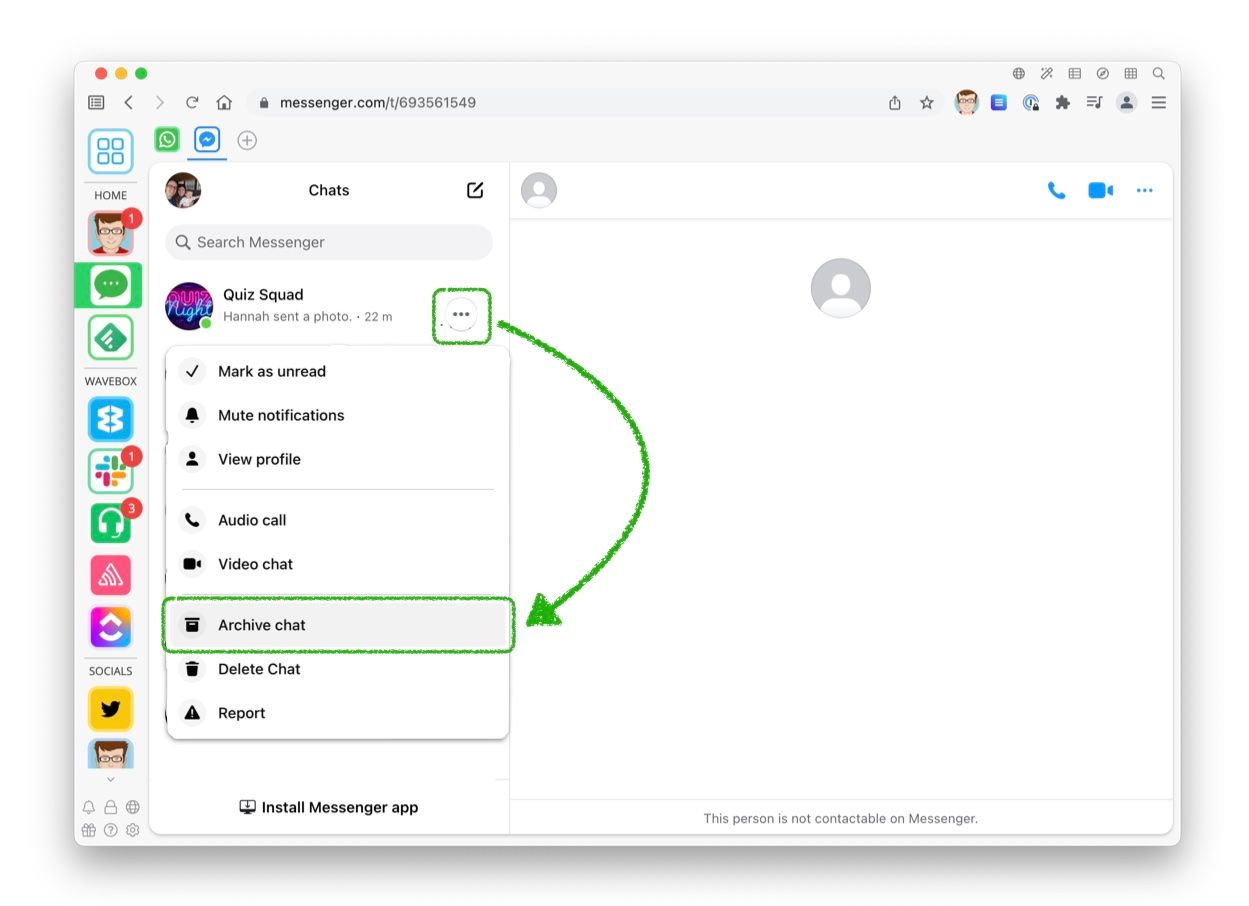
At its heart, archiving messages is the process of moving digital communications from your primary inbox or active view to a separate, designated storage area. This action does not delete the messages; rather, it removes them from your immediate sight, making your main communication channels cleaner and more focused. Think of it as tidying up your desk: you don’t throw away important papers, but you move them to a filing cabinet to keep your workspace clear for current tasks.
Differentiating Archiving from Deletion
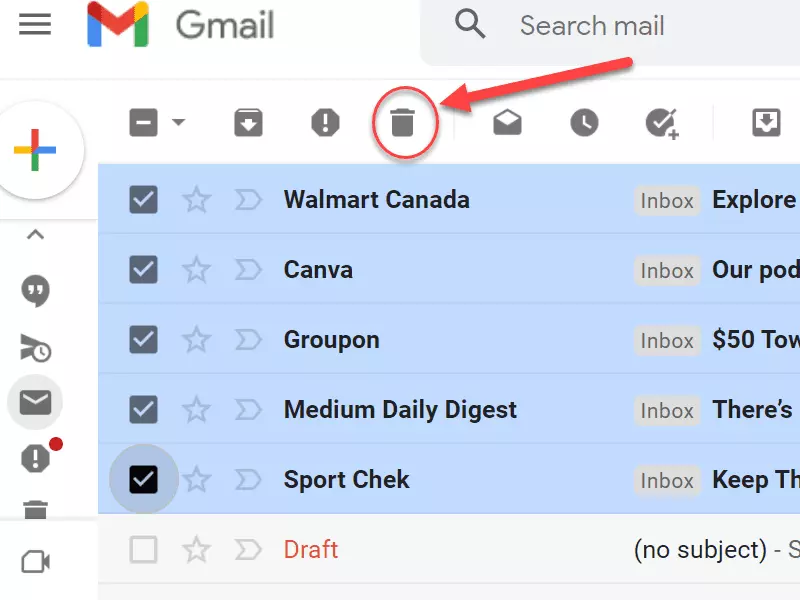
The most critical distinction to grasp is the difference between archiving and deleting. Deletion is a permanent act, intending to permanently remove data from a system. Once a message is deleted, it is typically sent to a “trash” or “deleted items” folder, which may have a limited retention period before being permanently purged. If it’s a hard delete, it’s gone forever. Archiving, on the other hand, is a non-destructive process. Archived messages remain accessible, searchable, and retrievable. They are simply moved out of the way, offering a safety net for important conversations or information that you might need later but don’t require constant visibility. This distinction is vital for data preservation and avoiding accidental loss of critical communications.
The Purpose and Benefits of Archiving
The primary purpose of archiving messages is to streamline your digital communication workflow. By moving less urgent or completed conversations out of your primary inbox, you can:
- Reduce Inbox Clutter: A tidy inbox leads to better focus. When you’re not distracted by old messages, you can concentrate on new, actionable items. This improves productivity and reduces the feeling of being overwhelmed.
- Improve Searchability: While searching your entire communication history is possible, having a well-archived system can significantly speed up retrieval. Many platforms allow you to search archived messages specifically, or a well-organized archive can make general searches more efficient by reducing the number of irrelevant results.
- Maintain Historical Records: For many, messages contain vital information – project details, client agreements, personal memories, or important decisions. Archiving ensures these records are preserved without cluttering daily operations. This is particularly relevant for professional contexts where maintaining communication trails is often a requirement.
- Free Up Space (in some older systems): While modern cloud storage is vast, in some legacy systems or specific configurations, archiving might have been a method to manage storage space. However, for most current email and messaging services, this is a less significant benefit compared to organization and retrieval.
- Enhance Privacy and Focus: By archiving personal conversations, you can keep your professional inbox focused on work-related matters, and vice-versa. This separation helps maintain boundaries and focus on the task at hand.
How Archiving Works Across Different Platforms
The implementation and user experience of archiving messages can vary slightly depending on the specific platform you are using. However, the underlying principle remains consistent: move to a separate storage location without deletion.
Email Archiving (Gmail, Outlook, etc.)
Email clients are perhaps where the concept of archiving is most widely understood and utilized.
Gmail
In Gmail, archiving a message moves it from your inbox to the “All Mail” folder. It’s no longer visible in your inbox, but it’s still accessible through search or by browsing “All Mail.” You can also create custom labels for archived emails for further organization, effectively creating a more granular filing system within your archive. To archive in Gmail, you typically select the message(s) and click the archive icon (often an open box with an arrow pointing into it).
Outlook
Outlook offers a similar archiving functionality. Users can archive messages by selecting them and choosing the “Archive” option, which moves them to a dedicated “Archive” folder. This folder is usually a separate PST file or an online archive mailbox, depending on your Outlook version and account type (Microsoft 365, Exchange, etc.). For users with older versions or POP accounts, archiving might involve manually moving emails to a designated archive PST file.
Other Email Providers
Most other email providers, such as Yahoo Mail, Apple Mail, and webmail interfaces from various ISPs, offer comparable archiving features. The interface and the exact naming of the archive folder might differ (e.g., “Archived,” “All Messages,” or a custom folder), but the core functionality of moving messages out of the inbox while retaining them for later access is universally present.
Messaging Apps and Collaboration Tools (Slack, Microsoft Teams, WhatsApp)
Beyond email, archiving has become a standard feature in many modern communication tools, especially those used for team collaboration and instant messaging.
Slack
In Slack, archiving a channel or direct message moves it out of your channel list. Archived channels are no longer active, and you won’t receive new messages in them. However, the entire history of the channel remains searchable for all members who had access to it. This is incredibly useful for project channels that have concluded or for conversations that are no longer active but might contain valuable historical data. You can also archive individual messages within a conversation, though this is less common than channel archiving.

Microsoft Teams
Microsoft Teams allows users to archive individual chats. When a chat is archived, it disappears from your main chat list. To access it again, you need to go to your “Archived chats” section. Archived chats are still searchable, and you can unarchive them at any time to bring them back to your main chat list. Teams also allows for archiving entire teams and channels, which effectively pauses activity and moves them to a separate administrative view, preserving all data and history for compliance or future reference.
WhatsApp and Other Instant Messengers
WhatsApp offers the ability to archive individual chats. When you archive a chat, it’s removed from your main chat screen but remains accessible in a separate “Archived Chats” folder, usually found by scrolling to the top of your chat list. Archived chats do not receive new notifications unless you explicitly unarchive them. This is a great way to declutter your main view from conversations you’re not actively engaged in but don’t want to delete. Other messaging apps like Telegram and Signal often have similar features, providing options to hide or archive conversations.
Advanced Uses and Best Practices for Archiving
Archiving is more than just a decluttering tool; it can be leveraged strategically to enhance productivity, compliance, and data management.
Creating an Effective Archiving Strategy
A haphazard approach to archiving can lead to an equally cluttered archive. Developing a strategy is key:
- Define “Archivable” Content: Establish clear criteria for what constitutes an “archived” message. This might include:
- Completed project communications.
- Informational emails or messages that no longer require immediate action.
- Conversations from previous roles or responsibilities.
- Historical data that might be needed for reference or audits.
- Regularly Review and Archive: Set aside dedicated time (e.g., weekly or monthly) to review your inbox and archive messages that meet your criteria. This proactive approach prevents inbox overflow.
- Leverage Search and Filters: Familiarize yourself with the search capabilities of your chosen platform. Learn to use keywords, sender/recipient filters, date ranges, and other advanced search operators to quickly locate archived messages.
- Consider Folders or Labels within Archives: For extensive archiving, especially in email, consider using folders or labels within your archive to categorize messages. This adds another layer of organization, making retrieval even more efficient. For instance, you might create folders for “Past Projects,” “Client A,” “Training Materials,” etc.
- Understand Retention Policies: If you are archiving for professional or compliance reasons, be aware of your organization’s data retention policies. Ensure your archiving practices align with these requirements.
Archiving for Compliance and Legal Holds
In many professional environments, maintaining communication records is not just good practice; it’s a legal or regulatory requirement. Archiving plays a crucial role in compliance efforts.
E-Discovery and Audits
Archived messages can be critical during legal proceedings or audits (e-discovery). They provide an immutable record of communications that can be used as evidence. Platforms often have specific features or integrations to facilitate legal holds, ensuring that specific messages or sets of messages are preserved and not subject to deletion, even accidentally, when under a legal hold.
Regulatory Adherence
Certain industries are subject to strict regulations regarding data retention and communication logging. For example, financial institutions or healthcare providers have specific rules about how long client communications must be stored. Properly archiving these messages ensures compliance with these regulations and avoids potential penalties.
Security Considerations for Archived Messages
While archiving itself is a feature of organization, the security of your archived data is paramount.
Access Control
Ensure that your archiving solution and your overall account security are robust. Use strong passwords, enable two-factor authentication, and be mindful of who has access to your accounts, as this directly impacts access to your archived messages.
Data Backup and Redundancy
While cloud-based archiving solutions generally have strong backup and redundancy measures in place, it’s always wise to understand how your data is protected. For highly sensitive information, consider if additional backup strategies are necessary, though this is less common with modern SaaS offerings.
Data Privacy
Be aware of the privacy policies of the platforms you use. Understand how your archived data is stored, accessed, and protected by the service provider. For sensitive personal or business information, choose platforms with strong privacy commitments.
In conclusion, archived messages are an indispensable feature in our digital communication landscape. They offer a sophisticated way to manage the overwhelming volume of messages we receive daily, ensuring that our inboxes remain clean and focused, while preserving vital information for future reference. By understanding what archiving means, how it works across various platforms, and by adopting best practices, individuals and organizations can significantly enhance their productivity, maintain historical integrity, and ensure compliance in an increasingly digital world.
aViewFromTheCave is a participant in the Amazon Services LLC Associates Program, an affiliate advertising program designed to provide a means for sites to earn advertising fees by advertising and linking to Amazon.com. Amazon, the Amazon logo, AmazonSupply, and the AmazonSupply logo are trademarks of Amazon.com, Inc. or its affiliates. As an Amazon Associate we earn affiliate commissions from qualifying purchases.