
In the contemporary landscape of ubiquitous high-speed internet, we often take for granted the seamless transition our smartphones make between Wi-Fi and cellular data. We stream high-definition video, conduct video conferences on the move, and sync massive files to the cloud without a second thought. However, behind this seamless experience lies a critical technical configuration that acts as the bridge between your mobile device and the wider digital world. This configuration is known as the APN, or Access Point Name.
While most users never need to interact with their APN settings, understanding what they are and how they function is essential for troubleshooting connectivity issues, optimizing network performance, and managing complex mobile ecosystems in both consumer and enterprise environments.
Decoding the Acronym: What is an Access Point Name?
At its most fundamental level, APN stands for Access Point Name. It is a gateway setting that identifies a specific network path for all cellular data connectivity. When a mobile device attempts to connect to the internet via a carrier (such as Verizon, AT&T, or T-Mobile), it presents an APN to the carrier’s network. The network then examines this identifier to determine what type of network connection should be established, which IP addresses should be assigned, and what security measures should be applied.
The Bridge Between Two Worlds
Think of the APN as the “address” your phone provides to the carrier’s computer system. Just as a physical address tells a courier where to deliver a package, the APN tells the carrier’s Gateway GPRS Support Node (GGSN) or Packet Data Network Gateway (P-GW) exactly where to route your data packets. Without a correctly configured APN, your device might be able to make voice calls and send basic SMS texts (which use different cellular protocols), but it will be unable to access the internet or send multimedia messages (MMS).
Components of an APN Configuration
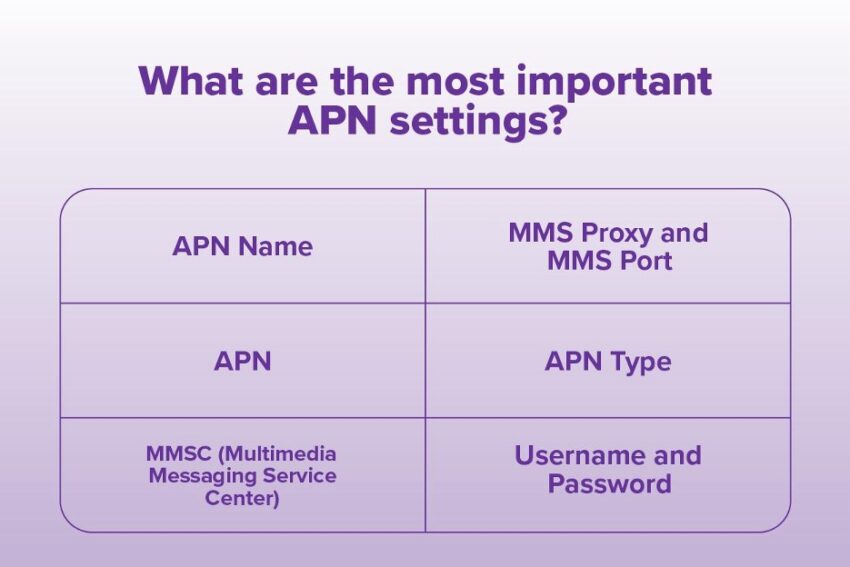
An APN is more than just a single string of text; it is a profile that contains several key parameters:
- APN Identifier: The name of the gateway (e.g., “fast.t-mobile.com”).
- MMSC (Multimedia Messaging Service Center): The URL used for sending and receiving picture and video messages.
- Proxy and Port: Technical settings that route data through specific servers, often used by older network configurations.
- MCC and MNC: Mobile Country Code and Mobile Network Code, which identify the specific carrier and country.
- Authentication Type: Determines if the connection requires a specific protocol like PAP or CHAP.
How APNs Work: The Technical Infrastructure
To understand the importance of the APN, one must look at the technical journey a data packet takes. When you open a browser on your smartphone, the device doesn’t simply “shout” into the air. It initiates a request to the local cell tower using the APN stored in its settings.
The Gateway GPRS Support Node (GGSN)
In 3G and 4G/LTE networks, the APN points the device toward the GGSN or P-GW. This gateway acts as the interface between the mobile network and the public internet or private corporate networks. The APN tells the gateway which “tunnel” to open for the user. If the APN is incorrect, the gateway will reject the connection, resulting in the dreaded “No Data Connection” error.
IP Address Allocation
The APN also dictates how your device receives its IP address. Depending on the APN settings, a device might receive a dynamic IP (which changes every time you connect) or a static IP (common in industrial IoT applications). It also determines whether the device is assigned an IPv4 or IPv6 address, or a combination of both.
Quality of Service (QoS) and Throttling
Carriers use different APNs to manage network traffic. For example, a carrier might have one APN for standard consumer data and another for high-priority emergency services or enterprise-grade connections. The APN tells the network what level of “Quality of Service” to provide, which can influence everything from latency to maximum download speeds.
Why Configuration Matters: Troubleshooting and Performance
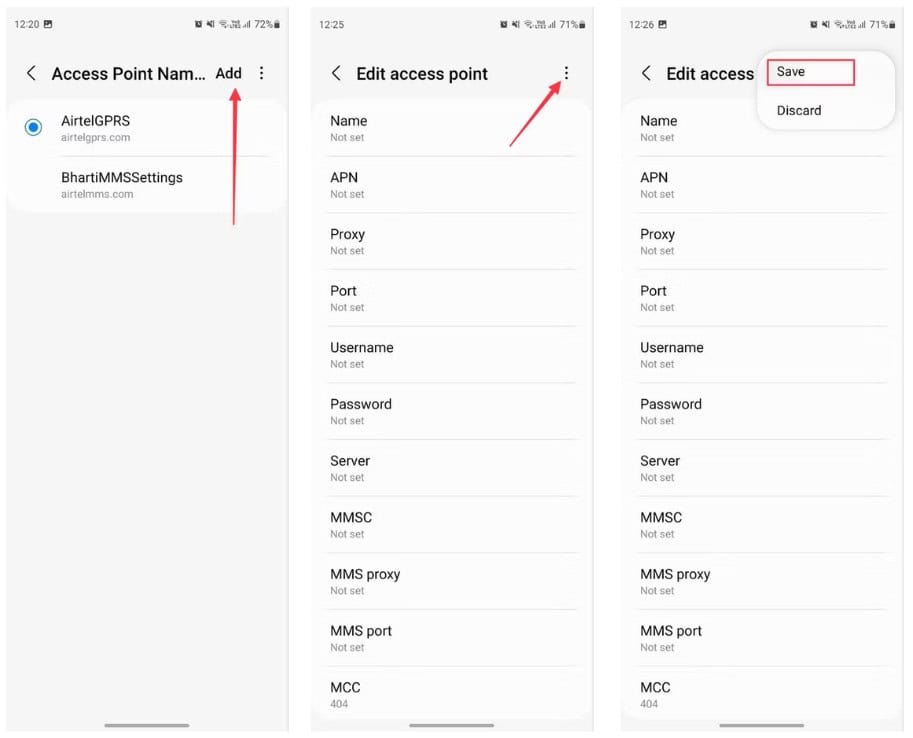
For the vast majority of users, APN settings are “set and forget.” When you insert a SIM card into a modern smartphone, the device automatically pulls the correct APN settings from the carrier’s database. However, there are several scenarios where manual intervention becomes necessary.
Using Unlocked Devices and MVNOs
The most common reason to manually edit an APN is when using an “unlocked” phone or switching to a Mobile Virtual Network Operator (MVNO) like Mint Mobile, Boost Mobile, or Google Fi. Because MVNOs lease network space from major carriers but often use their own gateways, the default settings on a phone (which might be programmed for the parent carrier) may not work. Users must manually enter the MVNO’s specific APN to enable data and MMS.
Optimizing International Roaming
When traveling abroad, your phone must negotiate a connection with a foreign carrier. Sometimes, the roaming “handshake” fails to pass the correct APN information. Manually updating the APN to the local carrier’s settings can often restore data services that appear to be broken, saving travelers from being disconnected in a foreign country.
Correcting “MMS Not Working” Issues
If you can browse the web but cannot send or receive picture messages, the culprit is almost always a misconfigured MMSC or MMS Proxy within the APN settings. Because MMS is a separate protocol handled by a specific server, it requires its own unique pathing within the APN profile.
Enterprise Solutions: Private APNs and Secure Data Pipelines
Beyond the consumer world, APNs play a massive role in corporate security and the Internet of Things (IoT). Many organizations require a level of security that the public internet cannot provide. This is where Private APNs come into play.
Creating a Virtual Private Cloud
A Private APN allows a company to connect its mobile devices (tablets, handheld scanners, or remote sensors) directly to its internal corporate network without the data ever touching the public internet. This creates a secure “tunnel” that is invisible to hackers and external threats. For industries handling sensitive data, such as healthcare or finance, a Private APN is an essential component of their cybersecurity strategy.
IoT and M2M Communications
In the world of Machine-to-Machine (M2M) communication, APNs are used to manage thousands of devices simultaneously. For example, a fleet of smart utility meters or a series of shipping containers with GPS trackers will use a specialized APN optimized for small, frequent data packets rather than high-speed streaming. These specialized APNs often include features like “sleep mode” awareness to conserve battery life on remote devices.
Custom Filtering and Security
Private APNs also allow companies to implement custom firewall rules and content filtering at the network level. Instead of installing software on every individual device, the company can control what sites and services are accessible through the APN itself, ensuring that corporate data plans are used strictly for business purposes.
The Future of APNs: 5G, eSIM, and Network Slicing
As we transition into the era of 5G and widespread eSIM adoption, the role of the APN is evolving. While the concept of a gateway identifier remains, the technology behind it is becoming more sophisticated.
The Shift Toward Network Slicing
In 5G architecture, the traditional APN is being augmented by a concept called Network Slicing. This allows a single physical 5G network to be partitioned into multiple virtual networks, each tailored to a specific use case. While an APN identifies a gateway, a network slice can provide an end-to-end virtual network with guaranteed latency and bandwidth. We are moving toward a future where “APN” might be replaced by more granular “Slice Descriptors.”
eSIM and Remote Provisioning
The rise of the eSIM (embedded SIM) is also changing how APNs are managed. With traditional physical SIMs, APN settings were often hardcoded or updated via SMS. With eSIM technology, carriers can push “Carrier Bundles” over the air, which contain pre-configured, verified APN settings. This reduces the need for manual user intervention and makes switching between carriers a much more seamless, software-driven experience.
Enhanced Security in the 5G Core
Modern APN configurations are also incorporating better encryption. Older 2G and 3G APN protocols were susceptible to certain types of spoofing and “Man-in-the-Middle” attacks. The 5G core utilizes more robust authentication protocols, ensuring that the connection between the device and the APN gateway is encrypted and verified, significantly reducing the risk of data interception during the initial handshake.
Conclusion
The Access Point Name is a silent but vital architect of our digital lives. Though it exists as a small string of text hidden deep within our device settings, it carries the massive responsibility of identifying, routing, and securing every kilobyte of data we consume. Whether you are a consumer trying to get a new MVNO SIM card to work, a traveler roaming through Europe, or an IT professional securing a fleet of corporate devices, understanding the APN is the key to mastering mobile connectivity.
As technology continues to advance toward 5G and beyond, the APN remains a fundamental bridge, ensuring that our devices can talk to the world, and the world can talk back. In the complex ecosystem of modern tech, the APN is the ultimate gateway to the internet in our pockets.
aViewFromTheCave is a participant in the Amazon Services LLC Associates Program, an affiliate advertising program designed to provide a means for sites to earn advertising fees by advertising and linking to Amazon.com. Amazon, the Amazon logo, AmazonSupply, and the AmazonSupply logo are trademarks of Amazon.com, Inc. or its affiliates. As an Amazon Associate we earn affiliate commissions from qualifying purchases.