
In the modern era of constant connectivity, we often take for granted the seamless transition our smartphones make between Wi-Fi and cellular data. However, behind every webpage loaded on a train or every video streamed in a park lies a critical technical configuration known as the Access Point Name, or APN. For most users, the APN is an invisible hand that manages data traffic, but when things go wrong—or when you switch to a new carrier—understanding what an APN is and how it functions becomes essential.
Understanding the Access Point Name (APN)
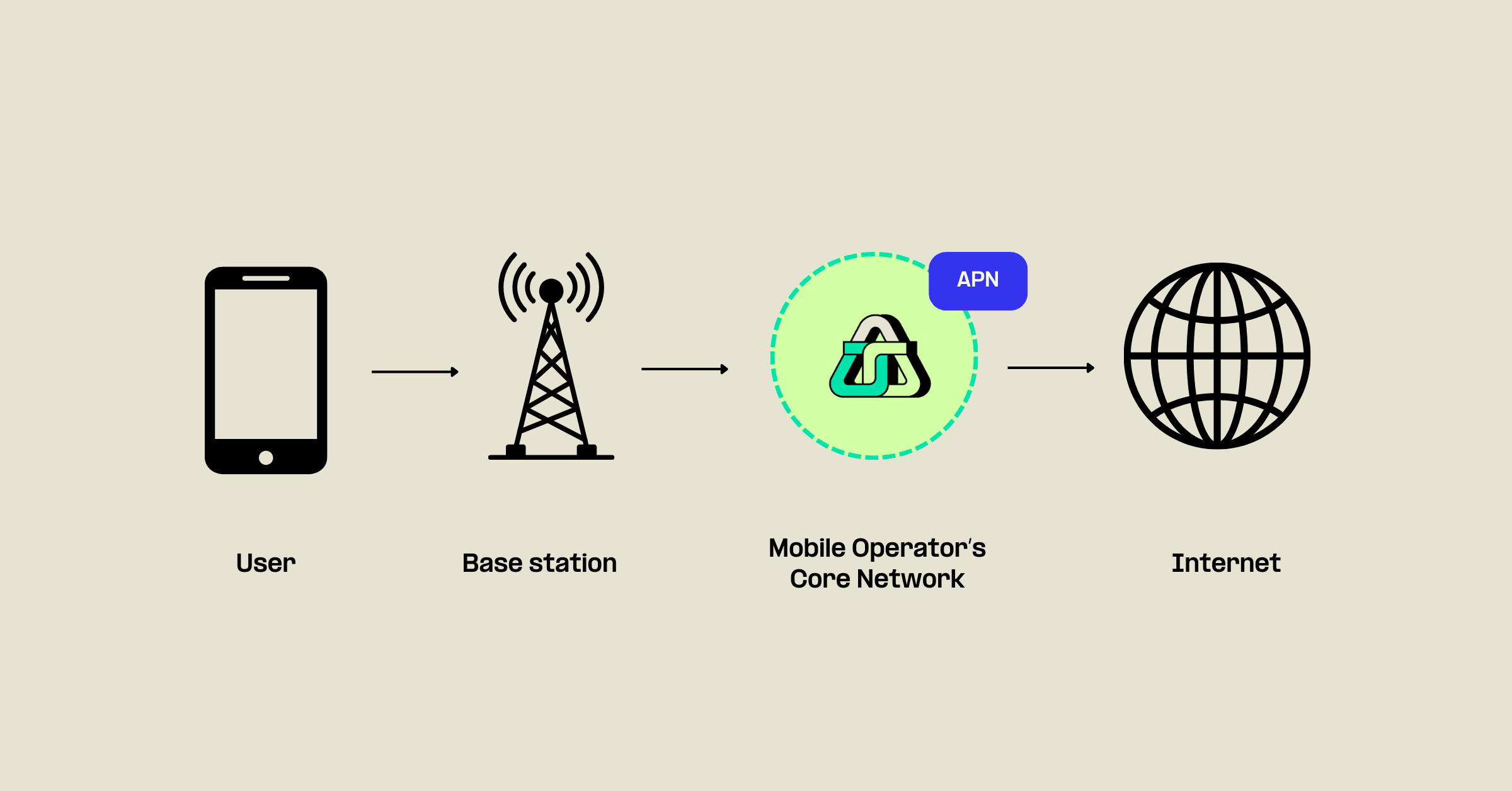
At its most fundamental level, an Access Point Name (APN) is a gateway between a mobile network (such as 3G, 4G LTE, or 5G) and another computer network, most frequently the public internet. Think of the APN as a set of instructions that tells your smartphone or cellular-enabled tablet exactly how to connect to the carrier’s network and what IP address to assign to the device.
The Bridge Between Your Device and the Internet
When you turn on cellular data, your device must communicate with the carrier’s Gateway GPRS Support Node (GGSN) or Packet Data Network Gateway (P-GW). To establish this connection, the carrier needs to know which path the data should take. The APN provides the network with the necessary details to determine if a private network should be used, which security methods should be applied, and how the user should be billed for the data consumed.
Without a correctly configured APN, your device may show that it has a signal (bars), but it will be unable to send or receive data. This is why “APN settings” is often the first place technicians look when a device can make phone calls but cannot access the internet or send multimedia messages (MMS).
How an APN Works Behind the Scenes
The process of connecting via an APN involves several steps of authentication and routing. When a device attempts to connect to the internet, it sends its APN string to the carrier’s network. The network then parses this string to identify the specific gateway.
Once identified, the gateway checks the user’s subscription profile. It verifies if the user has a valid data plan and what specific services they are authorized to use. For example, some APNs are configured specifically for mobile tethering (hotspots), while others are restricted to standard handset data. If the APN is verified, the gateway assigns an IP address to the device and opens a “tunnel” for data to flow back and forth.
The Anatomy of an APN Configuration
An APN is not just a single word; it is a profile consisting of several parameters that define the connection’s characteristics. While many of these fields are filled automatically by the SIM card, understanding the core components helps in troubleshooting and manual configuration.
The Network Identifier and Operator Identifier
A standard APN is technically divided into two main parts: the Network Identifier and the Operator Identifier.
- Network Identifier: This defines the external network to which the gateway is connected. In most consumer cases, this is simply the “internet.”
- Operator Identifier: This defines the specific mobile network operator’s (MNO) core network. It usually consists of the Mobile Country Code (MCC) and the Mobile Network Code (MNC).
For example, a common APN for a major carrier might look like internet.t-mobile.com. Here, the “internet” is the network identifier, and the rest identifies the specific carrier infrastructure.
MCC and MNC Codes
These are the numeric backbones of any APN profile. The Mobile Country Code (MCC) is a three-digit number representing the country of the carrier (e.g., 310 for the United States). The Mobile Network Code (MNC) is a two or three-digit code identifying the specific carrier within that country. These codes ensure that even if two carriers use the same name for their APN (like “internet”), the device knows exactly which physical infrastructure to talk to based on the SIM card’s origin.
Authentication and Protocol Settings
Beyond the identifiers, an APN profile contains several other technical toggles:
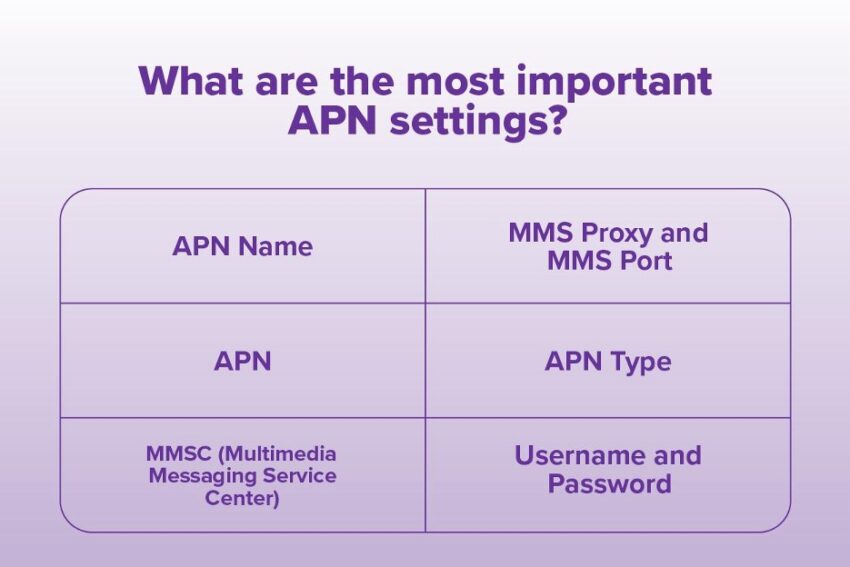
- APN Type: This specifies the type of data the APN handles. Common types include
default(for general internet),mms(for multimedia messages), andsupl(for GPS data). - Proxy and Port: Historically used in older WAP networks, these are mostly left blank in modern LTE and 5G configurations.
- Authentication Type: Options like PAP (Password Authentication Protocol) or CHAP (Challenge Handshake Authentication Protocol) are used to verify the device’s identity.
- APN Protocol: This defines whether the device uses IPv4, IPv6, or both (IPv4/IPv6). As the industry shifts toward the newer IPv6 standard, this setting has become increasingly important for network compatibility.
Why You Might Need to Change Your APN Settings
In a perfect world, APN settings are “plug and play.” Most modern smartphones are designed to read the APN settings directly from the SIM card or download them automatically from the carrier the moment they are activated. However, there are several scenarios where manual intervention is required.
Switching Carriers and Unlocked Devices
The rise of “Bring Your Own Device” (BYOD) plans and the popularity of unlocked smartphones have made APN management more common. If you purchase a phone directly from a manufacturer like Samsung or Apple and insert a SIM card from a smaller Mobile Virtual Network Operator (MVNO) like Mint Mobile or Visible, the phone might not recognize the carrier’s specific APN immediately.
MVNOs often use the infrastructure of major carriers (like Verizon or T-Mobile) but require their own unique APN to route data through their specific billing and management systems. In these cases, the user must manually enter the APN details to enable data services.
Traveling and Roaming Data
International travel is another common catalyst for APN issues. When you land in a foreign country and insert a local “travel SIM,” the device must adapt to a completely different network architecture. While most reputable travel SIM providers have automated setups, budget options or older handsets may require you to delete your home APN and input the local carrier’s settings to avoid exorbitant roaming charges or a total lack of connectivity.
Specialized Services: MMS and Tethering
Sometimes, general web browsing works fine, but you find that you cannot send picture messages or use your phone as a mobile hotspot. This is often because these services run on separate “channels” within the APN profile. If the MMS Proxy or the APN Type is not configured to include mms or dun (dial-up networking/tethering), those specific features will fail to initialize.
How to Configure APN Settings on Your Smartphone
Manually editing an APN may seem daunting, but the process is straightforward as long as you have the correct information from your service provider.
Android Devices: Step-by-Step Configuration
Android offers the most granular control over APN settings. Because there are many different versions of Android (One UI, OxygenOS, Pixel UI), the menu names might vary slightly, but the logic remains the same:
- Open Settings.
- Navigate to Connections or Network & Internet.
- Select Mobile Networks.
- Look for Access Point Names.
- Tap the Add button or the three dots in the corner to create a new profile.
- Enter the details provided by your carrier (Name, APN, MCC, MNC, etc.).
- Tap Save and ensure the new APN is selected.
iOS Devices: Managing APN on iPhone and iPad
Apple generally restricts users from editing APN settings to ensure a stable user experience. Most iPhones automatically configure themselves via “Carrier Settings Updates.” However, if your carrier allows manual entry:
- Go to Settings.
- Tap Cellular or Mobile Data.
- Tap Cellular Data Network.
- Here, you can input the APN strings for Cellular Data, LTE Setup, and MMS.
If the “Cellular Data Network” option is missing, it means your carrier has locked the settings, and you may need to reset your network settings or contact the carrier for a configuration profile.
Advanced APN Use Cases: Private Networks and IoT
While the average consumer only interacts with public APNs, the technology plays a massive role in enterprise-level digital security and the burgeoning Internet of Things (IoT) sector.
Corporate Connectivity and VPNs
Many corporations utilize Private APNs. Instead of routing employee mobile data through the public internet, a private APN directs the traffic straight into the company’s internal network. This provides an additional layer of security, as the mobile device acts as if it is physically plugged into the office local area network (LAN). It allows for better encryption, stricter firewall rules, and the ability to access internal resources without needing a separate VPN application running on the device.
The Role of APNs in the Internet of Things (IoT)
As we move toward a world of smart cities and connected industrial machinery, APNs are becoming specialized. IoT devices—such as smart meters, fleet trackers, or remote sensors—often require very little bandwidth but high reliability and low power consumption.
Specialized IoT APNs are designed to handle millions of devices simultaneously. They often feature “Static IP” assignments, which allow central servers to “reach out” to a device (like a smart gate) at any time. In a standard consumer APN, the IP address is dynamic and changes frequently, making it difficult to maintain a permanent two-way connection without an intermediate server.
Enhancing Digital Security through Custom APNs
Custom APNs are also a powerful tool for digital security. By using a custom APN, organizations can implement “Whitelisting,” where the mobile device is only permitted to communicate with specific IP addresses. This prevents malware from “calling home” to a command-and-center server and ensures that data-sensitive devices (like point-of-sale terminals) cannot be used to browse the open web, significantly reducing the surface area for cyberattacks.
In summary, while the Access Point Name is a technical configuration that most users will rarely need to touch, it remains the essential “handshake” that makes mobile technology possible. Whether it is ensuring your new smartphone works on a budget carrier, enabling data while traveling abroad, or securing a global fleet of IoT sensors, the APN is the fundamental gateway of our connected world.
aViewFromTheCave is a participant in the Amazon Services LLC Associates Program, an affiliate advertising program designed to provide a means for sites to earn advertising fees by advertising and linking to Amazon.com. Amazon, the Amazon logo, AmazonSupply, and the AmazonSupply logo are trademarks of Amazon.com, Inc. or its affiliates. As an Amazon Associate we earn affiliate commissions from qualifying purchases.