
In the digital age, academic writing transcends the pen and paper, moving into a realm where word processors, citation managers, and AI-powered tools redefine the creation and presentation of scholarly work. The Modern Language Association (MLA) format, a widely adopted style guide for research papers, essays, and literary analyses, especially within the humanities, provides a standardized framework for academic integrity and clarity. But beyond the mere rules, understanding “what an MLA format looks like” increasingly involves comprehending how technology shapes its appearance, simplifies its application, and ensures its adherence. This article delves into the visual and structural components of MLA format, viewed through the lens of the technological tools and practices that empower today’s students and researchers.
The Digital Blueprint of MLA: Understanding Its Core Structure
At its heart, MLA format is about consistency and readability, designed to guide the reader through a document effortlessly while giving due credit to sources. On a digital canvas, these principles translate into specific settings and functionalities within common software applications. Recognizing these technical configurations is the first step to mastering MLA’s visual identity.
Setting Up Your Document: Margins, Font, and Spacing in Digital Environments
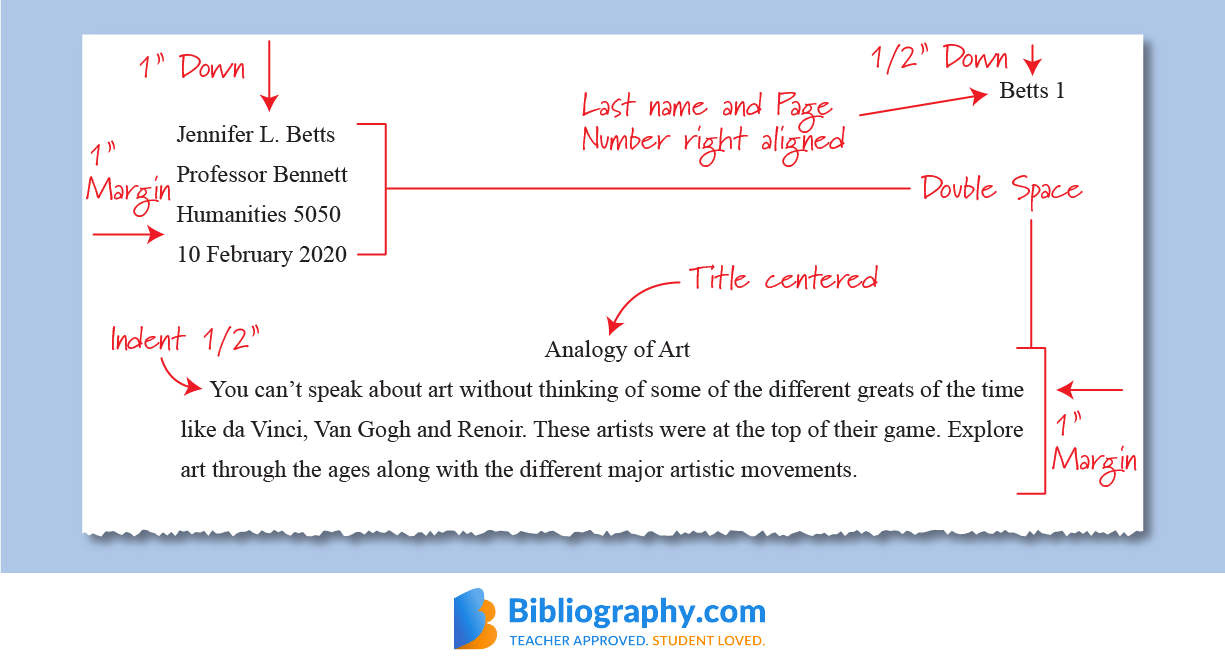
The foundational look of an MLA paper begins with its general layout. Digitally, this means correctly configuring your word processor’s settings. An MLA paper typically requires:
-
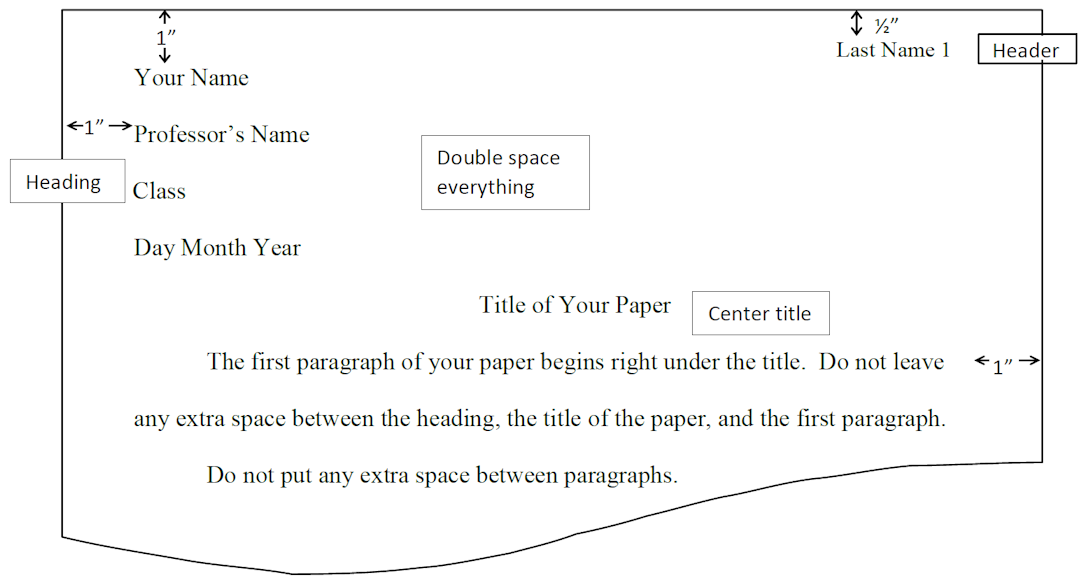
1-inch margins on all sides. Most modern word processors (Microsoft Word, Google Docs, Apple Pages) default to this setting, but it’s crucial to verify. Advanced users might even consider creating a custom template that automatically applies these margins.
-
A legible font, usually Times New Roman or a similar easy-to-read serif font, set to 12-point size. While font choice might seem aesthetic, readability is paramount, and digital rendering makes font selection a performance consideration as well.
-
Double-spacing throughout the entire document, including headings, quotations, and the Works Cited page. This is a crucial setting that can be applied with a single click in most software, avoiding manual line breaks. The absence of extra spaces after paragraphs is also a subtle but important detail, often controlled by paragraph formatting options in digital tools.
Learning how to navigate these settings efficiently within your chosen software—whether it’s Word’s “Page Setup” and “Font” dialogues, Google Docs’ “Format > Line & paragraph spacing,” or LaTeX’s document classes—is fundamental to crafting an MLA-compliant document. These digital adjustments not only standardize appearance but also facilitate ease of reading and grading for educators.
The Header and Title Page: Automating Professional Presentation
MLA format typically eschews a separate title page for most student papers, instead opting for a concise header on the first page. This header, often overlooked in its technical implementation, consists of:
-
Your Name, Instructor’s Name, Course Name, and Date (day month year format) aligned to the upper-left margin, double-spaced.
-
A running header with your last name and the page number, right-aligned in the upper-hand corner of every page.
Mastering the insertion of a running header with automatic page numbering is a quintessential tech skill for MLA. In Microsoft Word, this involves using the “Insert > Header & Footer” feature and selecting “Page Number.” Google Docs offers a similar functionality under “Insert > Page numbers.” For more complex documents, ensuring that the running header starts correctly on the first page (or is suppressed if a specific institutional guideline requires a title page) requires understanding section breaks and header/footer linking options within word processors. These automated features not only save time but also eliminate common errors associated with manual pagination.
Navigating In-text Citations: Tools for Seamless Integration
One of the defining features of MLA format is its parenthetical in-text citations, which direct readers to the full source information on the Works Cited page. The “look” of these citations—author’s last name and page number, e.g., (Smith 123)—is simple, but managing them across a long document can be complex.
-
Word processor features for cross-referencing or even simple “Find and Replace” can help verify consistency.
-
Digital note-taking applications (like Evernote, OneNote, or dedicated research apps) allow researchers to tag quotes and ideas with their source information, making it easier to pull correct citation data when drafting.
-
Browser extensions that capture citation data from web pages directly into a digital research notebook are also invaluable.
The seamless integration of citations is not just about placing them correctly but also about ensuring the information they contain is accurate and consistent with the Works Cited page—a task greatly aided by digital tools.
Software Solutions for Streamlined MLA Formatting
The era of manual formatting is largely behind us. A robust ecosystem of software solutions now exists to assist writers in meeting MLA requirements, ranging from the omnipresent word processors to specialized citation management tools.
Word Processors as Your Primary Tool: Features and Functions
For the vast majority of academic writers, the word processor remains the central hub for document creation.
-
Microsoft Word, with its robust “Styles” pane, allows users to define and apply consistent formatting for headings (H1, H2, etc.), standard body text, and block quotes. Its “References” tab, though often geared towards other citation styles, can be customized or used in conjunction with third-party add-ins for MLA.
-
Google Docs, a cloud-based alternative, offers collaborative features that are invaluable for group projects, allowing multiple authors to work on an MLA-formatted document simultaneously while maintaining consistency. Its simplicity makes it accessible, and its auto-save feature prevents data loss.
-
Apple Pages provides elegant templates and an intuitive interface for Mac users, offering similar formatting controls.
-
For advanced users, LaTeX (a document preparation system) offers unparalleled control over typography and formatting, though it has a steeper learning curve. LaTeX templates specifically designed for MLA can produce visually perfect documents, especially useful for theses and dissertations.
Understanding the specific features within your chosen word processor that pertain to margins, line spacing, font, headers, and bibliography generation is key to efficient MLA compliance. These tools aren’t just for typing; they are sophisticated publishing platforms.
Specialized Citation Managers: Mendeley, Zotero, and EndNote for MLA
Beyond basic word processing, specialized citation management software significantly reduces the burden of managing sources and generating Works Cited pages. These applications are digital libraries for your research, storing citation information, PDFs, and notes.
-
Zotero is a free, open-source tool that allows users to collect, organize, cite, and share research. It offers browser connectors to capture citation data from websites and provides add-ons for word processors to insert in-text citations and generate Works Cited pages in MLA style with remarkable accuracy.
-
Mendeley, another popular choice (now part of Elsevier), combines a reference manager with an academic social network. It allows for PDF annotation, research synchronization across devices, and integration with word processors for automated MLA citation.
-
EndNote (a commercial product) is a powerful, professional-grade tool often favored by university libraries. It offers extensive capabilities for organizing vast libraries of references and integrating them into documents with various citation styles, including MLA.
These tools are game-changers for large research projects, ensuring consistency across hundreds of sources and dynamically updating your Works Cited page as you add or remove citations. They make “what an MLA format looks like” consistent and automatically correct.
Online Citation Generators: Convenience vs. Accuracy
For quick tasks or individual citations, online citation generators (e.g., EasyBib, Citation Machine, BibMe) offer a rapid solution. Users input source details, and the tool outputs an MLA-formatted citation.
-
Convenience: They are incredibly fast and require minimal understanding of MLA rules for simple sources like books or journal articles.
-
Accuracy: However, their accuracy can vary, especially for less common source types (e.g., specific digital formats, obscure archival materials). Users must always double-check the generated citations against official MLA guidelines to avoid errors.
While convenient, relying solely on these tools without critical oversight can lead to inconsistencies that detract from the professional appearance of an MLA paper. They are best used as a starting point, not a definitive solution.
Embracing AI and Digital Tools for Enhanced MLA Compliance
The burgeoning field of artificial intelligence is beginning to touch every aspect of digital life, and academic writing is no exception. AI-powered tools can serve as powerful allies in ensuring MLA compliance, though their use requires careful ethical consideration.
Grammar and Plagiarism Checkers: Guarding Against Common Pitfalls
Maintaining academic integrity and clarity is paramount in MLA-formatted papers.
-
Grammarly, ProWritingAid, and Ginger are AI-powered grammar and style checkers that go beyond basic spell-checking. They can identify grammatical errors, stylistic inconsistencies, punctuation mistakes, and even suggest rephrasing for clarity—all critical for a polished MLA paper.
-
Plagiarism detection software (e.g., Turnitin, Copyscape) uses algorithms to compare submitted text against vast databases of published works and online content. While primarily a tool for institutions to detect academic dishonesty, understanding how these tools work can help students ensure they are properly citing all sources, a cornerstone of MLA.
These tools are not just about catching errors; they are about cultivating better writing habits and ensuring that the content presented within the MLA framework is as sound as its formatting.
AI-Powered Writing Assistants: Ethical Use in MLA-Formatted Papers
The advent of sophisticated AI writing assistants (e.g., ChatGPT, Jasper, Bard) introduces both opportunities and challenges for MLA papers.
-
Opportunities: These tools can help brainstorm ideas, refine sentence structure, summarize research, or even draft outlines, potentially accelerating the writing process.
-
Challenges and Ethical Considerations: The ethical use of AI in academic writing is a hot topic. Directly generating content and presenting it as one’s own without proper attribution is a serious academic offense. When AI tools are used, it’s crucial to understand institutional policies and to cite the AI as a tool or source if its output is incorporated into the work, following emerging guidelines from the MLA itself on citing AI-generated content.
The “look” of an MLA paper, therefore, might also extend to how transparently and ethically AI-assisted elements are acknowledged.
Collaborative Digital Workspaces: Teamwork in MLA Projects
For group projects, collaborative digital workspaces are indispensable.
-
Google Docs, Microsoft 365, and Notion offer real-time co-editing capabilities, version history, and commenting features. This allows team members to work on a single MLA-formatted document, track changes, resolve conflicts, and ensure stylistic consistency across different sections.
-
Version control systems (like Git, though typically used in software development) can even be adapted for highly complex academic projects, offering granular control over document versions and changes, ensuring no work is lost and every contribution is tracked.
These platforms foster efficient teamwork, ensuring that the final MLA-formatted document is a cohesive effort, despite multiple authors contributing simultaneously.
Beyond the Basics: Advanced Digital Strategies for MLA Mastery
Moving beyond the standard setup, advanced digital strategies can further refine the creation and management of MLA-formatted documents, ensuring accessibility and long-term utility.
Accessibility and Digital Publishing: Ensuring MLA Standards for All Readers
As more academic work is consumed digitally, accessibility becomes critical.
-
PDF standards (e.g., PDF/UA) for accessible documents ensure that screen readers can properly interpret the structure and content of an MLA paper. This involves using proper heading styles (H1, H2, H3), alt text for images, and clear document outlines, all features supported by modern word processors.
-
Semantic HTML conversion: For online journals or digital archives, converting MLA-formatted papers into well-structured HTML ensures they are discoverable, readable on various devices, and accessible to a broader audience. Tools exist to facilitate this conversion, preserving the academic integrity and readability of the original MLA design.
Ensuring an MLA paper looks good and functions well for all users, including those with disabilities, is an increasingly important aspect of digital academic publishing.
Archiving and Version Control: Managing Your MLA Papers Digitally
Effective document management is crucial for students and researchers.
-
Cloud storage services (Google Drive, OneDrive, Dropbox) provide secure backups and allow access to MLA papers from any device. This prevents data loss and ensures continuity of work.
-
Version history features within word processors and cloud services allow writers to revert to previous versions of their MLA paper, track changes over time, and compare drafts. This is invaluable for refining arguments and tracking the evolution of a paper.
-
Digital archiving best practices involve organizing files logically, using consistent naming conventions (e.g., “CourseCodeAssignmentNameLastName_Date.docx”), and maintaining a secure, redundant backup strategy.
These digital habits ensure that your MLA-formatted work is not only well-presented but also well-preserved and easily retrievable for future reference or revision.
Custom Templates and Macros: Personalizing Your MLA Workflow
For those who frequently produce MLA-formatted documents, creating custom templates and using macros can be a significant time-saver.
-
Custom Templates: Instead of setting up margins, font, spacing, and headers for every new document, a writer can create an MLA-specific template in their word processor. This template automatically applies all the necessary formatting from the moment a new document is opened, ensuring consistent “look” from the start.
-
Macros (in Word or similar software): For repetitive tasks that aren’t covered by standard features (e.g., a complex block quote format, a specific bibliography entry type), users can record or write macros (small scripts) to automate these actions with a single click. While requiring a bit more technical savvy, macros can significantly streamline the workflow for complex or specialized MLA needs.
These advanced digital tools allow users to personalize their experience, making the creation of MLA-formatted papers not just compliant but also highly efficient and tailored to individual needs.

Conclusion
Understanding “what an MLA format looks like” in the modern academic landscape is inextricably linked to technology. From the fundamental settings in word processors that define margins and spacing to sophisticated citation management systems and AI-powered writing assistants, technology serves as both the canvas and the toolkit for academic excellence. Embracing these digital resources not only simplifies the daunting task of adhering to MLA guidelines but also enhances the overall quality, accessibility, and integrity of scholarly work. As technology continues to evolve, so too will the methods and tools we use to present our ideas, ensuring that the principles of clear communication and academic honesty, championed by MLA, remain at the forefront of digital scholarship.
aViewFromTheCave is a participant in the Amazon Services LLC Associates Program, an affiliate advertising program designed to provide a means for sites to earn advertising fees by advertising and linking to Amazon.com. Amazon, the Amazon logo, AmazonSupply, and the AmazonSupply logo are trademarks of Amazon.com, Inc. or its affiliates. As an Amazon Associate we earn affiliate commissions from qualifying purchases.