
In our hyper-connected era, the Subscriber Identity Module—better known as the SIM card—remains the silent backbone of mobile communication. Despite its diminutive size, this small piece of plastic and silicon acts as a secure repository for your unique international mobile subscriber identity (IMSI) and the keys required to authenticate you on a cellular network. Because it is the bridge between your expensive hardware and the global telecommunications infrastructure, even minor physical or internal damage can render your flagship smartphone little more than a high-tech paperweight.
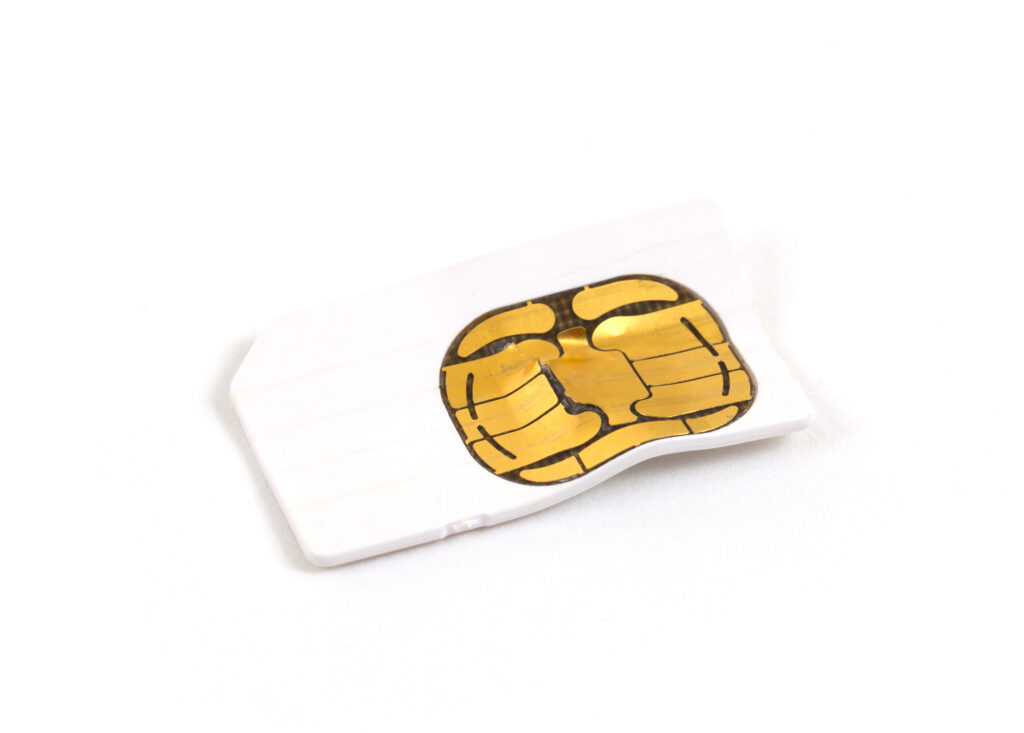
Identifying a damaged SIM card is not always as straightforward as spotting a shattered screen. Sometimes the damage is microscopic, while at other times, the “damage” is purely a result of chemical degradation or wear and tear. This guide delves into the physical aesthetics of a failing SIM, the technical symptoms your device might exhibit, and how to differentiate between a hardware failure and a software glitch.
1. Physical Indicators of SIM Card Damage
When a mobile device begins to lose signal or displays “No SIM” errors, the first step is a physical inspection. While SIM cards are designed to be durable, they are sensitive electronic components that can be compromised by several external factors.
Scratches and Scuffs on the Gold Contact Plate
The most critical part of a SIM card is the gold-plated contact area. This area is divided into several sectors, each responsible for different functions like power supply, ground, clock signal, and data input/output. If you see deep, horizontal or vertical gouges across these gold pads, the card may fail to create a consistent electrical connection with the phone’s internal pins. While light “rubbing” marks are normal from the card being inserted into a tray, deep scratches that reveal the material underneath are a clear sign of damage.
Corroded or Oxidized Terminals
Exposure to moisture is one of the most common silent killers of SIM cards. Even if you haven’t dropped your phone in water, high humidity or sweat can seep into the SIM tray over time. Corrosion typically manifests as a dulling of the gold’s luster, or in more severe cases, a greenish or whitish powdery residue on the contacts. This oxidation creates a layer of resistance that prevents the low-voltage signals from passing through, leading to intermittent connectivity or a total “SIM Not Found” error.
Bent, Cracked, or Warped Plastic
Modern Nano-SIMs are incredibly thin. If a card is forced into a tray incorrectly, or if the tray itself is bent, the SIM card can suffer structural failure. A warped card might look fine at a glance, but even a slight curvature prevents the contact pads from sitting flush against the phone’s internal reader. Furthermore, if you see a hairline crack running through the center of the gold chip, the internal circuitry—the actual microchip embedded in the plastic—is likely severed.
2. Internal vs. External Damage: When Looks are Deceiving
Not all damaged SIM cards look “broken.” In many cases, a SIM card may appear pristine to the naked eye but be functionally dead due to internal electronic failure. This is often where tech enthusiasts get frustrated, as the lack of visual evidence makes diagnosis difficult.
Electrostatic Discharge (ESD) and Internal Circuitry
SIM cards are integrated circuits. Just like a CPU or a RAM stick, they are susceptible to Electrostatic Discharge (ESD). If you handle a SIM card after walking across a carpet in a dry environment, a tiny spark—often too small for you to feel—can fry the microscopic transistors inside the SIM’s chip. An ESD-damaged SIM card looks perfect, but its internal logic is destroyed, making it impossible for the phone to “handshake” with the card.
Heat Damage and Delamination
Smartphones can generate significant heat, especially during intensive gaming, 5G data usage, or fast charging. Over years of thermal cycling (heating up and cooling down), the adhesive layers that hold the gold contact pad to the underlying silicon chip can begin to delaminate. While the card might look okay, the physical bond between the contact points and the chip is broken. This is particularly common in older SIM cards that have been moved from one phone to another over a five-to-ten-year period.
The Dangers of DIY “SIM Trimming”
A common cause of physical damage occurs when users try to cut an older Micro-SIM down to a Nano-SIM size using a template or a “SIM cutter” tool. If the cut is off by even a fraction of a millimeter, it can nick the internal wiring of the chip. Even if the card fits into the tray, the structural integrity of the plastic housing is compromised, making it prone to getting stuck or failing under thermal stress.
3. Software Symptoms: How Your Phone Tells You the SIM is Failing

When the hardware damage isn’t visible, the operating system of your device (iOS or Android) becomes the primary diagnostic tool. The software is programmed to recognize specific failure states of the SIM interface.
“No SIM Card Installed” or “Invalid SIM” Errors
This is the most direct symptom. If your phone suddenly displays “No SIM” while the card is clearly inside the tray, the phone’s OS has failed to detect any electrical resistance or data response from the SIM slot. If the error is “Invalid SIM,” it often means the phone can see the card, but the data being read from the ICCID (Integrated Circuit Card Identifier) is corrupted or unreadable due to physical degradation of the chip’s memory sectors.
Intermittent Signal Drops and SMS Failures
Sometimes a damaged SIM doesn’t die all at once. Instead, it “browns out.” You might notice that your phone frequently drops from 5G/LTE to “No Service” or “Emergency Calls Only,” even in areas with high signal density. Additionally, if you find that outgoing text messages frequently fail to send, or you aren’t receiving incoming calls despite having “bars,” the SIM card might be struggling to maintain the authentication session with the carrier’s HLR (Home Location Register).
Sudden Battery Drain
A less-known symptom of a damaged or poorly seated SIM card is rapid battery depletion. When a SIM card provides an unstable connection, the phone’s radio modem works overtime to re-authenticate and scan for the network. This constant “searching” state draws significantly more power than a stable connection, leading to a hot device and a battery that dies by mid-afternoon.
4. How to Test and Troubleshoot a Suspected Damaged SIM
If you suspect your SIM card is damaged, there are several tech-focused troubleshooting steps you can take before heading to a carrier store for a replacement.
The Cross-Device Testing Method
The “Gold Standard” for SIM diagnostics is the swap test. Take the suspected SIM card and insert it into a known-working, unlocked smartphone. If the second phone also fails to recognize the card, the SIM is definitively damaged. Conversely, if you insert a working SIM from another device into your original phone and it fails, the problem lies with your phone’s internal SIM reader pins or the SIM tray mechanism itself, rather than the card.
Cleaning the Contact Points Safely
Before declaring a SIM card dead, attempt to clean the contacts. Do not use water or harsh chemicals. Instead, use a high-percentage (90% or higher) Isopropyl alcohol on a lint-free microfiber cloth or a specialized electronic contact cleaner. Gently wipe the gold pads to remove skin oils, pocket lint, and minor oxidation. Some tech veterans use a soft pencil eraser to “buff” the contacts, which can effectively remove stubborn oxidation without scratching the gold plating.
Checking for Tray Alignment
Sometimes the “damage” is actually just a misalignment. Inspect your SIM tray for any slight bends. If the tray doesn’t sit perfectly flush with the phone’s frame, the SIM card won’t make contact with the internal pins. Ensure there is no debris or compacted lint inside the SIM slot; a pressurized air canister can be used to blow out the port.
5. The Future: Preventing Damage and the Shift Toward eSIM
As we move further into the decade, the physical SIM card is becoming a legacy technology. However, for those still using physical cards, prevention is the best cure.
Best Practices for Handling Physical Cards
To avoid the damage described above, always power off your device before removing or inserting a SIM card. This prevents any potential electrical surges from affecting the chip. Handle the card by the plastic edges only, avoiding touching the gold contacts to prevent the transfer of oils and salt from your skin, which accelerates corrosion.

The Rise of eSIM Technology
The ultimate solution to “damaged SIM cards” is the eSIM (Embedded SIM). Found in the latest iPhone, Pixel, and Galaxy models, the eSIM is a small chip soldered directly onto the device’s motherboard. Since it cannot be removed, it is immune to the physical scratches, moisture, and bending that plague traditional SIM cards. For users tired of dealing with fragile plastic cards, transitioning to an eSIM (if supported by your carrier) offers a more secure and durable alternative, eliminating the physical failure points of mobile connectivity.
In conclusion, a damaged SIM card can manifest as anything from a visible scratch to a mysterious software bug. By understanding the physical signs of wear and the technical symptoms of failure, you can quickly diagnose whether you need a simple cleaning or a trip to your service provider for a replacement. In the evolving landscape of mobile tech, the SIM remains a vital link, and keeping it—or its digital eSIM counterpart—in top condition is essential for staying connected.
aViewFromTheCave is a participant in the Amazon Services LLC Associates Program, an affiliate advertising program designed to provide a means for sites to earn advertising fees by advertising and linking to Amazon.com. Amazon, the Amazon logo, AmazonSupply, and the AmazonSupply logo are trademarks of Amazon.com, Inc. or its affiliates. As an Amazon Associate we earn affiliate commissions from qualifying purchases.