
In the modern digital landscape, communication is largely seamless. We send emojis, use specialized mathematical symbols, and read scripts from around the globe with a simple tap on a screen. However, every internet user has eventually encountered a jarring visual glitch: a small, hollow box, sometimes containing a question mark, appearing where a letter or icon should be.
In the tech world, these symbols are colloquially known as “tofu”—so named because they resemble small blocks of bean curd. While they may seem like a minor annoyance, they represent a complex breakdown in the way software, fonts, and encoding standards interact. Understanding what these question marks in a box mean requires a deep dive into the architecture of digital text, the evolution of character encoding, and the technical hurdles developers face in creating a truly universal digital language.

The Anatomy of the “Tofu”: Decoding the Box Symbol
At its core, a computer does not understand “A,” “B,” or a “Smiling Face” emoji. It only understands numbers—specifically, binary code. For a computer to display text, it relies on two critical components: an encoding standard and a font file. When you see a question mark in a box, it is a signal that these two components have failed to communicate.
Unicode and the Universal Language of Computers
In the early days of computing, different systems used different encoding standards. The most famous was ASCII (American Standard Code for Information Interchange), which could only represent 128 characters—mostly English letters, numbers, and basic punctuation. As computing went global, this was insufficient.
To solve this, the Unicode Consortium was formed to create a universal standard. Unicode assigns a unique number (a “code point”) to every character in every language, including ancient scripts and emojis. For example, the capital letter “A” is U+0041. The problem arises when a system receives a code point it recognizes but cannot visually represent.
Why the Symbol Appears: Missing Glyphs and Encoding Mismatches
The question mark in a box is technically referred to as the “Replacement Character” (U+FFFD) or a “Missing Glyph.” It appears for two primary reasons:
- Missing Font Support: Your computer knows you are trying to display a specific character (like a rare Mandarin symbol), but the font you are currently using does not have a drawing (glyph) for that character.
- Encoding Errors: The software is trying to read a file using the wrong “map.” If a file was saved using an old Japanese encoding (Shift-JIS) but your browser tries to read it as UTF-8 (the modern standard), the data becomes gibberish. When the computer encounters a sequence of bits that doesn’t make sense in the current map, it displays the question mark box to indicate “invalid data.”
Common Scenarios: Where You’ll Encounter These Symbols
While the underlying technology is the same, the context in which these symbols appear can vary significantly. From personal messaging to professional software development, “tofu” manifests in various digital environments.
Cross-Platform Messaging and Emoji Gaps
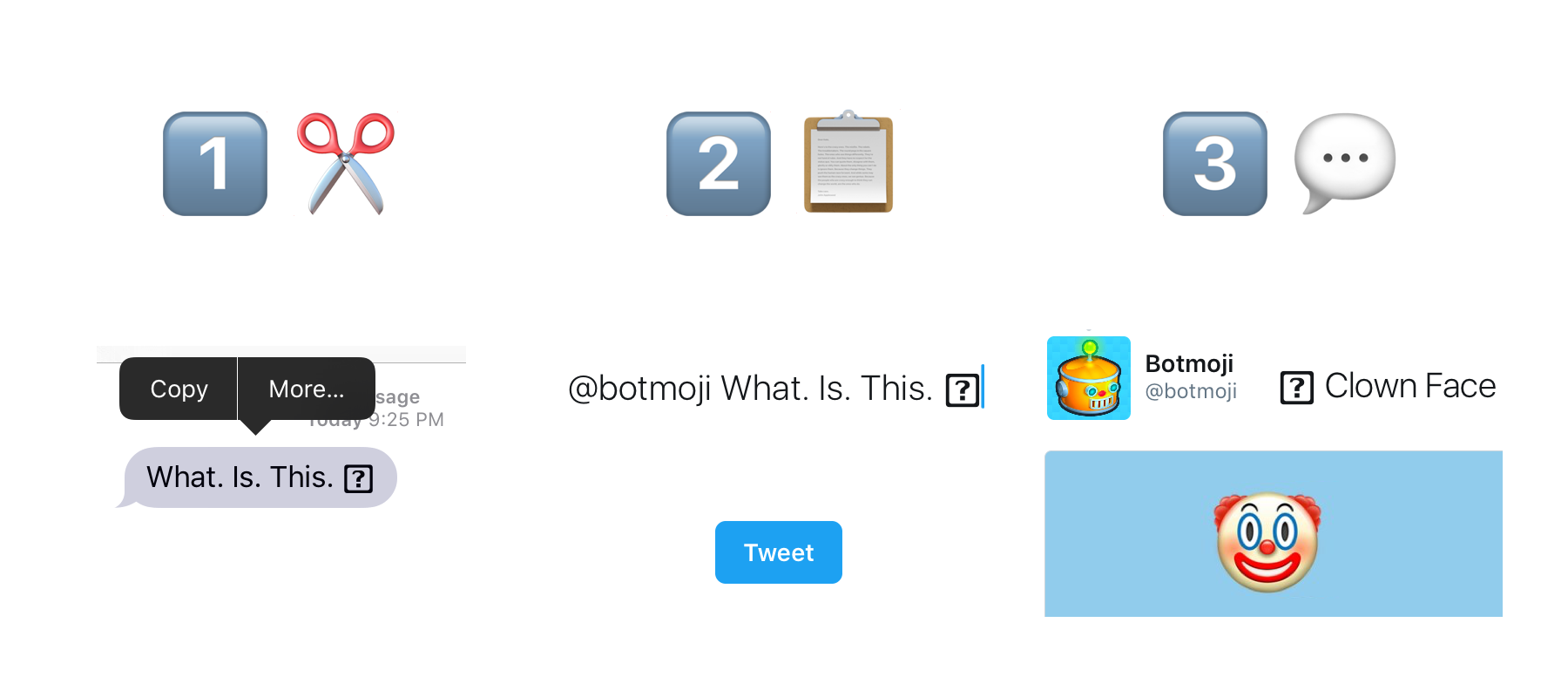
The most common place an average user sees the question mark box is within mobile messaging apps. Because the Unicode Consortium releases new emojis every year, there is often a lag between when a new emoji is standardized and when it is added to operating systems like iOS, Android, and Windows.
If a user with the latest version of iOS sends a “Melting Face” emoji to a user with a five-year-old Android phone, the recipient’s phone will receive the code for the emoji but won’t have the corresponding image in its system library. The result? A box with a question mark. This is a classic example of a hardware/software version mismatch.
Web Browsing and Legacy Systems
Web developers frequently encounter rendering issues when dealing with legacy databases or older browsers. If a website is not properly configured to serve content in UTF-8, it may default to an older standard like ISO-8859-1. When this happens, special characters like curly quotes, em-dashes, or accented vowels (like “é”) may break, resulting in those characteristic boxes. This is particularly prevalent in government or banking portals that still rely on infrastructure built decades ago.
Programming and Database Corruption
For software engineers, the “tofu” symbol is a red flag for data corruption. When migrating data from one server to another, if the “collation” or “character set” settings aren’t identical, the text can become “mojibake”—a Japanese term for transformed text that is unreadable. In these cases, the question mark in a box isn’t just a visual glitch; it represents a loss of data integrity that can break search functions, sorting algorithms, and user authentication systems.
How to Fix Character Rendering Issues
Resolving the appearance of these symbols requires a systematic approach, ranging from simple user-end fixes to complex server-side configurations.
Updating Fonts and Operating Systems
For the average user, the most effective solution is to keep software up to date. Operating system updates (Windows, macOS, Android, iOS) include updated font libraries that contain the latest Unicode characters.
On Linux and Windows systems, users can also install “Language Packs.” If you frequently browse websites in foreign languages and see boxes, installing the specific font support for East Asian, Indic, or Arabic scripts will provide the system with the necessary glyphs to fill those empty boxes.
Changing Browser Encoding Settings
If a specific website is showing question marks, the issue might be how your browser is interpreting the site’s data. While most modern browsers (Chrome, Firefox, Safari) handle this automatically, you can sometimes manually override the encoding. Navigating to the browser’s “View” or “More Tools” menu and selecting “Encoding” -> “Unicode (UTF-8)” can often force the correct characters to appear.
Implementing Google’s “Noto” Fonts for Developers
In the developer community, Google has spearheaded a project specifically designed to eliminate “tofu” from the internet. The project is called Noto (short for No More Tofu). Noto is a massive collection of high-quality fonts that covers over 1,000 languages and 150,000 characters. By using Noto as a fallback font in CSS or application design, developers can ensure that even if their primary font lacks a character, the system will pull from Noto instead of displaying a box.
The Security Implications of Broken Characters
Beyond the visual frustration, broken characters and the way systems handle them have significant implications for digital security. Malicious actors have found ways to exploit the ambiguity of character rendering to deceive users.
Homograph Attacks and Punycode
A homograph attack occurs when a hacker uses characters from different alphabets that look identical to Latin letters. For example, a Cyrillic “а” looks exactly like a Latin “a” but has a different Unicode point. If a system doesn’t render these correctly—or if it renders them too perfectly—a user might be tricked into visiting a phishing site that looks like apple.com but is actually a different domain.
When a browser encounters these “internationalized domain names,” it often uses “Punycode” to translate them. If the translation fails or the font is missing, the user might see the question mark box, which, ironically, serves as a warning that something is technically “off” with the URL.
Hidden Metadata and Malicious Scripting
In some instances, “tofu” can hide malicious scripts. Because some systems ignore or skip over unrenderable characters, hackers can embed commands within strings of text that are invisible to the user but executable by the underlying system. This is a common tactic in SQL injection or Cross-Site Scripting (XSS) attacks, where the question mark in a box is the only visible sign of an underlying attempt to breach a database.
The Future of Digital Communication: Towards 100% Rendering Accuracy
As technology advances, the prevalence of the question mark in a box is slowly diminishing. The tech industry is moving toward a future where “tofu” becomes a relic of the past.
The Role of the Unicode Consortium
The Unicode Consortium continues to refine the standards for digital text. By working with major tech giants like Apple, Google, and Microsoft, they ensure that new characters are synchronized across platforms more quickly than ever before. Their rigorous vetting process for new emojis and symbols ensures that the digital “alphabet” remains structured and manageable.
Adaptive and AI-Driven Font Rendering
The next frontier in tech involves AI-driven font generation. Future operating systems may not need to ship with gigabytes of font files. Instead, AI models could theoretically generate the necessary glyph on the fly based on the Unicode point provided. If your system encounters a character it doesn’t recognize, instead of showing a box, an AI could analyze the surrounding font style and “draw” the missing character in real-time to match the aesthetic of your interface.

Conclusion
The question mark in a box is more than just a glitch; it is a window into the complex machinery of global digital communication. It serves as a reminder of the monumental task of standardizing human language for machine consumption. Whether it is a missing emoji on an old phone or a critical encoding error in a corporate database, these symbols highlight the ongoing dialogue between data standards and visual representation. By understanding the tech behind the “tofu,” users and developers alike can better navigate the intricacies of our interconnected digital world, ensuring that every character—no matter how rare—finds its place on the screen.
aViewFromTheCave is a participant in the Amazon Services LLC Associates Program, an affiliate advertising program designed to provide a means for sites to earn advertising fees by advertising and linking to Amazon.com. Amazon, the Amazon logo, AmazonSupply, and the AmazonSupply logo are trademarks of Amazon.com, Inc. or its affiliates. As an Amazon Associate we earn affiliate commissions from qualifying purchases.